
Introducció
This manual provides detailed instructions for the Monoprice Blackbird 4K 5x1 HDMI 2.0 Switch, Model 42270. This device allows you to connect up to five HDMI video source devices to a single HDMI display. It supports 4K@60Hz video resolution with YCbCr 4:4:4 color space, 18Gbps video bandwidth, and all HDMI 3D video modes. The switch complies with HDMI 2.0 and HDCP 2.2 standards, supporting advanced video technologies such as HDR, HDR10, Dolby Vision, and Hybrid Log-Gamma (HLG). Control options include a top panel button and an included IR remote control.
Contingut del paquet
Si us plau, assegureu-vos que tots els elements que s'enumeren a continuació estiguin presents al vostre paquet:
- 1x Monoprice Blackbird 4K 5x1 HDMI 2.0 Switch (Model 42270)
- 1x control remot IR
- 1x cable d'alimentació USB
- 1 cable receptor IR
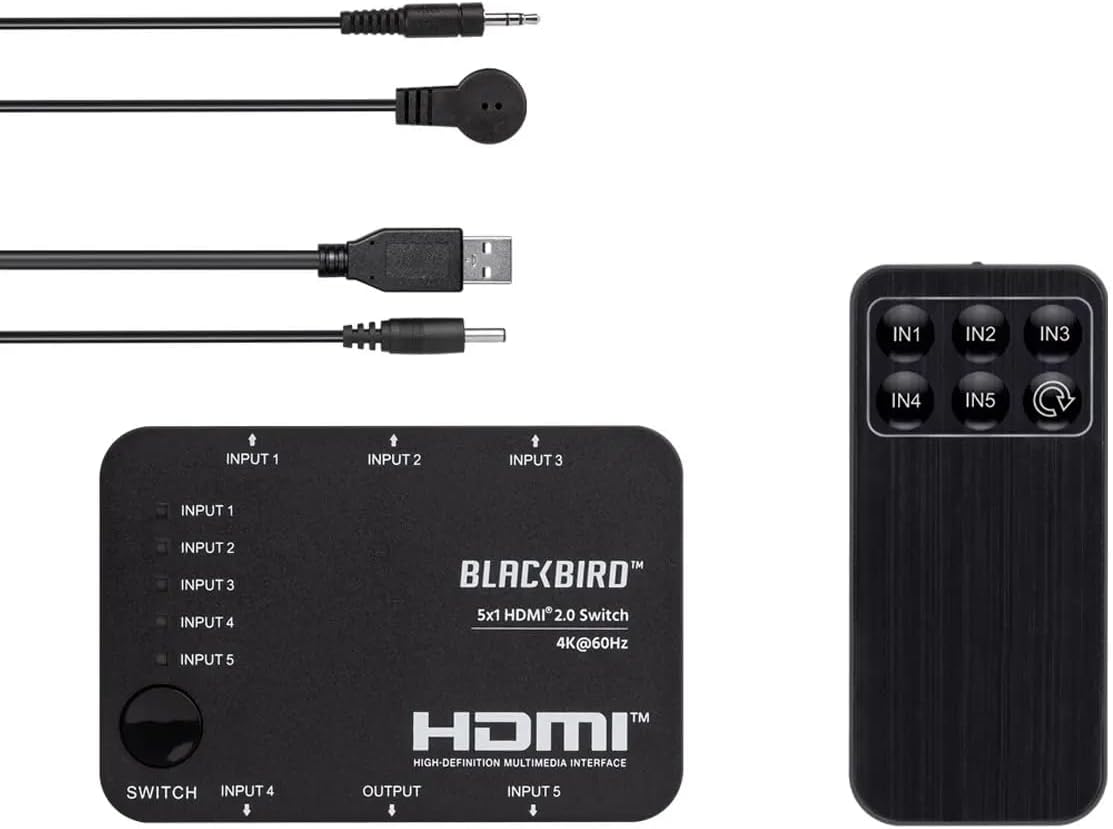
Image: The Monoprice Blackbird 4K 5x1 HDMI 2.0 Switch, its IR remote control, USB power cable, and IR receiver cable.
Característiques del producte
The Monoprice Blackbird 4K 5x1 HDMI 2.0 Switch offers the following key features:
- Supports video resolutions up to 4K@60Hz YCbCr 4:4:4.
- Compatible with all HDMI 3D video modes.
- Features 5 HDMI video inputs and 1 HDMI video output.
- Supports up to 18Gbps video bandwidth.
- Complies with HDMI 2.0, HDCP 2.2/1.x, and DVI 1.0 specifications.
- Supports High Dynamic Range (HDR), HDR10, Dolby Vision, and Hybrid Log-Gamma (HLG).
- USB powered with low power consumption.
- Includes an IR remote control for convenient switching.
Instruccions de configuració
Follow these steps to set up your HDMI switch:
- Connecteu els dispositius font HDMI: Connect up to five HDMI source devices (e.g., Blu-ray player, game console, streaming box) to the HDMI INPUT 1-5 ports on the switch.
- Connecteu la pantalla HDMI: Connect your HDMI display (e.g., TV, monitor, projector) to the HDMI OUTPUT port on the switch.
- Connecteu el receptor d'infrarojos (opcional): If you plan to use the IR remote control, connect the IR Receiver Cable to the "IR" port on the switch. Position the IR receiver in a location where it has a clear line of sight to your remote control.
- Connectar l'alimentació: Connect the USB Power Cable to the "DC 5V" port on the switch and then to a USB power source (e.g., a USB wall adapter, a USB port on your TV, or a computer). The switch is USB powered.
- Dispositius d'encesa: Power on your HDMI source devices and your HDMI display. The switch will power on automatically when connected to a power source.

Imatge: Part posterior view of the switch, highlighting the HDMI input ports (Input 4, Input 5), HDMI output port, DC 5V power input, and IR receiver port.

Imatge: Frontal view of the switch, showing HDMI input ports (Input 1, Input 2, Input 3) and the manual switch button with corresponding LED indicators.
Instruccions de funcionament
You can switch between HDMI input sources using two methods:
Canvi manual
- Premeu el botó "SWITCH" button located on the top panel of the device to cycle through the HDMI input sources (Input 1, Input 2, Input 3, Input 4, Input 5).
- The corresponding LED indicator for the active input will illuminate.
Remote Control Switching
- Ensure the IR Receiver Cable is connected and positioned correctly.
- Point the IR Remote Control towards the IR receiver.
- Press the desired input button (IN1, IN2, IN3, IN4, o IN5) on the remote control to directly select an HDMI source.
- Alternatively, press the cycle button (often labeled with a circular arrow) on the remote to cycle through inputs sequentially.

Imatge: Superior view of the switch, showing the manual "SWITCH" button and LED indicators for each input (Input 1-5).
Image: The IR remote control with buttons for direct input selection (IN1-IN5) and a cycle button.
Manteniment
To ensure the longevity and optimal performance of your HDMI switch, follow these maintenance guidelines:
- Neteja: Feu servir un drap suau i sec per netejar l'exterior del dispositiu. No utilitzeu netejadors líquids ni aerosols, ja que poden fer malbé la unitat.
- Ventilació: Assegureu-vos que l'interruptor estigui col·locat en una zona ben ventilada per evitar el sobreescalfament. No bloquegeu cap obertura de ventilació.
- Emmagatzematge: Quan no l'utilitzeu durant períodes prolongats, guardeu l'interruptor en un lloc fresc i sec, allunyat de la llum solar directa i de temperatures extremes.
- Gestió de cables: Avoid bending or kinking HDMI and power cables excessively, as this can lead to damage and signal loss.
Resolució de problemes
If you encounter issues with your Monoprice Blackbird 4K 5x1 HDMI 2.0 Switch, refer to the following common problems and solutions:
- Sense sortida de vídeo/àudio:
- Assegureu-vos que tots els cables HDMI estiguin connectats correctament tant als dispositius font com al commutador i a la pantalla.
- Verify that the correct input source is selected on the switch (check the LED indicators).
- Confirm that the switch is receiving power via the USB power cable.
- Try connecting the HDMI source directly to the display to rule out issues with the source device or display.
- Test with different HDMI cables, especially if using long cables or cables not rated for 4K@60Hz.
- El control remot no respon:
- Ensure the IR Receiver Cable is properly connected to the switch's "IR" port.
- Verify that the IR receiver has a clear line of sight to the remote control and is not obstructed.
- Comproveu si cal substituir la pila del comandament a distància.
- Intermittent Signal or Flickering:
- Ensure all HDMI cables are high-quality and rated for the resolution and bandwidth you are using (e.g., High-Speed HDMI with Ethernet for 4K@60Hz).
- Reduce cable lengths if possible.
- Comproveu si hi ha interferències electromagnètiques d'altres dispositius electrònics.
- Assegureu-vos que la font d'alimentació sigui estable.
Especificacions
Detailed technical specifications for the Monoprice Blackbird 4K 5x1 HDMI 2.0 Switch:
| Número de model | 42270 |
| Marca | Monopreu |
| Tipus de connector | HDMI, DVI (via adapter) |
| Nombre de Ports | 5 Inputs, 1 Output |
| Suport de resolució de vídeo | Fins a 4K a 60Hz YCbCr 4:4:4 |
| Ample de banda de vídeo | 18 Gbps |
| Compatibilitat amb HDMI | HDMI 2.0 |
| Compliment HDCP | HDCP 2.2 / 1.x |
| Suport HDR | HDR, HDR10, Dolby Vision, Hybrid Log-Gamma (HLG) |
| Font d'alimentació | USB Powered (DC 5V) |
| Mètodes de control | Manual button, IR Remote Control |
| Pes de l'article | 0.4 lliures |
| UPC | 889028165706 |
Informació de la garantia
This Monoprice Blackbird 4K 5x1 HDMI 2.0 Switch is covered by a 1 any de garantia from the date of purchase. This warranty covers defects in materials and workmanship under normal use. For warranty claims or further details, please contact Monoprice customer support.
Atenció al client
For technical assistance, troubleshooting, or general inquiries regarding your Monoprice Blackbird 4K 5x1 HDMI 2.0 Switch, please visit the official Monoprice website or contact their customer support team. You can typically find contact information, FAQs, and additional resources on their support pages.
Monoprice Official Weblloc: www.monoprice.com


