
1. Introducció
This manual provides detailed instructions for the installation, operation, and maintenance of your EONON GA2185J 10.1-inch Android Car Navigation System. Please read this manual thoroughly before using the product to ensure proper and safe operation. Keep this manual for future reference.
2. Informació de seguretat
- Instal·lació professional recomanada: A causa de la complexitat dels sistemes elèctrics dels cotxes, es recomana la instal·lació professional per evitar danys a la unitat o al vehicle.
- Seguretat de conducció: No feu funcionar el sistema de manera que us distregui de la conducció. Prioritzeu sempre la seguretat viària.
- Font d'alimentació: Ensure the unit is connected to a 12V DC power supply with negative grounding. Incorrect voltage pot causar danys.
- Temperatura: Eviteu exposar la unitat a temperatures extremes o a la llum solar directa durant períodes prolongats.
- Humitat: Mantingueu la unitat allunyada de l'aigua i de la humitat excessiva.
- Ventilació: Assegureu-vos que hi hagi una ventilació adequada al voltant de la unitat per evitar el sobreescalfament.
3. Contingut del paquet
Verifiqueu que tots els elements que s'enumeren a continuació s'inclouen al vostre paquet:

Imatge: Included Accessories. This image displays all components that come with the EONON GA2185J unit, neatly arranged and numbered for easy identification.
- GPS Antenna (3m) x1
- Cable d'alimentació x1
- Cable AV x2
- Microphone (3m) x1
- USB Cable (1m) x2
- Wi-Fi Antenna (1.5m) x1
- Fusible 15A x1
- Disassembly Tool x1
- Cargols de muntatge x4
- Manual d'instruccions x1
4. Producte acabatview
The EONON GA2185J is a 10.1-inch Android 10 car navigation system designed to provide a comprehensive multimedia and navigation experience in your vehicle.

Imatge: EONON GA2185J Main Unit. This image shows the front of the car navigation system, highlighting its memory specifications.
Característiques principals:
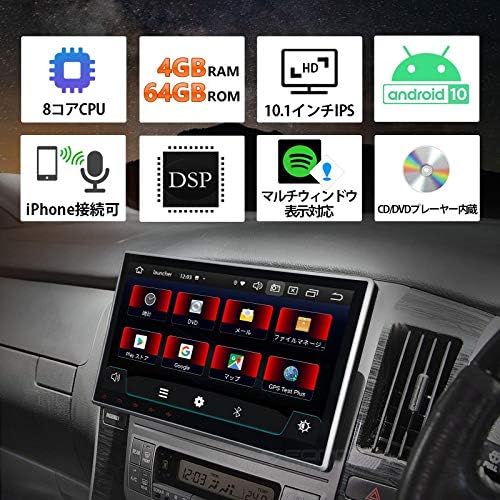
Imatge: Funció acabadaview. This infographic summarizes the main technical specifications and functionalities of the device.
- Sistema operatiu: Android 10
- Processador: CPU de 8 nuclis
- Memòria: 4 GB de RAM + 64 GB de ROM
- Visualització: Pantalla tàctil IPS de 10.1 polzades
- Connectivitat: Built-in Wi-Fi, Built-in Bluetooth, USB
- Característiques d'àudio: DSP (Digital Sound Processor), Equalizer, Subwoofer output, RCA outputs
- Ràdio: FM Tuner, AM Tuner, RDS
- Integració del telèfon intel·ligent: iPhone connectivity (Mirroring)
- Multitasca: Multi-window display support
- Reproducció multimèdia: CD/DVD Player built-in

Imatge: Processor Details. This image highlights the powerful 8-core processor and memory configuration of the system.
Rendiment:

Imatge: Fast Boot Time. This image demonstrates the system's quick startup, powering on in approximately 1 second.
The system is designed for a fast and smooth user experience, supporting numerous applications and improving data transfer speeds for efficient multitasking.
5. Configuració i instal·lació
Comprovació prèvia a la instal·lació:
- Before installation, carefully check the size and shape of your vehicle's console panel to ensure compatibility.
- If the product size does not match your console, please contact the service center directly for assistance.
Instal·lació física:
The unit features an adjustable screen, allowing for a gap of up to approximately 35mm between the LCD panel and the main unit for optimal viewangles d'ajust.

Imatge: Adjustable Screen Angle. This diagram illustrates how the screen can be tilted to achieve the best viewposició d'ingrés.
- Carefully remove your existing car stereo or panel.
- Connect the necessary wiring harnesses (power, speakers, accessories) to the GA2185J unit.
- Mount the unit securely into the dashboard using the provided mounting screws.
- Adjust the screen angle as needed for optimal visibility.
- Reinstall any removed panels or trim.
Connexions de cablejat:
Consulteu el diagrama de cablejat que s'inclou amb la unitat per a les connexions específiques. Les connexions clau inclouen:
- Cable de corrent: Connect to vehicle's 12V DC power supply (constant, accessory, ground).
- Cables de l’altaveu: Connecteu-vos als altaveus del vostre vehicle.
- Antena GPS: Connect the GPS antenna and place it in a location with a clear view del cel.
- Antena Wi-Fi: Connect the Wi-Fi antenna for optimal wireless signal reception.
- Cables USB: Connect USB devices for media playback or smartphone charging.
- AV Cables: Use for connecting external audio/video sources or outputting video to external displays.
- Micròfon: Connect the external microphone for hands-free calling and voice commands.
6. Instruccions de funcionament
Funcionament bàsic:
- Encès/apagat: Press and hold the power button (if available) or turn on your vehicle's ignition.
- Pantalla tàctil: Navigate the interface by tapping, swiping, and pinching on the 10.1-inch IPS touchscreen.
- Control de volum: Adjust volume using the on-screen controls or steering wheel controls (if connected).
Sistema Android 10:
Your device runs on Android 10, offering a familiar and intuitive user interface. It supports a wide range of applications and provides a smooth, responsive experience.

Imatge: Android 10 Interface. This image demonstrates the Android 10 operating system running on the device, showcasing its multimedia capabilities.
Connectivitat Bluetooth:
Pair your smartphone or other Bluetooth devices to the unit for hands-free calling and audio streaming.
- Go to the Bluetooth settings on the unit.
- Activeu el Bluetooth al vostre telèfon intel·ligent i cerqueu els dispositius disponibles.
- Select 'EONON GA2185J' (or similar name) from the list and confirm pairing.
Connexió Wi-Fi:
Connect to a Wi-Fi network to access online features, download apps, and browse the internet.
- Navigate to the Wi-Fi settings menu.
- Seleccioneu la xarxa Wi-Fi desitjada i introduïu la contrasenya si cal.
Navegació GPS:
Utilize pre-installed or downloaded navigation applications for turn-by-turn directions and real-time traffic information.
- Ensure the GPS antenna is properly installed and has a clear signal.
- Open your preferred navigation app and enter your destination.
Multi-Window Display:
The multi-window feature allows you to split the screen and use two applications simultaneously, enhancing multitasking capabilities.

Imatge: Multi-Window Display. This image illustrates the ability to run two applications side-by-side on the screen, such as navigation and music.
Smartphone Mirroring (iPhone Connectivity):
Connect your iPhone to the unit to mirror its display and access apps, navigation, calls, and music through the car stereo's interface. This feature is designed with driving safety in mind.

Imatge: iPhone Connectivity. This image shows an iPhone connected to the car stereo, demonstrating the mirroring functionality for seamless integration.
Configuració d'àudio:
Utilize the built-in DSP, equalizer, and subwoofer output to customize your audio experience.
- Access the audio settings menu to adjust sound profiles, bass, treble, and balance.
- The DSP allows for fine-tuning of sound characteristics.
- Connect an external subwoofer to the dedicated output for enhanced bass.
7. Manteniment
- Neteja de la pantalla: Feu servir un drap suau i sense borrissol per netejar suaument la pantalla tàctil. Eviteu productes de neteja o dissolvents abrasius.
- Actualitzacions de programari: Comproveu periòdicament si hi ha actualitzacions de programari per garantir un rendiment òptim i l'accés a noves funcions. Normalment, podeu trobar les actualitzacions a la pàgina del fabricant. website or through the system's settings.
- Atenció general: Mantingueu la unitat lliure de pols i deixalles. Eviteu col·locar objectes pesats a sobre de la unitat.
8. Solució De Problemes
If you encounter issues with your EONON GA2185J, refer to the following common problems and solutions:
| Problema | Causa possible | Solució |
|---|---|---|
| La unitat no s'encén. | Cablejat incorrecte, fusible fundit, problema d'alimentació del vehicle. | Check power cable connections. Inspect the 15A fuse. Verify vehicle's power supply. |
| Sense so. | Speaker wires disconnected, volume too low, audio settings incorrect. | Check speaker connections. Increase volume. Verify audio output settings. |
| El senyal GPS és feble o inexacte. | GPS antenna improperly placed or faulty. | Assegureu-vos que l'antena GPS tingui una visió clara view del cel. Comproveu la connexió de l'antena. |
| Problemes de connexió Bluetooth. | El dispositiu no està en mode d'emparellament, interferències, procés d'emparellament incorrecte. | Assegureu-vos que tots dos dispositius estiguin en mode d'emparellament. Suprimiu els emparellaments anteriors i torneu-ho a provar. Acosteu-vos a la unitat. |
| System freezes or becomes unresponsive. | Software glitch, too many apps running, overheating. | Perform a soft reset (refer to manual for reset button location, usually a small pinhole). Close unnecessary applications. Ensure proper ventilation. |
Si el problema persisteix després de provar aquestes solucions, poseu-vos en contacte amb l'atenció al client.
9. Especificacions
| Característica | Especificació |
|---|---|
| Mida de la pantalla | 10.1 polzades |
| Sistema operatiu | Android 10 |
| Processador | 8 nuclis |
| RAM | 4 GB |
| ROM | 64 GB |
| Connectivitat | Bluetooth, USB, Wi-Fi |
| Altres Funcions | AM Tuner, Bluetooth Built-in, DSP, FM Tuner, RCA, RDS, Wi-Fi Built-in, Equalizer, Subwoofer, Touchscreen |
| Dispositius compatibles | Smartphones, PCs |
| Tipus de connector | Jack de 3.5 mm, RCA |
| Mode de sortida d'àudio | Envoltant, estèreo |
| Mètode de control | App, Touch, Remote |
| Pes del producte | 2.3 kg |
| Dimensions del paquet | 34.8 x 32 x 23.88 cm |
10. Garantia i Suport
For warranty information, technical support, or service inquiries, please refer to the warranty card included with your product or contact the seller/manufacturer directly. Keep your purchase receipt as proof of purchase.