
1. Introducció
The DIGITEN DTC101 is a versatile digital temperature controller designed for precise temperature management in various environments. It supports both heating and cooling applications, making it suitable for greenhouses, reptile enclosures, fermentation processes, and more. This manual provides detailed instructions for setup, operation, and maintenance to ensure optimal performance and longevity of your device.

Figure 1: DIGITEN DTC101 Temperature Controller
2. Informació de seguretat
- Llegiu atentament totes les instruccions abans d'utilitzar.
- Ensure the power supply matches the device's voltagrequisits electrònics (110V/220V).
- Do not immerse the controller unit in water or expose it to excessive moisture. The sensor probe is waterproof, but the main unit is not.
- Mantenir fora de l'abast dels nens.
- No desmunteu ni modifiqueu el dispositiu. Encarregueu tot el manteniment a personal qualificat.
- Always unplug the device from the power outlet before cleaning or performing maintenance.
3. Components del producte
The DIGITEN DTC101 package includes the following items:
- DTC101 Temperature Controller Unit
- NTC Temperature Sensor Probe
- Manual d'usuari (aquest document)
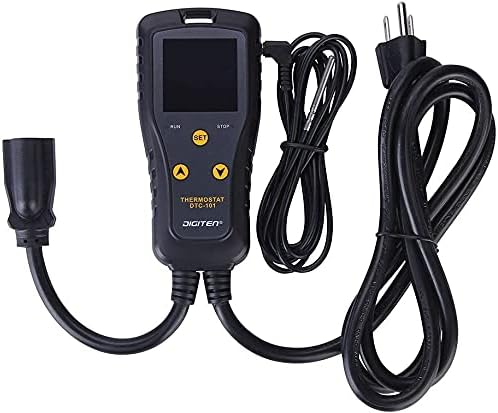
Figure 2: Controller unit with power and output cables
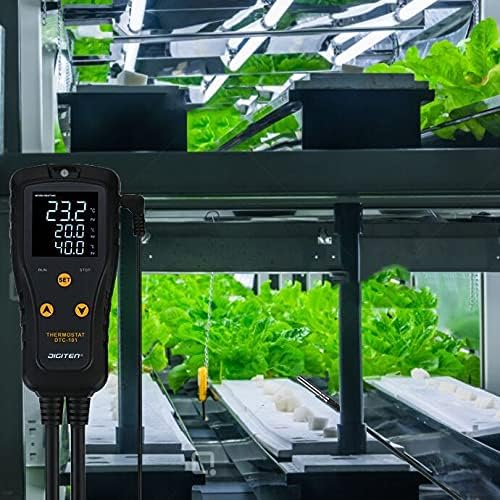
Figure 3: NTC Temperature Sensor Probe
4. Configuració
Follow these steps to set up your DIGITEN DTC101 Temperature Controller:
- Muntatge: The controller features an eyelet tab at the top for convenient hanging. Securely mount the controller in a suitable location, away from direct heat or moisture.
- Connecta el sensor: Plug the NTC temperature sensor probe into the designated port on the controller. Ensure it is firmly connected.
- Sensor de posició: Place the sensor probe in the area where you want to monitor and control the temperature. Ensure it is not directly exposed to heating or cooling elements, but rather measures the ambient temperature of the controlled environment.
- Connecteu l'aparell: Plug your heating or cooling appliance (e.g., heat mat, fan, heater) into the controlled outlet on the DTC101 unit.
- Encès: Plug the DTC101 controller's power cord into a standard electrical outlet. The display will illuminate, showing the current temperature and default settings.

Figure 4: Controller with integrated hanging design
5. Instruccions de funcionament
5.1 Mostra finalview
The LED display provides real-time information and settings:

Figure 5: Display with labeled indicators
- Mode: Indicates whether the controller is in Heating or Cooling mode.
- VA (Valor del Procés): Displays the current temperature measured by the sensor.
- RV (Run Value): Displays the temperature at which the connected appliance will turn ON.
- SV (Stop Value): Displays the temperature at which the connected appliance will turn OFF.
- Indicador RUN: Illuminates when the appliance is actively running (heating or cooling).
- STOP Indicator: Illuminates when the appliance is off.
5.2 Temperature Unit Conversion (°C/°F)
Per canviar entre Celsius (°C) i Fahrenheit (°F):
- Premeu el botó UP i ABAIX buttons simultaneously. The display will toggle between the two units.
5.3 Setting Heating Mode
In Heating mode, the appliance turns ON when the temperature drops below the RV and turns OFF when it reaches the SV.
- Premeu el botó SET button once. The RV (Run Value) will flash.
- Utilitza el UP or ABAIX buttons to adjust the desired ON temperature (RV).
- Premeu el botó SET button again. The SV (Stop Value) will flash.
- Utilitza el UP or ABAIX buttons to adjust the desired OFF temperature (SV).
- Premeu el botó SET button a third time to confirm and exit the setting mode.
5.4 Setting Cooling Mode
In Cooling mode, the appliance turns ON when the temperature rises above the RV and turns OFF when it reaches the SV.
- Premeu el botó SET button once. The RV (Run Value) will flash.
- Utilitza el UP or ABAIX buttons to adjust the desired ON temperature (RV).
- Premeu el botó SET button again. The SV (Stop Value) will flash.
- Utilitza el UP or ABAIX buttons to adjust the desired OFF temperature (SV).
- Premeu el botó SET button a third time to confirm and exit the setting mode.
5.5 Vídeo de demostració operativa
Official video demonstrating how to convert temperature units and set heating and cooling modes on the DIGITEN DTC101 Temperature Controller.
5.6 Alarmes
The DTC101 features high and low-temperature alarms to protect your environment from extreme conditions. If the temperature exceeds the set high limit or falls below the set low limit, an alarm will sound. Refer to the full product manual for detailed instructions on setting alarm thresholds.
6. Manteniment
- Neteja: Wipe the controller unit with a soft, dry cloth. Do not use abrasive cleaners or immerse the unit in liquids.
- Cura del sensor: Ensure the sensor probe is clean and free from debris for accurate readings.
- Emmagatzematge: When not in use, store the controller in a cool, dry place, away from direct sunlight and extreme temperatures.
7. Solució De Problemes
- Pantalla no activada: Comproveu si el cable d'alimentació està ben connectat a una presa de corrent que funcioni.
- Appliance Not Responding: Ensure the appliance is correctly plugged into the controller's output socket and that the controller's settings (RV/SV) are appropriate for the current temperature.
- Lectura de temperatura inexacta: Verify the sensor probe is properly connected and positioned correctly within the environment. Avoid placing the sensor directly on heating elements.
- L'alarma sona contínuament: Check the current temperature against your set high and low alarm thresholds. Adjust settings if necessary or address the environmental condition causing the alarm.
8. Especificacions
| Característica | Especificació |
|---|---|
| Marca | DIGITEN |
| Nom del model | DTC-101 |
| Dimensions del producte | 1.1 "P x 5.39" W x 2.56" H |
| Tipus de controlador | Pulsador |
| Tipus de control de temperatura | Refrigeració, Calefacció |
| Tecnologia de connectivitat | Amb cable |
| Components inclosos | DTC101 Temperature Controller, NTC sensor, manual |
| Font d'alimentació | Elèctric amb cable |
| Voltage | 110 volts, 220 volts |
| Material | Plàstic, vidre, metall |
| Tipus de visualització | Digital |
| Tipus de muntatge | Muntatge de paret |
| Pes de l'article | 15.2 unces |
9. Garantia i Suport
DIGITEN provides a one-year warranty for any product issues. If you encounter problems or require assistance, please refer to the contact information provided with your purchase or visit the official DIGITEN weblloc de suport.