
1. Introducció
Gràcies per la compraasing the Trevi CMP 588 DAB Portable Stereo System. This manual provides essential information for the safe and correct operation of your device. Please read it thoroughly before use and retain it for future reference.
The Trevi CMP 588 DAB is a versatile portable stereo system featuring DAB/DAB+ and FM radio with RDS, a CD/MP3 player, USB input, AUX-in, Bluetooth connectivity, and a headphone jack, all designed for an enhanced audio experience.
2. Informació de seguretat
- Font d'alimentació: Feu servir només l'adaptador de corrent o les piles especificades. Assegureu-vos que el volumtage matches the requirements of the unit.
- Aigua i humitat: Do not expose the unit to rain, moisture, or immerse it in water. Avoid placing objects filled with liquids, such as vases, on the unit.
- Ventilació: Assegureu-vos que hi hagi una ventilació adequada. No bloquegeu les obertures de ventilació.
- Calor: Mantingueu la unitat allunyada de fonts de calor com ara radiadors, registres de calor, estufes o altres aparells (inclosos amplificadors) que produeixen calor.
- Neteja: Desendolleu la unitat de la presa de corrent abans de netejar-la. Feu servir un drap suau i sec. No utilitzeu netejadors líquids ni aerosols.
- Manteniment: No intenteu atendre aquest producte vosaltres mateixos. Consulteu tots els serveis a personal de servei qualificat.
- Reproductor de CD: No mireu mai directament el raig làser.
3. Contingut del paquet
Verifiqueu que tots els elements siguin presents i en bon estat:
- Trevi CMP 588 DAB Portable Stereo System
- Cable d'alimentació de CA.
- Control remot
- Manual d'usuari (aquest document)
4. Característiques del producte
- DAB/DAB+ and FM Radio with RDS
- High Readability Dot Matrix Display
- CD Player (supports CD-DA, MP3)
- USB Input for MP3 Playback
- AUX-in for external audio devices
- Connectivitat Bluetooth
- Conector d'auriculars
- Disseny portàtil amb nansa de transport
- Comandament a distància inclòs
5. Controls i connexions

Figura 1: Frontal view of the Trevi CMP 588 DAB, showing speakers, display, and main controls.
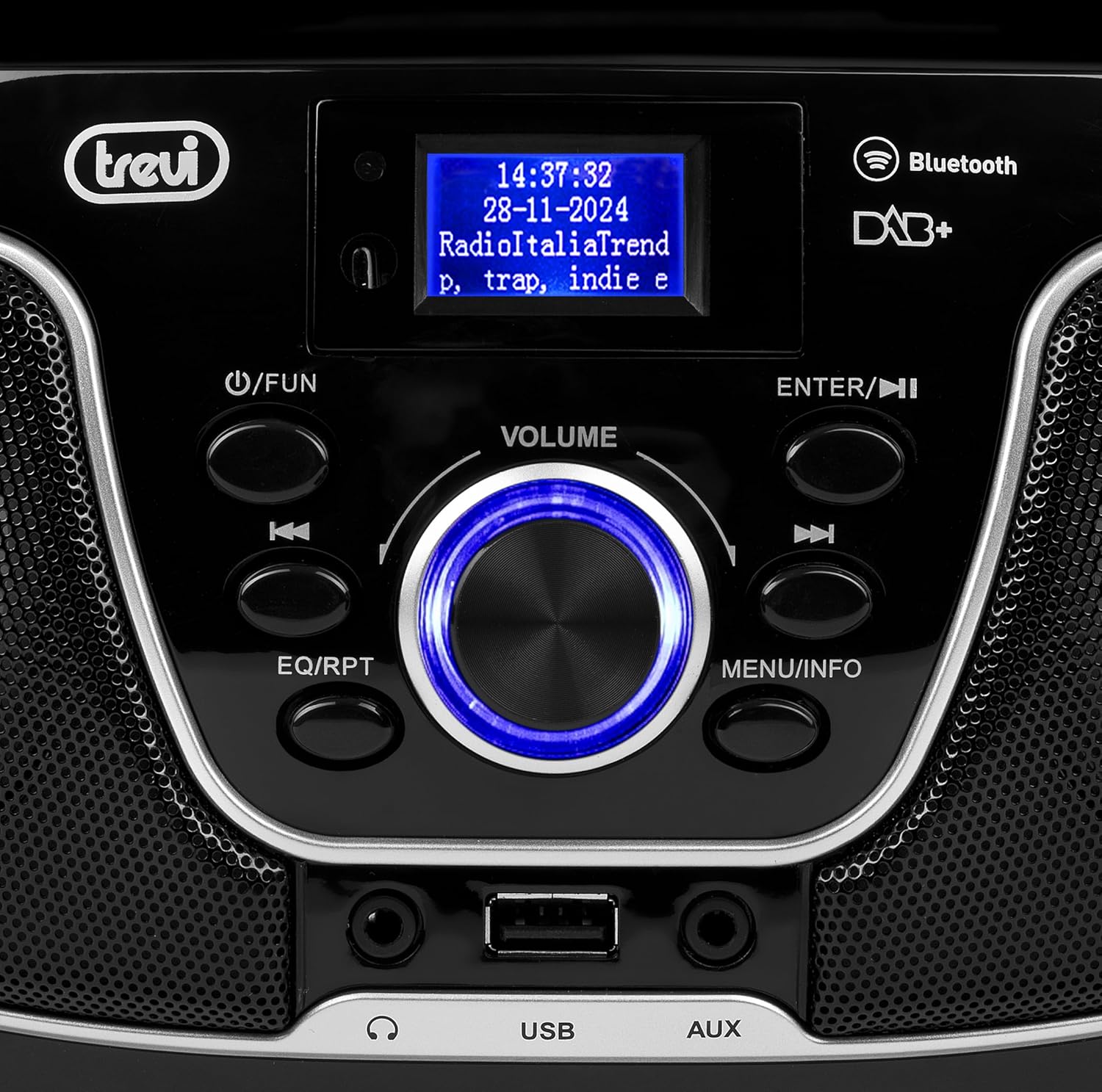
Figura 2: Detallada view of the control panel, including power, function, volume knob, and navigation buttons.
Controls del panell frontal:
- POWER / FUN button: Press to turn on/off, press to switch functions (CD/USB/DAB/FM/Bluetooth/AUX).
- Pom de VOLUM: Rotate to adjust volume. Press to confirm selections.
- ENTER / ►►I button: Confirm selection / Skip to next track/station.
- I▼▼ / EQ/RPT button: Skip to previous track/station / Equalizer settings / Repeat mode.
- MENU / INFO button: Access menu / Display information.
- Port USB: Connect USB storage devices for MP3 playback.
- Presa d'entrada AUX: Connecteu dispositius d'àudio externs.
- Auriculars Jack: Connecteu els auriculars per a una escolta privada.

Figura 3: posterior view of the Trevi CMP 588 DAB, showing the power input and telescopic antenna.
Connexions del panell posterior:
- Entrada d'alimentació de CA: Connecteu el cable d'alimentació de CA subministrat.
- Antena telescòpica: Esteneu-lo per a una recepció de ràdio òptima.

Figure 4: Remote control for the Trevi CMP 588 DAB, showing various function buttons.
Funcions de control remot:
- ESTÀNDUT: Encès / apagat.
- FUNCIÓ: Switch between modes (CD, USB, DAB, FM, Bluetooth, AUX).
- MUT: Silencia/activa l'àudio.
- RPT: Mode de reproducció repetida.
- ESCANEAR: Auto scan for radio stations.
- F+/CH+, F-/CH-: Navigate folders/channels.
- EQ: Configuració de l'equalitzador.
- PLAY/PAUSE (►II): Reproduir/pausar la reproducció.
- PREV/TUN- (▼▼): Previous track/tune down.
- NEXT/TUN+ (►►): Next track/tune up.
- ATURAR (■): Atura la reproducció.
- MENÚ: Menú d'accés.
- INFORMACIÓ: Mostra informació.
- PROG: Program tracks/stations.
- VOL+ / VOL-: Ajustar el volum.
6. Configuració
6.1 Connexió d'alimentació
- Alimentació CA: Connect the supplied AC power cable to the AC power input on the rear of the unit, then plug the other end into a wall outlet.
- Battery Operation (Optional): For portable use, insert 6 x C-size batteries (not included) into the battery compartment on the bottom of the unit. Ensure correct polarity.
6.2 Encès inicial
Premeu el botó POWER / FUN botó de la unitat o ESPERA button on the remote control to turn on the system. The display will light up.
6.3 Setting Up the Antenna
For optimal radio reception, fully extend the telescopic antenna located at the rear of the unit. Adjust its position for the best signal.
7. Instruccions de funcionament
7.1 Funcionament de la ràdio DAB/DAB+
- Premeu el botó POWER / FUN button repeatedly until "DAB" mode is selected.
- The unit will automatically scan for available DAB/DAB+ stations on first use. To perform a manual scan, press the MENÚ button, navigate to "Full Scan" and press ENTRAR.
- Un cop finalitzada l'escaneig, utilitzeu ▼▼ or ►► buttons to browse through the available stations. Press ENTRAR per seleccionar una estació.
- Premeu el botó INFO button to cycle through different information displays (e.g., program type, signal strength, time).
7.2 Funcionament de la ràdio FM
- Premeu el botó POWER / FUN premeu el botó repetidament fins que seleccioneu el mode "FM".
- To auto-scan and store stations, press the ESCANEAR button on the remote. The unit will scan and save strong signals.
- Per sintonitzar manualment, premeu i manteniu premut el botó ▼▼ or ►► buttons to search for the next available station. Press briefly to fine-tune the frequency.
- The RDS function will display station information (if available).
Reproducció de CD/MP3 de 7.3

Figura 5: superior view of the Trevi CMP 588 DAB with the CD compartment open, ready for disc insertion.
- Obriu la tapa del compartiment del CD.
- Place a CD (CD-DA or MP3 CD) onto the spindle with the label side facing up.
- Tanqueu la coberta del compartiment del CD.
- Premeu el botó POWER / FUN repetidament fins que se seleccioni el mode "CD".
- The unit will read the disc. Press PLAY/PAUSE (►II) per iniciar la reproducció.
- Ús ▼▼ or ►► to skip tracks. Press and hold to fast forward/rewind.
- Premeu ATURAR (■) per aturar la reproducció.
Reproducció USB 7.4
- Inseriu una unitat flash USB que contingui MP3 files al port USB.
- Premeu el botó POWER / FUN button repeatedly until "USB" mode is selected.
- The unit will automatically detect and begin playing MP3 files.
- Ús ▼▼ or ►► per saltar pistes.
7.5 Emparellament i reproducció per Bluetooth
- Premeu el botó POWER / FUN button repeatedly until "Bluetooth" mode is selected. The display will show "BT" or "PAIRING".
- Activa el Bluetooth al teu dispositiu mòbil (telèfon intel·ligent, tauleta, etc.).
- Cerca available devices and select "TREVI CMP 588 DAB" from the list.
- Once paired, you can play audio from your device through the stereo system.
- Use the controls on your mobile device or the stereo system to manage playback.
7.6 Funcionament d'entrada AUX
- Connect an external audio device (e.g., MP3 player, smartphone) to the AUX-in jack using a 3.5mm audio cable (not included).
- Premeu el botó POWER / FUN repetidament fins que se seleccioni el mode "AUX".
- Play audio from your connected device. The volume can be controlled via both the stereo system and the external device.
8. Manteniment
8.1 Neteja de la unitat
Wipe the exterior of the unit with a soft, dry cloth. Do not use abrasive cleaners, waxes, or solvents as they may damage the finish. Ensure the unit is unplugged before cleaning.
8.2 Cura de les lents de CD
If the CD player experiences reading errors, the lens may be dirty. Use a commercially available CD lens cleaner to clean the lens. Do not touch the lens with your fingers.
8.3 Emmagatzematge
If the unit will not be used for an extended period, remove the batteries (if applicable) and unplug the power cable. Store the unit in a cool, dry place away from direct sunlight and extreme temperatures.
9. Solució De Problemes
| Problema | Causa possible | Solució |
|---|---|---|
| Sense poder | Cable d'alimentació no connectat; piles esgotades o inserides incorrectament. | Comproveu la connexió del cable d'alimentació; canvieu les piles o assegureu-vos de la polaritat correcta. |
| Sense so | Volum massa baix; Funció de silenci activa; Font incorrecta seleccionada. | Increase volume; Deactivate mute; Select correct function (CD, USB, DAB, FM, BT, AUX). |
| Mala recepció de ràdio | Antenna not extended or positioned incorrectly; Weak signal area. | Esteneu i ajusteu completament l'antena telescòpica; proveu de moure la unitat a una altra ubicació. |
| El CD/USB no es reprodueix | Disc brut/ratllat; Incorrecte file format on USB; USB drive not properly inserted. | Clean or replace disc; Ensure MP3 format for USB; Reinsert USB drive. |
| S'ha produït un error en l'aparellament de Bluetooth | Device too far; Bluetooth not enabled on source device; Unit not in pairing mode. | Move devices closer; Enable Bluetooth on source device; Ensure unit is in Bluetooth mode and searching. |
10. Especificacions
- Model: CM 588 DAB
- Font d'alimentació: AC 230V ~ 50Hz or 6 x C-size batteries (not included)
- Consum d'energia: 15 watts
- Tipus d'altaveu: Stereo (2 speakers)
- Connectivitat: Bluetooth, USB, AUX-in
- Formats d'àudio compatibles: CD audio (CD-DA), MP3
- Freqüències de ràdio: DAB/DAB+, FM with RDS
- Dimensions (L x A x A): 50 x 50 x 28 cm (aproximadament)
- Pes: 1.5 quilograms (aproximadament)
- Color: Negre
11. Garantia i Suport
This product is covered by a standard manufacturer's warranty. Please refer to the warranty card included in your package for specific terms and conditions, including the warranty period and coverage details.
For technical support, service, or warranty claims, please contact your retailer or the official Trevi customer service. Contact information can typically be found on the Trevi weblloc o a l'embalatge del producte.
Please retain your proof of purchase (receipt) for any warranty-related inquiries.