
Introducció
This manual provides detailed instructions for the setup, operation, and maintenance of your INPHIC V930B Mechanical Wireless Keyboard. The V930B is a compact 60% layout keyboard featuring dual-mode connectivity (Bluetooth 5.0 and Type-C wired), RGB backlighting, and responsive blue mechanical switches. Designed for both office and gaming use, its ergonomic design aims to provide comfort during extended use.
Característiques clau
Disseny compacte del 60%.

The V930B features a 60% compact layout with 61 keys, optimizing desk space while retaining essential functionality through Fn key combinations. Dimensions are approximately 291mm x 102mm.
Interruptors mecànics blaus
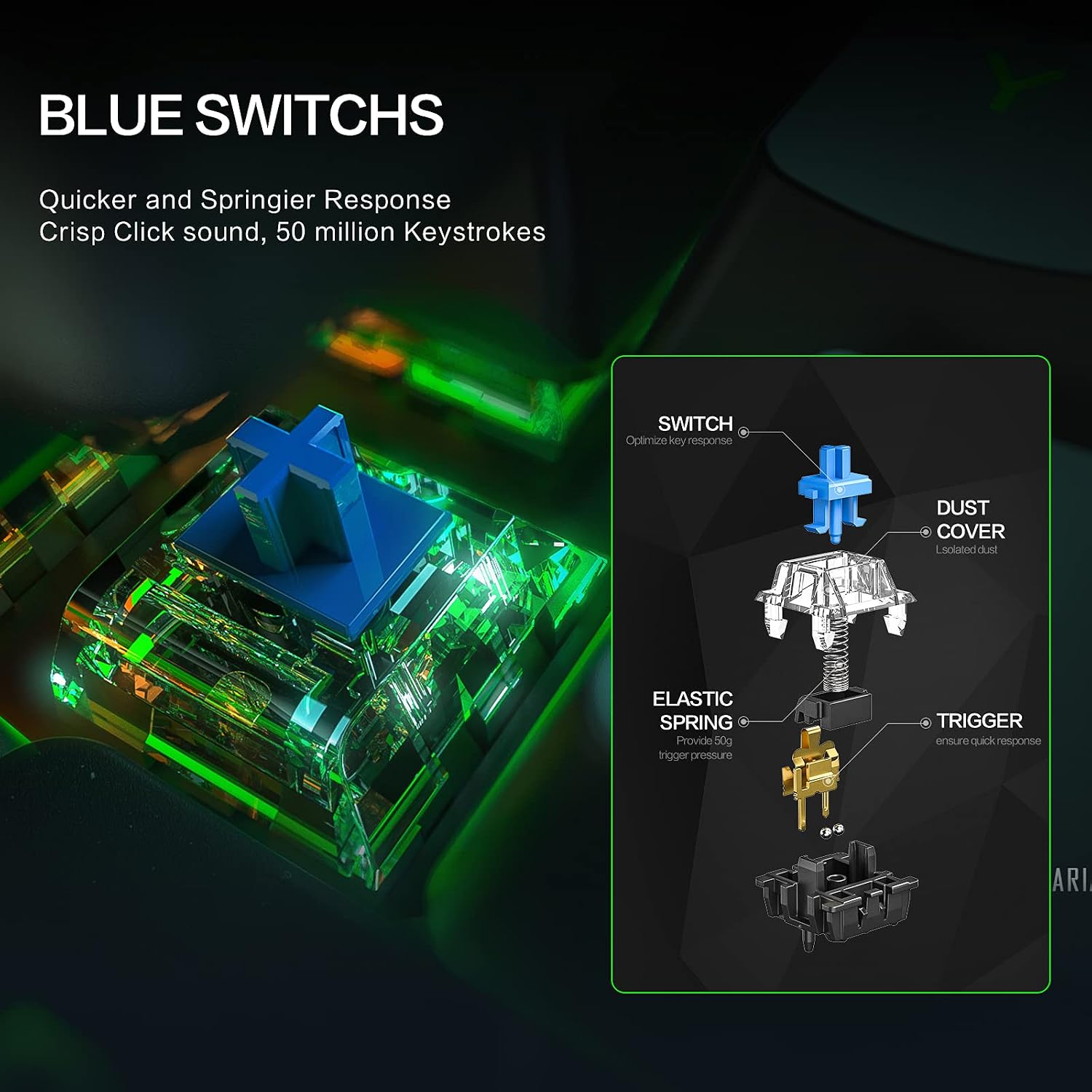
Equipped with blue mechanical switches, the keyboard provides a tactile bump and an audible click, offering a responsive and satisfying typing experience ideal for typists and gamers.
Disseny ergonòmic

The keyboard features an 8° tilt angle and a sculpted key design to reduce wrist strain, promoting comfortable use during long typing sessions.
Contingut del paquet
Si us plau, verifiqueu que tots els elements siguin presents al paquet:
- INPHIC V930B Mechanical Wireless Keyboard
- Cable desmuntable tipus C
- Manual d'usuari (aquest document)
Configuració
1. Connexió per cable
Per utilitzar el teclat en mode cablejat:
- Connect the provided Type-C cable to the keyboard's Type-C port.
- Connect the other end of the cable to an available USB port on your computer or device.
- El teclat serà reconegut automàticament i estarà llest per al seu ús.

Image: The INPHIC V930B keyboard illustrating its dual-mode connection capability, showing the Type-C port for wired connection and a Bluetooth icon for wireless pairing. This highlights the flexibility of connecting via cable or wirelessly.
2. Wireless (Bluetooth) Connection
The keyboard supports Bluetooth 5.0 and can connect to up to three devices simultaneously.
- Canvia al mode Bluetooth: Premeu Fn + Tab to switch the keyboard to Bluetooth mode. The indicator light will flash, indicating it's ready for pairing.
- Seleccioneu un canal Bluetooth: Premeu Fn + Q, Fn + W, o Fn + E to select one of the three available Bluetooth channels. The corresponding key (Q, W, or E) will flash slowly.
- Introduïu el mode de vinculació: Mantén premut Fn + Q (or W/E) for 3-5 seconds until the Q (or W/E) key flashes rapidly. This indicates the keyboard is in pairing mode.
- Vincula amb el teu dispositiu:
- On your device (PC, laptop, tablet), open Bluetooth settings.
- Cerca nous dispositius.
- Select "INPHIC V930B" (or similar name) from the list of available devices.
- Seguiu les indicacions de la pantalla per completar el procés de vinculació.
- Canvi entre dispositius: Once paired, you can switch between connected devices by pressing Fn + Q, Fn + W, o Fn + E.
Instruccions de funcionament
1. Function Key (Fn) Combinations
The INPHIC V930B is a 61-key keyboard that utilizes the Function (Fn) key to access additional commands and multimedia controls. Press and hold the Fn key, then press the desired key for its secondary function.
| Combinació de tecles | Funció |
|---|---|
| Fn + Tab | Switch between Wired and Bluetooth modes. |
| Fn + Q/W/E | Select/Switch between Bluetooth devices 1, 2, or 3. |
| Fn+A | Pista anterior |
| Fn + S | Reproduir/Pausa |
| Fn + D | Pista següent |
| Fn + F | Baixa el volum |
| Fn + G | Puja el volum |
| Fn + H | Silenciar |
| Fn + J | Insereix |
| Fn + K | Casa |
| Fn + L | Amunt pàgina |
| Fn + ; | Pàgina avall |
| Fn + ' | Final |
| Fn + P | Imprimir pantalla |
| Fn + [ | Disminueix la brillantor de la llum de fons |
| Fn + ] | Augmenta la brillantor de la llum de fons |
| Fn + \\ | Canvia el mode de retroiluminació (12 modes) |
| Fn + Intro | Toggle Arrow Keys (Right Shift, Fn, Ctrl, Alt become arrow keys) |
2. Control de la llum de fons
The keyboard features 12 adjustable RGB backlight modes. Use the following combinations to control the lighting:
- Fn + \\ (Backslash key): Cycle through 12 different RGB lighting effects.
- Fn + [ (Left Bracket key): Reduir la brillantor de la retroiluminació.
- Fn + ] (Right Bracket key): Augmenta la brillantor de la retroiluminació.

Image: The INPHIC V930B keyboard displaying its vibrant RGB backlighting. The image also illustrates the key combinations for switching light effects, adjusting brightness, and controlling speed.
Manteniment
To ensure the longevity and optimal performance of your INPHIC V930B keyboard, follow these maintenance guidelines:
- Neteja: Use a soft, dry cloth to wipe the surface of the keyboard. For deeper cleaning, use a can of compressed air to remove dust and debris from between the keycaps. Avoid using liquid cleaners directly on the keyboard.
- Emmagatzematge: Guardeu el teclat en un lloc fresc i sec, allunyat de la llum solar directa i de temperatures extremes.
- Cura del cable: Handle the detachable Type-C cable with care. Avoid bending or twisting it excessively to prevent damage.
- Bateria: The keyboard contains a built-in Lithium Polymer battery. Do not attempt to replace the battery yourself.
Resolució de problemes
If you encounter issues with your INPHIC V930B keyboard, refer to the following common problems and solutions:
| Problema | Possible solució |
|---|---|
| El teclat no respon en mode amb cable. |
|
| Keyboard not pairing via Bluetooth. |
|
| La retroiluminació no funciona o està enganxada. |
|
| Cursor keys are not working as expected. |
|
| Les claus no es registren ni s'escriuen dues vegades. |
|
Especificacions
| Característica | Detall |
|---|---|
| Número de model | V930B |
| Disseny | 60% Compact, 61 Keys |
| Tipus de canvi | Interruptors mecànics blaus |
| Connectivitat | Bluetooth 5.0 (Wireless), Type-C (Wired) |
| Suport multidispositiu | Up to 3 Bluetooth devices |
| Il·luminació de fons | RGB, 12 adjustable modes |
| Bateria | 1 bateria de polímer de liti (inclosa) |
| Pes de l'article | 1.94 lliures (aprox. 880 g) |
| Dimensions del paquet | 14.25 x 5.83 x 2.01 polzades |
| Dispositius compatibles | PC, Laptop, Pad |
| Material | Plàstic |
Garantia i Suport
INPHIC products are designed for reliability and performance. For specific warranty details, please refer to the warranty card included with your purchase or visit the official INPHIC website. If you encounter any issues or require technical assistance, please contact INPHIC customer support through their official channels.
Per obtenir més informació o suport, visiteu el INPHIC Store on Amazon.