
Introducció
This manual provides essential information for the safe and effective use of your Pioneer DJ VM-80 8-inch Active Monitor Speaker. Please read this manual thoroughly before use to ensure proper setup, operation, and maintenance. Keep this manual for future reference.

Davant view of the Pioneer DJ VM-80 8-inch Active Monitor Speaker, showcasing its sleek black design and speaker components.
Informació de seguretat
Seguiu sempre les precaucions de seguretat bàsiques quan utilitzeu aquest producte per reduir el risc d'incendi, descàrrega elèctrica i lesions a les persones. Això inclou, entre d'altres:
- No exposar aquest aparell a la pluja o la humitat.
- No obstruïu cap obertura de ventilació. Instal·leu d'acord amb les instruccions del fabricant.
- No instal·leu a prop de cap font de calor com ara radiadors, registres de calor, estufes o altres aparells (inclosos amplificadors) que produeixen calor.
- Eviteu que el cable d'alimentació sigui trepitjat o pessigat, especialment als endolls, els endolls i el punt on surten de l'aparell.
- Utilitzeu només accessoris/accessoris especificats pel fabricant.
- Demaneu tot el servei a personal de servei qualificat. Cal fer servei quan l'aparell s'hagi fet malbé d'alguna manera.
Contingut del paquet
Verifiqueu que tots els elements que s'enumeren a continuació s'inclouen al vostre paquet:
- Pioneer DJ VM-80 Active Monitor Speaker (x1)
- Cable d'alimentació (x1)
- Instruccions de funcionament (aquest manual)
- Precaucions de seguretat
Producte acabatview
The Pioneer DJ VM-80 is an 8-inch active monitor speaker designed for accurate audio reproduction in various environments, from DJ booths to home studios. It features a Class D amplifier, 96 kHz sampling DSP, and a 4-mm rigid aluminum front baffle to reduce unwanted vibrations.
Característiques clau
- Clear, Fast-Attacking Bass: Achieved through an Aramid fiber woofer cone and a Vortex Bass Accelerator for distortion-free airflow.
- Constant Directivity Horn: Ensures a natural sound and smooth frequency crossover.
- Control DSP: Offers 16 EQ configurations to adjust the sound to suit your room or application.
- Construcció robusta: 4-mm rigid aluminum front baffle minimizes resonance.
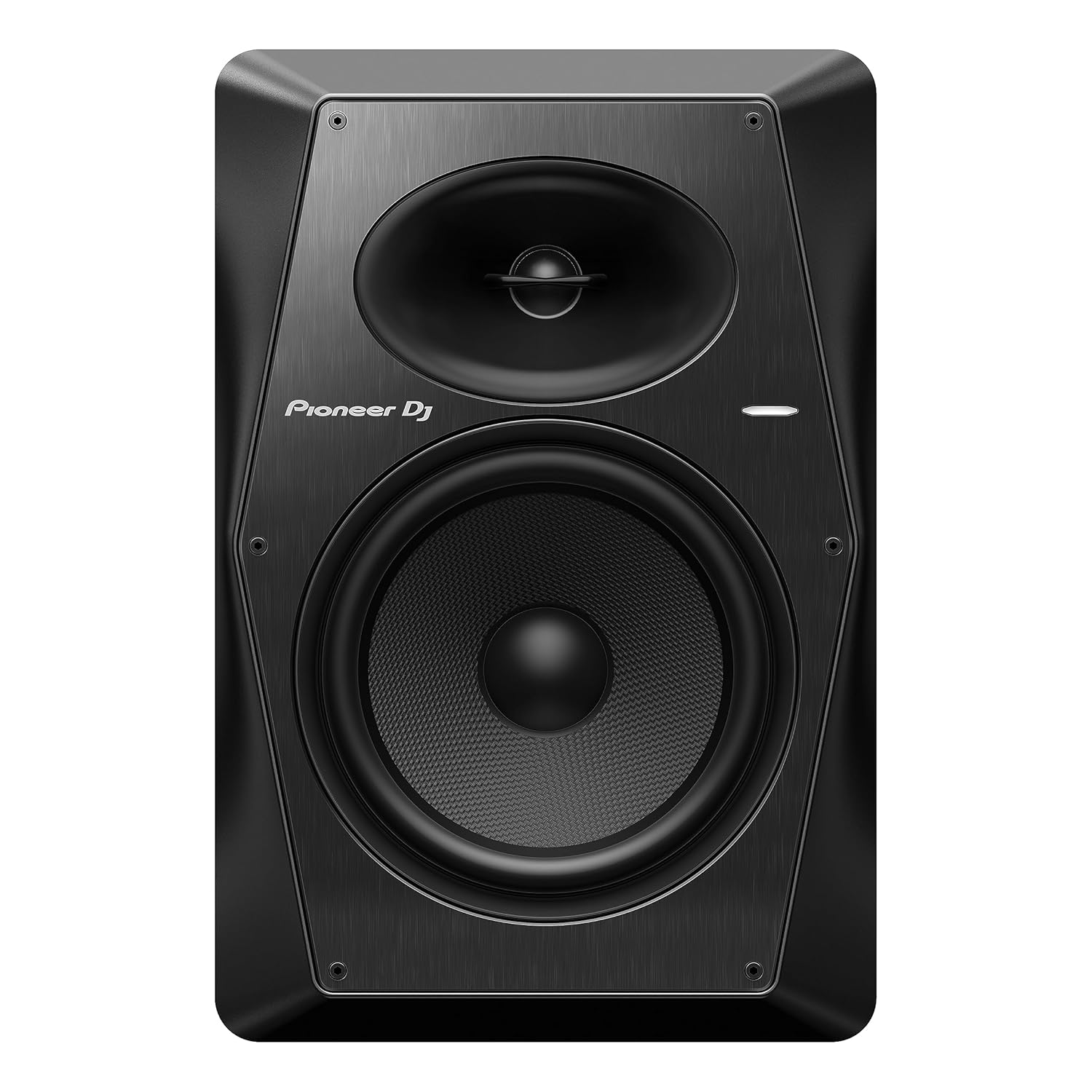
The front of the VM-80 speaker, highlighting the woofer and tweeter.

Side profile of the VM-80 speaker, showing its robust enclosure.
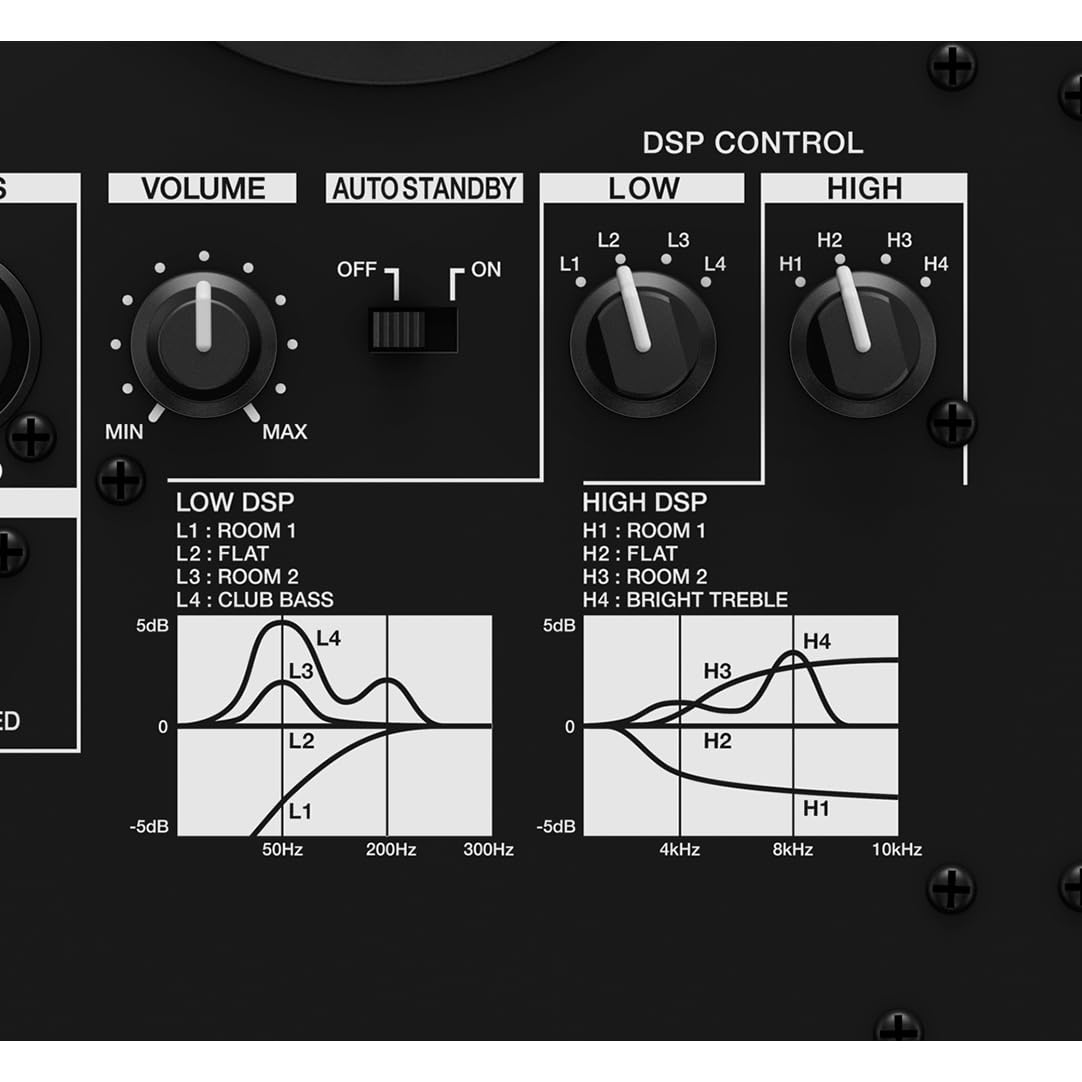
Rear panel of the VM-80, featuring input connectors (XLR/TRS, RCA), volume control, auto standby switch, and DSP control knobs for LOW and HIGH EQ.
Configuració
Proper setup is crucial for optimal performance of your VM-80 monitor speakers.
Col·locació
- Place the speakers on a stable, flat surface at ear level.
- Position the speakers to form an equilateral triangle with your listening position.
- Avoid placing speakers directly against walls or in corners, as this can overemphasize bass frequencies. If necessary, use the DSP controls to compensate.

A typical studio setup showing two VM-80 speakers flanking a DJ mixer and turntables.
Connexions
The VM-80 offers balanced XLR/TRS and unbalanced RCA input options.
- Ensure the speaker's power switch is OFF before making any connections.
- Connect your audio source (e.g., DJ mixer, audio interface) to the speaker using appropriate cables. For balanced connections, use XLR or 1/4-inch TRS cables. For unbalanced connections, use RCA cables.
- Connect the power cord to the AC IN socket on the rear panel and then to a power outlet.

Detail of the VM-80 rear panel, showing the XLR/TRS and RCA input jacks, along with the volume and DSP controls.
En funcionament
Encès/Apagat
- Before turning on the speaker, ensure the volume knob is set to minimum.
- Flip the power switch on the rear panel to the ON position. The LED indicator on the front will illuminate.
- Gradually increase the volume to your desired listening level.
- To power off, reduce the volume to minimum and then flip the power switch to OFF.
DSP Control (EQ Adjustment)
The VM-80 features DSP controls for both LOW and HIGH frequencies, offering 16 different configurations to optimize sound for your room or application.

Detallada view of the DSP control section, showing the LOW and HIGH EQ knobs and their corresponding frequency response curves for different settings like Room 1, Flat, Room 2, Club Bass, and Bright Treble.
- LOW DSP: Adjusts the bass response. Options include L1: Room 1, L2: Flat, L3: Room 2, L4: Club Bass.
- HIGH DSP: Adjusts the treble response. Options include H1: Room 1, H2: Flat, H3: Room 2, H4: Bright Treble.
- Experimenta amb aquests paràmetres per trobar el professional de so òptim.file for your listening environment and audio content.
Funció d'espera automàtica
The VM-80 includes an auto standby feature to conserve energy. If no audio input is detected for a certain period, the speaker will automatically enter standby mode. The LED indicator will change color or turn off. It will automatically resume normal operation when an audio signal is detected.
Vídeo oficialasing the Pioneer DJ VM Series active monitor speakers, highlighting features like clear bass, DSP control, and room adjustment capabilities.
Manteniment
Regular maintenance ensures the longevity and optimal performance of your VM-80 speakers.
- Neteja: Feu servir un drap suau i sec per netejar l'exterior de l'altaveu. No utilitzeu productes de neteja abrasius, ceres ni dissolvents.
- Pols: Regularly dust the speaker grilles and ventilation openings to prevent accumulation that could affect performance.
- Emmagatzematge: If storing the speakers for an extended period, disconnect them from power, clean them, and store them in a cool, dry place away from direct sunlight and extreme temperatures.
Resolució de problemes
If you encounter issues with your VM-80 speakers, refer to the following common problems and solutions:
| Problema | Causa possible | Solució |
|---|---|---|
| Sense so | Power not connected; Volume too low; Input cable loose/faulty; Auto standby active. | Check power connection; Increase volume; Reconnect/replace input cable; Send an audio signal to wake from standby. |
| So distorsionat | Volume too high (input or speaker); Faulty cable; Incorrect DSP settings. | Reduce volume on source and speaker; Replace cable; Adjust DSP settings. |
| Soroll de brunzit/brunzit | Bucle de terra; Interferències d'altres aparells electrònics; Cable defectuós. | Ensure proper grounding; Move speakers away from other electronics; Replace cable. |
| L'altaveu no s'encén | No power; Power switch off. | Check power outlet and cord; Ensure power switch is ON. |
If the problem persists after trying these solutions, please contact Pioneer DJ customer support.
Especificacions
| Característica | Detall |
|---|---|
| Número de model | VM-80 |
| Dimensions del producte | 12.8 x 10.51 x 15.75 polzades |
| Pes | 21.41 lliures |
| Potència de sortida màxima dels altaveus | 120 watts |
| Resposta de freqüència | 36 KHz (Note: This value seems unusually high for a frequency response range. Typically, it would be a range like 40 Hz - 20 kHz. Please refer to official product documentation for precise specifications.) |
| Tecnologia de connectivitat | XLR, TRS, RCA |
| Mode de sortida d'àudio | estèreo |
| AmpTipus més viu | Classe D |
| DSP SampTarifa ling | 96 kHz |
Informació de la garantia
Pioneer DJ products are covered by a limited warranty. The specific terms and duration of the warranty may vary by region and product. Please refer to the warranty card included with your product or visit the official Pioneer DJ weblloc web per obtenir informació detallada sobre la garantia i els procediments de registre.
Suport
For technical assistance, product inquiries, or service requests, please contact Pioneer DJ customer support through the following channels:
- Weblloc: Visit the official Pioneer DJ support website for FAQs, driver downloads, and contact forms.
- Telèfon: Refer to your regional Pioneer DJ website for local support telephone numbers.
When contacting support, please have your product model number (VM-80) and serial number ready.