
1. Introducció
This manual provides instructions for the proper use and maintenance of your Mocute 053 Bluetooth Gamepad. Please read this manual thoroughly before operating the device to ensure optimal performance and longevity.
2. Contingut del paquet
The Mocute 053 Bluetooth Gamepad package typically includes:
- Mocute 053 Bluetooth Gamepad
- USB Charging Cable (may vary)
- Manual d'usuari (aquest document)
3. Producte acabatview
Familiarize yourself with the various components and controls of your Mocute 053 Bluetooth Gamepad.

Figura 3.1: Davant view of the Mocute 053 Bluetooth Gamepad, showing the dual analog sticks, D-pad, action buttons (A, B, X, Y), START, SELECT, and M buttons.

Figura 3.2: A dalt view of the Mocute 053 Bluetooth Gamepad, highlighting the shoulder buttons (L1, R1) and trigger buttons (L2, R2).
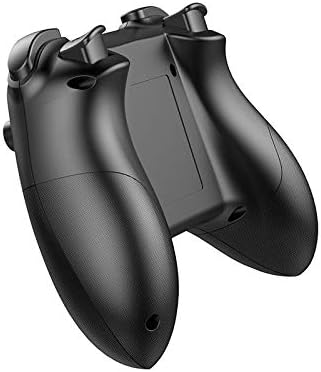
Figura 3.3: Enrere view of the Mocute 053 Bluetooth Gamepad, showing the ergonomic grips and the battery compartment/charging port area.
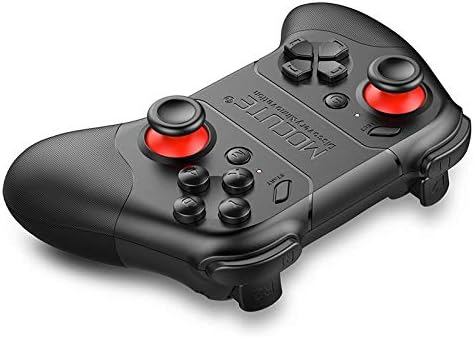
Figura 3.4: En angle view of the Mocute 053 Bluetooth Gamepad, illustrating its overall design and button layout from a different perspective.
Components clau:
- Manets analògics: For precise 360-degree movement.
- D-Pad: Directional pad for digital input.
- Botons d'acció (A, B, X, Y): Per a accions dins del joc.
- Botons d'espatlla (L1, R1) i disparadors (L2, R2): Additional control inputs.
- Botons INICI/SELECCIONAR: Standard gamepad functions.
- Botó M: Mode switching or special function button.
- Botó d'encesa: To turn the gamepad on/off.
- Indicadors LED: For connection status, charging, and mode.
- Titular del telèfon: Integrated bracket to secure a mobile device.
- Port de càrrega: Per recarregar la bateria interna.
4. Configuració
4.1. Càrrega del GamePad
- Connect the provided USB charging cable to the gamepad's charging port.
- Connect the other end of the USB cable to a USB power source (e.g., computer, USB wall adapter).
- The LED indicator will typically show a charging status (e.g., red light) and turn off or change color when fully charged.
- A full charge provides approximately 40 hours of operation.
4.2. Pairing with Android Devices
- Assegureu-vos que el gamepad estigui prou carregat.
- Press and hold the Power button (and potentially a specific mode button, refer to gamepad markings) to turn on the gamepad and enter pairing mode. The LED indicator will flash rapidly.
- Al teu dispositiu Android, vés a Configuració > Bluetooth.
- Activa el Bluetooth i busca els dispositius disponibles.
- Select "Mocute-053" or a similar name from the list of available devices.
- Once paired, the LED indicator on the gamepad will stop flashing and remain solid.
4.3. Pairing with iPhone Devices
- Assegureu-vos que el gamepad estigui prou carregat.
- Press and hold the Power button (and potentially a specific mode button for iOS, refer to gamepad markings) to turn on the gamepad and enter pairing mode. The LED indicator will flash rapidly.
- Al vostre iPhone, aneu a Configuració > Bluetooth.
- Activa el Bluetooth.
- Select "Mocute-053" or a similar name from the list of available devices.
- Once paired, the LED indicator on the gamepad will stop flashing and remain solid.
4.4. Mounting a Mobile Device
The Mocute 053 features an integrated bracket for holding your smartphone.
- Gently extend the phone holder bracket located on the top of the gamepad.
- Carefully place your smartphone into the bracket, ensuring it is securely held without excessive force.
- Ajusteu l'angle per a l'òptim viewdurant el joc.
5. Instruccions de funcionament
5.1. Encendre/apagar
- Per encendre: Premeu i manteniu premut el botó d'engegada fins que l'indicador LED s'encengui.
- Per apagar: Press and hold the Power button until the LED indicator turns off. The gamepad will also automatically power off after a period of inactivity to conserve battery.
5.2. Mode Switching (if applicable)
Some games or applications may require different operating modes. The Mocute 053 may support various modes (e.g., standard gamepad mode, mouse mode, media control mode). Refer to the specific instructions provided with your gamepad or experiment with the 'M' button or combinations of buttons (e.g., Power + A, Power + B) to switch modes. The LED indicators often change to reflect the current mode.
5.3. Joc
Once paired and in the correct mode, your gamepad is ready for use with compatible games and applications. The functionality of each button and stick will depend on the specific game's controls. Most modern games automatically detect and configure gamepads.
- Utilitza el Sticks analògics for movement and camera control.
- Utilitza el D-Pad for directional input, especially in retro games or menu navigation.
- Utilitzeu el Botons d'acció (A, B, X, Y) for primary in-game actions like jumping, attacking, or interacting.
- El Shoulder Buttons (L1, R1) i Triggers (L2, R2) are commonly used for secondary actions, aiming, or firing.
6. Manteniment
6.1. Neteja
- Wipe the gamepad with a soft, dry cloth.
- Per a la brutícia persistent, lleugerament dampal drap amb aigua o un netejador suau i no abrasiu.
- No utilitzeu productes químics agressius, dissolvents ni materials abrasius, ja que poden danyar la superfície.
- Ensure no liquid enters the device through button gaps or ports.
6.2. Emmagatzematge
- Guardeu el gamepad en un lloc fresc i sec, allunyat de la llum solar directa i de temperatures extremes.
- Avoid placing heavy objects on the gamepad.
- Si l'emmagatzemeu durant un període prolongat, assegureu-vos que la bateria estigui parcialment carregada (al voltant del 50%) per allargar-ne la vida útil.
6.3. Cura de la bateria
- The gamepad uses a built-in lithium rechargeable battery.
- Eviteu descarregar completament la bateria amb freqüència.
- Carregueu la bateria regularment, fins i tot si no l'esteu fent servir, per mantenir-ne el bon estat.
- Do not attempt to replace the battery yourself. Contact support if battery issues arise.
7. Solució De Problemes
7.1. Gamepad Does Not Power On
- Ensure the battery is charged. Connect the gamepad to a power source and allow it to charge for at least 30 minutes before attempting to power on again.
- Verify that the power button is being pressed and held correctly.
7.2. Unable to Pair with Device
- Assegureu-vos que el Bluetooth estigui habilitat al vostre dispositiu mòbil.
- Ensure the gamepad is in pairing mode (LED flashing rapidly). If not, power off and then power on again, holding the appropriate button combination for pairing.
- Move the gamepad closer to your device.
- Forget or unpair any previously connected Mocute-053 devices from your phone's Bluetooth settings and try pairing again.
- Reinicia tant el dispositiu mòbil com el gamepad.
7.3. Gamepad Connects but Does Not Respond in Game
- Check if the game you are playing supports external gamepads.
- Ensure the gamepad is in the correct operating mode for the game (e.g., Android standard mode, iOS mode). Refer to the game's settings or the gamepad's specific mode switching instructions.
- Some games may require specific mapping or configuration within their settings.
- Try disconnecting and reconnecting the gamepad.
7.4. Buttons or Sticks Not Responding Correctly
- Perform a factory reset on the gamepad if available (check for a small reset button or specific button combination).
- Ensure the gamepad is clean and free from debris that might obstruct button movement.
- Si el problema persisteix, pot indicar un mal funcionament del maquinari.
8. Especificacions
| Característica | Detall |
|---|---|
| Model | Mocute 053 |
| Connectivitat | Bluetooth |
| Compatibilitat | Android and iPhone systems |
| Tipus de bateria | Bateria recarregable de liti |
| Capacitat de la bateria | 400 mAh |
| Temps de funcionament | Fins a 40 hores (amb una càrrega completa) |
| Característica integrada | Internal bracket to hold phones |
| Dimensions del paquet | 210 x 130 x 60 cm |
| Pes | 200 g |
9. Garantia i Suport
Per obtenir informació sobre la garantia o assistència tècnica, consulteu la documentació proporcionada en el moment de la compra o poseu-vos en contacte amb el vostre distribuïdor. Conserveu el comprovant de compra per a qualsevol reclamació de garantia.