
1. Introducció
This manual provides detailed instructions for the setup, operation, and maintenance of your Other Digital Red LED Wall Clock, Model 3615. Please read this manual thoroughly before using the product to ensure proper function and longevity.
2. Contingut del paquet
En desempaquetar, comproveu que tots els elements que s'enumeren a continuació hi són presents i en bon estat:
- Other Digital Red LED Wall Clock Model 3615
- Adaptador de corrent (amb cable elèctric)
- Manual d'usuari (aquest document)
3. Producte acabatview
The Model 3615 is a digital wall clock featuring a clear red LED display. It provides time, date, day of the week, and temperature information. The clock is designed for wall mounting and operates via a corded electric power source.
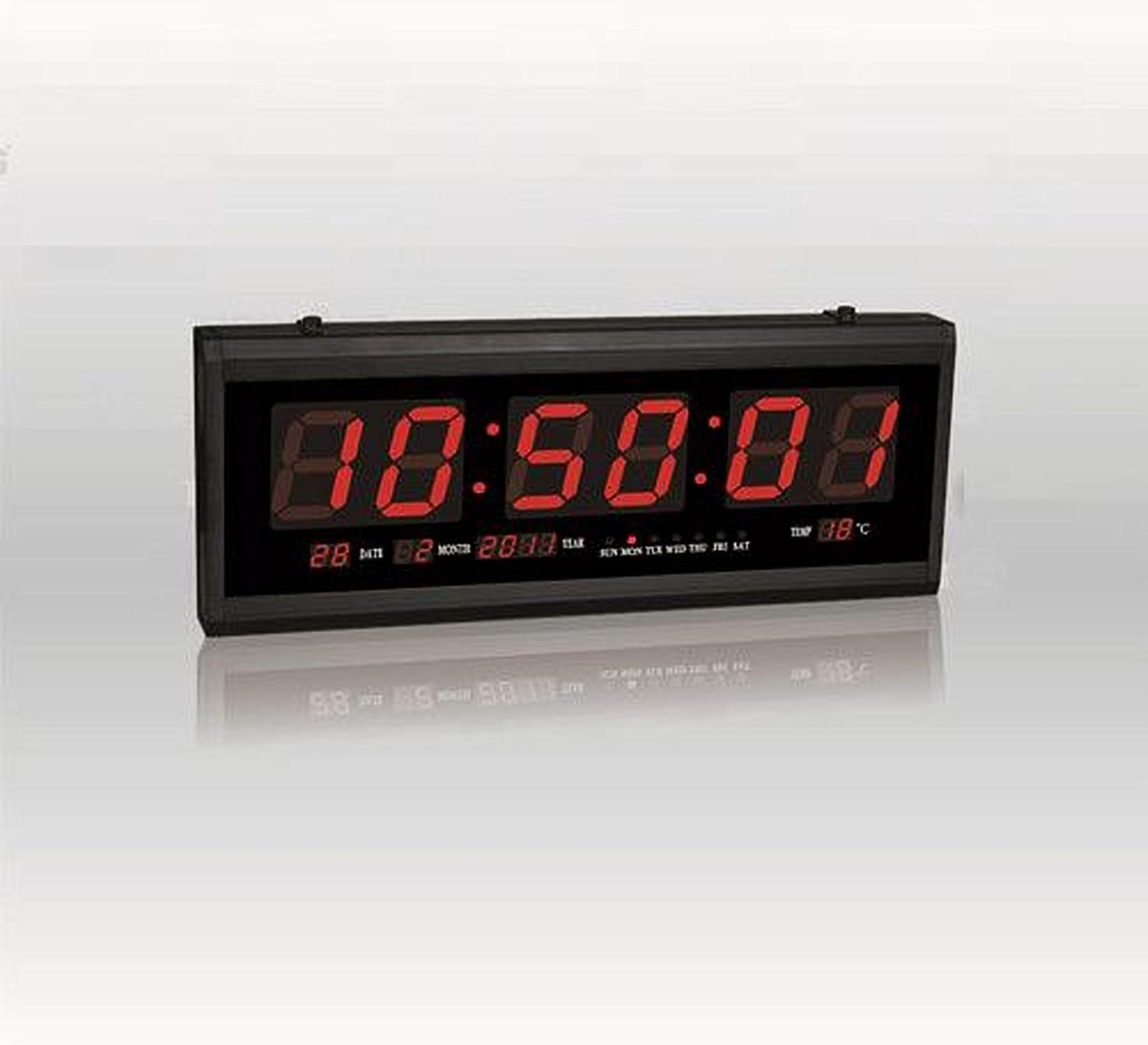
Figura 1: Davant view of the Digital Red LED Wall Clock Model 3615. The display shows the current time prominently, with smaller indicators for date (day and month), year, day of the week (SUN MON TUE WED THU FRI SAT), and temperature in Celsius.
Elements de visualització:
- Hora: Large red LED digits (HH:MM:SS format).
- Data: Day and Month (e.g., 28 02).
- Any: (p. ex., 2088).
- Dia de la setmana: Indicators for SUN, MON, TUE, WED, THU, FRI, SAT.
- Temperatura: Displays ambient temperature in Celsius (e.g., 88°C).
- Alarma: Built-in alarm function.
4. Configuració
4.1 Muntatge a la paret
- Select a suitable location on a wall, ensuring it is within reach of a power outlet.
- Use appropriate hardware (screws, anchors – not included) to securely mount the clock to the wall. The clock features mounting points on its rear casing.
- Ensure the clock is level before tightening the mounting hardware.
4.2 Connexió d'alimentació
- Locate the power input port on the clock.
- Connect the provided power adapter to the clock.
- Plug the power adapter into a standard electrical outlet. The clock display should illuminate.
5. Instruccions de funcionament
The clock typically features control buttons on its side or rear for setting time, date, and alarm. Refer to the specific button labels on your device (e.g., SET, UP, DOWN, MODE).
5.1 Configuració de l'hora
- Premeu el botó MODE or SET fins que els dígits de l'hora comencin a parpellejar.
- Utilitza el UP i ABAIX botons per ajustar l'hora.
- Premeu MODE or SET again to move to the minute setting, then adjust with UP i ABAIX.
- Repeat for seconds if applicable.
- Premeu MODE or SET per confirmar i sortir del mode de configuració de l'hora.
5.2 Setting Date and Day of Week
- From normal display, press MODE or SET repeatedly until the date or year digits flash.
- Ajusteu l'any, el mes i el dia amb el botó UP i ABAIX buttons, pressing MODE or SET to cycle between them.
- The day of the week should automatically update once the date is set correctly. If not, there may be a separate setting for the day of the week, which can be adjusted similarly.
- Premeu MODE or SET to confirm and exit date setting mode.
5.3 Configuració de l'alarma
- Premeu el botó ALARMA or MODE fins que els dígits de l'hora de l'alarma parpellegin.
- Utilitza el UP i ABAIX botons per configurar l'hora d'alarma desitjada.
- Premeu ALARMA or MODE again to set the alarm minute.
- Premeu ALARMA or MODE per confirmar.
- To activate/deactivate the alarm, there is usually a dedicated switch or a long press function on one of the buttons. A small indicator on the display may show if the alarm is active.
5.4 Visualització de la temperatura
The clock automatically displays the ambient temperature. No user adjustment is typically required for this feature.
6. Manteniment
6.1 Neteja
Per netejar el rellotge, netegeu suaument la pantalla iasing amb un to suau, sec o lleugerament damp cloth. Avoid using abrasive cleaners, solvents, or excessive moisture, as these can damage the display or internal components.
6.2 Desconnexió d'alimentació
If the clock will not be used for an extended period, disconnect it from the power outlet.
7. Solució De Problemes
- La pantalla està en blanc:
- Assegureu-vos que l'adaptador de corrent estigui ben connectat tant al rellotge com a una presa de corrent que funcioni.
- Comproveu si la presa de corrent funciona connectant-hi un altre dispositiu.
- Hora/data incorrecta:
- Follow the instructions in Section 5.1 and 5.2 to reset the time and date.
- L'alarma no sona:
- Ensure the alarm is activated (check for an alarm indicator on the display).
- Verifiqueu que l'hora de l'alarma estigui configurada correctament.
- La lectura de temperatura sembla inexacta:
- Ensure the clock is not placed near heat sources or in direct sunlight, which can affect sensor readings.
8. Especificacions
| Marca | Altres |
| Model | 3615 |
| Tipus de visualització | Digital, Red LED |
| Material | Plastic & Glass (Frame: Plastic) |
| Font d'alimentació | Elèctric amb cable |
| Característiques especials | Alarm, Time, Date, Day of Week, Temperature |
| Tipus de muntatge | Muntatge de paret |
| Pes de l'article | 850 g |
| Dimensions del paquet | 34 x 19.2 x 7 cm |
| Piles incloses | No |
9. Garantia i Suport
Per obtenir informació sobre la garantia o assistència tècnica, consulteu la documentació proporcionada en el moment de la compra o poseu-vos en contacte directament amb el venedor/fabricant. Conserveu el rebut de compra com a comprovant de compra.