
1. Introducció
Benvingut al teu Remax 560BT Wireless Headphones. This manual will guide you through the features and functions of your new headphones, ensuring optimal performance and user experience. Please read these instructions carefully before using the product.
2. Contingut del paquet
Si us plau, comproveu el paquet per veure si hi ha els elements següents:
- Remax 560BT Wireless Headphones
- Cable de càrrega USB
- Cable d'àudio de 3.5 mm
- Manual d'usuari
3. Producte acabatview
Familiarize yourself with the components of your Remax 560BT headphones.
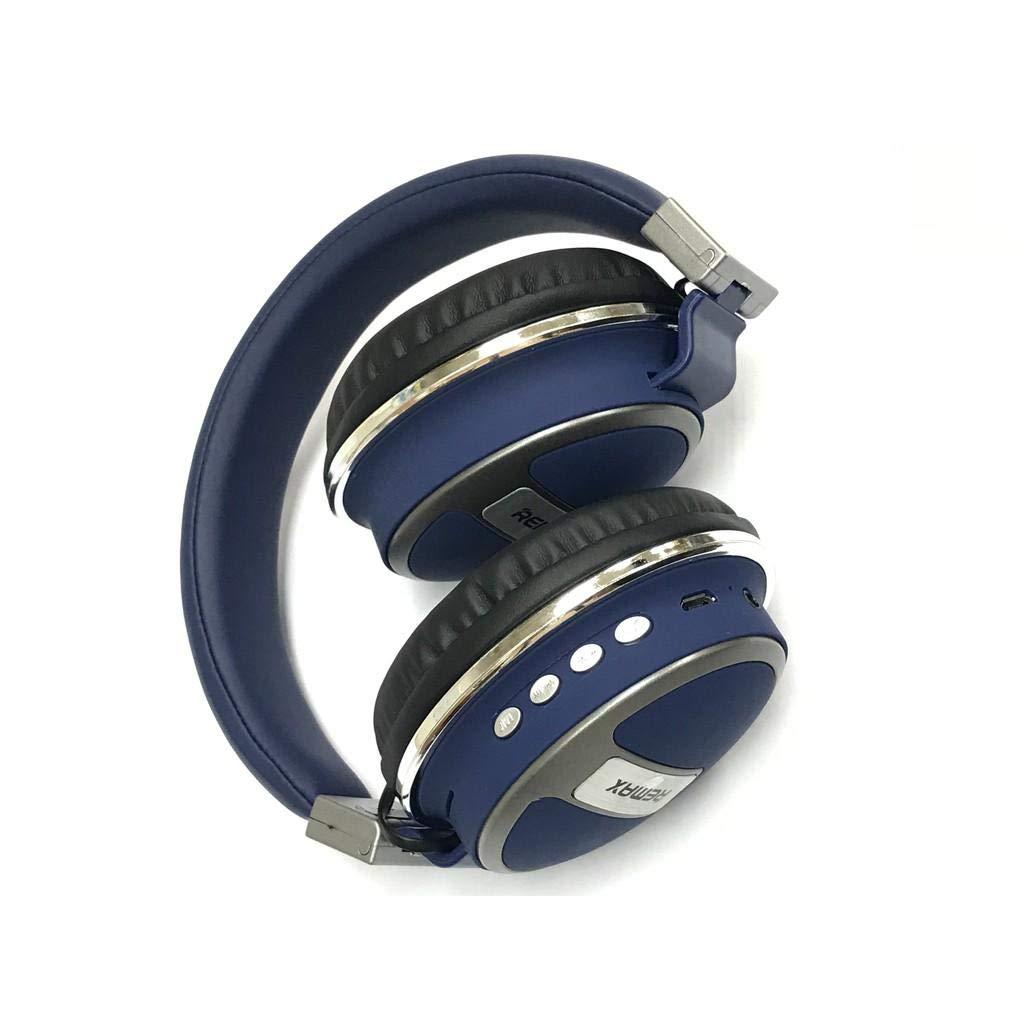
Image: Remax 560BT Wireless Headphones, showing the over-ear design, earcups, and headband.
4. Configuració
4.1 Càrrega dels auriculars
Before first use, ensure your headphones are fully charged.
- Connecteu el Cable de càrrega USB to the charging port on the headphones.
- Connecteu l'altre extrem del cable USB a una font d'alimentació USB compatible (per exemple, un port USB de l'ordinador, un adaptador de paret).
- The LED indicator will illuminate (e.g., red) during charging and turn off or change color (e.g., blue) when fully charged.
4.2 Vinculació Bluetooth
Per connectar els auriculars a un dispositiu amb Bluetooth:
- Assegureu-vos que els auriculars estiguin apagats.
- Manteniu premut el botó Botó d'encesa until the LED indicator flashes rapidly (often alternating blue and red), indicating pairing mode.
- Al dispositiu (telèfon intel·ligent, tauleta, ordinador), activeu el Bluetooth i cerqueu els dispositius disponibles.
- Selecciona "Remax 560BT" de la llista de dispositius trobats.
- Once connected, the LED indicator will typically turn solid blue.
- If prompted for a password, enter "0000".
5. Instruccions de funcionament
5.1 Encès/Apagat
- Per engegar: premeu i manteniu premut el botó Botó d'encesa fins que s'encén l'indicador LED.
- Per apagar: premeu i manteniu premut el botó Botó d'encesa fins que l'indicador LED s'apagui.
5.2 Reproducció de música
- Reproduir/pausa: Premeu el botó Botó multifunció una vegada.
- Pista següent: Manteniu premut el botó Botó Pujar el volum.
- Pista anterior: Manteniu premut el botó Botó per baixar el volum.
5.3 Control de volum
- Pujar el volum: Premeu el botó Botó Pujar el volum breument.
- Baixar el volum: Premeu el botó Botó per baixar el volum breument.
5.4 Call Management (with Microphone)
- Respondre/Finalitzar la trucada: Premeu el botó Botó multifunció una vegada.
- Rebutja la trucada: Manteniu premut el botó Botó multifunció durant 2 segons.
- Torna a marcar l'últim número: Premeu dues vegades el botó Botó multifunció.
5.5 Wired Connection (3.5mm Audio Jack)
Per utilitzar els auriculars amb una connexió amb cable:
- Connecteu el subministrament Cable d'àudio de 3.5 mm to the headphone's audio jack.
- Connect the other end of the cable to your audio source's 3.5mm port.
- The headphones can be used passively without power in this mode.
6. Manteniment
Per garantir la longevitat i el rendiment òptim dels vostres auriculars, seguiu aquestes pautes de manteniment:
- Netegeu els auriculars amb un drap suau i sec. No utilitzeu productes de neteja abrasius ni dissolvents.
- Eviteu exposar els auriculars a temperatures extremes, humitat o llum solar directa.
- Guardeu els auriculars en un lloc fresc i sec quan no els feu servir.
- No intenteu desmuntar ni modificar els auriculars, ja que això anul·larà la garantia.
7. Solució De Problemes
7.1 Headphones will not power on.
Assegureu-vos que els auriculars estiguin completament carregats. Connecteu-los a una font d'alimentació i torneu-ho a provar.
7.2 Cannot pair with device.
- Assegureu-vos que el Bluetooth estigui habilitat al vostre dispositiu.
- Assegureu-vos que els auriculars estiguin en mode d'emparellament (LED parpellejant).
- Acosta els auriculars al dispositiu.
- Esborreu la llista d'emparellament Bluetooth del dispositiu i torneu a intentar l'emparellament.
7.3 No sound or low volume.
- Comproveu els nivells de volum tant dels auriculars com del dispositiu connectat.
- Assegureu-vos que els auriculars estiguin connectats correctament mitjançant Bluetooth o el cable d'àudio de 3.5 mm.
- If using a wired connection, ensure the cable is fully inserted.
7.4 Microphone not working.
- Ensure the headphones are connected via Bluetooth, as the microphone typically functions only in wireless mode.
- Comproveu la configuració del micròfon al dispositiu connectat.
8. Especificacions
| Característica | Descripció |
|---|---|
| Marca | Remax |
| Número de model | 560BT |
| Connectivitat | Sense fil (Bluetooth), amb cable (connector de 3.5 mm) |
| Micròfon | Sí |
| Cancel·lació de soroll | No (aïllament passiu del soroll) |
| Mètode de control | Toca |
| Dispositius compatibles | Multidispositiu |
| Material | Cautxú |
| Descripció del rang d'edat | Adult |
| Dimensions de l'article | 18.96 x 14.67 x 6.73 cm |
| Pes de l'article | 262.72 grams |
| ASIN | B091C1QMJC |
9. Garantia i Suport
For warranty information and technical support, please refer to the documentation included with your purchase or visit the official Remax weblloc web. Conserveu el comprovant de compra per a qualsevol reclamació de garantia.


