
SPRT POS58 IVU
SPRT POS58 IVU Receipt Thermal Printer User Manual
Model: POS58 IVU
Introducció
This manual provides essential information for the proper setup, operation, and maintenance of your SPRT POS58 IVU Receipt Thermal Printer. Please read this manual thoroughly before using the printer to ensure optimal performance and longevity.
The SPRT POS58 IVU is a compact and efficient thermal receipt printer designed for various point-of-sale applications. It features USB connectivity and is compatible with 5.7 cm wide thermal paper.
Configuració
1. Desembalatge i inspecció
- Traieu amb cura la impressora i tots els accessoris de l'embalatge.
- Verify that all components are present: printer unit, power adapter, USB cable.
- Inspect the printer for any visible damage. If damaged, contact your supplier immediately.
2. Connexió de la impressora
- Connectar l'alimentació: Insert the power adapter cable into the printer's power port and plug the other end into a suitable power outlet.
- Connectar USB: Connecteu un extrem del cable USB al port USB de la impressora i l'altre extrem a un port USB disponible de l'ordinador o del sistema TPV.
- Encès: Locate the power switch on the printer (typically on the side or front) and turn it to the 'ON' position.
3. Càrrega de paper tèrmic
The SPRT POS58 IVU printer uses standard 5.7 cm wide thermal paper rolls.
- Open the paper cover by pressing the release button or lifting the latch (location may vary slightly).
- Insert the thermal paper roll with the printing surface facing the thermal head. Ensure the roll is seated correctly in the paper compartment.
- Estireu una petita quantitat de paper per treure-la del tallador.
- Tanqueu la coberta de paper fermament fins que encaixi al seu lloc.
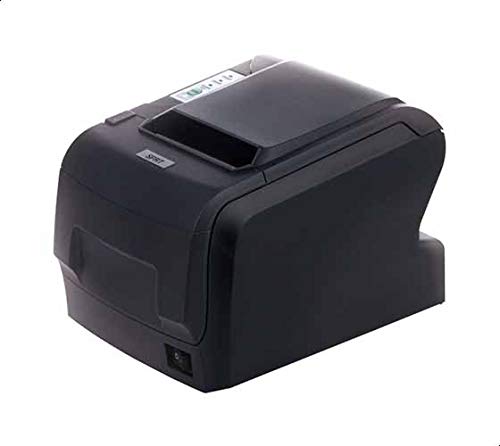
Figure 1: SPRT POS58 IVU Receipt Thermal Printer. This image displays the compact black thermal printer from an angled view, highlighting its paper output slot and the power switch located on the side.
Instruccions de funcionament
Impressió bàsica
- Ensure the printer is powered on and connected to your computer/POS system.
- Install the necessary printer drivers on your operating system if not already installed. Refer to the driver installation guide provided separately or available from the manufacturer's weblloc.
- From your application (e.g., POS software, word processor), select the SPRT POS58 IVU as your printer.
- Initiate the print command. The printer will automatically feed and print the receipt.
- Tear off the receipt against the serrated edge of the paper output slot.
Llums indicadores
The printer typically has indicator lights to show its status:
- Llum de potència: Indica que la impressora està engegada.
- Llum d'error: Illuminates or blinks to indicate an error condition (e.g., paper out, print head overheat).
- Llum de fora de paper: Indicates that the paper roll is empty or incorrectly loaded.
Manteniment
Neteja del capçal tèrmic
Regular cleaning of the thermal head ensures clear print quality and extends printer life. Clean the thermal head after every 50-100 km of printing or if print quality degrades.
- Apagueu la impressora i desconnecteu el cable d'alimentació.
- Obriu la coberta del paper.
- Wait a few minutes for the thermal head to cool down if the printer has been recently used.
- Gently wipe the thermal head surface with a cotton swab lightly moistened with absolute alcohol (ethanol).
- Allow the alcohol to evaporate completely before closing the cover and reconnecting power.
Neteja de l'exterior
Netegeu l'exterior de la impressora amb un drap suau i secamp drap. No utilitzeu dissolvents forts ni productes de neteja abrasius.
Manipulació del paper
- Use only high-quality thermal paper to prevent damage to the thermal head and ensure optimal print quality.
- Store thermal paper in a cool, dry place away from direct sunlight and heat.
Resolució de problemes
| Problema | Causa possible | Solució |
|---|---|---|
| La impressora no s'encén. | Power cable not connected; power outlet faulty; printer switch off. | Comproveu la connexió del cable d'alimentació; proveu una presa de corrent diferent; assegureu-vos que l'interruptor d'alimentació estigui encès. |
| No printing / Blank output. | Paper loaded incorrectly (upside down); paper out; driver not installed/configured; printer not selected. | Reload paper correctly (printing side facing thermal head); replace paper roll; install/reinstall drivers; select printer in application. |
| Poca qualitat d'impressió. | Thermal head dirty; low-quality paper; paper stored improperly. | Clean thermal head; use recommended thermal paper; store paper correctly. |
| Emballament de paper. | Paper not loaded straight; foreign object in paper path. | Open cover, remove jammed paper carefully, reload paper straight; inspect for obstructions. |
Especificacions
| Característica | Detall |
|---|---|
| Marca | SPRT |
| Número de model | POS58 IVU |
| Tipus d'impressora | Impressora tèrmica de rebuts |
| Tecnologia de connectivitat | USB |
| Mitjans impresos | Labels (commonly used for receipts) |
| Amplada del paper | 5.7 cm |
| Color | Negre |
| Pes de l'article | 1.82 quilos |
| Dimensions del paquet | 28 x 21.4 x 17.8 cm |
Garantia i Suport
Specific warranty terms and detailed support contact information are not provided within the available product data. For warranty claims, technical support, or service inquiries, please refer to the documentation included with your purchase or contact your point of sale or the manufacturer directly.
You may find additional resources and contact details on the official SPRT weblloc.
Ask a question about this manual
Ask about setup, troubleshooting, compatibility, parts, safety, or missing instructions. Manuals+ will review the question and use this page’s manual context to help answer it.