
Introducció
This manual provides detailed instructions for the installation, operation, and maintenance of the VIVOTEK CC9381-HV 5MP Outdoor Network Dome Camera. The CC9381-HV is a robust surveillance solution designed for outdoor environments, featuring a 5MP CMOS sensor, 180° panoramic view, WDR Pro, Smart IR, and a built-in microphone. Its IP66 and IK10 ratings ensure durability against weather and vandalism. Please read this manual thoroughly before using the product to ensure proper setup and optimal performance.
Producte acabatview
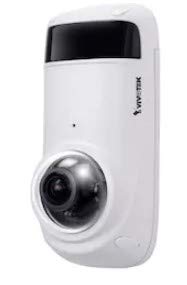
Image: VIVOTEK CC9381-HV 5MP Outdoor Network Dome Camera unit.
Característiques clau
- Resolució de 5 megapíxels: Captures high-quality video at 2560 x 1920 resolution.
- Panoràmica a 180 ° View: Ofereix un ampli camp de view (180° Horizontal, 120° Vertical, 180° Diagonal) with a 1.45 mm fisheye lens.
- IR intel·ligent: Integrated IR LEDs offer night vision up to 49 feet (15 meters) for clear imaging in low-light conditions.
- WDR Pro (120 dB): Ensures extreme visibility in high contrast lighting environments.
- Smart Stream III: Optimizes bandwidth efficiency by reducing data usage without compromising image quality.
- Weather-proof (IP66-rated): Protected against dust and powerful water jets, suitable for outdoor use.
- Vandal-proof (IK10-rated): Offers high resistance against impact and physical damage.
- Micròfon integrat: Habilita les funcions de monitorització d'àudio.
- Suport PoE: Power over Ethernet simplifies installation by delivering power and data through a single RJ45 cable.
- Compliment amb ONVIF: Ensures interoperability with a wide range of network video products.
Configuració i instal·lació
Abans de la instal·lació
Assegureu-vos que teniu el següent:
- A stable network connection (Ethernet).
- Power over Ethernet (PoE) switch or injector, or a 12V DC power supply (if not using PoE).
- Mounting tools (drill, screws, screwdriver).
- A computer or mobile device for initial configuration.
Instal·lació física
- Seleccioneu una ubicació de muntatge: Trieu una ubicació que ofereixi el camp desitjat de view and is within reach of your network cable. Consider the camera's 180° panoramic capability. The camera is IP66 and IK10 rated, making it suitable for exposed outdoor areas.
- Muntar la càmera: Use the provided mounting template (if available) to mark drill holes. Secure the camera base firmly to the mounting surface using appropriate screws. Ensure the camera is oriented correctly for your desired coverage.

Image: Dimensional diagram of the VIVOTEK CC9381-HV camera.
- Connecteu el cable de xarxa: Connect an RJ45 Ethernet cable from your PoE switch/injector to the camera's RJ45 port. If not using PoE, connect a standard Ethernet cable and a separate 12V DC power supply.

Image: Standard RJ45 Ethernet cable for network connection.
Configuració de la xarxa
- Encès: Un cop connectada, la càmera s'encén. Espereu uns minuts perquè s'iniciï.
- Descobreix la càmera: Use VIVOTEK's IP Search utility or a similar network discovery tool to find the camera's IP address on your network.
- Accés Web Interfície: Obre a web browser and enter the camera's IP address. You will be prompted to log in. Use the default username and password (refer to the camera's quick installation guide for default credentials).
- Configuració inicial: Follow the on-screen instructions to change the default password, set up network settings (if not using DHCP), and configure basic video settings.
Funcionament de la càmera
Viu View i Enregistrament
Once configured, you can access the camera's live video feed through its web interface or a compatible Network Video Recorder (NVR) / Video Management Software (VMS). From the live view, pots:
- Monitor the 180° panoramic view.
- Adjust image settings such as brightness, contrast, and saturation.
- Initiate manual recordings or configure scheduled/event-triggered recordings to a microSD card (if installed) or network storage.
Funcions avançades
- WDR Pro: Enable WDR Pro in the image settings to improve visibility in scenes with both very bright and very dark areas.
- Smart Stream III: Configure Smart Stream III settings to optimize video quality and reduce bandwidth consumption based on scene activity.
- Visió nocturna: The camera automatically switches to night vision mode in low light. Ensure the IR illuminators are not obstructed.
- Detecció de moviment: Set up motion detection zones and sensitivity to trigger alarms or recordings when movement is detected.
- Monitorització d'àudio: Utilize the built-in microphone for audio surveillance. Adjust audio input levels as needed.
Manteniment
Neteja
Regularly clean the camera's lens and housing to ensure clear image quality. Use a soft, damp cloth to wipe away dust and dirt. Avoid abrasive cleaners or solvents that could damage the lens or housing.
Actualitzacions de firmware
Periodically check the VIVOTEK official website for firmware updates. Keeping your camera's firmware up-to-date ensures optimal performance, security enhancements, and access to new features. Follow the instructions provided with the firmware update package carefully.
Resolució de problemes
- Sense imatge/vídeo:
- Check power supply and network cable connections.
- Verify the camera's IP address and network settings.
- Ensure the camera is powered on and has completed its boot sequence.
- Mala qualitat d'imatge:
- Netegeu la lent de la càmera.
- Adjust image settings (brightness, contrast, WDR Pro).
- Check network bandwidth if streaming is choppy.
- Problemes de visió nocturna:
- Assegureu-vos que no hi hagi obstacles que bloquegin els il·luminadors d'infrarojos.
- Check if the camera is switching to night mode automatically.
- Problemes de connexió de xarxa:
- Verify the Ethernet cable is securely connected.
- Comproveu que el vostre encaminador/commutador de xarxa funcioni correctament.
- Confirm the camera's IP address is unique and within the network's range.
Especificacions tècniques
| Característica | Especificació |
|---|---|
| Número de model | CC9381-HV |
| Sensor d'imatge | 1/2.7" Progressive CMOS |
| Resolució de fixes efectius | 5 MP |
| Resolució de captura de vídeo | 2560 x 1920 (5 MP) |
| Velocitat de fotogrames | 30 fps |
| Distància focal | f = 1.45 mm |
| Camp de View | 180° (horitzontal), 120° (vertical), 180° (diagonal) |
| Tecnologia WDR | WDR Pro (120 dB) |
| Visió nocturna | Smart IR, up to 49 ft (15m) |
| Classificació resistent a la intempèrie | IP66 |
| Vandal-proof Rating | IK10 |
| Tecnologia de connectivitat | Wired (RJ45), PoE (802.3af/at) |
| Micròfon incorporat | Sí |
| Emmagatzematge | MicroSD card slot (for edge storage) |
| Dimensions | 2.37 x 2.83 x 6.3 polzades (aprox. 60.2 x 71.9 x 159.9 mm) |
| Font d'alimentació | PoE (802.3af/at) o 12V DC |
| Protocol de connectivitat | ONVIF |
Garantia i Suport
Informació de la garantia
VIVOTEK products are covered by a limited manufacturer's warranty. For specific details regarding the warranty period and terms for your CC9381-HV camera, please refer to the warranty card included with your product or visit the official VIVOTEK weblloc.
Suport tècnic
If you encounter any issues that cannot be resolved using this manual's troubleshooting section, please contact VIVOTEK technical support. You can find contact information and additional resources, including FAQs and software downloads, on the official VIVOTEK weblloc.