
1. Introducció
Thank you for choosing the TOMZON A 4K Camera Drone. This manual provides essential information for the safe operation, setup, and maintenance of your drone. Please read this manual thoroughly before operating the device to ensure proper function and to prevent damage or injury.
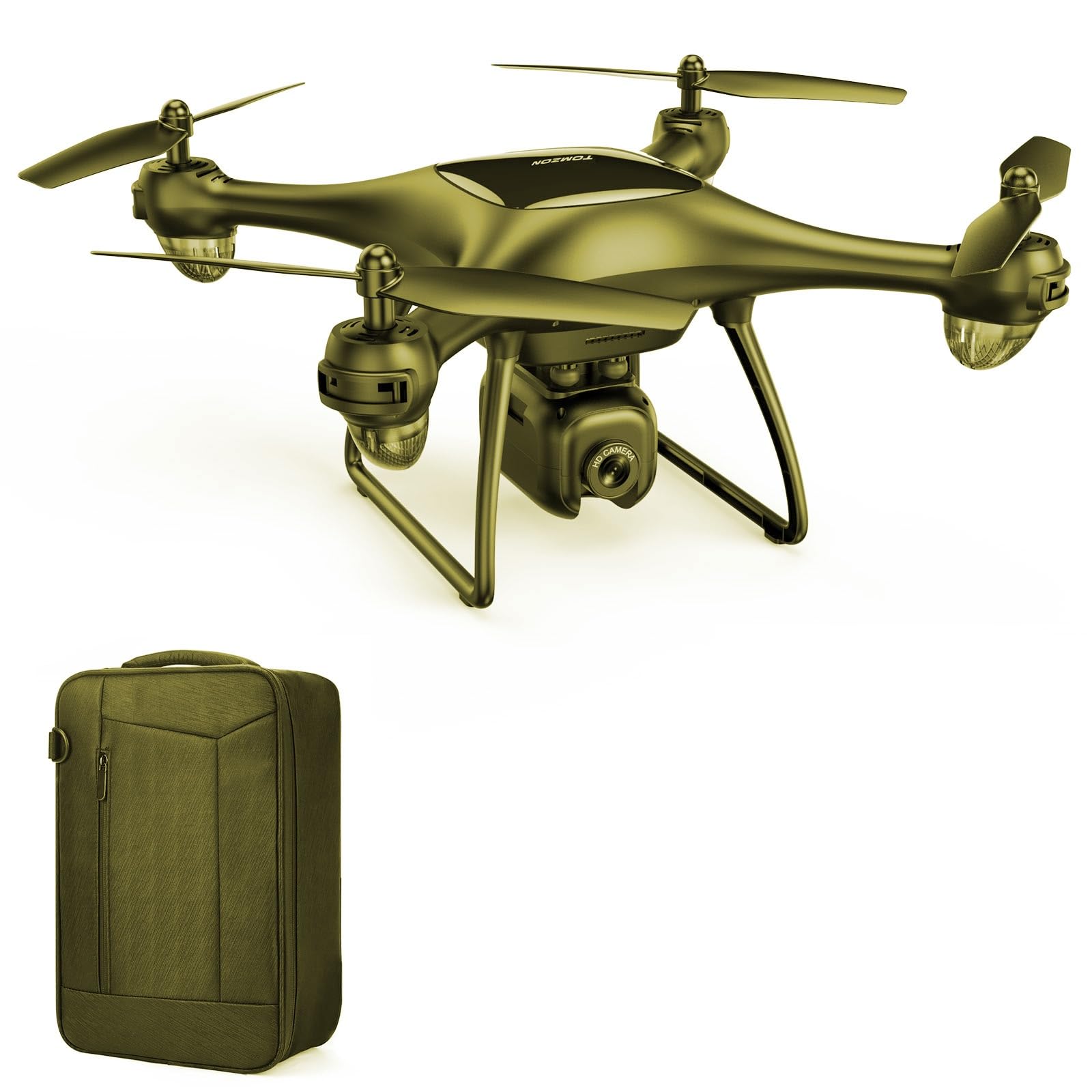
Image 1.1: The TOMZON A 4K Camera Drone. This image displays the drone from a slightly elevated angle, showcasing its compact design and camera.
2. Pautes de seguretat
Adhering to these safety guidelines is crucial for safe operation and to prevent damage to the drone or injury to individuals.
- Comprovació prèvia al vol: Always inspect the drone, propellers, and battery for any damage before each flight.
- Condicions ambientals: Voleu en zones obertes, lluny de persones, animals, edificis i línies elèctriques. Eviteu volar amb vents forts, pluja o neu.
- Seguretat de la bateria: Use only original TOMZON batteries and chargers. Do not overcharge or puncture batteries. Discontinue use if batteries show signs of swelling or damage.
- Línia de visió: Mantingueu la línia de visió amb el dron en tot moment durant el vol.
- Restricció d'edat: Aquest producte està pensat per a ús adult.
- Seguretat de l'hèlix: Mantingueu les mans, la cara i la roba ampla allunyades de les hèlixs giratòries.
- Normativa local: Be aware of and comply with all local laws and regulations regarding drone operation.
3. Contingut del paquet
Verifiqueu que tots els elements que s'enumeren a continuació s'inclouen al vostre paquet:
- TOMZON A 4K Camera Drone (1 unit)
- Control remot (1 unitat)
- Drone Battery (Quantity may vary by package, typically 1-2)
- Cable de càrrega USB (1 unitat)
- Spare Propellers (4 units)
- Propeller Guards (4 units)
- Bossa de transport (1 unitat)
- Manual d'instruccions (Aquest document)

Image 3.1: TOMZON A 4K Camera Drone and included accessories. This image shows the drone, spare propellers, and propeller guards, providing a visual reference for the package contents.
4. Producte acabatview i Components
Familiarize yourself with the main components of your TOMZON A 4K Camera Drone.
4.1 Components del dron
- Hèlixs: Four rotating blades that provide lift.
- Motors: Drive the propellers.
- Càmera: Integrated 4K camera for photo and video capture.
- Compartiment de la bateria: Houses the drone battery.
- Indicadors LED: Provide status information (e.g., power, pairing, low battery).
- Botó d'encesa: Per encendre/apagar el dron.
4.2 Components del controlador remot
- Joystick esquerre: Controla l'altitud (amunt/avall) i la rotació (guinyar esquerra/dreta).
- Joystick dret: Controla el moviment endavant/enrere i esquerra/dreta.
- Takeoff/Landing Button: One-key takeoff and landing.
- Botó foto/vídeo: Activa les funcions de la càmera.
- Interruptor de velocitat: Adjusts flight speed (low/medium/high).
- Botó d'encesa: To turn the remote controller on/off.
5. Configuració
5.1 Càrrega de la bateria del dron
- Connecteu el cable de càrrega USB a la bateria del dron.
- Plug the USB end of the cable into a USB power adapter (not included) or a computer's USB port.
- The indicator light on the charging cable will show charging status (e.g., red for charging, green for fully charged).
- La càrrega sol trigar aproximadament entre 60 i 90 minuts. No deixeu les bateries sense vigilància mentre es carreguen.

Image 5.1: TOMZON Drone Batteries and USB Charging Cable. This image illustrates the drone batteries and the USB charging cable used for recharging.
5.2 Instal·lació de la bateria del dron
- Assegureu-vos que el drone estigui apagat.
- Open the battery compartment cover on the drone.
- Insert the fully charged battery into the compartment, ensuring it is securely seated.
- Tanqueu la tapa del compartiment de la bateria.
5.3 Attaching Propellers and Propeller Guards
- Identify the correct propellers (marked A or B) and match them to the corresponding motor shafts.
- Gently push the propellers onto the motor shafts until they are secure. Do not force them.
- Attach the propeller guards by snapping them into place around each motor arm. Ensure they are firmly attached to protect the propellers during flight.

Image 5.2: TOMZON Drone Propellers. This image shows a set of four drone propellers, indicating their design and material.

Image 5.3: TOMZON Drone Propeller Guards. This image displays four propeller guards, designed to protect the drone's propellers from impact.
5.4 Pairing the Remote Controller with the Drone
- Col·loqueu el drone sobre una superfície plana i plana.
- Press and hold the power button on the drone until the LED indicators begin to flash.
- Turn on the remote controller. The remote's indicator light will also flash.
- Push the left joystick up to its maximum position, then pull it down to its minimum position.
- The drone and remote indicator lights will become solid, indicating successful pairing.
6. Instruccions de funcionament
6.1 Controls bàsics de vol
- Enlairament: After pairing, press the One-Key Takeoff/Landing button, or push both joysticks simultaneously outwards and downwards to start the motors, then push the left joystick up to ascend.
- Pujar/Descens: Empenyeu el joystick esquerre cap amunt per pujar, estireu-lo cap avall per baixar.
- Endavant/Enrere: Empenyeu el joystick dret cap amunt per volar endavant i estireu-lo cap avall per volar cap enrere.
- Left/Right Sideways Flight: Empenyeu el joystick dret a l'esquerra per volar a l'esquerra, empenyeu-lo a la dreta per volar a la dreta.
- Gir a l'esquerra/dreta (guinyada): Empenyeu el joystick esquerre cap a l'esquerra per girar a l'esquerra, empenyeu-lo cap a la dreta per girar a la dreta.
- Aterratge: Press the One-Key Takeoff/Landing button, or slowly pull the left joystick down until the drone lands.
6.2 Camera Operation (4K Camera)
- Fent fotos: Briefly press the Photo/Video button on the remote controller to capture a single photo. The drone's LED indicators may flash once to confirm.
- Gravació de vídeo: Press and hold the Photo/Video button for approximately 2 seconds to start video recording. Press and hold again to stop recording. The drone's LED indicators may flash continuously during recording.
- Emmagatzematge: Photos and videos are typically stored on a microSD card (not included) inserted into the drone's camera slot. Ensure a card is inserted before flight.
- ViewMitjans de comunicació: Remove the microSD card from the drone and insert it into a card reader to view files on a computer or compatible device.
6.3 Característiques especials
- Manteniment d'altitud: The drone maintains a stable altitude automatically, making it easier to control.
- Mode sense cap: In this mode, the drone's orientation is relative to the pilot, regardless of the drone's front direction. Activate via the remote controller (refer to remote diagram for specific button).
- Girs en 3D: For advanced users, the drone can perform 360-degree flips. Ensure sufficient altitude and clear surroundings before attempting.
7. Manteniment
Un manteniment regular garanteix la longevitat i el rendiment òptim del vostre dron.
- Neteja: Feu servir un drap suau i sec per netejar el cos del dron i la lent de la càmera. Eviteu utilitzar líquids o dissolvents.
- Substitució de l'hèlix: If propellers are damaged or bent, replace them immediately with spare propellers. Ensure correct A/B propeller placement.
- Cura de la bateria: Store batteries in a cool, dry place. Do not fully discharge batteries for extended periods. Charge them to about 50-60% for long-term storage.
- Inspecció de motors: Periodically check motors for debris or obstructions.
8. Solució De Problemes
| Problema | Causa possible | Solució |
|---|---|---|
| El dron no respon al comandament a distància. | No emparellat; bateria baixa al dron o al comandament a distància. | Re-pair the drone and remote. Charge drone battery; replace remote batteries. |
| El dron es desplaça durant el vol. | Not calibrated; uneven surface at takeoff; strong wind. | Calibrate the drone on a flat surface. Fly in calm conditions. |
| Les hèlixs no giren. | Obstrucció; motor danyat; bateria baixa. | Check for obstructions. Ensure battery is charged. Contact support if motor is damaged. |
| Camera not recording/taking photos. | No microSD card; card full; card error. | Insert a formatted microSD card. Check card capacity. Try a different card. |
9. Especificacions
| Característica | Detall |
|---|---|
| Marca | TOMZON |
| Nom del model | A 4K |
| Número de part | T-P5G-B-US |
| Resolució de captura de vídeo | 4K |
| Nivell d'habilitat | Professional |
| Dimensions del producte (L x A x A) | 8.07" x 8.07" x 4.13" |
| Color | groc |
| Interval d'edat (descripció) | Adult |
| Piles incloses | No (referring to initial purchase, but drone uses rechargeable battery) |
10. Garantia i Suport
TOMZON products are designed for quality and reliability. For warranty information, technical support, or any inquiries regarding your TOMZON A 4K Camera Drone, please contact TOMZON customer service. The brand offers 24/7 consulting services.
Conserveu el vostre comprovant de compra per a reclamacions de garantia.