
Introducció
Gràcies per la compraasing the VoltEdge CX40 Classic Black Controller. This manual provides essential information for setting up, operating, and maintaining your new controller. The VoltEdge CX40 is designed to provide optimal performance and full functionality, featuring built-in dual vibration for an immersive gaming experience and ergonomics tailored for long hours of gaming.
Contingut del paquet
Si us plau, assegureu-vos que tots els elements estiguin presents al paquet:
- VoltEdge CX40 Classic Black Controller
- Manual d'usuari (aquest document)

Image: The retail packaging box for the VoltEdge CX40 controller, showing the controller and key features like 2m cable, ergonomic design, and dual vibration.
Producte acabatview
The VoltEdge CX40 controller features a classic layout with all standard buttons and analog sticks. It is designed for comfortable use during extended gaming sessions.

Imatge: De dalt a baix view of the VoltEdge CX40 controller, showcasing the D-pad, analog sticks, action buttons (triangle, circle, cross, square), Share, Options, and PS buttons.

Imatge: Frontal view of the VoltEdge CX40 controller, highlighting the ergonomic grips and the central PS button.
Característiques del controlador:
- Feedback de doble vibració
- Funció Turbo
- 2-meter Cable Length
- Disseny ergonòmic
- Compatible amb PS4, PS3 i PC
Configuració
The VoltEdge CX40 is a wired controller, offering a simple plug-and-play setup.
Connecting to PS4/PS3/PC:
- Locate an available USB port on your PS4, PS3, or PC.
- Insert the USB connector of the VoltEdge CX40 controller into the USB port.
- The system should automatically detect and install the necessary drivers. This may take a few moments.
- Once detected, the controller is ready for use.
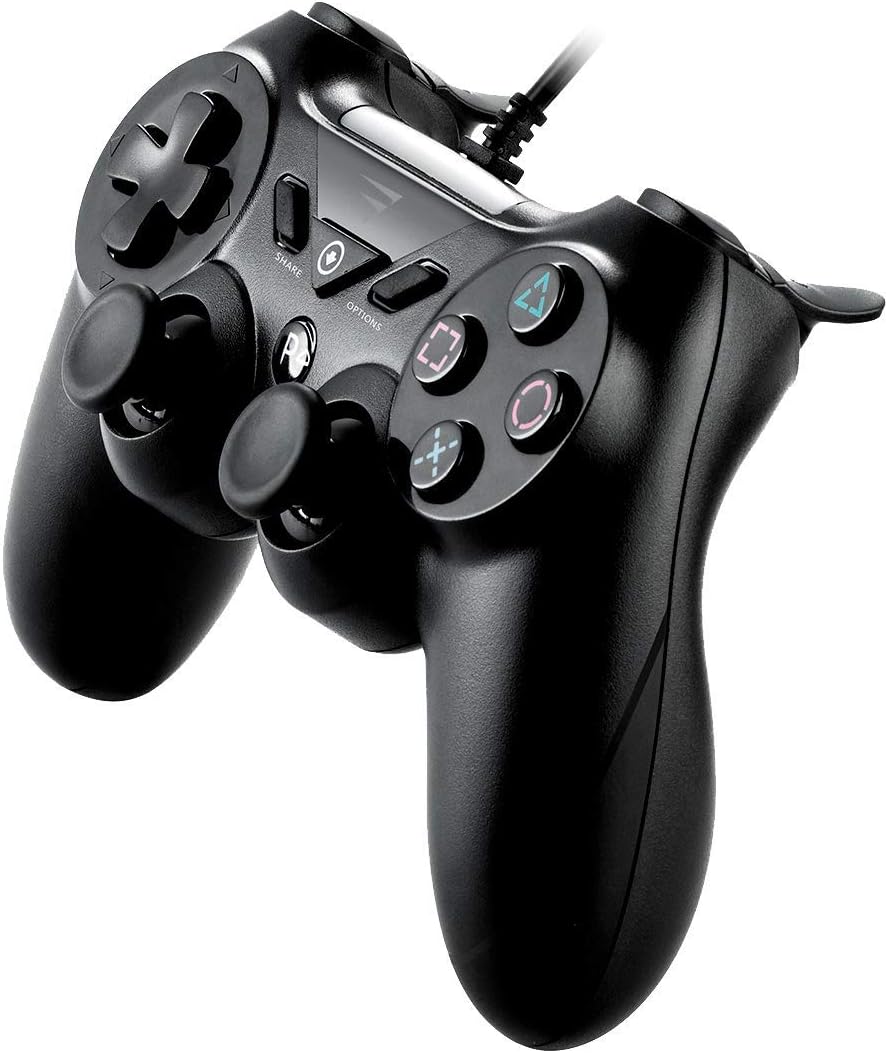
Imatge: Lateral view of the VoltEdge CX40 controller, illustrating the attached USB cable extending from the top of the controller.
Instruccions de funcionament
The VoltEdge CX40 controller functions similarly to standard game controllers. Familiarize yourself with the button layout for optimal gameplay.
Funcions del botó:
| Botó/Component | Funció |
|---|---|
| D-Pad | Directional input for movement or menu navigation. |
| Manets analògics esquerra/dreta | Precise directional control, camera movement, or character movement. Press down for L3/R3 functions. |
| Action Buttons (Triangle, Circle, Cross, Square) | Primary in-game actions (e.g., jump, attack, interact). |
| L1/R1 Buttons | Shoulder buttons, often used for secondary actions or weapon switching. |
| Disparadors L2/R2 | Analog triggers, often used for aiming, shooting, or acceleration/braking. |
| Botó COMPARTIR | (PS4) Share gameplay moments, screenshots, or video clips. |
| Botó OPCIONS | (PS4) Access in-game menus, pause, or settings. |
| Botó PS | (PS4/PS3) Access the system menu or turn on/off the console. |

Imatge: Anglesa view of the VoltEdge CX40 controller, showing the layout of the D-pad, left analog stick, Share, Options, PS buttons, and the right analog stick and action buttons.
Funció turbo:
The Turbo function allows a button to be pressed repeatedly as long as it is held down. To activate/deactivate Turbo for a specific button:
- Manteniu premut el botó Turbo button (if present, or a designated combination).
- While holding Turbo, press the desired action button (e.g., Cross, Circle).
- Release both buttons. The Turbo function is now active for that action button.
- Repeat the process to deactivate Turbo for the same button.
Note: Specific Turbo button location or activation method may vary. Refer to the controller's physical markings if a dedicated Turbo button is present.
Manteniment
Proper maintenance ensures the longevity and optimal performance of your VoltEdge CX40 controller.
Neteja:
- Disconnect the controller from the console/PC before cleaning.
- Use a soft, dry cloth to wipe down the surface of the controller.
- Per a la brutícia persistent, lleugerament dampNetegeu el drap amb aigua o una solució de neteja suau i no abrasiva. Eviteu la humitat excessiva.
- Do not use harsh chemicals, solvents, or abrasive cleaners, as these can damage the controller's finish.
- Use cotton swabs or compressed air to clean around buttons and analog sticks.
Emmagatzematge:
- Guardeu el controlador en un lloc fresc i sec, allunyat de la llum solar directa i de temperatures extremes.
- Avoid placing heavy objects on the controller, which could damage the analog sticks or buttons.
- Keep the cable neatly coiled to prevent tangling or damage.
Resolució de problemes
If you encounter issues with your VoltEdge CX40 controller, refer to the following common solutions:
| Problema | Possible solució |
|---|---|
| El comandament no és reconegut per la consola/PC. |
|
| Els botons o els joysticks analògics no responen. |
|
| La vibració no funciona. |
|
Especificacions
| Característica | Detall |
|---|---|
| Nom del model | VoltEdge CX40 Classic Black Controller |
| Número de model | 850021579128 |
| Connectivitat | USB per cable |
| Longitud del cable | 2 metres |
| Vibració | Doble vibració |
| Compatibilitat | PS4, PS3, PC |
| Dimensions (L x A x A) | 17 x 6.2 x 14.5 cm |
| Pes | 400 g |
Garantia i Suport
VoltEdge products are designed for durability and performance. For warranty information and technical support, please refer to the official VoltEdge weblloc web o contacteu directament amb el seu servei d'atenció al client.
Conserva el comprovant de compra per a qualsevol reclamació de garantia.
Per a més ajuda, visiteu: www.voltedge.com