
T-WOLF T70
T-WOLF T70 Wired Mechanical Keyboard User Manual
Model: T70
Introducció
This manual provides comprehensive instructions for the setup, operation, maintenance, and troubleshooting of your T-WOLF T70 Wired Mechanical Keyboard. The T70 is an 87-key mechanical keyboard featuring blue switches, electroplated punk keycaps, and RGB backlighting, designed for PC and laptop use.
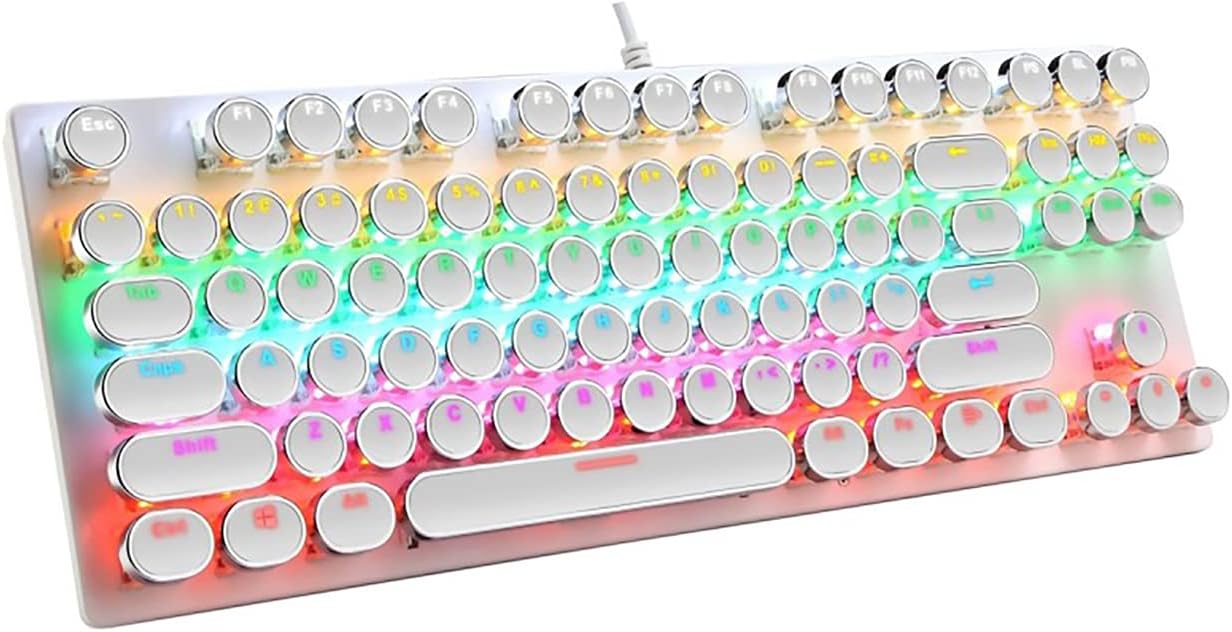
Figure 1: The T-WOLF T70 Wired Mechanical Keyboard showcasing its RGB backlighting and unique round, electroplated punk keycaps.
Configuració
Follow these steps to set up your T-WOLF T70 keyboard:
- Descomprimir el teclat: Traieu amb cura el teclat del seu embalatge. Assegureu-vos que hi hagi tots els components.
- Connexió a l'ordinador: The T-WOLF T70 is a wired keyboard. Locate the USB cable attached to the keyboard. Insert the USB connector into an available USB port on your PC or laptop.
- Compatibilitat del sistema: The keyboard is compatible with Windows operating systems, including Windows XP, 7, 8, and 10, as well as macOS 10.2 or above. No special drivers are typically required; the keyboard should be recognized automatically by your operating system.
- Prova inicial: Once connected, the keyboard's RGB backlighting should illuminate. Open a text editor or a web browser and type to confirm that the keys are functioning correctly.
Instruccions de funcionament
The T-WOLF T70 keyboard offers standard typing functionality along with customizable RGB backlighting.
Característiques principals:
- Disposició de 87 tecles: A compact tenkeyless (TKL) design, providing essential keys while saving desk space.
- Blue Mechanical Switches: Known for their tactile bump and audible click, providing satisfying feedback for typing and gaming.
- Electroplated Punk Keycaps: Unique round keycaps with an electroplated finish, offering a distinct aesthetic and feel.
- Retroil·luminació RGB: Features dynamic RGB lighting effects.
Control de la llum de fons:
The keyboard's RGB backlighting can be adjusted using specific key combinations. Refer to the keyboard's function keys (F1-F12) and modifier keys (Fn) for specific lighting mode changes, brightness adjustments, and speed controls. Common combinations include:
- Fn + F-keys: Often used to cycle through different lighting modes or adjust brightness.
- Fn + Tecles de fletxa: May control lighting direction or speed of effects.
Experiment with these combinations to find your preferred lighting setup.

Figure 2: The T-WOLF T70 keyboard, illustrating the mechanical shaft design and the unique electroplated punk keycaps.
Manteniment
Un manteniment adequat garanteix la longevitat i el rendiment òptim del teclat.
- Neteja de les tecles:
To clean the electroplated punk keycaps, gently wipe them with a soft, lint-free cloth dampened with a small amount of water or a mild, non-abrasive cleaning solution. Avoid excessive moisture. For deeper cleaning, keycaps can be carefully removed using a keycap puller (not included) and cleaned individually.
- Cleaning the Keyboard Base:
Use a soft brush or compressed air to remove dust and debris from between the keys and from the keyboard's base. Wipe the surface with a dry or slightly damp tela.
- Eviteu líquids: No vessiu líquids sobre el teclat. En cas de vessament accidental, desconnecteu immediatament el teclat de l'ordinador i deixeu-lo assecar completament abans de tornar-lo a connectar.
- Emmagatzematge: Quan no l'utilitzeu durant períodes prolongats, guardeu el teclat en un lloc net i sec, allunyat de la llum solar directa i de temperatures extremes.
Resolució de problemes
If you encounter issues with your T-WOLF T70 keyboard, try the following solutions:
- El teclat no respon:
- Assegureu-vos que el cable USB estigui ben connectat tant al teclat com al port USB de l'ordinador.
- Prova de connectar el teclat a un port USB diferent de l'ordinador.
- Reinicieu l'ordinador.
- Prova el teclat en un altre ordinador per determinar si el problema és del teclat o del sistema.
- Backlighting Not Working or Flickering:
- Check if the backlight is turned off using the keyboard's function keys (e.g., Fn + specific F-key).
- Ensure the keyboard is receiving sufficient power from the USB port. Try a different USB port.
- If the issue persists, disconnect and reconnect the keyboard.
- Claus que no es registren o escrivien dues vegades:
- Clean around and under the affected keycaps to remove any debris that might be obstructing the switch.
- If a specific key is consistently malfunctioning, it might indicate a hardware issue.
Especificacions
Detailed specifications for the T-WOLF T70 Wired Mechanical Keyboard:
| Característica | Detall |
|---|---|
| Marca | T-WOLF |
| Número de model | T70 |
| Connectivitat | Wired (USB cable with magnetic ring) |
| Idioma del teclat | Anglès |
| Nombre de claus | 87 |
| Tipus de canvi | Interruptors mecànics blaus |
| Tipus de tecla | Electroplated Punk Keycaps (Two-color injection) |
| Il·luminació de fons | RGB Backlit (Cool and charming lighting effect) |
| Color | Blanc |
| Material | Metall |
| Sistemes operatius compatibles | Windows XP / 7 / 8 / 10, macOS 10.2 or above |
| Dimensions del producte (L x A x A) | 360mm x 130mm x 36mm (approx. 45.4 x 17 x 5.2 cm package dimensions) |
| Pes de l'article | 882 g (approx. 624g product weight) |

Figure 3: Product parameters and dimensions of the T-WOLF T70 keyboard, indicating a length of 360mm and width of 130mm.
Garantia i Suport
For warranty information and technical support, please refer to the documentation provided with your purchase or visit the official T-WOLF weblloc web. Conserveu el comprovant de compra per a reclamacions de garantia.
Ask a question about this manual
Ask about setup, troubleshooting, compatibility, parts, safety, or missing instructions. Manuals+ will review the question and use this page’s manual context to help answer it.