
MageGee V620
Manual d'usuari del combinat de teclat i ratolí sense fil MageGee V620
Model: V620
Introducció
Gràcies per la compraasing the MageGee V620 Wireless Keyboard and Mouse Combo. This manual provides detailed instructions on how to set up, operate, maintain, and troubleshoot your new wireless peripheral set. Please read this manual carefully before use to ensure optimal performance and longevity of your product.

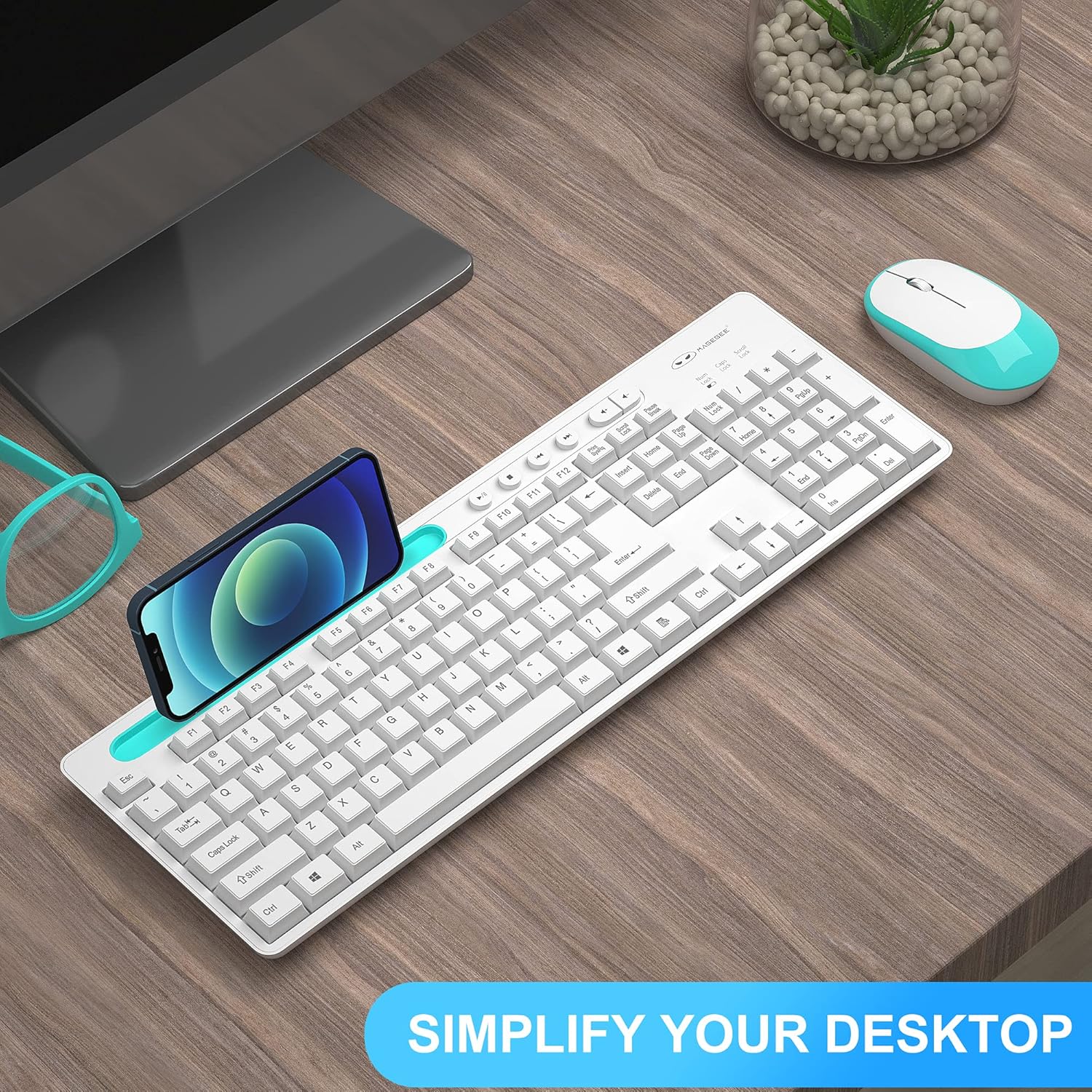
Image: The MageGee V620 wireless keyboard and mouse combo, featuring a full-size keyboard with an integrated phone holder and a compact, ergonomic mouse. A smartphone is shown placed in the keyboard's holder.
Contingut del paquet
- MageGee V620 Wireless Keyboard
- MageGee Wireless Mouse
- Receptor USB (emmagatzemat al compartiment de la bateria del ratolí)
- Manual d'usuari (aquest document)
- AA Battery (for mouse, pre-installed or included)
Configuració
Follow these steps to set up your MageGee V620 Wireless Keyboard and Mouse Combo:
- Instal·leu les bateries:
- Ratolí: Open the battery compartment cover on the bottom of the mouse. Insert the provided AA battery, ensuring correct polarity (+/-). Close the cover.
- Teclat: The keyboard typically uses AAA batteries (not explicitly mentioned in JSON, but common for wireless keyboards). Open the battery compartment on the bottom of the keyboard and insert the required batteries (usually 2x AAA, not included based on JSON).
- Localitza el receptor USB: The USB receiver for both the keyboard and mouse is usually stored inside the mouse's battery compartment for safekeeping during transport. Carefully remove it.
- Connecteu el receptor USB: Plug the USB receiver into an available USB port on your computer (desktop, laptop, PC).
- Encès:
- Ratolí: Enceneu l'interruptor d'alimentació situat a la part inferior del ratolí.
- Teclat: Ensure the keyboard is powered on (some keyboards have a power switch, others activate upon key press).
- Connexió automàtica: The keyboard and mouse should automatically connect to your computer within a few seconds. No additional drivers are typically required for Windows, macOS, or Linux systems.

Image: Illustration demonstrating the 2.4GHz wireless connection of the MageGee V620 combo. A USB receiver is shown plugged into a laptop, wirelessly connecting to both the keyboard and mouse, indicating a range of 33 feet.
Instruccions de funcionament
Característiques del teclat
- Disseny a mida completa: Inclou un teclat numèric per a una entrada de dades eficient.
- Quiet Crater-Switch Keys: Designed for responsive and quiet typing, reducing noise during use.
- Suport de telèfon integrat: A convenient slot at the top of the keyboard allows you to prop up your smartphone or tablet for easy viewing.
- Media Shortcut Keys: Access common functions quickly with dedicated media keys (e.g., volume control, play/pause).
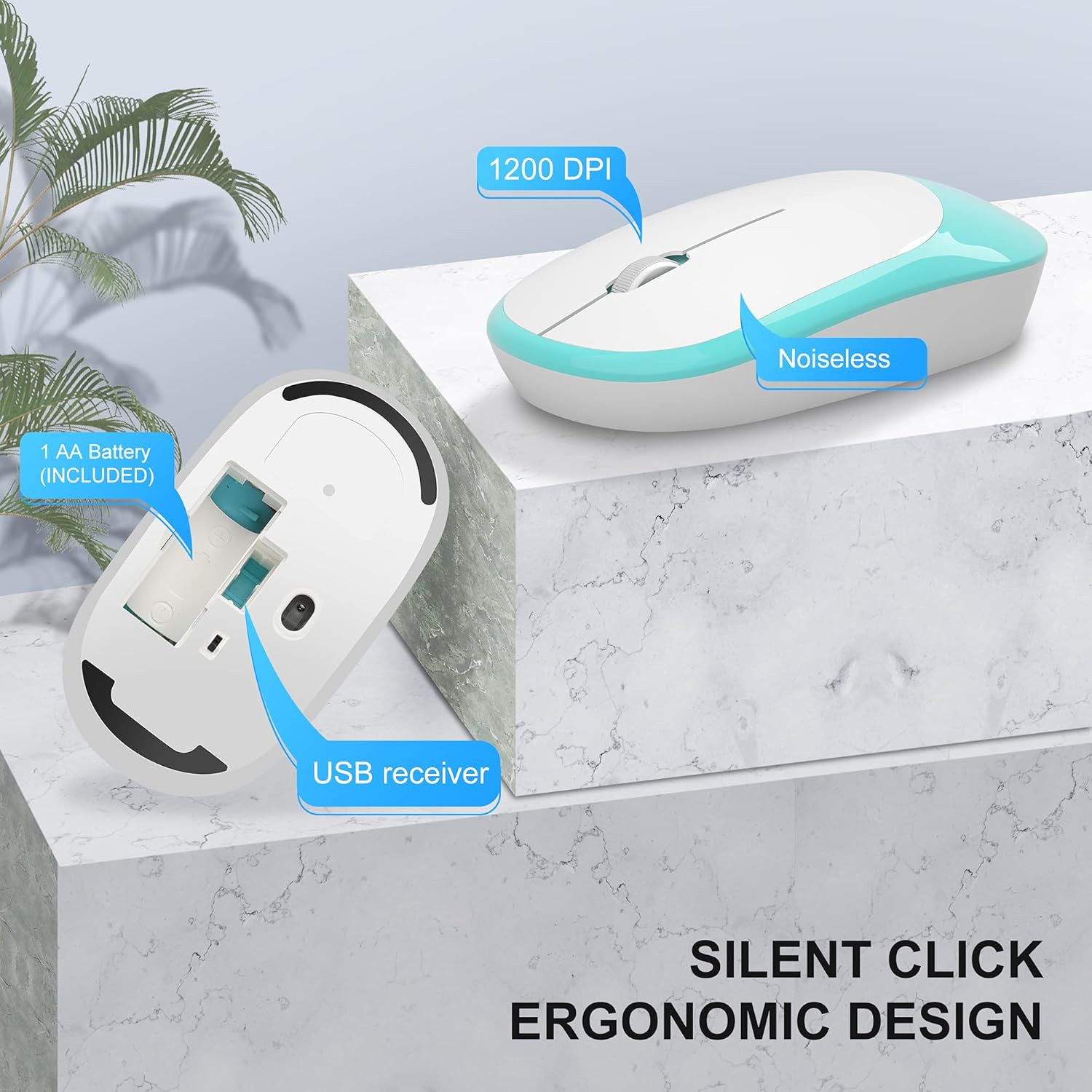
Image: The MageGee V620 wireless keyboard, with highlighted sections indicating the integrated phone holder and the location of 6 media shortcut keys.

Imatge: Un primer pla view of the MageGee V620 keyboard keys, emphasizing the responsive and quiet crater-switch design. Icons below indicate anti-scratch, comfortable touch, soft click, and crater switch features.
Funcions del ratolí
- Disseny ergonòmic: Shaped for comfortable use over extended periods.
- Clic silenciós: Reduces click noise, ideal for quiet environments.
- 1200 DPI: Provides precise and smooth cursor control.
- Emmagatzematge del receptor USB: The USB receiver can be conveniently stored inside the mouse when not in use, preventing loss.
Imatge: Una imatge detallada view of the MageGee V620 wireless mouse, pointing out its silent click feature, ergonomic design, 1200 DPI sensitivity, and the location of the AA battery compartment and USB receiver storage.
Manteniment
- Neteja: Feu servir un drap suau i sec per netejar el teclat i el ratolí. Per a la brutícia persistent, netegeu lleugerament.amp cloth with mild soap can be used, ensuring no liquid enters the device. Do not use harsh chemicals or abrasive cleaners.
- Substitució de la bateria:
- When the keyboard or mouse becomes unresponsive or experiences lag, it may be time to replace the batteries.
- Refer to the "Setup" section for instructions on opening battery compartments and inserting new batteries.
- Eliminar les piles velles de manera responsable d'acord amb la normativa local.
- Emmagatzematge: When not in use for extended periods, turn off the mouse to conserve battery life. Store the USB receiver inside the mouse's compartment to prevent loss.
Resolució de problemes
If you encounter issues with your MageGee V620 combo, try the following solutions:
- No Connection / Unresponsive:
- Assegureu-vos que el receptor USB estigui connectat correctament a un port USB que funcioni de l'ordinador.
- Check if the mouse and keyboard are powered on.
- Replace the batteries in both the keyboard and mouse.
- Proveu de connectar el receptor USB a un port USB diferent.
- Acosteu el teclat i el ratolí al receptor USB per descartar problemes d'abast.
- Reinicieu l'ordinador.
- Connexió endarrerida o intermitent:
- Ensure there are no large metal objects or other electronic devices (like Wi-Fi routers, other wireless devices) between the keyboard/mouse and the receiver that might cause interference.
- Try using a USB extension cable to position the receiver closer to the keyboard and mouse, away from potential interference sources.
- Comproveu els nivells de bateria.
- Keys Not Working / Mouse Cursor Not Moving:
- Clean any debris from around the affected keys or the mouse sensor.
- Ensure the Num Lock or Caps Lock indicators are functioning correctly (for keyboard).
- Re-establish connection by unplugging and re-plugging the USB receiver.
Especificacions
| Característica | Detall |
|---|---|
| Marca | MageGee |
| Model | V620 |
| Tecnologia de connectivitat | Sense fil de 2.4 GHz (receptor USB) |
| Dispositius compatibles | Gaming Console, Laptop, Personal Computer (Windows, PC) |
| Característica especial | Ergonomic Design, Quiet Keys, Phone Holder |
| DPI del ratolí | 1200 DPI |
| Descripció del teclat | Mida completa amb teclat numèric |
| Pes de l'article | 1.44 lliures (aprox. 0.65 kg) |
| Dimensions del paquet | 17.48 x 8.62 x 1.5 polzades (aprox. 44.4 x 21.9 x 3.8 cm) |

Image: Technical drawing showing the dimensions of the MageGee V620 wireless keyboard: approximately 440mm (length), 145mm (width), and 27mm (height).

Image: Technical drawing showing the dimensions of the MageGee V620 wireless mouse: approximately 108mm (length), 60mm (width), and 26mm (height).
Garantia i Suport
MageGee products are designed for reliability and performance. For warranty information or technical support, please refer to the contact details provided with your purchase or visit the official MageGee weblloc web. Conserveu el rebut de compra com a comprovant de compra per a reclamacions de garantia.
For further assistance, you may contact MageGee customer service through their official channels. You can often find support information on the MageGee Store on Amazon.
Ask a question about this manual
Ask about setup, troubleshooting, compatibility, parts, safety, or missing instructions. Manuals+ will review the question and use this page’s manual context to help answer it.