
1. Introducció
The Energizer Connect Smart WiFi Plug allows you to control your electronic devices remotely using a mobile application or voice commands. This smart plug connects directly to your home's 2.4GHz Wi-Fi network, eliminating the need for a separate hub. It is compatible with Amazon Alexa, Google Assistant, and Siri for convenient voice control. This manual provides detailed instructions for setting up, operating, maintaining, and troubleshooting your smart plug.
2. Informació de seguretat
Si us plau, llegiu i comprengui totes les instruccions de seguretat abans d'utilitzar aquest producte. Si no segueix aquestes instruccions, es poden produir descàrregues elèctriques, incendis o danys materials.
- Només per a ús interior.
- No supereu la càrrega màxima de 15 Amps (120 Volts).
- Do not immerse the plug in water or expose it to moisture.
- No intenteu desmuntar o modificar el dispositiu.
- Mantenir fora de l'abast dels nens.
- Assegureu-vos que l'endoll estigui completament inserit a la presa de corrent.
- Desendolleu el dispositiu de la presa de corrent abans de netejar-lo.
3. Contingut del paquet
- 1 x Energizer Connect Smart WiFi Plug
- 1 x Manual d'usuari (aquest document)
4. Producte acabatview
The Energizer Connect Smart WiFi Plug features a compact design that allows access to the second outlet. It includes a power button and an LED indicator for status.

Imatge 4.1: The Energizer Connect Smart WiFi Plug shown with its retail packaging, highlighting key features like 15 Amps of power, grouping, voice control, and Wi-Fi connectivity. The plug itself is white and compact.

Imatge 4.2: Un front de primer pla view of the Energizer Connect Smart WiFi Plug, showing the standard Type B electrical outlet configuration (two vertical slots and a round ground hole).

Imatge 4.3: This image displays the compact dimensions of the Energizer Connect Smart WiFi Plug. The side view shows a depth of 1.0625 inches, and the front view indicates a diameter of 1.125 inches, illustrating its mini size.
4.1. Components
- Botó d'encesa: Press to manually turn the connected device on or off. Press and hold for 5 seconds to initiate pairing mode (LED will blink rapidly).
- Indicador LED:
- Blau sòlid: El dispositiu està encès.
- Apagat: El dispositiu està apagat.
- Rapidly Blinking Blue: Mode de sincronització.
- Blau parpellejant lentament: Desconnectat de la Wi-Fi.
5. Instruccions de configuració
Follow these steps to set up your Energizer Connect Smart WiFi Plug.
5.1. Requisits del sistema
- A stable 2.4GHz Wi-Fi network (5GHz networks are not supported).
- A smartphone or tablet running iOS 10.0 or higher, or Android 6.0 or higher.
- Access to the Apple App Store or Google Play Store.
5.2. Descàrrega i instal·lació d'aplicacions
- Descarrega't el Aplicació Energizer Connect des de l'App Store d'Apple o Google Play Store. Cerca "Energizer Connect".
- Obriu l'aplicació i seguiu les instruccions a la pantalla per crear un compte o iniciar sessió.

Imatge 5.1: A smartphone displaying the Energizer Connect App interface, showing the smart plug in an "ON" state. The image also includes the physical smart plug and icons for downloading the app from the App Store and Google Play.
5.3. Pairing the Smart Plug
- Plug the Energizer Connect Smart WiFi Plug into a standard 120V wall outlet.
- The LED indicator on the plug should begin blinking rapidly, indicating it is in pairing mode. If not, press and hold the power button on the side of the plug for 5 seconds until it blinks rapidly.
- Open the Energizer Connect App.
- Toqueu la icona "+" (o "Afegeix dispositiu") per afegir un dispositiu nou.
- Seleccioneu "Presa elèctrica" o "Endoll intel·ligent" de la llista de dispositius.
- Confirm that the indicator light is blinking rapidly in the app.
- Enter your 2.4GHz Wi-Fi network name and password. Ensure your phone is connected to the same 2.4GHz network.
- The app will attempt to connect to the smart plug. This may take a few moments.
- Once successfully paired, the LED indicator on the plug will turn solid blue, and the app will confirm the connection.
- You can then rename your smart plug within the app for easier identification (e.g., "Living Room Lamp", "Cafetera").

Imatge 5.2: A visual guide showing the three easy steps for setting up the Energizer Connect Smart WiFi Plug: download the app, install the device, and set up and control via the app or voice assistants. The image also features the Energizer bunny mascot.
6. Instruccions de funcionament
Control your smart plug using the Energizer Connect App or compatible voice assistants.
6.1. Control manual
Press the power button on the side of the smart plug to manually turn the connected device on or off.
6.2. Control d'aplicacions
- On/Off: Open the Energizer Connect App, select your smart plug, and tap the power icon to toggle its state.
- Programació: Set custom schedules for your plug to turn on or off automatically at specific times or days. This is useful for lights, coffee makers, or other appliances.
- Temporitzadors: Configura temporitzadors de compte enrere perquè l'endoll s'apagui després d'un temps determinat.
- Accés remot: Control your smart plug from anywhere with an internet connection, even when you are away from home.
- Agrupació: Group multiple Energizer Connect smart plugs together to control them simultaneously with a single command.
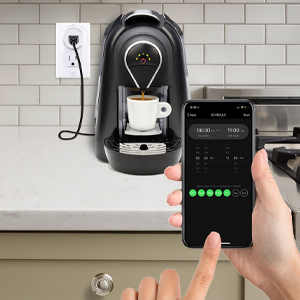
Imatge 6.1: A hand holding a smartphone displaying the Energizer Connect App's scheduling interface, set to turn on a coffee maker at a specific time. The smart plug is visible in the background, connected to the coffee machine.

Imatge 6.2: A person using a smartphone to remotely control a smart plug, demonstrating the ability to turn devices on or off from any location. The image shows a split view of the person and a living room with a lamp connected to a smart plug.
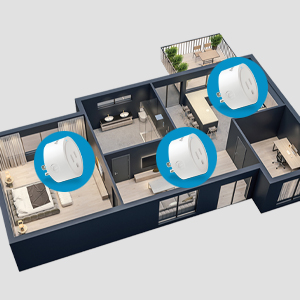
Imatge 6.3: An overhead diagram of a home showing multiple Energizer Connect Smart WiFi Plugs placed in different rooms, illustrating the concept of grouping and controlling several devices simultaneously.
6.3. Control per veu
The Energizer Connect Smart WiFi Plug is compatible with Amazon Alexa, Google Assistant, and Siri. To enable voice control:
- Ensure your smart plug is successfully paired with the Energizer Connect App.
- Open your Amazon Alexa, Google Home, or Apple Home app.
- Follow the app's instructions to link the "Energizer Connect" skill or service. You will need to log in with your Energizer Connect account credentials.
- Un cop enllaçat, podeu utilitzar ordres de veu com ara:
- "Alexa, activa [Nom del connector]."
- "Ei Google, desactiva [Nom de l'endoll]."
- "Hey Siri, turn on [Plug Name]." (Requires setting up Siri Shortcuts in the Energizer Connect App)

Imatge 6.4: A living room scene demonstrating voice control capabilities. The image shows a smart plug connected to a fan, with icons for Google Assistant, Alexa, and Siri Shortcuts, indicating compatibility with these voice assistants.
7. Manteniment
To ensure optimal performance and longevity of your smart plug:
- Neteja: Desconnecta l'endoll intel·ligent de la presa de corrent abans de netejar-lo. Fes servir un drap suau i sec per netejar la superfície. No utilitzis netejadors líquids ni aerosols.
- Emmagatzematge: When not in use, store the smart plug in a cool, dry place away from direct sunlight and moisture.
- Condicions ambientals: Avoid exposing the plug to extreme temperatures or humidity.
8. Solució De Problemes
If you encounter issues with your Energizer Connect Smart WiFi Plug, refer to the following solutions:
| Problema | Causa possible | Solució |
|---|---|---|
| Plug not connecting to Wi-Fi / LED blinking slowly | Incorrect Wi-Fi password, 5GHz network selected, plug too far from router, network interference. |
|
| App cannot find the plug during pairing | Plug not in pairing mode, incorrect app used, network issues. |
|
| El control de veu no funciona | Voice assistant not linked, incorrect device name, internet connectivity issues. |
|
| Plug unresponsive | Potència outage, device malfunction. |
|
9. Especificacions
| Característica | Detall |
|---|---|
| Número de model | B0929DFGZY |
| UPC | 805106871352 |
| Entrada Voltage | 120 Volts |
| Corrent de càrrega màxima | 15 Amps |
| Freqüència Wi-Fi | 2.4 GHz (IEEE 802.11 b/g/n) |
| Compatibilitat | Amazon Alexa, Google Assistant, Siri (via Shortcuts) |
| Certificacions | FCC Certified, ETL Certified |
| Material | Plàstic, cautxú |
| Color | Blanc |
| Pes de l'article | 2.89 unces |
| Dimensions (Approx. Plug Body) | 1.125" (Diameter) x 1.0625" (Depth from outlet face) |
10. Garantia i Suport
For warranty information and technical support, please contact the manufacturer or seller directly. The manufacturer of this product is Jem Accessories, and the brand is Energizer Connect (distributed by XTREME DIGITAL LIFESTYLE ACCESSORIES).
Conserveu el vostre comprovant de compra per a reclamacions de garantia.
For further assistance, visit the Energizer Connect weblloc web o consulteu la informació de contacte que s'inclou amb l'embalatge del producte.