
1. Informació important de seguretat
Si us plau, llegiu atentament totes les instruccions abans del muntatge i l'ús. Conserveu aquest manual per a futures consultes.
- ADVERTIMENT: Always assemble the desk according to the provided instructions to ensure stability.
- No supereu la capacitat màxima de pes de 177 lliures (80 kg).
- Be cautious when using the height adjustment feature to avoid injury from moving parts.
- Keep hands and fingers away from the moving parts during operation.
- Ensure the power cord is not pinched or damaged during assembly or operation.
- Aquest producte només està pensat per a ús interior.
2. Producte acabatview
The FLEXISPOT E1L is a dual-motor, L-shaped electric standing desk designed for home and office use. It features adjustable height, a quiet operation, and a customizable control panel.

Image 2.1: The FLEXISPOT E1L desk frame demonstrating its adjustable height capabilities.

Image 2.2: The FLEXISPOT E1L desk in a typical office setup, showcasing its L-shape and functionality.
3. Muntatge i muntatge
Assembly of the FLEXISPOT E1L desk is designed to be straightforward, typically taking less than 30 minutes. All necessary tools are included.
3.1 Desembalatge i comprovació de components
Carefully unpack all components and verify against the packing list. Ensure all parts are present and undamaged before proceeding.
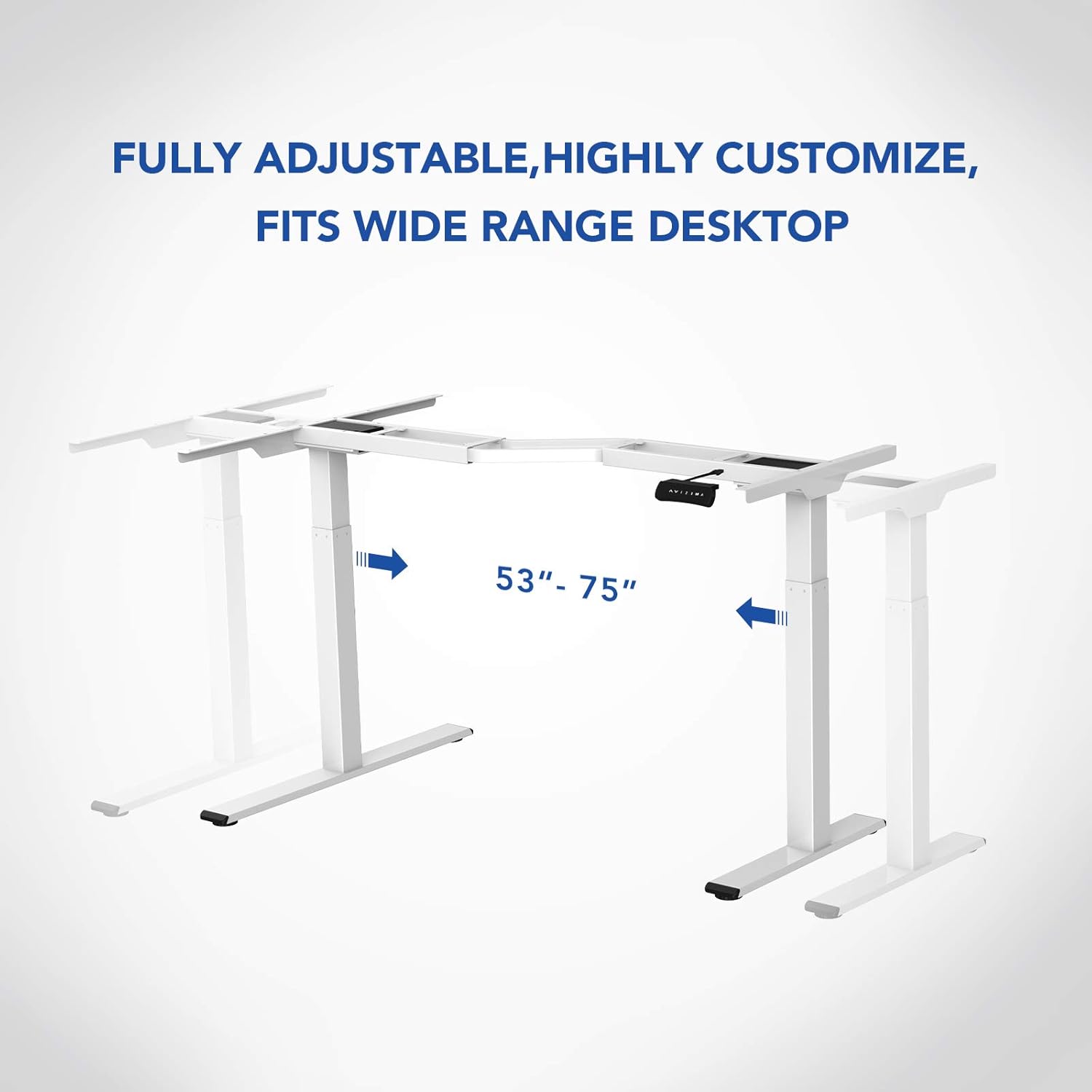
Imatge 3.1: acabatview of the FLEXISPOT E1L desk frame components prior to assembly.
3.2 Passos de muntatge
- Attach the lifting columns to the desktop frame.
- Fixeu els peus a la part inferior de les columnes elevadores.
- Connect the control box and motor cables as per the detailed diagram in the included assembly guide.
- Mount the control panel to the desired location on the desk.
- Place the desktop surface onto the assembled frame and secure it.
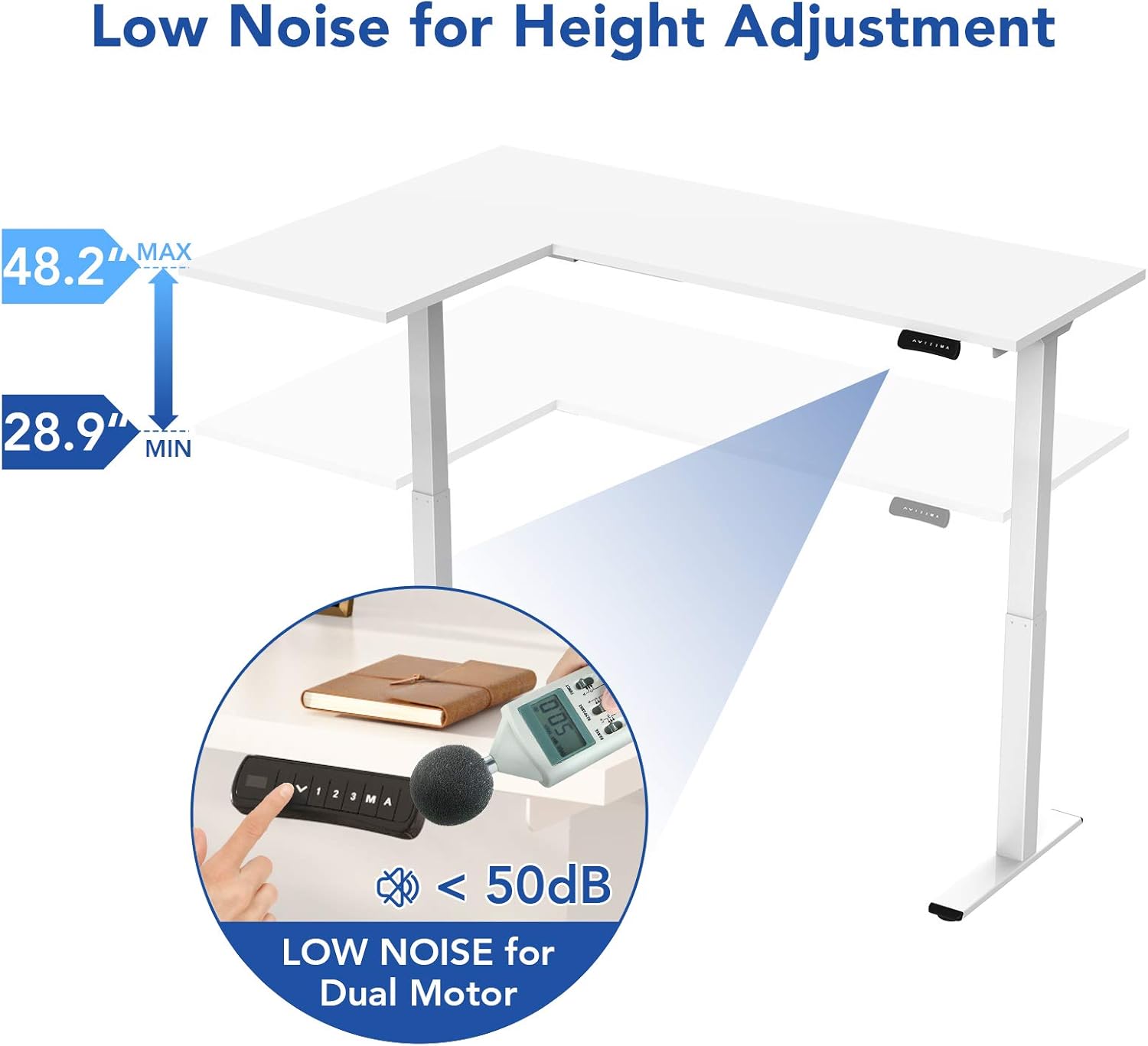
Image 3.2: An assembly step illustrating the connection of the L-shaped desk frame components.

Image 3.3: The desk frame nearing completion, with the control panel attached.
3.3 Reversible L-Shape Configuration
The L-shaped configuration of the desk is reversible, allowing you to set up the longer side on either the left or right, depending on your preference and workspace layout. This flexibility is determined during the assembly process.

Image 3.4: Visual representation of the desk's reversible L-shape, allowing for left or right-hand configurations.
4. Instruccions de funcionament
4.1 Ajust d'alçada
The desk features a dual-motor lift mechanism for smooth and quiet height adjustments. The height can be adjusted from 27.9 inches (70.9 cm) to 47.2 inches (120 cm).
- Utilitza el Up (▲) i Avall (▼) buttons on the control panel to manually adjust the desk height.
- The desk operates at a speed of 1 inch per second and maintains a noise level under 50 dB during movement.

Image 4.1: Illustration highlighting the low noise operation (under 50 dB) of the desk's dual motor system.
4.2 Funcions del tauler de control
The built-in LED control panel allows for easy customization and programming of desk height settings.

Image 4.2: Close-up of the control panel, detailing its buttons and functions.
- Up/Down Buttons (▲, ▼): Ajusta manualment l'alçada de l'escriptori.
- Preajustos de memòria (1, 2, 3): Store and recall up to three preferred height settings. To save a height, adjust the desk to the desired position, then press the 'M' button followed by the desired number (1, 2, or 3).
- Memory Button (M): Used to save height presets.
- Sit-Stand Reminder (A): Activate a programmable timer to remind you to switch between sitting and standing postures. Refer to the full assembly guide for detailed programming instructions.
4.3 Anti-Collision System
The desk is equipped with a built-in anti-collision system. If the desk encounters an obstruction during height adjustment, it will automatically stop and reverse slightly to prevent damage or injury.

Image 4.3: Visual explanation of the anti-collision system, showing the desk reversing upon contact with an obstacle.
5. Manteniment
Regular maintenance ensures the longevity and optimal performance of your FLEXISPOT E1L desk.
- Neteja: Netegeu la superfície i el marc de l'escriptori amb un drap suau iamp drap. Eviteu productes de neteja abrasius o dissolvents que puguin danyar l'acabat.
- Gestió de cables: Periodically check all cables to ensure they are securely connected and not pinched or frayed. Use the included cable management tray to keep wires organized.
- Elements de fixació: De tant en tant, comproveu tots els cargols i perns per assegurar-vos que estiguin ben ajustats. Torneu-los a apretar si cal.
- Inspecció de motors: Listen for any unusual noises during operation. If you notice any, discontinue use and consult the troubleshooting section or contact customer support.
6. Solució De Problemes
Si teniu problemes amb el vostre escriptori, consulteu els passos habituals següents per a la resolució de problemes:
| Problema | Causa possible | Solució |
|---|---|---|
| L'escriptori no es mou. | Power cable disconnected; control box error; overload. | Check power connections. Unplug and replug the power cord. Reduce weight on the desk. |
| L'escriptori es mou de manera desigual. | Uneven load; motor synchronization issue. | Distribute weight evenly. Perform a reset (refer to the full manual for specific reset procedures). |
| Codi d'error mostrat. | Error específic del sistema. | Refer to the detailed error code list in the complete user manual or contact customer support. Often, a power cycle (unplugging for 10 seconds and replugging) can resolve temporary errors. |
| Anti-collision system triggers too easily. | Sensitivity setting too high. | Adjust the anti-collision sensitivity setting via the control panel (refer to the full manual for instructions). |
If these steps do not resolve the issue, please contact FLEXISPOT customer support.
7. Especificacions
| Característica | Especificació |
|---|---|
| Marca | FLEXISPOT |
| Número de model | E1L |
| Disseny d'escriptori | Escriptori d'ordinador en forma de L |
| Material del marc | Industrial-grade Steel |
| Mecanisme d'elevació | Dual Electric Motor |
| Interval d'ajust d'altura | De 27.9" a 47.2" (de 70.9 cm a 120 cm) |
| Velocitat d'elevació | 1"/segon |
| Nivell de soroll | Menys de 50 dB |
| Capacitat màxima de pes | 177 lliures (80 kg) |
| Tauler de control | LED with 3 Memory Presets & Sit-Stand Reminder |
| Característiques especials | Anti-Collision System, Corded Operation, Reversible L-Shape |
| Muntatge obligatori | Sí (inclou totes les eines de muntatge) |
| Persones recomanades per al muntatge | 1 |
8. Garantia i Suport
8.1 Informació de la garantia
The FLEXISPOT E1L desk comes with a Limited Warranty. Please refer to the warranty card included with your product or visit the official FLEXISPOT website for detailed terms and conditions regarding parts and labor coverage.
8.2 Atenció al client
For technical assistance, warranty claims, or any questions regarding your FLEXISPOT E1L desk, please contact FLEXISPOT customer support through their official weblloc web o la informació de contacte que es proporciona a l'embalatge del producte.
També podeu visitar el FLEXISPOT Store on Amazon per obtenir informació addicional sobre el producte i recursos d'assistència.