
1. Introducció
This manual provides essential information for the setup, operation, and maintenance of your LOUTOC Universal Replacement Remote Control. This remote is designed to provide a seamless replacement experience for compatible Roku streaming devices.
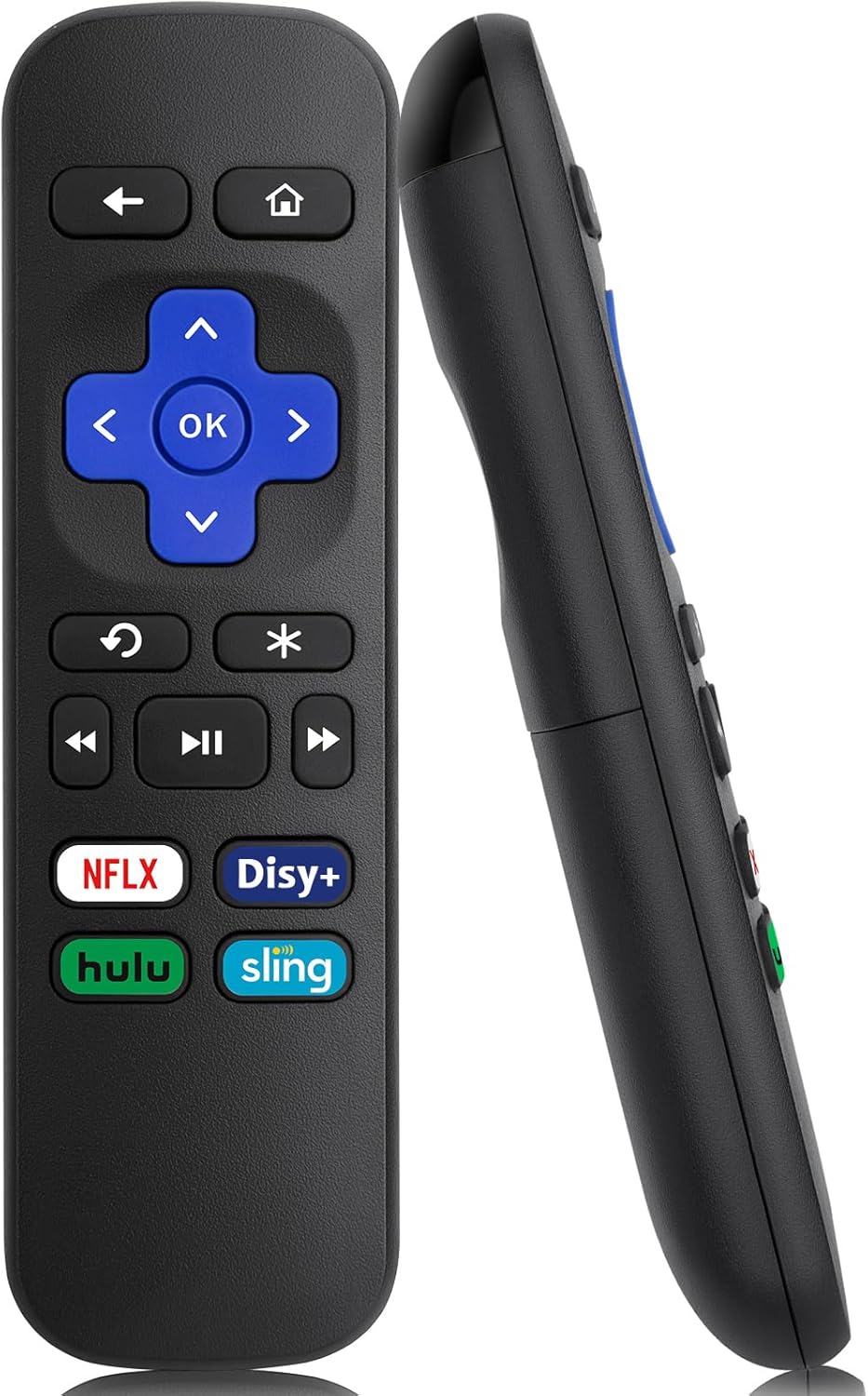
Imatge 1: Frontal i lateral view of the LOUTOC Universal Replacement Remote Control.
2. Compatibilitat
The LOUTOC Universal Replacement Remote Control is compatible with a range of Roku streaming players and boxes. Please verify your Roku model against the list below to ensure compatibility.
2.1 Compatible Roku Models:
- Roku 1 SE (Model 2710)
- Roku 2 HD (Model 3000), Roku 2 XD (Model 3050), Roku 2 XS (Model 3100), Roku 2 (Models 2720, 4210)
- Roku 3 (Models 4200, 4230)
- Roku 4 (Model 4400)
- Roku HD (Models 2500, 2000, N1100), Roku LT (Models 2450, 2400), Roku XD (Model 2050), Roku XDS (Model 2100)
- Roku Express (Models 3700, 3900, 3930R)
- Roku Express+ (Models 3710, 3910, 3931W)
- Roku Premiere (Models 4620, 3920R)
- Roku Premiere+ (Models 4630, 3921RW)
2.2 Incompatible Devices:
Aquest comandament a distància és NO compatible with the following devices:
- Any Roku Streaming Stick model
- Any Roku TV model (e.g., TCL Roku TV, Hisense Roku TV)
- Roku Ultra
- Roku devices requiring an RF (Radio Frequency) remote
- Roku Gaming devices
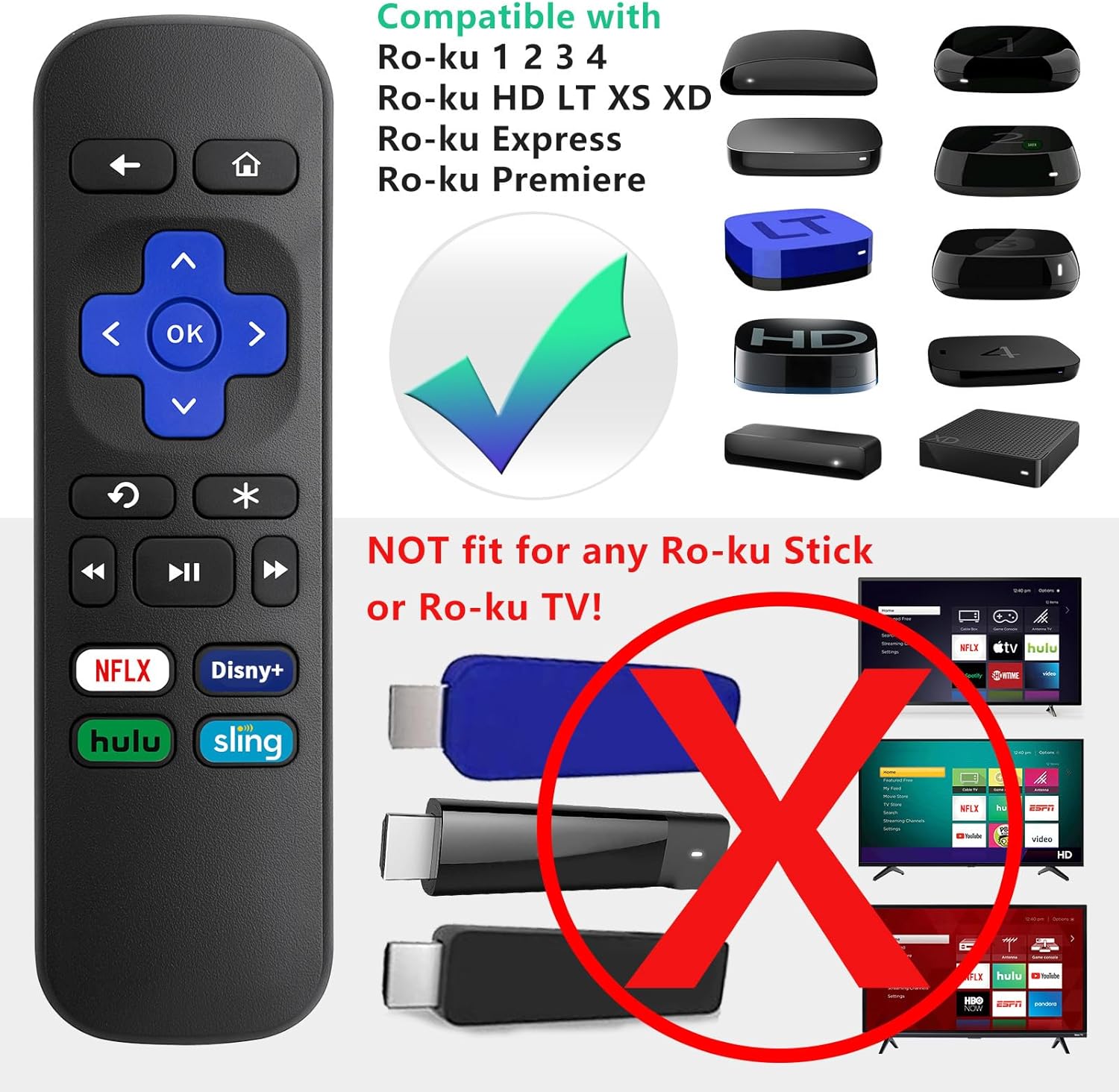
Image 2: Visual guide to compatible Roku players and incompatible Roku Sticks/TVs.

Image 3: Comprehensive compatibility chart for Roku devices.
3. Features and Limitations
3.1 Característiques principals:
- Tecnologia d'infrarojos (IR): Operates using infrared signals, requiring a direct line of sight to your Roku device.
- No Setup Required: Functions immediately upon battery insertion with compatible Roku devices. No programming or pairing is needed.
- Dedicated Shortcut Buttons: Includes four direct access buttons for popular streaming services: Netflix, Disney+, Hulu, and Sling.
- Construcció duradora: Fet de material ABS per a una major longevitat.

Image 4: Remote in use, emphasizing ease of use and IR technology.
3.2 Important Limitations:
Please note that this remote control does NO include the following functionalities:
- No Headphone Jack
- No Pairing Button
- Sense control de volum
- Sense cerca per veu
- No Power Button
- Not an RF (Radio Frequency) Model

Image 5: Visual representation of features not included (volume, pairing, headphone jack).

Image 6: Visual representation of features not included (power, voice search, RF model).
4. Configuració
4.1 Instal·lació de la bateria:
- Localitzeu el compartiment de la bateria a la part posterior del comandament a distància.
- Feu lliscar la tapa de la bateria cap avall per obrir-la.
- Insert two (2) AAA batteries, ensuring correct polarity (+ and -) as indicated inside the compartment. Batteries are not included.
- Torneu a col·locar la tapa de la bateria lliscant-la cap amunt fins que encaixi al seu lloc.

Image 7: Battery compartment for AAA batteries.
4.2 Ús inicial:
Once batteries are installed, the remote is ready for immediate use with your compatible Roku device. No additional programming or pairing steps are required.
5. Instruccions de funcionament
Point the remote control directly at your Roku streaming device. Ensure there are no obstructions between the remote and the Roku player for optimal performance.
5.1 Funcions dels botons:
| Botó | Funció |
|---|---|
| Casa | Torna a la pantalla d'inici de Roku. |
| Enrere | Torna a la pantalla o al menú anterior. |
| Coixinet direccional (amunt, avall, esquerra, dreta) | Navega pels menús i el contingut. |
| OK | Selecciona un element o confirma una acció. |
| Repetició instantània | Replays the last few seconds of video. |
| Options (*) | Accesses additional options or settings within an app. |
| Rebobinar | Rebobina la reproducció de vídeo. |
| Reproduir/Pausa | Reprodueix o pausa el contingut de vídeo. |
| Avança ràpida | Avança ràpidament la reproducció de vídeo. |
| Netflix | Accés directe a l'aplicació Netflix. |
| Disney+ | Direct access to the Disney+ application. |
| Hulu | Accés directe a l'aplicació Hulu. |
| Eslinga | Direct access to the Sling application. |

Image 8: Remote control highlighting the dedicated streaming service buttons.
6. Solució De Problemes
6.1 Remote Not Responding:
- Comproveu les bateries: Ensure the batteries are inserted correctly with the proper polarity. Replace old or depleted batteries with fresh AAA batteries.
- Línia de visió: Confirm that there is a clear, unobstructed path between the remote control and the infrared receiver on your Roku device.
- Compatibilitat: Double-check that your Roku model is listed as compatible in Section 2.1. This remote will not work with Roku Sticks or Roku TVs.
- Interferència: Ensure no strong light sources (like direct sunlight or bright fluorescent lights) are interfering with the IR signal.
7. Especificacions
| Especificació | Detall |
|---|---|
| Dimensions del producte | 5.5 x 1.65 x 0.79 polzades (13.97 x 4.19 x 2.01 cm) |
| Pes de l'article | 1.76 unces (50 grams) |
| Font d'alimentació | 2 piles AAA (no incloses) |
| Tecnologia de connectivitat | Infrarojos (IR) |
| Material | ABS |

Image 9: Remote control dimensions.
8. Garantia i Suport
LOUTOC offers a Substitució de 60 dies policy for this product. If you experience any issues within 60 days of purchase, please contact your retailer for a replacement.

Image 10: 60-Day Replacement icon.
For further assistance or inquiries, please refer to the contact information provided by your point of purchase or visit the official LOUTOC brand store.