Introducció
The Audizio RP310 is a high-quality belt-driven turntable designed for playing vinyl records. It features an integrated preamplifier, automatic return function, and a high-performance Audio Technica cartridge. This manual provides detailed instructions for setting up, operating, and maintaining your RP310 turntable to ensure optimal performance and longevity.
Instruccions importants de seguretat
- Llegiu atentament totes les instruccions abans d'utilitzar el dispositiu.
- Conserveu aquest manual com a referència futura.
- No exposeu la unitat a la pluja ni a la humitat per evitar incendis o descàrregues elèctriques.
- Assegureu-vos que la ventilació sigui adequada; no obstruïu cap obertura de ventilació.
- Col·loqueu la unitat sobre una superfície estable i plana.
- Utilitzeu només accessoris/accessoris especificats pel fabricant.
- Desendolleu la unitat durant les tempestes llamps o quan no l'utilitzeu durant llargs períodes.
- Demaneu tot el servei a personal de servei qualificat.
Contingut del paquet
Verifiqueu que tots els elements que s'enumeren a continuació siguin presents a l'embalatge:
- Audizio RP310 Turntable Unit
- Manual d'instruccions
- Mat giratori de goma
- Cable RCA
- Adaptador de corrent de 12V
- Funda antipols
Producte acabatview
The Audizio RP310 turntable is designed for high-fidelity vinyl playback with user-friendly features.
- Automatic Return Function: The tonearm automatically returns to its rest position after playback.
- Audio Technica Cartridge: Equipped with a high-performance Audio Technica AT-3600L MM cartridge and diamond stylus for superior sound reproduction.
- Construcció duradora: Features a solid wooden housing with a high-gloss black finish for enhanced stability and aesthetics.
- Removable Dust Cover: Protects the turntable from dust and debris when not in use.
- Connectivitat USB: Allows for direct connection to a computer for converting vinyl records to MP3 digital files.
- Dual Speed Playback: Supports both 33 1/3 and 45 RPM records.
- Auto-Lift Tonearm: The tonearm features an auto-lift function for gentle record handling.
- Shock-Absorbing Feet: Minimizes vibrations for stable playback.
- Adjustable Tracking System: Allows for fine-tuning the tracking force between 1.5 and 3 grams for optimal stylus-to-groove contact.
- Preampmés viu: Enables direct connection to any standard line-level input on an amplifier o altaveus alimentats.
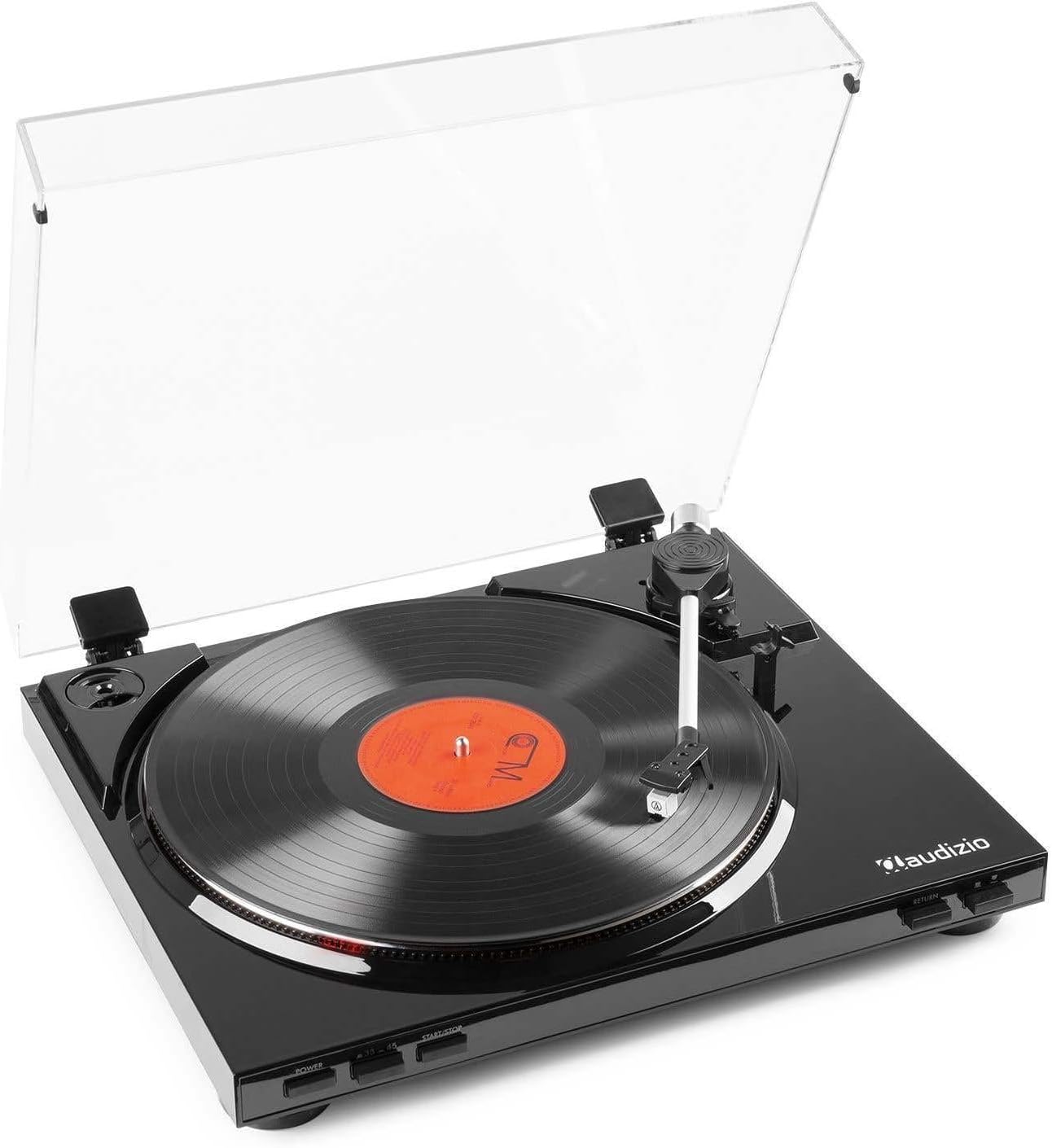
Figura 1: The Audizio RP310 turntable with its dust cover open, showcasing a vinyl record on the platter and the tonearm in position.

Figura 2: A dalt view of the Audizio RP310 turntable with the protective dust cover closed, highlighting its sleek black finish.
Guia de configuració
- Desembalatge: Carefully remove the turntable from its packaging. Retain all packaging materials for future transport or storage.
- Col·locació: Place the turntable on a stable, level surface away from direct sunlight, heat sources, and excessive vibration. Ensure adequate space for the dust cover to open fully.
- Dust Cover Installation: Insert the hinges of the dust cover into the corresponding slots at the rear of the turntable unit.
- Plat i estora: Place the platter onto the spindle. Then, place the rubber turntable mat on top of the platter.
- Tonearm Balance and Tracking Force:
- Gently remove the stylus protector.
- Carefully balance the tonearm by adjusting the counterweight until it floats horizontally.
- Once balanced, set the tracking force to the recommended range of 1.5 to 3 grams by rotating the counterweight. Refer to the cartridge manufacturer's specifications for the precise recommended force.

Figura 3: Detail of the tonearm and counterweight, illustrating the adjustable tracking system.
- Connexió d'àudio: Connect the supplied RCA cable from the "AUDIO OUT" ports on the rear of the turntable to a standard line-level input (e.g., "AUX," "CD," or "LINE IN") on your amplifier o altaveus alimentats. Do not connect to a "PHONO" input, as the RP310 has a built-in preampmés viu.
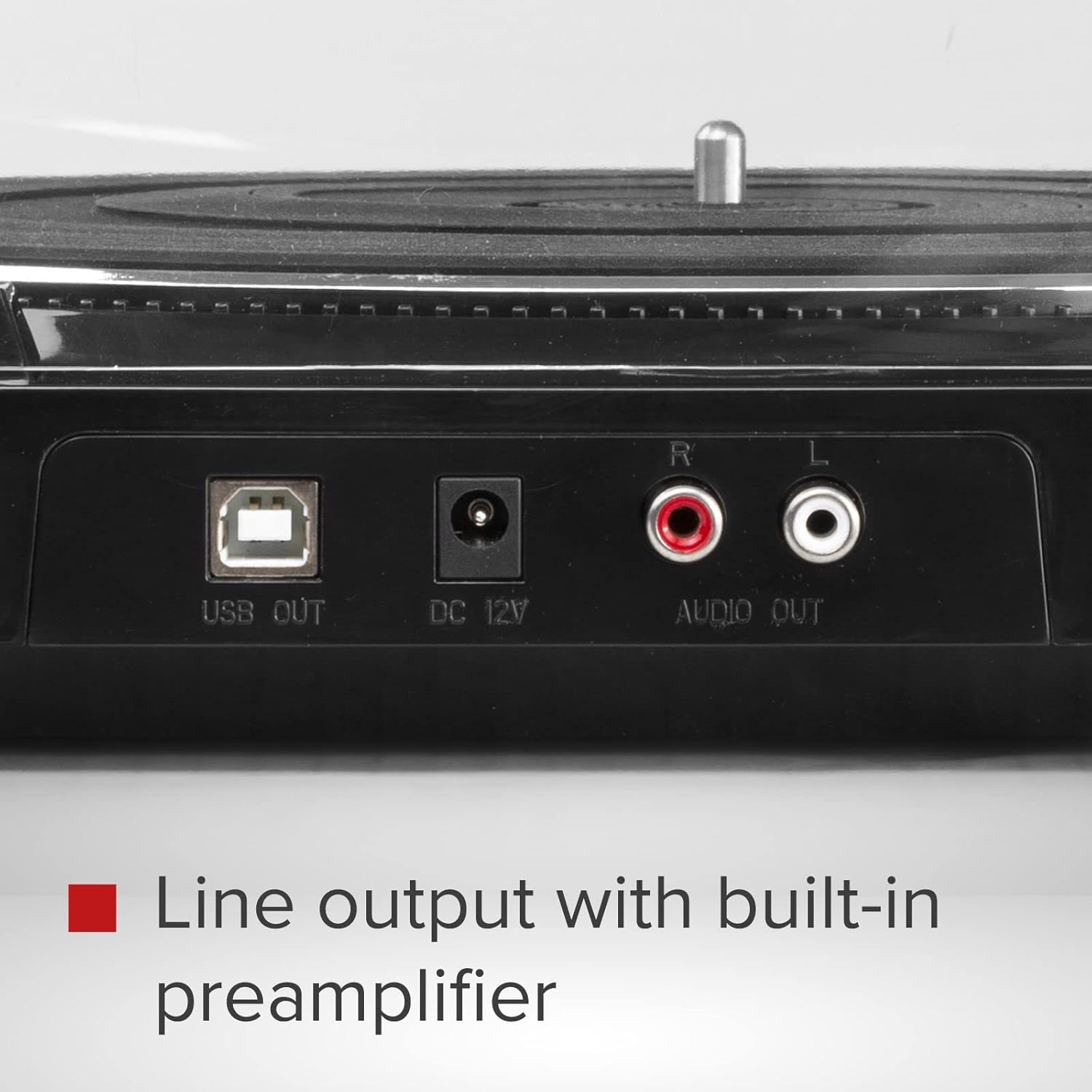
Figura 4: Rear panel connections including USB Out, DC 12V power input, and RCA Audio Out ports.
- Connexió d'alimentació: Connect the 12V power adapter to the "DC 12V" input on the rear of the turntable, then plug the adapter into a suitable wall outlet.
Instruccions de funcionament
- Encès: Premeu el botó PODER button located on the front panel to turn on the turntable.
- Seleccioneu la velocitat: Premeu el botó 33/45 button to select the appropriate playback speed (33 1/3 RPM or 45 RPM) for your record. The selected speed will be indicated by an LED.
- Registre del lloc: Carefully place a vinyl record on the turntable platter. If playing a 45 RPM single, use the included adapter if necessary.
- Inicia la reproducció:
- Premeu el botó INICI/PARA button. The platter will begin to rotate.
- Manually lift the tonearm using the cueing lever and position it over the desired track on the record.
- Lower the cueing lever to gently place the stylus onto the record.
- Alternatively, for automatic start, simply move the tonearm over the record, and it will automatically lower.
- Retorn automàtic: At the end of the record, the tonearm will automatically lift, return to its rest position, and the platter will stop rotating.
- Atura la reproducció: To stop playback manually at any time, lift the tonearm using the cueing lever, return it to its rest, and press the INICI/PARA button to stop the platter.

Figura 5: Front panel controls for power, speed selection, and start/stop functions.
USB Recording (Vinyl to MP3)
The Audizio RP310 allows you to convert your vinyl records into digital MP3 files using a computer. This feature is ideal for archiving your collection or listening to your records on portable devices.
- Connexió a l'ordinador: Use a USB cable (not always included, but mentioned in feature bullets as "supplied cable") to connect the "USB OUT" port on the turntable to an available USB port on your PC or Mac computer.
- Instal·lar programari: Install the provided recording software on your computer. If no software CD is included, check the Audizio website for compatible software downloads. Audacity is a commonly used free audio recording software that is compatible with most USB turntables.
- Configura el programari: Open the recording software and select the Audizio RP310 as the audio input device. Adjust recording levels as needed to prevent clipping or distortion.
- Comença a gravar: Begin playing your vinyl record on the turntable as described in the "Operating Instructions" section. Simultaneously, initiate recording within the software.
- Desa Files: Once the record side is finished, stop the recording in the software and save the audio as an MP3 file. You may need to edit the track breaks and metadata within the software.
Manteniment
- Neteja del llapis: Regularly clean the stylus using a soft brush designed for stylus cleaning, brushing gently from back to front. A dirty stylus can degrade sound quality and damage records.
- Neteja de la unitat: Wipe the turntable's surface and dust cover with a soft, dry, or slightly damp tela. Eviteu utilitzar netejadors abrasius o dissolvents.
- Cura de registres: Mantingueu els vostres discos nets i sense pols. Guardeu-los verticalment dins de les seves fundes per evitar que es deformin.
- Substitució del llapis: The stylus has a limited lifespan (typically 300-1000 hours of playback). Replace it when you notice a decrease in sound quality or visible wear. Consult your dealer for a replacement Audio Technica AT-3600L stylus.
Resolució de problemes
| Problema | Causa possible | Solució |
|---|---|---|
| Sense poder | L'adaptador de corrent no està connectat o la presa de corrent està defectuosa. | Ensure the power adapter is securely connected to the turntable and a working power outlet. Check the power button. |
| Sense so ni volum baix | Incorrect audio connection; amplifier input not selected; volume too low. | Verify RCA cables are correctly connected to a LINE IN input on your amplifier. Select the correct input source on your amplifier and increase volume. |
| So saltat o distorsionat | Dirty record or stylus; incorrect tracking force; turntable not level. | Clean the record and stylus. Re-adjust the tracking force. Ensure the turntable is on a stable, level surface. |
| Velocitat de reproducció incorrecta | Wrong speed selected; belt issue. | Ensure the correct speed (33 or 45 RPM) is selected. Check if the drive belt is properly seated around the motor pulley and platter. |
| Tonearm does not return automatically | Mechanism obstruction or malfunction. | Ensure no obstructions are preventing the tonearm's movement. If the issue persists, contact customer support. |
Especificacions tècniques
| Model | Audizio RP310 |
| Velocitats | 33 1/3, 45 RPM |
| Tipus de conducció | Accionament per cinturó |
| Cartutx | Audio Technica AT-3600L MM |
| Interval de força de seguiment | 1.5 - 3 grams |
| Connexió de sortida | Sortida de línia RCA |
| Sortida USB | Yes (for MP3 conversion) |
| Font d'alimentació | 12V DC Adapter (230 VAC/50 Hz input) |
| Dimensions (L x A x A) | 40 x 36 x 9 cm |
| Pes | 2.7 kg |
Garantia i Suport
For warranty information, technical support, or service inquiries, please refer to the warranty card included with your product or contact your retailer or the Audizio customer service department. Please have your model number (RP310) and purchase date available when contacting support.