
Introducció
This manual provides detailed instructions for the installation, operation, and maintenance of your LogiLink BP0144 Monitor Wall Bracket. Please read this manual thoroughly before installation to ensure correct setup and safe use. This wall bracket is designed to securely mount 17-32 inch flat or curved monitors, offering flexible positioning with its gas lift mechanism.
Informació de seguretat
Before installation, ensure you have read and understood all instructions. Failure to do so may result in personal injury, property damage, or voiding of warranty.
- Capacitat de pes: No supereu la capacitat de càrrega màxima de 9 kg (19.8 lliures).
- Tipus de paret: Ensure the mounting surface can safely support the combined weight of the bracket and your monitor. Consult a professional if unsure.
- Eines: Utilitzeu les eines adequades per a la instal·lació.
- Nens: Mantingueu els nens allunyats durant la instal·lació.
- Parts mòbils: Aneu amb compte amb les peces mòbils durant l'ajust per evitar que us pessiguin.
- Molla de gas: No intenteu desmuntar el mecanisme de la molla de gas.
- Apretament: No estrenyeu massa els cargols, ja que això pot causar danys.
Contingut del paquet
Si us plau, comproveu que tots els components siguin presents abans de començar la instal·lació.
- 1 x LogiLink BP0144 Monitor Wall Mount
- 1 x Screw Set (various screws, washers, anchors for different wall types)
- 1 x Manual d'usuari (aquest document)

Image: LogiLink BP0144 Monitor Wall Bracket product packaging, showing the box with product features.
Configuració i instal·lació
Note: Installation requires drilling into a wall. Ensure you have the necessary tools and expertise. If you are unsure, seek professional assistance.
- Prepara el mur: Choose a suitable location on a solid wall (e.g., concrete, brick, or wood stud). Use a stud finder to locate wood studs if mounting to drywall. Mark the drilling points according to the wall plate dimensions.
- Fixeu la placa de paret: Drill pilot holes at the marked locations. Secure the wall plate to the wall using the appropriate screws and anchors from the provided screw set. Ensure it is level and firmly attached.
- Muntatge del braç: Attach the monitor arm to the wall plate. Follow the specific instructions in the included diagram for your model to ensure correct orientation and secure fastening.
- Col·loqueu la placa VESA al monitor: Locate the VESA mounting holes on the back of your monitor (75x75mm or 100x100mm). Attach the VESA plate from the bracket to your monitor using the appropriate screws. Do not overtighten.

Imatge: Frontal view of the LogiLink BP0144 Monitor Wall Bracket, showing the wall plate, arm, and VESA mounting plate.
- Monitor de muntatge: Carefully lift the monitor with the attached VESA plate and slide it onto the arm's mounting head. Secure it with the locking mechanism or screws as indicated in the instructions.

Imatge: Part posterior view of a monitor with the VESA plate of the LogiLink BP0144 bracket attached, ready for mounting.

Imatge: Primer pla view of the VESA plate connection point on the LogiLink BP0144 arm, showing how the monitor attaches.
- Ajustar la tensió de la molla de gas: The gas spring tension may need adjustment to properly counterbalance your monitor's weight. Use the provided Allen key to turn the adjustment screw (usually located on the arm) until the monitor stays at the desired height without drifting up or down. Turn clockwise to increase tension for heavier monitors, counter-clockwise for lighter monitors.
- Gestió de cables: Route monitor cables through the integrated cable management channels on the arm for a tidy appearance.

Imatge: Lateral view of the LogiLink BP0144 Monitor Wall Bracket with a monitor securely attached, demonstrating its profile.
Instruccions de funcionament
Your LogiLink BP0144 Monitor Wall Bracket offers versatile adjustments for optimal viewcomoditat.
- Height Adjustment (Gas Lift): Gently push or pull the monitor to the desired height. The gas spring mechanism will hold it in place once adjusted correctly.
- Ajust d'inclinació: The monitor can be tilted -45° to +90° (upwards/downwards). Loosen the tilt screw slightly, adjust the angle, and then retighten to secure.
- Ajust de gir: Swivel the monitor -90° to +90° (left/right) for collaborative viewing or to change orientation.
- Rotació (Retrat/Paisatge): The front panel allows for 360° rotation, enabling you to switch between landscape and portrait modes without removing the monitor.
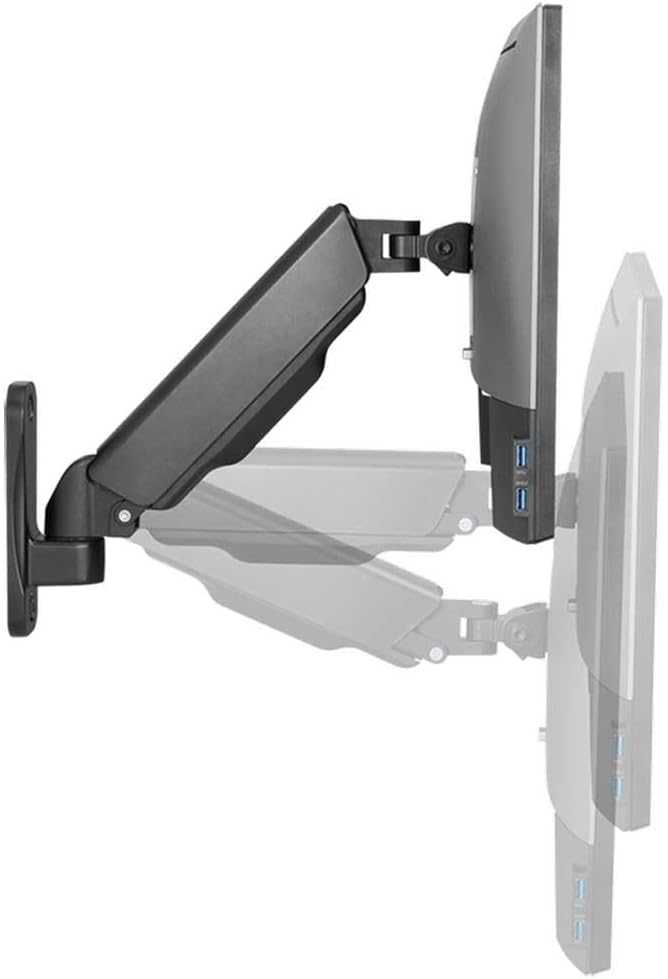
Image: The LogiLink BP0144 Monitor Wall Bracket with a monitor, illustrating the range of tilt and swivel motion.

Imatge: Lateral view of the LogiLink BP0144 Monitor Wall Bracket, showing a cable routed through its integrated management system.
Manteniment
Regular maintenance ensures the longevity and safe operation of your monitor wall bracket.
- Neteja: Wipe the bracket with a soft, damp drap. Eviteu productes de neteja o dissolvents abrasius.
- Inspecció: Reviseu periòdicament tots els cargols i connexions per assegurar-vos que estiguin ben ajustats. Torneu a apretar-los si cal.
- Molla de gas: La molla de gas no requereix manteniment. No intenteu lubricar-la ni desmuntar-la.
Resolució de problemes
If you encounter issues with your monitor wall bracket, refer to the following common solutions:
- Monitor drifts down/up: The gas spring tension needs adjustment. Refer to the 'Adjust Gas Spring Tension' step in the Setup section.
- Dificultat per moure el braç: Check if any screws are overtightened, especially at the joints. Loosen slightly if movement is restricted. Ensure the gas spring tension is not too high for a light monitor.
- Bracket feels unstable: Re-check all wall mounting screws and monitor attachment screws. Ensure the wall type is appropriate and the anchors are correctly installed. Do not exceed the maximum weight capacity.
Especificacions
| Característica | Detall |
|---|---|
| Model | BP0144 |
| Marca | Logilink |
| Mides de pantalla compatibles | 17 - 32 inches (flat/curved) |
| Capacitat de càrrega màxima | 9 kg (19.8 lliures) |
| Tipus de muntatge | Muntatge a la paret |
| Compatibilitat VESA | 75x75mm, 100x100mm |
| Distància des de la paret | 90 - 380 mm |
| Interval d'inclinació | -45 ° / + 90 ° |
| Gamma giratòria | -90 ° / + 90 ° |
| Rotació de pantalla | 360° (portrait/landscape) |
| Longitud del braç | 290 mm màx. |
| Tipus de moviment | Rotate, Swivel, Tilt (Gas Lift) |
| Material | Edelstahl (Stainless Steel) |
| Color | Negre |
| Pes de l'article | 2 quilos |
| Fabricant | 2direct GmbH |
Informació de la garantia
No specific warranty information is provided in the product data. Please refer to your purchase documentation or contact the retailer for warranty details.
Informació de suport
No specific customer support contact information is provided in the product data. For assistance, please contact your retailer or visit the LogiLink official weblloc.