
Introducció
This manual provides comprehensive instructions for the setup, operation, and maintenance of your NC LED Temperature Display Electronic Desktop Clock, Model GH0715L. This digital alarm clock features time, date, and temperature display, adjustable brightness, and multiple power options. Please read this manual carefully to ensure proper use and longevity of your device.

Figura 1: Frontal view of the NC LED Temperature Display Electronic Desktop Clock.
Contingut del paquet
- NC LED Temperature Display Electronic Desktop Clock (Model GH0715L)
- Cable d'alimentació USB
- Manual d'usuari (aquest document)
Note: 3 AAA batteries and a 5V/1A USB adapter are not included and must be purchased separately for certain power modes.

Figure 2: Power supply options for the clock, showing the included USB cable and required AAA batteries (not included).
Característiques del producte
- LED Time, Date, and Temperature Display
- Nivells de brillantor ajustables
- Three Independent Alarm Settings
- Snooze Function (1-60 minutes, 3 times total)
- Intelligent Voice Control (activates display at 90dB or by tapping)
- 12-hour and 24-hour Time Display Options
- Power-off Time Memory Function (requires AAA batteries)
- Dual Power Sources: USB (constant display) or 3x AAA Batteries (power-saving mode)

Figure 3: Visual representation of the clock's key features.
Configuració
1. Engegar el rellotge
The clock can be powered in two ways:
- USB Power (Recommended for continuous display): Connect the included USB cable to the clock's USB port and plug the other end into a 5V/1A USB adapter (not included) or a compatible USB power source. The LED display will remain on continuously.
- Battery Power (Power-saving mode): Insert 3 AAA batteries (not included) into the battery compartment located at the back of the clock. In this mode, the LED display will automatically turn off after 15 seconds of inactivity to conserve power. The display can be reactivated by lightly tapping the clock, clicking, or tapping the surface it rests on.
Note: To maintain time and settings during power outages or when unplugged, it is recommended to install AAA batteries even when using USB power.
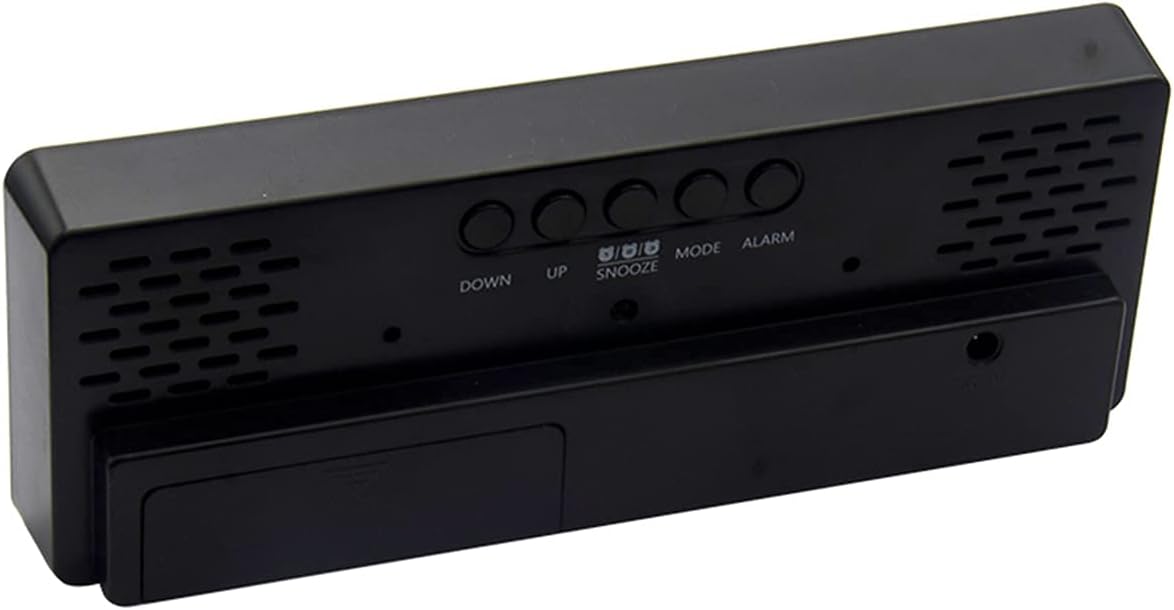
Figura 4: posterior view of the clock, highlighting the battery compartment and control buttons.
2. Engegada inicial
Upon powering on, the LED display will show for approximately 2 seconds, followed by a "B" sound. The clock will then enter normal clock mode, defaulting to 0:00 in 24-hour format.
Instruccions de funcionament
1. Basic Mode Navigation
In normal clock mode, press the MODE per anar canviant pels següents modes de visualització:
- Clock Mode (Time)
- Mode Data
- Mode de temperatura
- Night ON/OFF Mode
2. Configuració de l'hora i la data
- From Clock or Date mode, press and hold the MODE button to enter the setting state.
- Utilitza el UP i ABAIX buttons to adjust the flashing value (hours, minutes, year, month, day).
- Mantén premut UP or ABAIX to accelerate value adjustment.
- Premeu MODE de nou per confirmar la configuració i passar al paràmetre següent.
- To switch between 12-hour and 24-hour display, press the UP botó mentre esteu en el mode de visualització de l'hora normal.
3. Configuració d'alarmes
- In normal mode, single press the ALARMA button to display the alarm clock mode.
- While in alarm mode, single press the ALARMA botó per activar/desactivar l'alarma.
- To set an alarm, long press the ALARMA button to enter the setting state.
- Utilitza el UP i ABAIX buttons to adjust the alarm time (hours and minutes).
- Premeu ALARMA again to confirm and move to the snooze time setting.
- Set the snooze duration (1 to 60 minutes) using UP i ABAIX. The snooze function can be used up to 3 times.
- Premeu ALARMA to exit alarm settings.
4. Ajust de brillantor
- In normal time, date, or temperature mode, single press the UP button to directly adjust between two levels of brightness.
- To turn off the LED display completely (while clock still runs), long press the UP button. Press it again to turn the display back on.
- When night mode is activated (see Basic Mode Navigation), the brightness will automatically dim from 18:00 (6 PM) to 6:00 (6 AM).
5. Control de veu intel·ligent
When the clock is in power-saving mode (battery powered), the display can be activated by sound or vibration:
- If the ambient sound reaches 90 decibels (e.g., a clap), the display will turn on.
- Gently tapping the desktop where the alarm clock is placed will also activate the display.
- The display will automatically turn off after 16 seconds of inactivity.

Figure 5: How to activate the display using intelligent voice control.
6. Visualització de la temperatura
To cycle through time, date, and temperature display automatically, long press the MODE button until you hear a "BI" beep. The LED will then display time for 10 seconds, followed by date, then temperature, and cycle continuously.
Manteniment
- Neteja: Feu servir un drap suau i sec per netejar la superfície del rellotge. No utilitzeu productes de neteja abrasius ni dissolvents, ja que poden danyar l'acabat.
- Substitució de la bateria: If using battery power, replace all 3 AAA batteries when the display becomes dim or the clock stops functioning correctly. Ensure correct polarity when inserting new batteries.
- Emmagatzematge: If storing the clock for an extended period, remove the batteries to prevent leakage and potential damage to the device.
- Medi ambient: Eviteu exposar el rellotge a temperatures extremes, llum solar directa, humitat elevada o ambients polsosos.
Resolució de problemes
| Problema | Possible causa/solució |
|---|---|
| Display is dim or off (when using batteries) |
|
| Display is too bright at night |
|
| Clock does not keep time after unplugging |
|
| El control per veu no respon |
|
Especificacions
| Número de model | GH0715L |
| Marca | NC |
| Tipus de visualització | LED digital |
| Color | Green (LED display color) |
| Dimensions del producte | 16 cm d'amplada x 5.8 cm d'alçada |
| Pes de l'article | 5.1 unces (144.6 grams) |
| Font d'alimentació | Battery Powered (3x AAA, not included), Corded Electric (USB cable included, 5V/1A adapter not included) |
| Material | Acrilonitril butadiè estirè (plàstic) |
| Característiques especials | Alarm, Snooze, Temperature Display, Voice Control, Adjustable Brightness |
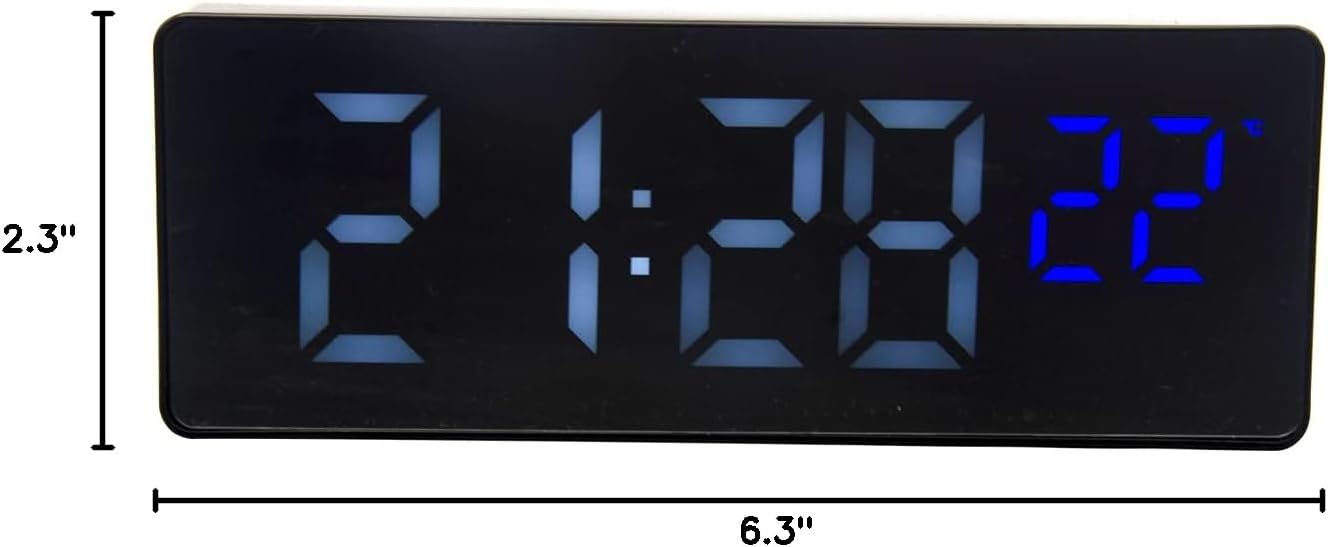
Figure 6: Product dimensions of the clock.
Garantia i Suport
Specific warranty information for this product is not provided within this manual. For warranty claims, technical support, or further inquiries, please contact the retailer or the manufacturer directly through their official channels. Please retain your proof of purchase for any warranty-related requests.
Manufacturer: Wuhan Prisco