
1. Producte acabatview
The Benro TablePod Pro Kit is a lightweight and portable carbon fiber tripod system designed for mobile content creators, photographers, and videographers. It features a compact ball head with 360-degree panoramic rotation and a weight capacity of 3kg (6.6 lbs). This kit includes the Benro ARCASMART70 Combination Plate and Phone Holder, offering versatile mounting options for both cameras and smartphones.
Les característiques clau inclouen:
- Disseny compacte i portàtil: Lightweight 8-layer carbon fiber construction, folding to just 22.2cm (8.74 inches) and weighing 0.25kg (0.5 lbs), making it ideal for travel and on-the-go use.
- Ball Head with Precise Control: Smooth ball head adjustment for accurate framing, suitable for overhead views, product shoots, interviews, i vlogging.
- ArcaSmart70 Plate Adapter: A dual-use plate that functions as an Arca-Swiss compatible camera mount and a smartphone adapter, allowing quick transitions between devices.
- Adjustable Leg Angles: Multiple leg angle positions for low-angle shooting, flat lay photography, and stable placement on uneven surfaces.
- Creator-Ready Accessories: Built-in cold shoe mounts and threaded connection points for attaching lights, microphones, and other small accessories.

Figure 1: Benro TablePod Pro Kit components.
2. Muntatge i muntatge
2.1 Desembalatge i inspecció inicial
Carefully remove all components from the packaging. Verify that all items listed in the "What's in the Box" section are present and undamaged. The kit typically includes the TablePod Pro tripod, ball head, ArcaSmart70 plate, smartphone adapter, and a carrying pouch.
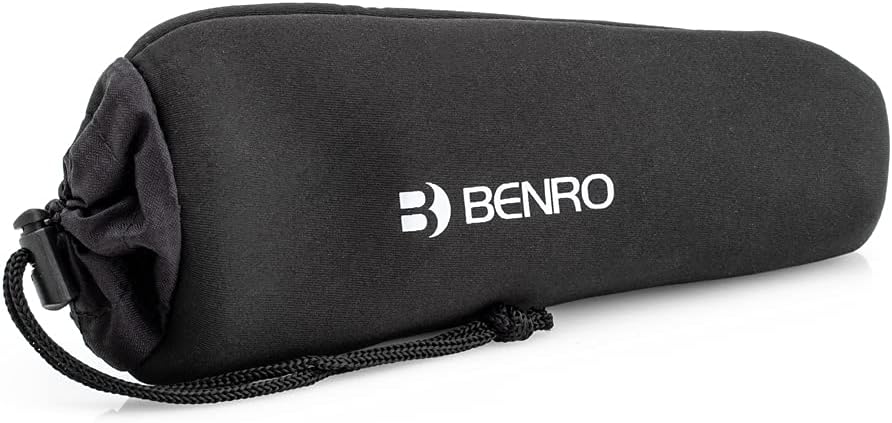
Figure 2: The Benro TablePod Pro Kit stored in its carrying pouch.
2.2 Attaching the Camera or Smartphone
- Per a càmeres: Attach the Arca-Swiss compatible plate (part of the ArcaSmart70) to the bottom of your camera using the 1/4"-20 screw. Ensure it is securely tightened.
- Per a telèfons intel·ligents: Extend the smartphone adapter arms of the ArcaSmart70 plate. Place your smartphone into the adapter and ensure it is held firmly.
- Slide the mounted camera or smartphone (with ArcaSmart70) onto the ball head's quick release clamp. Apretar el clamp knob to secure the device.

Figure 3: A camera mounted on the TablePod Pro Kit.
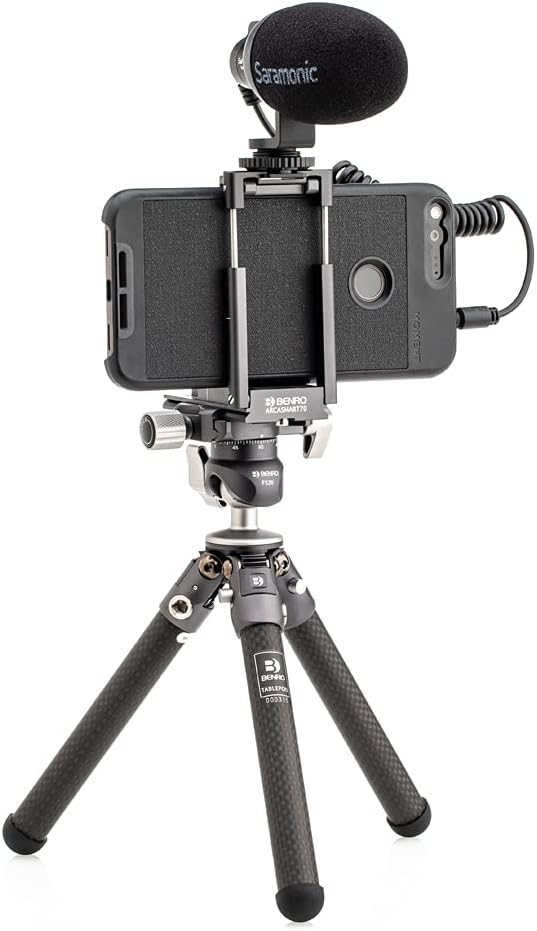
Figure 4: A smartphone mounted on the TablePod Pro Kit with an external microphone.
2.3 Ajust de l'angle de les cames
Each leg of the TablePod Pro Kit features a button for adjusting its angle. Press the button on the leg and move the leg to one of the available angle positions. This allows for stable setup on various surfaces and for achieving different shooting heights, including low-angle shots.

Figure 5: Adjusting the leg angle by pressing the release button.

Figure 6: Tripod legs adjusted for a low-angle setup.
3. Instruccions de funcionament
3.1 Ajustaments del capçal esfèric
The integrated ball head allows for flexible positioning of your camera or smartphone. Loosen the main locking knob to adjust the angle and tilt. Tighten the knob firmly once the desired position is achieved. The head also features a separate knob for 360-degree panoramic rotation, with a built-in pan scale for precise adjustments.

Figure 7: Ball head with pan scale for precise rotation.
3.2 Switching Between Landscape and Portrait Orientation
The ball head includes two built-in 90-degree notches. To switch from landscape to portrait orientation, loosen the main locking knob, tilt the camera/smartphone into one of the notches, and then re-tighten the knob. This allows for quick and easy changes in shooting orientation.
3.3 Attaching Additional Accessories
The tripod features 1/4"-20 threaded mounts on the legs, allowing you to attach various accessories such as LED lights, external microphones, or other compatible equipment. The ArcaSmart70 smartphone adapter also includes cold shoe mounts for direct attachment of accessories.
4. Manteniment
- Neteja: Wipe the tripod legs and ball head with a soft, dry cloth after each use to remove dust and debris. For stubborn dirt, use a slightly damp drap i sabó suau, i després eixugueu-ho bé. Eviteu productes químics agressius.
- Inspecció: Periodically check all screws, knobs, and moving parts for tightness. Ensure the quick release plate mechanism operates smoothly.
- Emmagatzematge: Store the tripod in its provided carrying pouch in a cool, dry place away from extreme temperatures and humidity.
5. Solució De Problemes
| Problema | Causa possible | Solució |
|---|---|---|
| El trípode és inestable. | Legs not fully extended or locked; uneven surface; excessive weight. | Ensure legs are fully extended and leg angle buttons are engaged. Adjust leg angles to compensate for uneven ground. Verify device weight is within the tripod's maximum payload. |
| Camera/Smartphone is loose on the ball head. | Quick release plate not tightened; ball head locking knob loose. | Ensure the quick release plate is securely attached to your device. Tighten the quick release clamp knob on the ball head. Tighten the main ball head locking knob. |
| El moviment del capçal esfèric és rígid. | Dust/debris in the ball head mechanism. | Clean the ball head thoroughly. If the issue persists, contact Benro customer support. |
6. Especificacions
| Característica | Detall |
|---|---|
| Dimensions del producte | 3.35 x 1.97 x 8.74 polzades |
| Pes de l'article | 1.1 lliures (0.5 kg) |
| Material | Fibra de carboni |
| Límit de pes (càrrega útil) | 6.6 lliures (3 kg) |
| Altura màxima | 8.8 polzades (22.35 cm) |
| Tipus de capçal de trípode | Ball Head (FS20) |
| Placa d'alliberament ràpid | Arca-Swiss compatible (ArcaSmart70) |
| Adaptador de telèfon intel·ligent | Integrated into ArcaSmart70, with cold shoe mounts |
| Accessory Mounts | 1/4"-20 threads on legs |
7. Vídeos de productes
Benro Tablepod Kit & Pro Kit Overview
Aquest vídeo ofereix una descripció completaview of the Benro TablePod Kit and TablePod Pro Kit, demonstrating their features, components, and various usage scenarios for content creation. It highlights the compact design, adjustable leg angles, and the versatility of the included accessories like the ArcaSmart70 plate.
8. Garantia i Suport
8.1 Informació de la garantia
The standard limited warranty for the Benro TablePod Pro Kit is 3 anys from the date of purchase for the original owner. If the product is registered online, the warranty is extended by an additional 2 anys, totaling 5 anys in applicable regions. Please refer to the official Benro weblloc web per obtenir informació detallada sobre els termes i condicions de la garantia.
8.2 Atenció al client
For technical assistance, troubleshooting, or warranty claims, please visit the official Benro website or contact their customer support team. Contact details can typically be found on the manufacturer's weblloc o a l'embalatge del producte.