
Introducció
Thank you for choosing the Newskill Manticore Gaming PC Case. This manual provides essential information for the proper installation, operation, and maintenance of your new PC chassis. Please read these instructions carefully before beginning the assembly process to ensure optimal performance and longevity of your components.
Producte acabatview
The Newskill Manticore is an ATX mid-tower gaming PC case designed for high-performance builds. It features a mesh front panel for superior airflow, a tempered glass side panel to showcase your components, and four pre-installed 120mm ARGB fans for effective cooling and customizable aesthetics.
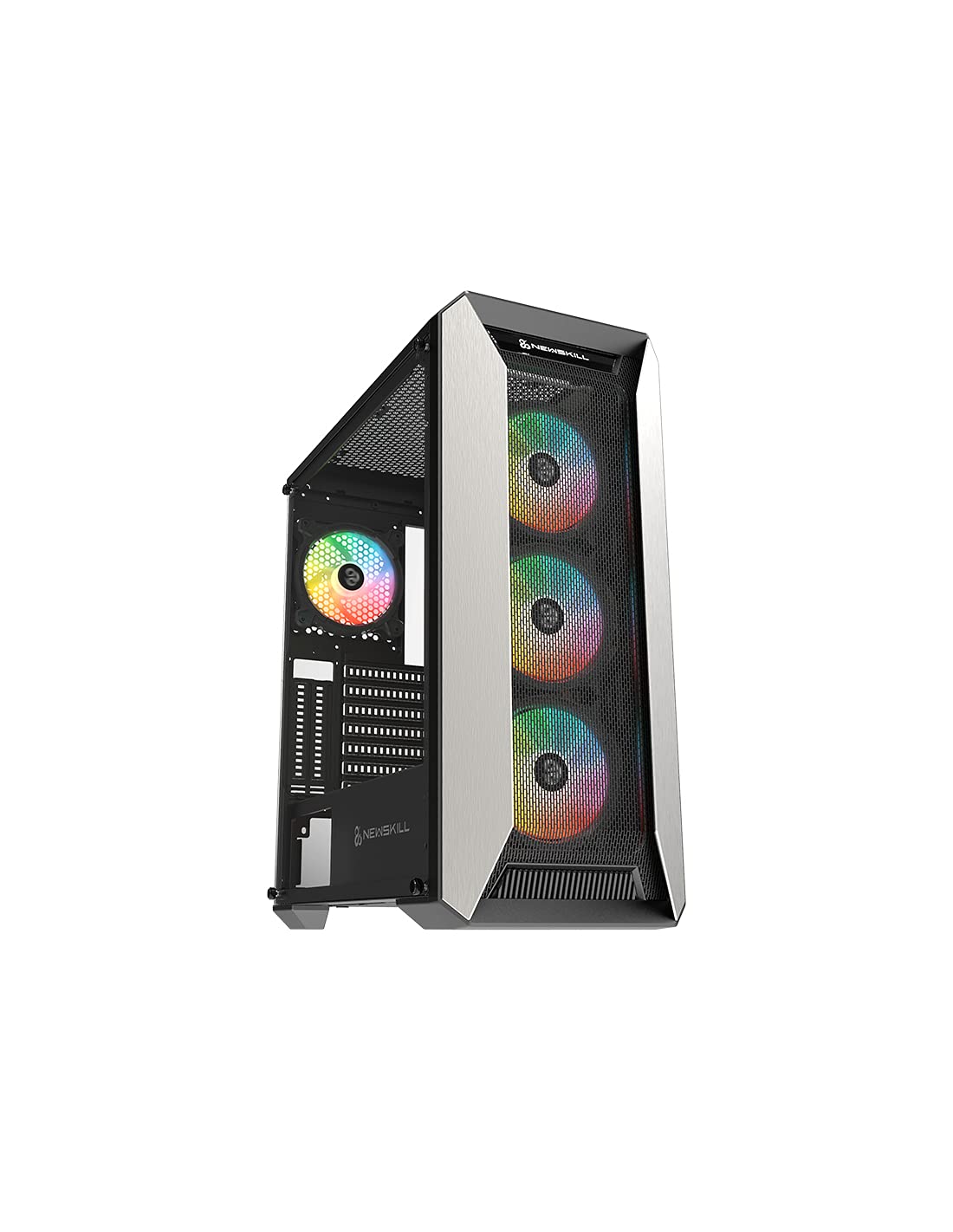
Figura 1: Frontal view of the Newskill Manticore Gaming PC Case, highlighting the mesh front and tempered glass side panel.
Característiques principals:
- ATX Mid-Tower compatibility
- Mesh front panel for optimized airflow
- Panell lateral de vidre temperat
- Four pre-installed 120mm ARGB fans
- Two removable dust filters
- USB 3.0 connectivity on the front panel
Configuració i instal·lació
1. Desembalatge
Carefully remove the PC case from its packaging. Inspect for any damage that may have occurred during shipping. Retain the packaging for future transport or warranty claims.
2. Identificació de components
Before installation, familiarize yourself with the case components and included accessories:
- Newskill Manticore PC Case
- Accessory box (screws, cable ties, standoffs)
- Manual d'usuari (aquest document)
3. Instal·lació de la placa base
- Traieu el panell lateral de vidre temperat desenroscant els cargols de polze.
- Install the necessary motherboard standoffs into the motherboard tray.
- Carefully place your ATX motherboard onto the standoffs, aligning the screw holes.
- Fixeu la placa base amb els cargols proporcionats.
4. Instal·lació de la font d'alimentació (PSU)
- Localitzeu la zona de muntatge de la font d'alimentació a la part inferior posterior de la carcassa.
- Slide your PSU into position from the rear of the case.
- Fixeu la font d'alimentació amb cargols des de la part posterior exterior de la carcassa.
5. Instal·lació de la unitat d'emmagatzematge
The case supports various storage configurations. Refer to your specific drive type for mounting instructions (e.g., 2.5" SSDs, 3.5" HDDs).
6. Instal·lació de la targeta gràfica i la targeta d'expansió
Remove the necessary PCIe slot covers and install your graphics card or other expansion cards, securing them with screws.
7. Connexions del panell frontal
Connect the front panel cables (USB 3.0, HD Audio, Power Switch, Reset Switch, Power LED, HDD LED) to the corresponding headers on your motherboard. Consult your motherboard manual for exact pin layouts.
8. Gestió de cables
Aprofita els retalls de cables i els punts d'amarratge que hi ha darrere de la safata de la placa base per gestionar els cables. Això millora la circulació del flux i l'estètica.
Instruccions de funcionament
Encès/Apagat
Press the power button located on the top panel of the case to turn on your system. To shut down, use the operating system's power-off function or press and hold the power button for several seconds for a forced shutdown (not recommended for regular use).
Control d'il·luminació ARGB
The pre-installed ARGB fans can be controlled via your motherboard's ARGB software (if compatible) or a dedicated ARGB controller (if included or purchased separately). Refer to your motherboard or controller manual for specific instructions on changing lighting effects and colors.
Manteniment
Neteja del filtre de pols
The Newskill Manticore includes two removable dust filters (typically located on the top and bottom/front). Regularly clean these filters to maintain optimal airflow and prevent dust buildup inside your PC. Gently slide them out, clean with water and mild soap, or use a vacuum cleaner, and ensure they are completely dry before re-inserting.
Neteja exterior
Netegeu les superfícies exteriors amb un damp drap. Eviteu productes de neteja abrasius o dissolvents que puguin danyar l'acabat o el vidre temperat.
Resolució de problemes
Sense poder
- Ensure the PSU is properly connected to the wall outlet and switched on.
- Verify all power cables from the PSU are correctly connected to the motherboard and components.
- Comproveu les connexions de l'interruptor d'alimentació del panell frontal a la placa base.
Fans Not Spinning / ARGB Not Lighting Up
- Confirmeu que els cables d'alimentació del ventilador estiguin connectats correctament a la placa base o al controlador del ventilador.
- Check ARGB connections to the motherboard's ARGB header or dedicated controller.
- Ensure ARGB software or controller settings are correctly configured.
Poor Airflow / Overheating
- Netegeu els filtres de pols regularment.
- Ensure no obstructions are blocking air intake or exhaust vents.
- Verify all fans are spinning correctly and oriented for optimal airflow.
For further assistance, please contact Newskill support.
Especificacions
| Característica | Detall |
|---|---|
| Nom del model | Mantícora |
| Número de model | 1102 |
| Tipus de cas | Torre mitja |
| Compatibilitat amb la placa base | ATX |
| Dimensions (L x A x A) | 60 x 60 x 85 cm |
| Pes | 1 kg |
| Material | Vidre temperat, metall |
| Mètode de refrigeració | Air (4x 120mm ARGB fans included) |
| Ports d'E / S frontals | USB 3.0, Audio Jacks, Power, Reset |
| Filtres de pols | 2 (extraïble) |
| Ús recomanat | Jocs |
Informació de la garantia
The Newskill Manticore PC Case comes with a Garantia del fabricant de 2 anys. This warranty covers defects in materials and workmanship under normal use. It does not cover damage caused by misuse, accident, modification, or unauthorized repair. Please retain your proof of purchase for warranty claims.
Suport i Contacte
For technical support, troubleshooting assistance, or warranty inquiries, please visit the official Newskill website or contact their customer service department. You can find contact information on the Newskill weblloc: www.newskillgaming.com