
Introducció
Thank you for choosing the Renkforce RF-SBS-500 2D Wired Barcode Scanner. This device is designed for efficient and reliable scanning of both 1D and 2D barcodes from various surfaces, including paper and smartphone screens. Its omnidirectional scanning capability and hands-free operation make it suitable for a wide range of applications. This manual provides essential information for the proper setup, operation, and maintenance of your scanner.
Instruccions de seguretat
- Do not expose the scanner to extreme temperatures, humidity, or direct sunlight.
- Eviteu deixar caure l'escàner ni sotmetre'l a impactes forts.
- Do not attempt to disassemble or modify the scanner. This will void the warranty.
- Keep the scanning window clean to ensure optimal performance. Use a soft, dry cloth.
- Ensure the USB cable is connected securely to prevent accidental disconnection.
Contingut del paquet
- Renkforce RF-SBS-500 2D Wired Barcode Scanner
- Integrated USB-A Cable
- Manual d'usuari (aquest document)
Configuració
Follow these steps to set up your Renkforce RF-SBS-500 barcode scanner:
- Desempaquetar l'escàner: Traieu amb cura l'escàner del seu embalatge.
- Connexió a un ordinador: Plug the integrated USB-A cable from the scanner into an available USB port on your desktop or laptop computer.
- Instal·lació del controlador: The scanner is typically plug-and-play. Your operating system (Windows, macOS, Linux) should automatically detect and install the necessary drivers. Wait for the installation to complete.
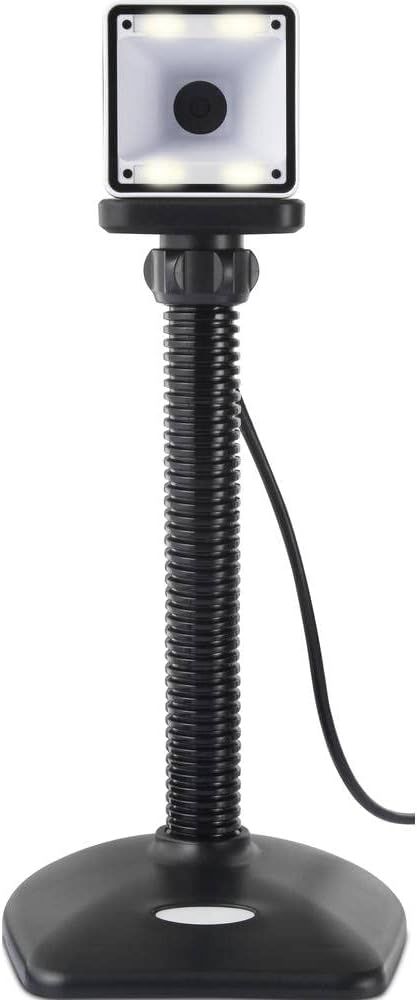
- Col·locació: Place the scanner on a stable, flat surface. The flexible neck allows for adjustment of the scanning head angle for optimal positioning.

Funcionament de l'escàner
The Renkforce RF-SBS-500 is designed for ease of use with its omnidirectional and hands-free capabilities.
- Encès: Once connected via USB, the scanner will power on automatically. The LED indicators on the scanner head may illuminate briefly.
- Escaneig d'un codi de barres: Position the barcode within the scanning area of the scanner head. The scanner will automatically detect and read the barcode.
- Comentaris visuals i audibles: Upon successful scanning, the integrated buzzer will emit a short beep, and the LED display on the scanner will flash or change color, indicating a successful read.
- Omnidirectional Reading: The scanner can read barcodes regardless of their orientation, eliminating the need to align the barcode precisely.
- Hands-Free Mode (Presentation Mode): The scanner operates continuously in a presentation mode, allowing you to simply pass items with barcodes in front of the scanning window without pressing any buttons. This saves time and improves workflow efficiency.
- Codis de barres compatibles: The scanner supports both 1D (e.g., EAN, UPC, Code 39) and 2D (e.g., QR Code, Data Matrix, PDF417) barcode types.
Manteniment
Un manteniment adequat garanteix la longevitat i el rendiment òptim del vostre escàner.
- Neteja de la finestra d'escaneig: Netegeu regularment la finestra d'escaneig amb un drap suau i sense borrissol. Per a la brutícia resistent, netegeu lleugeramentampNetegeu el drap amb aigua o un netejador suau i no abrasiu. No ruixeu el netejador directament sobre l'escàner.
- Neteja general: Netegeu l'exterior de l'escàner amb un drap sec o lleugerament humit.amp tela. Eviteu utilitzar productes químics o materials abrasius.
- Emmagatzematge: When not in use, store the scanner in a clean, dry environment away from direct sunlight and extreme temperatures.
Resolució de problemes
Si teniu problemes amb l'escàner, consulteu els problemes i solucions més comuns següents:
| Problema | Causa possible | Solució |
|---|---|---|
| L'escàner no s'encén. | USB cable not connected properly or faulty USB port. | Ensure the USB cable is firmly connected to both the scanner and the computer. Try a different USB port. |
| L'escàner no llegeix codis de barres. | Barcode damaged, scanning window dirty, or incorrect barcode type. | Check the barcode for damage. Clean the scanning window. Ensure the barcode type is supported (1D/2D). Adjust the distance and angle of the barcode to the scanner. |
| No beep or LED feedback after scanning. | Barcode not read successfully. | Refer to the "Scanner does not read barcodes" solution. If the issue persists, contact support. |
| Les dades escanejades apareixen incorrectament. | Keyboard layout mismatch or software issue. | Ensure your computer's keyboard layout matches the expected output. Test with a simple text editor. |
If the problem persists after trying these solutions, please contact Renkforce customer support.
Especificacions
| Característica | Especificació |
|---|---|
| Número de model | RF-4679568 |
| Capacitat d'escaneig | 1D and 2D Barcodes |
| Tecnologia de connectivitat | USB-A (amb cable) |
| Taxa d'escaneig | 60 imatges per segon |
| Mode d'escaneig | Omnidirectional, Hands-free (Presentation Mode) |
| Feedback | Integrated Buzzer, LED Display |
| Dispositius compatibles | Desktop Computer, Laptop, Smartphone (via appropriate adapter if needed) |
| Dimensions (L x A x A) | 150 x 5.2 x 5.2 cm |
| Pes de l'article | 102 grams |
| Font d'alimentació | Alimentat per USB |
| País d'origen | Alemanya |
Garantia i Suport
Renkforce products are manufactured to high-quality standards and come with a standard warranty. Please refer to your purchase documentation or the Renkforce official weblloc web per conèixer els termes i condicions de garantia específics aplicables a la vostra regió.
For technical support, troubleshooting assistance, or warranty claims, please contact Renkforce customer service. Contact details can typically be found on the Renkforce weblloc web o a l'embalatge del producte.