
Walfront SVP-916
Volum ajustable sobre i sota Walfront SVP-916tage Manual d'usuari de Protector
Model: SVP-916 (40A)
Introducció
This user manual provides comprehensive instructions for the installation, operation, maintenance, and troubleshooting of the Walfront SVP-916 Adjustable Over and Under Voltage Protector. This device is designed to protect electrical appliances from damage caused by voltage fluctuations, including overvoltage i undervoltage conditions. Please read this manual thoroughly before using the product to ensure safe and efficient operation.
Característiques clau
- Overvoltage protecció
- Undervoltage protecció
- Voltagpantalla electrònica (vol.)tagmesura e)
- Sobrevol ajustabletagvalor de protecció
- Sobrevol ajustabletage valor de recuperació
- Sobrevol ajustabletagtemps d'acció de protecció electrònica
- Subvol ajustabletagvalor de protecció
- Subvol ajustabletage valor de recuperació
- Subvol ajustabletagtemps d'acció de protecció electrònica
- Adjustable delay time for fault recovery
- Adjustable power-on delay on time
- Reset method selection
- Resolució de problemes
- Restaura la configuració de fàbrica
Producte acabatview

Figura 1: Davant view del Walfront SVP-916 Volum ajustabletage Protector, showing the digital display and control buttons.

Figura 2: lateral view of the Walfront SVP-916, highlighting its compact design and qualification sticker.
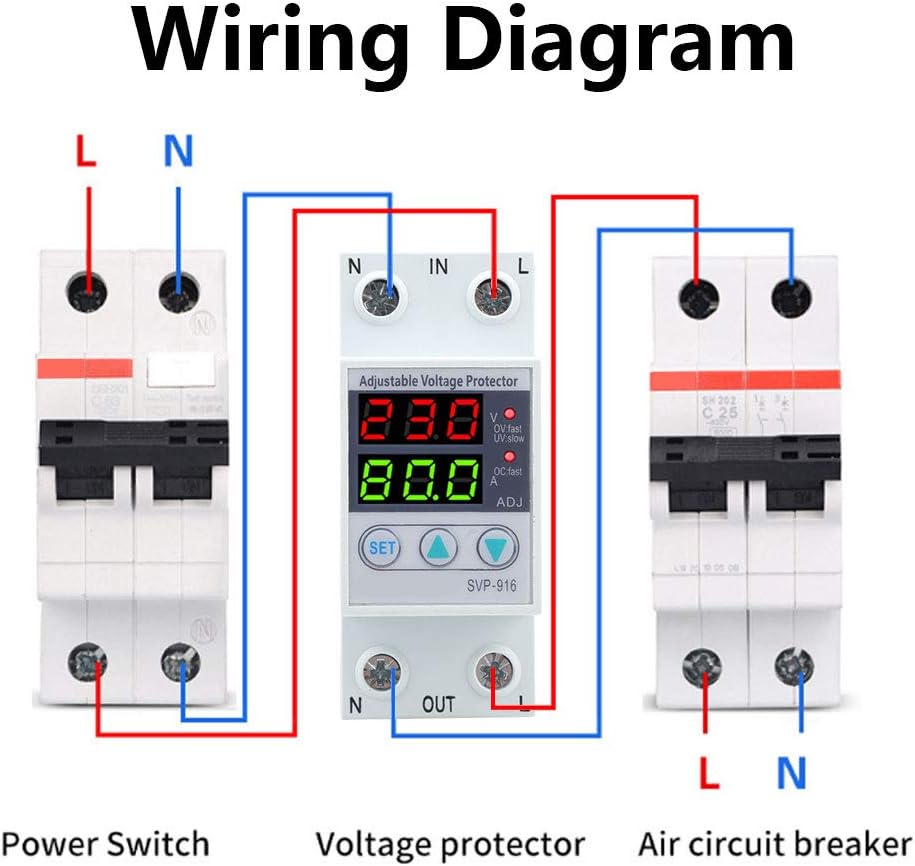
Figura 3: Detailed dimensions of the Walfront SVP-916, showing measurements in millimeters and inches for installation planning.
Configuració i instal·lació
Before installation, ensure the main power supply is turned off to prevent electric shock. This device is designed for DIN rail mounting.
Esquema de cablejat

Figura 4: Diagrama de cablejat que il·lustra la connexió del voltage protector between a power switch and an air circuit breaker. Ensure correct L (Live) and N (Neutral) connections for both input and output terminals.
- Mount the SVP-916 protector onto a standard DIN rail in your electrical panel.
- Connect the incoming Live (L) and Neutral (N) wires from your power source to the "IN" terminals of the protector.
- Connect the outgoing Live (L) and Neutral (N) wires from the "OUT" terminals of the protector to your load (e.g., air circuit breaker, appliances).
- Assegureu-vos que totes les connexions estiguin segures i aïllades correctament.
- Once wiring is complete, restore power to the circuit. The device display will light up.
Instruccions de funcionament
The SVP-916 features a digital display for real-time voltage and current monitoring, along with buttons for setting protection parameters.
Ajust de paràmetres
Per ajustar el voltage and current coefficients, follow these steps:
- Premeu el botó SET button 10 times. The display will show "PF1" and a numerical value (default 524). This value represents the voltage coefficient.
- Utilitza el Up (▲) i Avall (▼) buttons to adjust this value. For example, to increase the displayed voltage, increase this coefficient.
- Premeu el botó SET button again. The display will show "PF2" and a numerical value (default 129). This value represents the current coefficient.
- Utilitza el Up (▲) i Avall (▼) buttons to adjust this value if needed.
- Premeu el botó SET button twice more to save the settings and return to normal operation.
Vídeo 1: Demonstration of adjusting the voltage and current coefficients on the Walfront SVP-916. This video shows how to access the PF1 and PF2 settings and modify their values to calibrate the device's readings.
Configuració de protecció
The device allows for adjustment of various protection parameters:
- Overvoltage Valor de protecció: Adjustable from OFF-80V-100V (Default: 90V).
- OvervoltagValor de recuperació electrònica: Estableix el voltage at which the device restores power after an overvoltage esdeveniment.
- OvervoltagTemps d'acció: Configures the delay before the device trips on overvoltage.
- Undervoltage Valor de protecció: Sets the minimum voltage llindar.
- UndervoltagValor de recuperació electrònica: Estableix el voltage at which the device restores power after an undervoltage esdeveniment.
- UndervoltagTemps d'acció: Configures the delay before the device trips on undervoltage.
- Temps de retard de recuperació d'errors: Delay before power is restored after any protection trip.
- Temps de retard d'encesa: Delay before power is supplied to the load upon initial power-up.
Manteniment
The Walfront SVP-916 is designed for low maintenance. Regular checks can ensure its longevity and proper function:
- Inspecció visual: Inspeccioneu periòdicament el dispositiu per detectar qualsevol signe de danys físics, connexions soltes o decoloració.
- Neteja: Keep the device clean and free from dust. Use a dry, soft cloth for cleaning. Do not use liquid cleaners or solvents.
- Comprovació de la connexió: Ensure all wiring connections remain tight and secure. Loose connections can lead to overheating or intermittent operation.
- Prova de funcionalitat: If possible, periodically test the protection functions by simulating overvoltage o undervoltage conditions (e.g., using a variable power supply) to ensure the device trips as expected.
In case of any malfunction, refer to the troubleshooting section or contact customer support. Do not attempt to open or repair the device yourself, as this may void the warranty and pose a safety risk.
Resolució de problemes
This section provides solutions to common issues you might encounter with your SVP-916 Voltage Protector.
| Problema | Causa possible | Solució |
|---|---|---|
| El dispositiu no s'encén. | No power supply; incorrect wiring; internal fault. | Check main power supply. Verify wiring connections according to the diagram. If problem persists, contact support. |
| El dispositiu s'encén amb freqüència. | Voltage fluctuations; protection settings too sensitive. | Monitor voltage stability. Adjust overvoltage/undervoltage protection values or action times to be less sensitive if appropriate for your application. |
| Vol incorrectetage/current display. | Calibration issue (PF1/PF2 settings). | Refer to "Parameter Adjustment" in Operating Instructions to recalibrate PF1 (voltage) and PF2 (current) values. |
| Device does not reset after trip. | Fault condition still present; manual reset required; internal fault. | Assegureu-vos que el voltage/current has returned to normal range. Check reset method selection. If manual reset is enabled, press the reset button. If problem persists, contact support. |
Restauració de la configuració de fàbrica
To restore the device to its factory default settings, you must manually adjust the PF1 and PF2 values back to their default (PF1: 524, PF2: 129) as described in the "Parameter Adjustment" section. There is no single button for factory reset.
Especificacions
| Paràmetre | Valor |
|---|---|
| Marca | Walfront |
| Model | SVP-916 (40A) |
| Voltage | 100-130VAC |
| Freqüència | 50/60Hz |
| Pes de l'article | 6.5 unces |
| Dimensions del producte | 0.39 x 0.39 x 0.39 inches (approx. 10x10x10 mm) |
| País d'origen | Xina |
| Material | Plàstic |
| Mètode d'instal·lació | Muntatge sobre carril DIN |
Informació de la garantia
Si us plau, consulteu l'embalatge del producte o el del venedor. website for specific warranty terms and conditions. Typically, Walfront products come with a standard manufacturer's warranty covering defects in materials and workmanship.
Atenció al client
For technical assistance, troubleshooting beyond this manual, or warranty claims, please contact Walfront customer support through their official website or the retailer from whom you purchased the product. Have your product model (SVP-916) and purchase details ready when contacting support.
Podeu visitar la botiga Walfront per obtenir més informació: Botiga oficial de Walfront
Ask a question about this manual
Ask about setup, troubleshooting, compatibility, parts, safety, or missing instructions. Manuals+ will review the question and use this page’s manual context to help answer it.