
1. Introducció
The NETVIP WiFi Repeater Model WN531 is designed to extend the coverage of your existing wireless network. It eliminates Wi-Fi dead zones by boosting your current Wi-Fi signal, providing a strong and reliable connection in areas where your router's signal is weak or non-existent. This device supports wireless speeds of up to 300Mbps on the 2.4GHz band and is compatible with IEEE 802.11 b/g/n standards, working with most standard wireless routers.

Image 1.1: The NETVIP WiFi Repeater extending wireless coverage in a home environment.
2. Contingut del paquet
Si us plau, comproveu el contingut del paquet en obrir-lo per assegurar-vos que hi hagi tots els elements:
- 1 x NETVIP WiFi Repeater (Model WN531)
- 1 x cable Ethernet
- 1 x Manual d'usuari

Image 2.1: Contents of the NETVIP WiFi Repeater package, including the device, Ethernet cable, and user manual.
3. Característiques del producte
- Enhanced Wi-Fi Coverage: Extends wireless signal to previously unreachable areas, providing a strong and reliable Wi-Fi connection with up to 300Mbps wireless speed.
- Compatibilitat universal: Complies with IEEE 802.11 b/g/n standards, ensuring compatibility with virtually any wireless router.
- Dual Functionality (2-in-1): Supports both Repeater Mode and Access Point (AP) Mode, allowing flexible deployment based on your network needs. Works with various wireless devices including smart home devices, computers, mobile phones, and IP cameras.
- Disseny compacte: Plugs directly into a standard wall outlet, featuring a discreet and space-saving design.
- Configuració fàcil: Installation can be completed quickly and easily via your smartphone, tablet, or laptop.

Image 3.1: Illustration of the 2.4G wireless signal support and enhanced wall penetration for wider coverage.
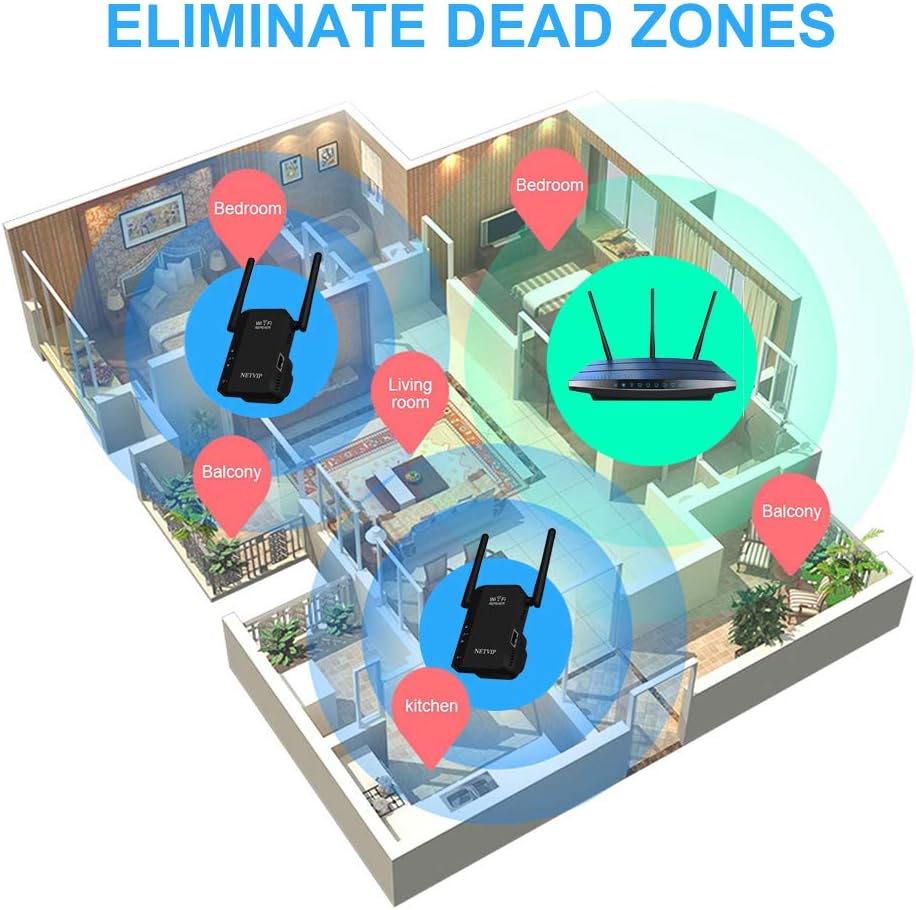
Image 3.2: Diagram showing how the WiFi Repeater helps eliminate dead zones in a multi-room environment.
4. Producte acabatview (Physical Components)
Familiarize yourself with the physical components of your NETVIP WiFi Repeater:
- Llums LED: Indicate power, Wi-Fi signal status, and Ethernet connection.
- Botó de restabliment: S'utilitza per restaurar el dispositiu a la configuració de fàbrica.
- Port LAN: An Ethernet port for wired connections in AP Mode or for connecting a wired device in Repeater Mode.

Imatge 4.1: Detallada view of the NETVIP WiFi Repeater highlighting the LED lights, Reset Button, and LAN Port.
5. Guia de configuració
Follow these steps to set up your NETVIP WiFi Repeater:
- Encès: Plug the repeater into a standard wall outlet near your main router. Wait for the power LED to light up.
- Connect to Repeater's Wi-Fi: On your smartphone, tablet, or laptop, search for available Wi-Fi networks. Connect to the network named 'Wireless-N' or similar (check the label on the device for the exact default SSID). No password is required for the initial connection.
- Accés Web Interfície: Obre a web browser (e.g., Chrome, Firefox) and enter the default IP address (usually 192.168.10.1 or 192.168.1.254) into the address bar. You may be prompted to enter a default username and password (often 'admin' for both).
- Seleccioneu el mode de funcionament: Once logged in, you will see the setup wizard. Choose your desired operating mode:
- Mode de repetidor: To extend an existing Wi-Fi network.
- Mode AP: To create a new Wi-Fi network from a wired Ethernet connection.
- Configura la configuració de la xarxa:
- For Repeater Mode: Select your main Wi-Fi network from the list, enter its password, and choose a new SSID (network name) for your extended network or keep the original.
- For AP Mode: Set a new SSID and password for the new Wi-Fi network that the repeater will create. Connect an Ethernet cable from your main router to the repeater's LAN port.
- Apply Settings and Relocate: Apply the settings. The repeater will restart. Once restarted, you can unplug it and move it to a suitable location between your router and the Wi-Fi dead zone. Ensure the signal LED indicates a good connection to your main router.
6. Modes de funcionament
The NETVIP WiFi Repeater supports two primary operating modes:
6.1. Mode repetidor
In Repeater Mode, the device wirelessly connects to your existing router's Wi-Fi network and re-transmits the signal, effectively extending its range. This is ideal for eliminating Wi-Fi dead zones in your home or office.

Image 6.1: Diagram illustrating the Repeater Mode, where the device extends the signal from a wireless router to WLAN clients.
6.2. Access Point (AP) Mode
In AP Mode, the device connects to your wired router via an Ethernet cable and transforms the wired internet connection into a new wireless network. This is useful for adding Wi-Fi capability to a wired-only network or creating a separate Wi-Fi network.
Image 6.2: Diagram illustrating the AP Mode, where the device creates a wireless network from a wired router connection for WLAN clients.
7. Manteniment
To ensure optimal performance and longevity of your NETVIP WiFi Repeater, consider the following maintenance tips:
- Col·locació: Place the repeater in an open area, away from obstructions like large metal objects, concrete walls, and other electronic devices that may cause interference.
- Neteja: Mantingueu el dispositiu net i lliure de pols. Feu servir un drap suau i sec per netejar l'exterior. No utilitzeu netejadors líquids.
- Actualitzacions de firmware: Periodically check the NETVIP official website for any available firmware updates. Updating the firmware can improve performance, add new features, and fix bugs.
- Ventilació: Ensure the device has adequate ventilation to prevent overheating. Do not cover the ventilation holes.
8. Solució De Problemes
If you encounter issues with your NETVIP WiFi Repeater, refer to the following common problems and solutions:
- Cannot connect to the repeater's default Wi-Fi (Wireless-N):
- Ensure the repeater is powered on and the power LED is lit.
- Try resetting the repeater to factory defaults by pressing and holding the Reset button for 5-10 seconds.
- Ensure your device's Wi-Fi is enabled and scanning for networks.
- No es pot accedir a web management page (192.168.10.1):
- Verify that your device is connected to the repeater's Wi-Fi network (e.g., 'Wireless-N').
- Ensure you are typing the correct IP address into the browser's address bar.
- Prova una altra web navegador o esborra la memòria cau del navegador.
- Temporarily disable any VPN or firewall software on your device.
- Repeater is not extending the Wi-Fi signal or signal is weak:
- Relocate the repeater to a position halfway between your router and the desired coverage area. The signal LED should indicate a good connection to your main router.
- Ensure the password for your main Wi-Fi network was entered correctly during setup.
- Comproveu si hi ha interferències d'altres dispositius electrònics.
- Update the repeater's firmware if available.
- Slow internet speed through the repeater:
- Ensure the repeater is placed in an optimal location with a strong signal from the main router.
- Reduce the number of devices connected to the repeater.
- Check your main internet connection speed.
9. Especificacions
| Característica | Especificació |
|---|---|
| Model | WN531 |
| Marca | NETVIP |
| Comunicació sense fils estàndard | 802.11b, 802.11n |
| Velocitat de transferència de dades | 300 megabits per segon |
| Color | Negre |
| Dispositius compatibles | Encaminador |
| Dimensions del paquet | 10.4 x 10.2 x 10 cm |
| Pes de l'article | 180 g |
10. Garantia i Suport
The NETVIP WiFi Repeater Model WN531 comes with a 1 anys de garantia del producte des de la data de compra. Aquesta garantia cobreix defectes de fabricació i avaries en condicions d'ús normal.
For technical support, warranty claims, or any questions regarding your device, please contact NETVIP customer service through the retailer's platform or the official NETVIP website. Please have your purchase receipt and product model number (WN531) ready when contacting support.