
Creative X4
Creative Sound Blaster X4 User Manual
Model: X4 | Brand: Creative
Introducció
Welcome to the user manual for your Creative Sound Blaster X4. This external USB Digital-to-Analog Converter (DAC) and amplifier is designed to elevate your audio experience across various platforms, including PC, Mac, and gaming consoles. It features advanced surround sound technologies, intelligent communication tools, and versatile connectivity to deliver high-fidelity audio for all your entertainment and communication needs.
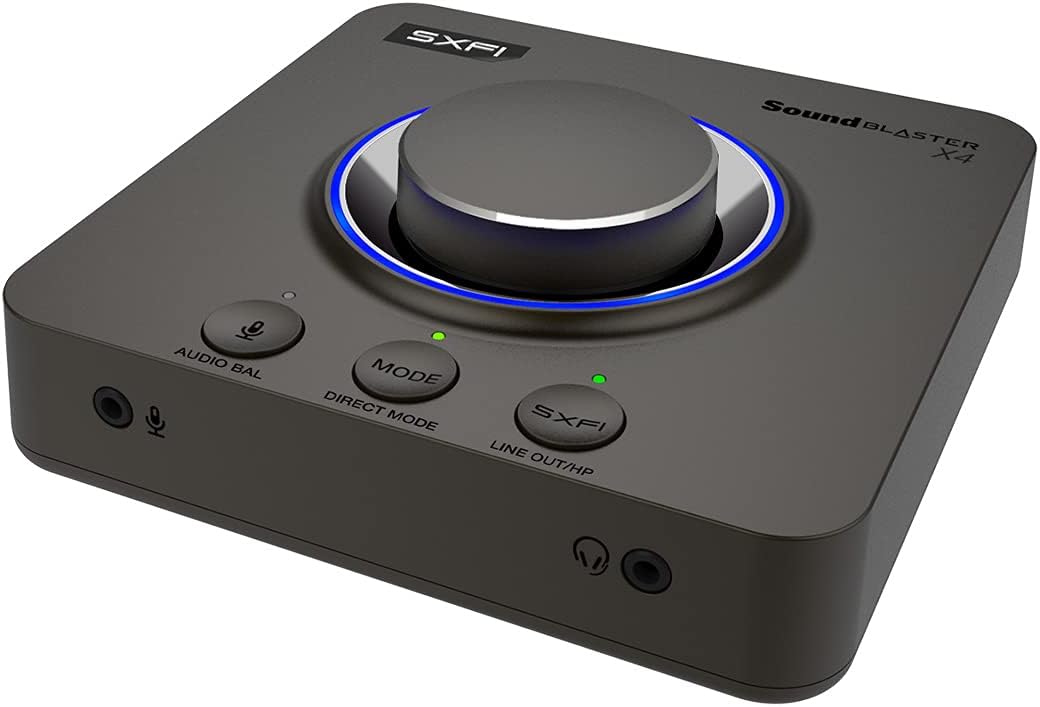
The Creative Sound Blaster X4, a versatile external audio device.
Contingut del paquet
Ensure all the following items are included in your Sound Blaster X4 package:
- Sound Blaster X4 Unit
- Cable USB-C a USB-A
- Cable òptic
- Quick Start Guide (User Guide available online)

Contents typically found in the Sound Blaster X4 package.
Configuració
S'està connectant al teu dispositiu
The Sound Blaster X4 offers versatile connectivity options:
- Connexió USB-C: Connect the Sound Blaster X4 to your PC, Mac, PS4, PS5, or Nintendo Switch using the provided USB-C to USB-A cable. This connection provides both power and audio data.
- Optical-in Connection: For devices supporting optical output, connect an optical cable from your device's optical out port to the Sound Blaster X4's optical-in port.

Connecting the Sound Blaster X4 to a laptop via USB-C.

Rear ports of the Sound Blaster X4, including optical and USB.
Instal·lació de controladors i programari
For full functionality and customization, download and install the Aplicació creativa from the official Creative website. The app provides access to all audio settings, EQ modes, and communication features.
Operating the Sound Blaster X4
Controls acabatsview
The Sound Blaster X4 features intuitive controls for easy access to key functions:
- Pom de control de volum: Large, central knob for precise volume adjustments.
- Direct Mic Mute Button: Mutes/unmutes your microphone instantly.
- Botó de mode: Cycles through three customizable EQ modes.
- Botó SXFI: Toggles Super X-Fi and SXFI BATTLE Mode on/off.
- Audio Balance Feature: Adjusts volume levels between two audio sources (SPDIF / Optical / USB) via the volume knob.
- Direct Mode Button: Activates Direct Mode for pure, unprocessed audio.
- Speaker (Line-out) and Headphones Switch Button: Seamlessly switch audio output between speakers and headphones without unplugging.
Front panel controls of the Sound Blaster X4.
Audio Balance Feature
The Audio Balance feature allows you to quickly adjust the volume mix between two different audio sources. This is particularly useful for balancing game audio with voice chat during online communication.
Demonstration of the Sound Blaster X4's audio balance feature.
Característiques clau
Surround Sound Technologies
Experience immersive audio with multiple surround sound options:
- 7.1 Discrete Surround: Supports up to 7.1 discrete channels for multi-channel speaker systems.
- Super X-Fi: Headphone holography technology that recreates the soundstage d'un sistema de diversos altaveus als auriculars.
- Motor acústic: Sound Blaster's renowned surround virtualization for both speakers and headphones.
- Dolby Digital Live: Real-time encoding of any audio source into Dolby Digital for single-cable connection to your home theater system.

Sound Blaster X4's multiple surround sound technologies.
SmartComms Kit
The SmartComms Kit simplifies your online communication experience on Windows 10:
- Detecció de veu: Automatically mutes and unmutes your microphone as you speak, eliminating the need for manual control.
- Neteja de soroll: Two-way noise cancellation that removes static background noise from both your environment and the other parties' audio.

SmartComms Kit and CrystalVoice for enhanced communication.
Auriculars Ampmés viu
The Sound Blaster X4 functions as a powerful headphone amplifier, capable of driving studio-grade headphones with impedance up to 600Ω, ensuring high-quality audio output.

High-resolution audio support and powerful headphone amplificació.
Característiques de joc
Gain a competitive edge with specialized gaming modes:
- SXFI BATTLE Mode: Designed for FPS games, this mode provides accurate audio cues and depth, allowing you to pinpoint enemy locations.
- Mode Explorador: Enhances important in-game audio cues like footsteps and weapon reloads, helping you hear beyond what you see.
Connectivitat
The Sound Blaster X4 offers a comprehensive set of I/O connectors:
- Port USB-C: For power and data connection to PC, Mac, and consoles.
- Entrada òptica: For digital audio input from various devices.
- Optical-out: For digital audio output to external speakers or receivers.
- Line-in / Line-out: Analog connections for various audio sources and outputs.
- Headset-in: Dedicated port for connecting headsets.
- Microphone-out: Per a la connexió de micròfon extern.

Detallada view of the Sound Blaster X4's seven I/O connectors.
Aplicació creativa
The Creative App provides full audio customization on Windows PC via USB, and quick EQ and audio tweaks on Android and iOS via Bluetooth. It allows you to:
- Select between various Sound Modes (Gaming, Music, Movies, etc.).
- Access and configure Super X-Fi, Acoustic Engine, SmartComms Kit, CrystalVoice, Scout Mode, Encoder, and Mixer settings.
- Customize and save your own EQ modes.

The Creative App interface for comprehensive audio control.
Requisits mínims del sistema
| Categoria | SO Windows | macOS |
|---|---|---|
| Processador | Intel® Core™ i3 or AMD® equivalent | Intel, AMD, or 100% compatible motherboard |
| Sistema operatiu | Microsoft Windows 11, Windows 10 version 1703, 32 / 64-bit or later | macOS versió 10.15 o posterior |
| RAM | 4 GB de RAM | 4 GB de RAM |
| Espai al disc dur | 4 GB d'espai lliure al disc dur | 4 GB d'espai lliure al disc dur |
| Port USB | Port USB 2.0 / USB 3.0 | Port USB 2.0 / USB 3.0 |
Note: SmartComms Kit, Scout Mode, CrystalVoice, and Sound Blaster Acoustic Engine's features are only accessible via the Creative App, downloadable on PC and Mac.
Compatibilitat
| Característica | PC Windows | macOS | PS5 | PS4 | Nintendo Switch |
|---|---|---|---|---|---|
| Super X-Fi and SXFI BATTLE Mode | ✓ | ✓ | ✓ | ✓ | ✓ |
| Discrete 7.1 / 5.1 Virtual 7.1 / 5.1 | ✓ | ✓ | |||
| Dolby Digital Live Encoding | via Optical-out cable | ||||
| Balanç d'àudio | ✓ | ✓ | via HDMI to optical converter | via Optical cable | |
| Programmable EQ Modes | ✓ | ✓ | ✓ | ✓ | ✓ |
| Mode directe | ✓ | ✓ | ✓ | ✓ | ✓ |
| Botó de silenci del micròfon | ✓ | ✓ | ✓ | ✓ | ✓ |
| SmartComms Kit | Windows 10 Ver 1703 or later | ||||
| CrystalVoice | Windows 10 Ver 1703 or later | Ver 10.14 (Intel-based Mac) | |||
| Scout Mode | Windows 10 Ver 1703 or later | Ver 10.14 (Intel-based Mac) | |||
| Motor acústic | ✓ | ✓ | |||
| Aplicació creativa | Windows 10 Ver 1703 or later | Ver 10.14 (Intel-based Mac) | via Bluetooth from mobile devices |
Resolució de problemes
If you encounter any issues with your Sound Blaster X4, please refer to the following common solutions:
- Sense sortida de so:
- Ensure the USB-C cable is securely connected to both the Sound Blaster X4 and your device.
- Verify that the correct audio output device (Sound Blaster X4) is selected in your operating system's sound settings.
- Check the volume levels on the Sound Blaster X4, your operating system, and your connected headphones/speakers.
- If using optical connection, ensure the optical cable is correctly inserted and the source device is outputting audio via optical.
- Problemes amb el micròfon:
- Confirm the microphone is properly plugged into the Sound Blaster X4's microphone input.
- Check that the microphone is not muted on the device or in your operating system's sound settings.
- Adjust microphone gain settings within the Creative App.
- Àudio distorsionat:
- Assegureu-vos que tots els cables estiguin connectats correctament i que no estiguin danyats.
- Try reducing the volume level on both the Sound Blaster X4 and your source device.
- Update the Sound Blaster X4 firmware and drivers via the Creative App.
- If using Direct Mode, ensure no other audio effects are enabled that might cause distortion.
- Dispositiu no reconegut:
- Try connecting the Sound Blaster X4 to a different USB port on your computer.
- Restart your computer and the Sound Blaster X4.
- Reinstall the Creative App and drivers.
Manteniment
To ensure the longevity and optimal performance of your Sound Blaster X4, follow these maintenance guidelines:
- Neteja: Feu servir un drap suau i sec per netejar el dispositiu. Eviteu utilitzar netejadors líquids o materials abrasius.
- Emmagatzematge: Guardeu el dispositiu en un lloc fresc i sec, allunyat de la llum solar directa i de temperatures extremes quan no l'utilitzeu.
- Manipulació: Eviteu deixar caure el dispositiu ni sotmetre'l a impactes forts. No intenteu desmuntar la unitat, ja que això anul·larà la garantia.
- Cura del cable: Handle cables gently. Avoid bending or crimping them excessively, which can damage internal wires.
Especificacions tècniques
- Dimensions del producte: 5.16 x 5.16 x 1.61 polzades
- Pes de l'article: 1.37 lliures
- Fabricant: Laboratoris creatius
- ASIN: B0953LL5R6
- País d'origen: Xina
- Número de model de l'article: X4
- Data de primera disponibilitat: 17 de maig de 2021
- Dispositius compatibles: Personal Computer, Laptop, Gaming Console, Speaker, Headphone, Ampmés viu
- Marca: Creatiu
- Interfície de maquinari: USB
- Mode de sortida d'àudio: Surround, Dolby Digital
- Plataforma: No específic de la màquina
Garantia i Suport
For detailed warranty information and technical support, please refer to the official Creative Labs weblloc web o el PDF de la guia d'usuari.
Guia de l'usuari (PDF): Descarrega la Guia d'usuari
Creative Support: Visita el Creative Support Page for FAQs, drivers, and contact options.
Documents relacionatsX4


Ask a question about this manual
Ask about setup, troubleshooting, compatibility, parts, safety, or missing instructions. Manuals+ will review the question and use this page’s manual context to help answer it.