
1. Introducció
Thank you for choosing the MEDION X64060 Party Speaker. This manual provides essential information for the safe and efficient use of your device. Please read it thoroughly before operating the speaker and keep it for future reference.
The MEDION X64060 is a versatile party speaker designed for various entertainment needs, featuring powerful audio output, integrated DJ and karaoke functions, and dynamic light effects.
2. Instruccions de seguretat
- Llegiu atentament totes les instruccions abans d'utilitzar.
- Mantingueu l'altaveu allunyat de l'aigua, la humitat i les temperatures extremes.
- No bloquejar les obertures de ventilació.
- Use only the power cord supplied with the device.
- No intenteu reparar el dispositiu vosaltres mateixos. Envieu totes les tasques de manteniment a personal qualificat.
- Ensure the speaker is placed on a stable, level surface to prevent tipping.
- Eviteu l'exposició prolongada a nivells de volum elevats per evitar danys auditius.
3. Contingut del paquet
Si us plau, comproveu el paquet per veure si hi ha els elements següents:
- MEDION X64060 Party Speaker
- 1 x micròfon
- Cable d'alimentació
- Manual d'usuari (aquest document)
4. Producte acabatview
Familiarize yourself with the main components and controls of your MEDION X64060 Party Speaker.

Image: Control Panel Overview
This image displays a close-up of the speaker's top control panel, showing various knobs and buttons for audio adjustments, DJ functions, and input selections.

Image: Speaker Dimensions and Connections
This image illustrates the overall dimensions of the speaker (980mm height, 350mm width, 340mm depth) and highlights the available connection ports: 1x USB, 2x Microphone (6.3 mm), 1x Guitar (6.3 mm), 1x Audio Input (3.5 mm), and 1x Audio Input (RCA).
4.1 Tauler frontal
- Ponents: Two main speakers with integrated LED lighting.
- Efectes de llum: Dynamic LED lights that synchronize with music.
4.2 Tauler de control superior
- Botó d'encesa: Per encendre/apagar l'altaveu.
- Controls de volum: Main volume, microphone volume (MIC1 VOL, MIC2 VOL), guitar volume (GUITAR VOL), and echo volume (ECHO VOL).
- Equalitzador (EQ): 5-band equalizer for sound adjustment.
- Selectors d'entrada: Buttons for Bluetooth, USB, AUX.
- DJ Functions: Cross-fader, scratch wheel, drum pads (HI-HAT, SNARE, BASS DRUM, CYMBAL, TOM1, TOM2), and record function.
- Port USB: For USB playback.
- Entrades de micròfon: Two 6.3 mm jack inputs.
- Entrada de guitarra: One 6.3 mm jack input.
- Entrada AUX: 3.5 mm jack input.
4.3 Panell posterior
- Entrada d'alimentació: Per connectar el cable d'alimentació.
- RCA Audio Input: Additional audio input.
4.4 Característiques de mobilitat
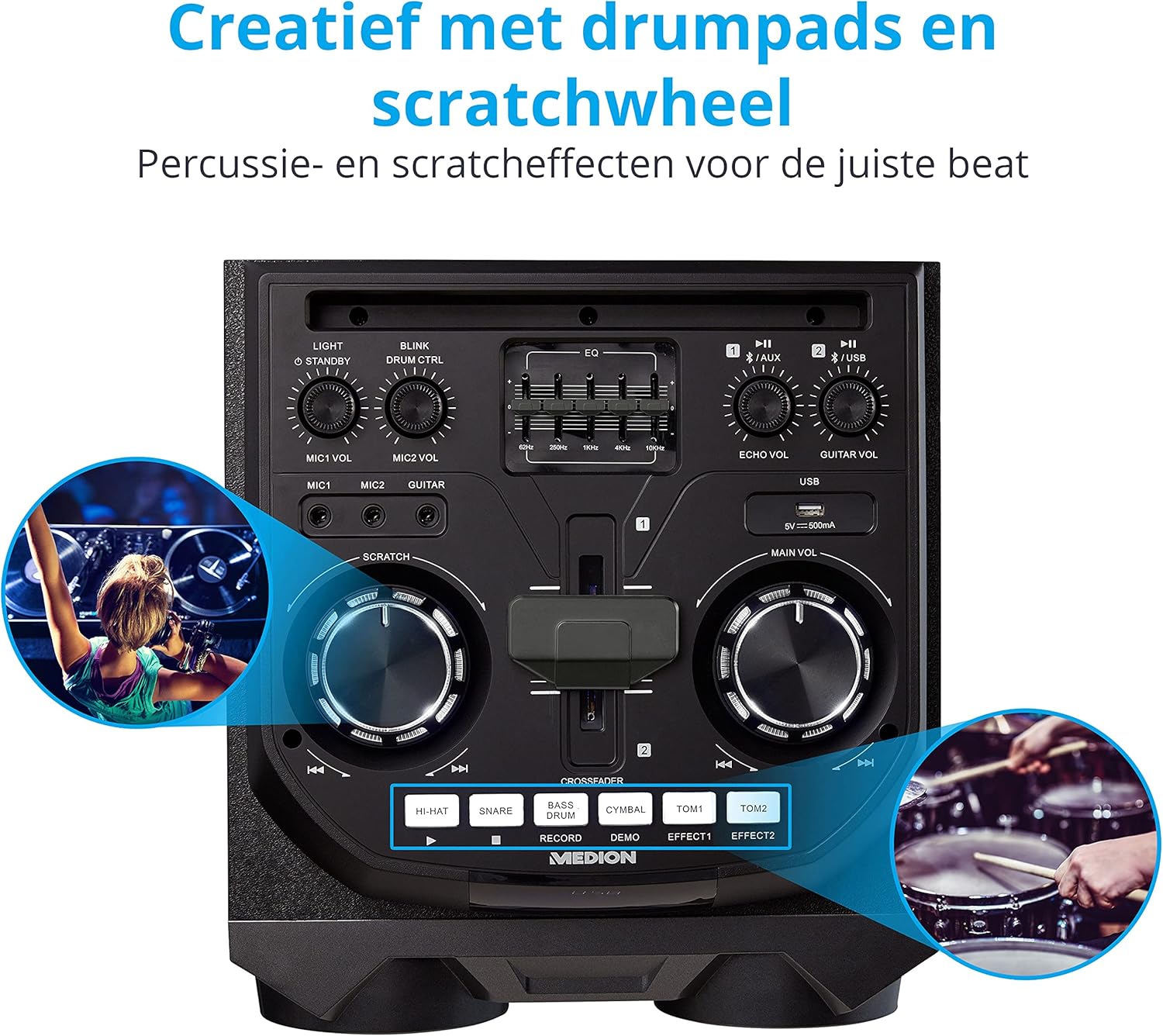
Image: Integrated Wheels for Portability
This image shows the back of the speaker, highlighting the integrated wheels at the bottom, designed for easy transport.
- Rodes integrades: For easy transportation of the speaker.
- Nanses: Ergonomic handles for lifting and moving.
5. Configuració
5.1 Col·locació inicial
Col·loqueu l'altaveu sobre una superfície estable i plana. Assegureu-vos que hi hagi una ventilació adequada al voltant de la unitat. Eviteu col·locar-lo a prop de fonts de calor o sota la llum solar directa.
5.2 Connexió d'alimentació
- Connect the supplied power cord to the power input on the rear of the speaker.
- Connecteu l'altre extrem del cable d'alimentació a una presa de corrent adequada.
- Press the power button on the top control panel to turn on the speaker. The LED lights will illuminate.
5.3 Connecting a Microphone or Guitar
For karaoke or live instrument performance:
- Plug your microphone(s) into the MIC1 or MIC2 6.3 mm jack inputs on the top panel.
- Plug your guitar into the GUITAR 6.3 mm jack input on the top panel.
- Adjust the respective volume knobs (MIC1 VOL, MIC2 VOL, GUITAR VOL) and ECHO VOL to your preference.
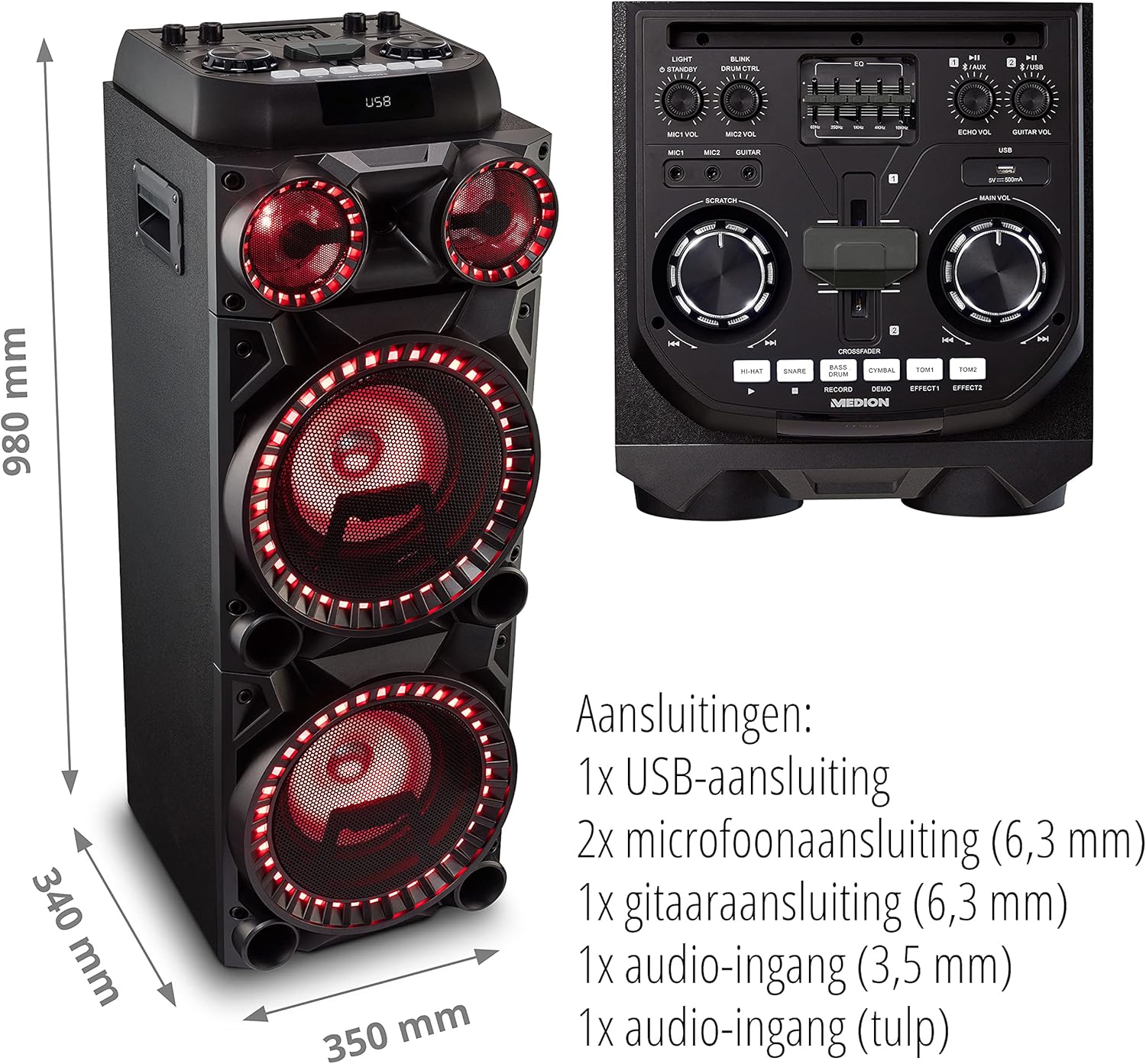
Image: Microphone and Guitar Connection for Karaoke
This image shows individuals enjoying karaoke, demonstrating the use of a microphone connected to the speaker for singing.
6. Instruccions de funcionament
6.1 Connexió Bluetooth
- Premeu el botó Bluetooth button on the control panel. The Bluetooth indicator will blink.
- Activa el Bluetooth al teu telèfon intel·ligent, tauleta o altre dispositiu d'àudio.
- Cerca "MEDION X64060" in your device's Bluetooth settings and select it to pair.
- Once connected, the Bluetooth indicator will stop blinking and remain solid. You can now play music wirelessly.

Image: Bluetooth Music Playback
This image shows a smartphone displaying a music application, indicating a wireless Bluetooth connection to the speaker for audio streaming.
Reproducció USB 6.2
- Inseriu una unitat flash USB que contingui àudio files into the USB port on the top panel.
- Premeu el botó USB botó per seleccionar el mode USB.
- The speaker will automatically detect and begin playing audio files from the USB drive. Use the playback controls (play/pause, skip track) on the control panel.
6.3 Entrada AUX
- Connect an external audio device (e.g., MP3 player, laptop) to the 3.5 mm AUX input or the RCA audio input on the rear panel using an appropriate audio cable (not included).
- Premeu el botó AUX botó per seleccionar el mode AUX.
- Play audio from your connected device. The speaker will output the sound.
6.4 Funcions de DJ
The MEDION X64060 includes various DJ features for creative sound mixing.

Image: DJ Function Controls
Aquesta imatge ofereix un detall view of the DJ control section, including the cross-fader, scratch wheel, and various drum pads.
- Cross-fader: Use the cross-fader to smoothly transition between different audio sources or effects.
- Scratch Wheel: Manipulate the scratch wheel for classic DJ scratch effects.
- Coixinets de tambor: Premeu el botó HAT, CAIXA, BOMBO, PLATOL, TOM1, i TOM2 pads to add drum sound effects to your music.
- Funció d'enregistrament: Utilitza el REGISTRAR button to record your drum pad sequences.
6.5 Funció de karaoke
Connect a microphone as described in section 5.3. Play your chosen karaoke track via Bluetooth, USB, or AUX. Adjust the microphone and echo volumes for the desired effect.
6.6 Efectes de llum
The speaker features dynamic LED light effects that respond to the music. These lights automatically activate when the speaker is on. There may be a dedicated button (e.g., "LIGHT" or "BLINK") to control or cycle through different light modes, refer to the control panel for specific options.

Image: Dynamic Blue Light Effects
This image showcases the speaker with its blue LED lights illuminated, demonstrating the atmospheric light effects.

Image: Dynamic Red Light Effects
This image shows the speaker with its red LED lights illuminated, highlighting another color option for the atmospheric light effects.
7. Manteniment
7.1 Neteja
- Desendolleu sempre l'altaveu de la presa de corrent abans de netejar-lo.
- Feu servir un drap suau i sec per netejar les superfícies exteriors.
- No utilitzeu netejadors líquids, aerosols ni materials abrasius, ja que poden danyar l'acabat o els components interns.
7.2 Emmagatzematge
When not in use for extended periods, store the speaker in a cool, dry place, away from direct sunlight and extreme temperatures. Cover the unit to protect it from dust.
8. Solució De Problemes
| Problema | Causa possible | Solució |
|---|---|---|
| Sense poder | Power cord not connected properly; Power outlet not working. | Ensure the power cord is securely plugged into both the speaker and a working wall outlet. Test the outlet with another device. |
| Sense so | Volume too low; Incorrect input selected; Device not paired (Bluetooth); Cable not connected (AUX/Guitar/Mic). | Increase the main volume and individual input volumes. Select the correct input source (Bluetooth, USB, AUX). Re-pair Bluetooth device. Check all cable connections. |
| La connexió Bluetooth falla | Altaveu no en mode d'emparellament; Dispositiu massa lluny; Interferències. | Ensure the speaker is in Bluetooth pairing mode (blinking indicator). Move your device closer to the speaker. Avoid obstacles and other wireless devices. |
| El micròfon/la guitarra no funciona | Volume too low; Cable faulty; Incorrect input. | Increase MIC/GUITAR VOL. Check microphone/guitar cable. Ensure the instrument is properly connected. |
9. Especificacions
| Marca | MEDIÓ |
| Número de model | X64060 | MD44060 |
| Potència de sortida | 2 x 100 W RMS (2 x 1000 W max. music output power) |
| Tecnologia de connectivitat | Bluetooth 5.0, USB, AUX (3.5mm, RCA) |
| Entrades d'àudio | 2 x Microphone (6.3 mm), 1 x Guitar (6.3 mm), 1 x AUX (3.5 mm), 1 x RCA |
| Equalitzador | 5 bandes |
| Color | Negre |
| Material | Plàstic |
| Dimensions del producte (L x A x A) | 38.8 x 35 x 101 cm |
| Pes de l'article | 15 kg |
| Tipus de muntatge | Terra de peu |
| Font d'alimentació | Elèctric amb cable |
| Dispositius compatibles | Portàtil, Smartphone |
10. Garantia i Suport
For warranty information and technical support, please refer to the warranty card included with your product or visit the official MEDION weblloc web. Conserveu el comprovant de compra per a qualsevol reclamació de garantia.
MEDION Customer Service: For assistance, please contact MEDION customer support through their official channels. Contact details can typically be found on the MEDION weblloc o a l'embalatge del producte.