
Introducció
This manual provides detailed instructions for the safe and efficient operation of your DIGITNOW M513 Record Player. Please read this manual thoroughly before using the product and retain it for future reference. This record player features a belt-drive turntable, external stereo speakers, Bluetooth connectivity, and Vinyl-to-MP3 recording capabilities.
Producte acabatview
Familiaritzeu-vos amb els components i els controls del vostre tocadiscos.
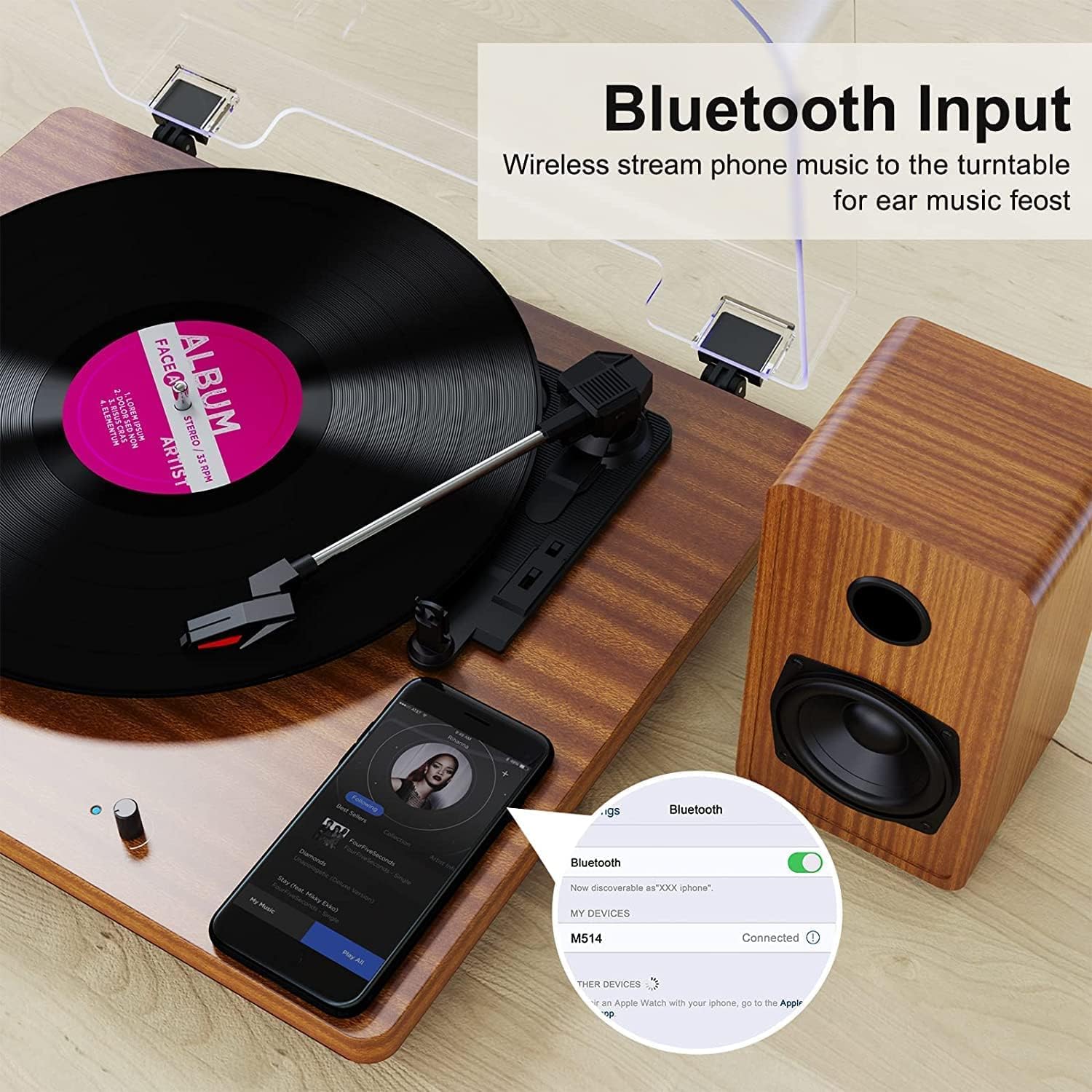
Figure 1: DIGITNOW M513 Record Player with external speakers and Bluetooth connectivity.
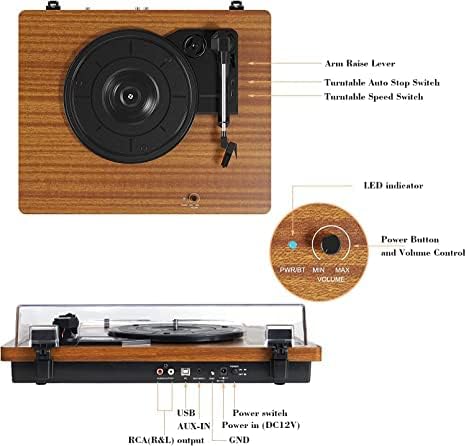
Figure 2: Top and rear panel controls including arm raise lever, auto stop switch, speed switch, power button, volume control, USB, AUX-IN, RCA(R&L) output, power input, and ground.
Components clau:
- Plat giratori: Where vinyl records are placed.
- Braç: Sosté el llapis i segueix els solcs del disc.
- Agulla (punta): Llegeix la informació d'àudio del registre.
- External Stereo Speakers: Proporcioneu sortida d'àudio.
- Funda antipols: Protegeix el tocadiscos de la pols.
- Tauler de control: Includes power, volume, speed selection, and input/output ports.
Configuració
- Desembalatge: Carefully remove all components from the packaging. Ensure all accessories (dust cover, 45 RPM adapter, RCA output cables, ground wire, USB cable, user manual) are present.
- Col·locació: Place the record player on a stable, level surface away from direct sunlight, heat sources, and excessive vibration. Position the external speakers for optimal sound distribution.
- Connectar els altaveus: Connect the provided external stereo speakers to the RCA output ports on the rear of the record player using the RCA cables. Ensure correct left (L) and right (R) connections.
- Connexió d'alimentació: Connect the DC 12V power adapter to the power input port on the rear of the unit, then plug the adapter into a wall outlet.
- Dust Cover Installation: Attach the dust cover to the hinges at the back of the turntable.
Instruccions de funcionament
Reproducció de discos
- Encès: Turn the Power/Volume knob clockwise to power on the unit. The LED indicator will illuminate.
- Seleccioneu la velocitat: Choose the appropriate speed (33, 45, or 78 RPM) using the speed switch located on the top panel. Use the 45 RPM adapter for 7-inch records with large center holes.
- Registre del lloc: Col·loca amb cura el disc de vinil al plat del tocadiscos.
- Elevació del braç: Use the arm raise lever to gently lift the tonearm.
- Posició del braç: Move the tonearm over the desired starting track of the record.
- Braç inferior: Slowly lower the tonearm using the arm raise lever. The stylus will make contact with the record, and playback will begin.
- Ajustar el volum: Ajusteu el volum amb el botó d'engegada/volum.
- Parada automàtica: The record player features an auto-stop function. When enabled via the Auto Stop switch, the platter will stop spinning automatically when the record finishes. If disabled, the platter will continue to spin.
- End Playback: At the end of the record, or when you wish to stop, use the arm raise lever to lift the tonearm, return it to the tonearm rest, and then lower the lever. Turn the Power/Volume knob counter-clockwise to power off the unit.

Figura 3: Detallada view of the stylus, belt-driven design for smooth music, and 33/45/78 RPM speed options for various record sizes.
Connexió Bluetooth
The record player can receive audio wirelessly from your Bluetooth-enabled devices.
- Activa el mode Bluetooth: Ensure the record player is powered on. The unit will automatically enter Bluetooth receiving mode if no record is playing or AUX input is not connected. The LED indicator may change color or blink to indicate Bluetooth mode.
- Activa el Bluetooth al dispositiu: Al telèfon intel·ligent o a un altre dispositiu Bluetooth, activeu Bluetooth i cerqueu els dispositius disponibles.
- Parella el dispositiu: Select "DIGITNOW" or a similar name from the list of available devices to pair. Once connected, you will hear a confirmation sound.
- Reproduir àudio: Play music from your device, and it will stream through the record player's speakers.
Video 1: Demonstrates the setup and Bluetooth connection process for the DIGITNOW M513 Record Player, including placing a record and pairing with a smartphone.
Enregistrament de vinil a MP3
Convert your vinyl records to digital MP3 files via a USB connection to your computer.
- Connexió a l'ordinador: Use the provided USB cable to connect the record player's USB port (PC OUT) to a USB port on your Mac or PC.
- Instal·lar programari: Refer to the detailed instructions in the included user manual for information on compatible recording software and installation.
- Comença a gravar: Follow the software's instructions to begin recording audio from your vinyl record to your computer.

Figure 4: Connection diagram illustrating USB for PC recording, AUX-IN for external audio sources like CD players, and RCA OUT for external speakers.
External Audio Connections
- Entrada AUX: Connect external audio sources (e.g., CD player, smartphone, digital media player) to the AUX-IN port on the rear panel using a 3.5mm audio cable. The record player will play audio from the connected device through its speakers.
- Sortida RCA: For enhanced or louder sound, connect the RCA(R&L) output ports to an external ampamplificador o altaveus autoamplificats mitjançant cables RCA.
Manteniment
- Neteja del llapis: Gently clean the stylus regularly with a soft brush designed for stylus cleaning, brushing from back to front. Avoid touching the stylus with your fingers.
- Neteja de la unitat: Wipe the record player and dust cover with a soft, dry cloth. Do not use abrasive cleaners or solvents.
- Belt Maintenance: The belt-drive system is designed for durability. If the platter does not spin or spins inconsistently, the drive belt may have slipped during shipping or use. Refer to the full user manual for instructions on how to re-seat or replace the drive belt.
- Cura de registres: Keep your records clean and free of dust to ensure optimal sound quality and prolong stylus life. Store records vertically in their sleeves.
Resolució de problemes
| Problema | Causa possible | Solució |
|---|---|---|
| Sense poder | L'adaptador de corrent no està connectat o la presa de corrent no funciona. | Ensure power adapter is securely plugged into the unit and a working wall outlet. Check the power switch. |
| Sense so | Volume too low; speakers not connected; incorrect input mode. | Increase volume. Verify speaker connections. Ensure correct input mode (Phono, Bluetooth, AUX). |
| So saltat o distorsionat | Disc brut o malmès; agulla desgastada o bruta; unitat no anivellada. | Clean record. Clean or replace stylus. Place unit on a level surface. |
| El disc es reprodueix massa ràpid/lent | Configuració de velocitat incorrecta. | Adjust the speed switch to 33, 45, or 78 RPM as appropriate for the record. |
| Soroll de brunzit | Ground wire not connected; interference from other electronics. | Ensure the ground wire is properly connected (if applicable). Move the unit away from other electronic devices. |
Especificacions
- Model: M513
- Marca: DIGITNOW
- Dimensions del producte: 15 x 12.87 x 6.22 polzades
- Pes de l'article: 11.77 lliures
- Velocitats: 33 1/3, 45 i 78 RPM
- Tipus de conducció: Transmissió per corretja
- Tipus de motor: Motor de corrent continu
- Connectivitat: Bluetooth, AUX-IN, RCA Output, USB (for Vinyl-to-MP3 recording)
- Components inclosos: Dust cover, 45 RPM adapter, RCA output cables, ground wire, USB cable, user manual
- Material: Plàstic, Fusta
- Característiques especials: Bluetooth Function, RCA Output, Vinyl-to-MP3 Recording, Auto Stop
Garantia i Suport
For warranty information, technical support, or service inquiries, please refer to the contact details provided in the original product packaging or visit the official DIGITNOW weblloc web. Conserveu el rebut de compra com a comprovant de compra per a reclamacions de garantia.