
1. Introducció
This manual provides comprehensive instructions for the installation, programming, and operation of the Finder 12.A4.8.230.0010 NFC Weekly Time Clock. This electronic astronomical time switch features a weekly program, an analog output, and can be programmed via a joystick or an NFC-enabled smartphone using the Finder Toolbox app.
2. Informació de seguretat
Llegiu atentament aquestes instruccions de seguretat abans de la instal·lació i el funcionament. Si no seguiu aquestes instruccions, podeu patir descàrregues elèctriques, incendis o danys al dispositiu.
- La instal·lació ha de ser realitzada per un electricista qualificat d'acord amb les normatives locals de cablejat.
- Assegureu-vos que el subministrament elèctric estigui desconnectat abans de qualsevol treball d'instal·lació o manteniment.
- No exposeu el dispositiu a la humitat, temperatures extremes ni ambients corrosius.
- El dispositiu està dissenyat només per a ús en interiors.
3. Producte acabatview
The Finder 12.A4.8.230.0010 is an electronic time switch designed for DIN rail mounting. It offers precise time control with a weekly program and astronomical function.

Figura 1: Frontal view of the Finder 12.A4.8.230.0010 Time Clock, showing the LCD display, joystick, and NFC symbol.
Característiques principals:
- Weekly program for flexible scheduling.
- 1 analog output: 0-10 V or PWM.
- 1 changeover contact for 16 A / 250 V AC (AC1).
- Subministrament voltage: 110-230 V AC/DC.
- LCD display for clear information.
- Programming via joystick or NFC-enabled smartphone with Finder Toolbox app (Android and iOS).
- Astronomical time control: automatic switching at sunrise and sunset based on postcode or coordinates.
- Adjustable time offset for sunrise/sunset.
4. Configuració i instal·lació
This device is designed for DIN rail mounting. Follow these steps for proper installation:
- Desconnexió d'alimentació: Ensure the main power supply to the installation area is completely disconnected before proceeding.
- Muntatge: Mount the time switch securely onto a standard DIN rail.
- Cablejat: Connect the power supply (110-230 V AC/DC) to terminals A1 and A2. Connect the load to the changeover contact terminals (NO, NC, COM) and the analog output (W, O, Y) as required. Refer to the wiring diagram below.
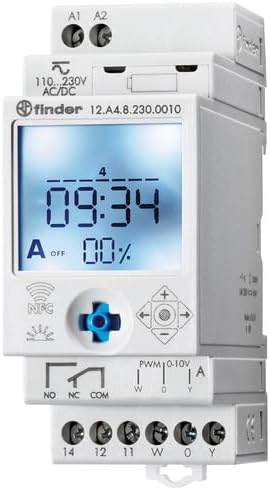
Figura 2: Detallada view of the wiring terminals for power input (A1, A2), relay output (NO, NC, COM), and analog output (W, O, Y).
Nota: The device features safe separation between the power supply and contacts.
5. Instruccions de funcionament
5.1 Engegada inicial
Once wired, restore power. The LCD display will illuminate. You may need to set the current date and time if it's the first use or after a prolonged power outage.
5.2 Programming via Joystick
The integrated joystick allows for direct programming on the device:
- Navegació: Use the joystick to move through menu options (up, down, left, right).
- Selecció/Confirmació: Press the joystick inwards to select an option or confirm a setting.
- Follow the on-screen prompts to set the current time, date, weekly program, and astronomical functions.
5.3 Programming via NFC (Finder Toolbox App)
For maximum flexibility, program the time switch using an NFC-enabled smartphone and the Finder Toolbox app:
- Descarregar l'aplicació: Download the "Finder Toolbox" app from the Google Play Store (Android) or Apple App Store (iOS).
- Create/Load Program: Open the app and create a new program or load an existing one. The app allows for detailed configuration of weekly schedules, astronomical settings, and special functions.
- Transferència de dades: To transfer the program, hold your smartphone close to the NFC symbol on the time switch. The app will guide you through the data transfer process.
- Read Program: You can also read an existing program from the time switch to your smartphone for editing or backup.
5.4 Astronomical Time Control
The device can automatically switch based on sunrise and sunset times:
- Configuració d'ubicació: Set your location by entering a postcode or geographical coordinates in the programming menu (via joystick or app).
- Desplaçament: You can set a selectable time offset for both sunrise and sunset times to adjust switching points.
- Astro ON/OFF: Configure specific ON/OFF times during the astronomical ON period if needed.
6. Manteniment
The Finder 12.A4.8.230.0010 is designed for maintenance-free operation. However, periodic checks are recommended:
- Neteja: Netegeu el dispositiu amb un drap sec i suau. No utilitzeu productes de neteja abrasius ni dissolvents.
- Connexions: Comproveu periòdicament les connexions dels terminals per assegurar-vos que siguin segures.
- Actualitzacions de firmware: Check the Finder website or app for any available firmware updates for improved functionality or bug fixes.
7. Solució De Problemes
| Problema | Causa possible | Solució |
|---|---|---|
| El dispositiu no s'encén. | No hi ha alimentació o cablejat incorrecte. | Check power connections (A1, A2) and ensure power is supplied. Verify wiring against the diagram. |
| Program not executing. | Incorrect program settings or manual override active. | Review program settings via joystick or app. Check for any active manual override functions. Ensure current date/time is correct. |
| NFC transfer fails. | Smartphone not NFC-enabled, app not open, or poor contact. | Ensure your smartphone has NFC enabled. Open the Finder Toolbox app. Hold the phone directly over the NFC symbol on the device. |
| Astronomical function inaccurate. | Incorrect location (postcode/coordinates) or time zone setting. | Verify the entered postcode or coordinates. Check the time zone setting. |
If the problem persists, please contact Finder technical support.
8. Especificacions tècniques
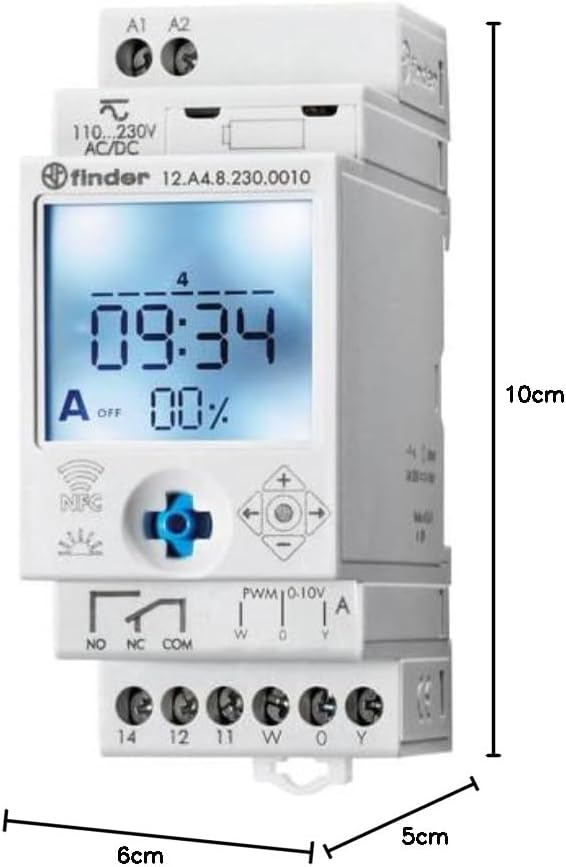
Figure 3: Dimensions of the Finder 12.A4.8.230.0010 Time Clock, showing approximate measurements of 10cm height, 6cm width, and 5cm depth.
| Característica | Detall |
|---|---|
| Marca | Cercador |
| Número de model | 12.A4.8.230.0010 |
| Dimensions (A x A x P) | 10 x 6 x 5 cm |
| Pes | 70 g |
| Subministrament Voltage | 110-230 V AC/DC |
| Contacte de sortida | 1 changeover contact, 16 A / 250 V AC (AC1) |
| Sortida analògica | 0-10 V or PWM |
| Material de contacte | AgSnO2 |
| Màx. Corrent d'entrada | 120 A per 5 ms |
| Min. Switching Time | 1 minut |
| Max. Switching Power (230 V AC1) | 4000 VA |
| Entrada de la interfície humana | Buttons (Joystick) |
| Piles necessàries | No |
| Compatible amb | Power supplies/ballasts with 0-10 V or PWM inputs, or Slave dimmers Type 15.11 |
9. Garantia i Suport
For warranty information and technical support, please refer to the official Finder weblloc web o poseu-vos en contacte amb el vostre distribuïdor local. Conserveu el rebut de compra com a comprovant de compra.
Fabricant: Cercador
Product on Amazon.es since: 24 de maig de 2021