
Introducció
Thank you for choosing the Hbada Ergonomic Gaming Chair. This manual provides essential information for the safe and efficient assembly, operation, and maintenance of your new chair. Please read these instructions carefully before use and retain them for future reference.

Image: The Hbada Ergonomic Gaming Chair in a modern gaming environment, showcasing its design and presence.
Informació de seguretat
- Assegureu-vos que tots els components siguin presents i no estiguin danyats abans del muntatge. No utilitzeu el producte si hi falta alguna peça o si està trencada.
- Follow the assembly instructions precisely. Incorrect assembly can lead to instability and injury.
- Do not stand on the chair. Use it only for sitting.
- No supereu la capacitat màxima de pes (vegeu les especificacions).
- Mantingueu els nens i les mascotes allunyats de la cadira durant el muntatge.
- Avoid exposing the chair to direct sunlight or extreme temperatures to prevent material degradation.
Dimensions del producte
Understanding the dimensions of your chair is important for proper placement and comfortable use. Below are the key measurements:
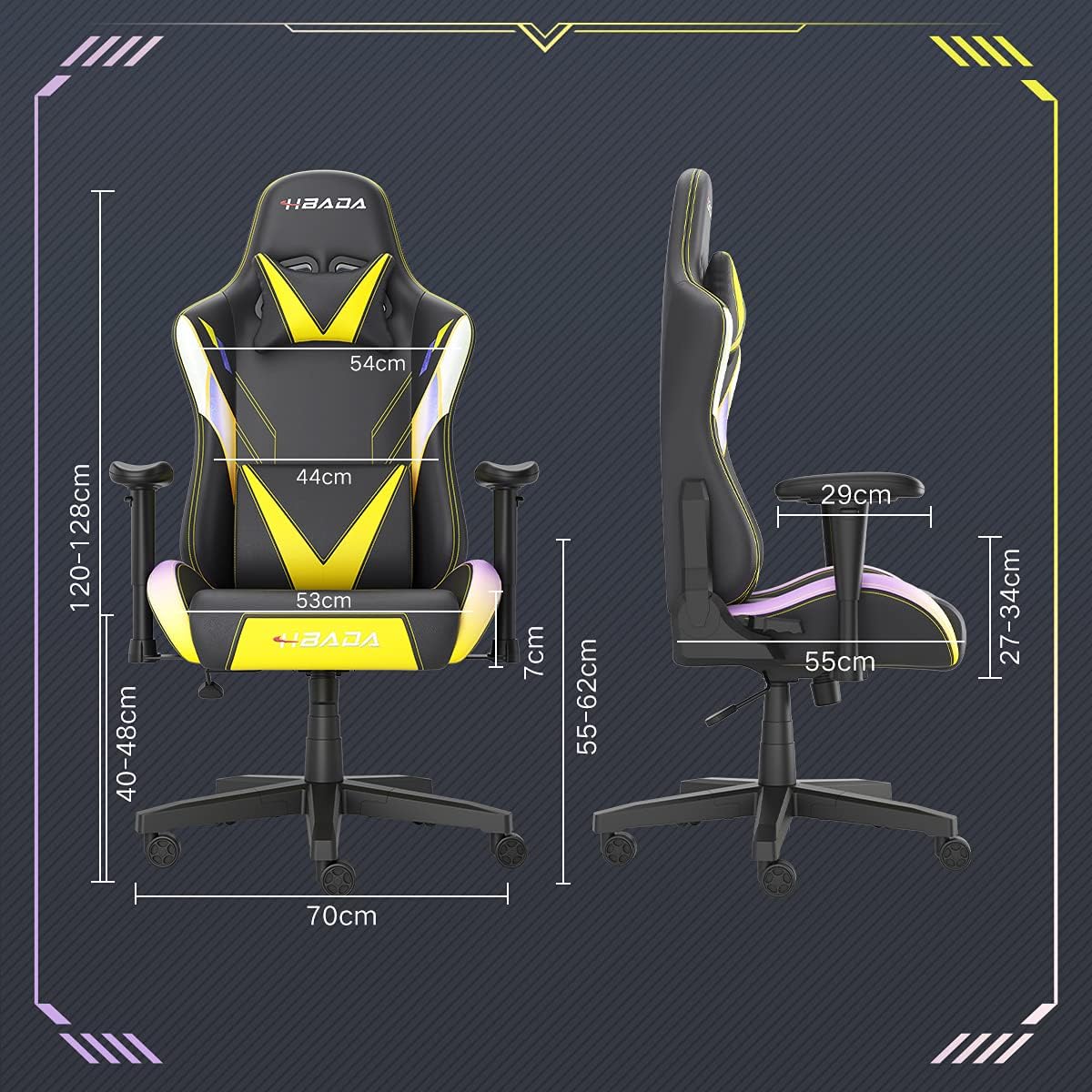
Image: A detailed diagram illustrating the various dimensions of the Hbada Gaming Chair, including height, width, and depth measurements.
- Alçada total: 120-128 cm (ajustable)
- Alçada del seient: 40-48 cm (ajustable)
- Amplada del seient: 53 cm
- Profunditat del seient: 55 cm
- Amplada del respatller: 54 cm (shoulder area), 44 cm (lumbar area)
- Alçada del reposabraços (des del seient): 7 cm (adjustable)
- Diàmetre de la base: 70 cm
Muntatge i muntatge
Please follow these steps carefully to assemble your Hbada Gaming Chair. It is recommended to have a clear, spacious area for assembly.
Passos de muntatge:
- Step 1: Assemble the Base and Wheels
Insert the five casters into the holes on the star base. Then, place the gas lift cylinder into the center hole of the base.

Image: Illustration of attaching the five casters to the chair's star-shaped base and inserting the gas lift cylinder.
- Step 2: Attach the Seat and Backrest
Connect the backrest to the seat using the provided screws and mounting plates. Ensure all screws are tightened securely.

Image: Diagram showing the process of securing the backrest to the seat cushion using screws and brackets.
- Pas 3: Instal·leu els reposabraços
Attach the armrests to the sides of the seat using the designated screws. Make sure they are firmly attached.

Image: Visual guide for attaching the armrests to the chair's seat base.
- Step 4: Connect Seat to Base
Carefully place the assembled seat onto the gas lift cylinder, ensuring it is properly seated and stable.

Image: Depiction of lowering the assembled seat onto the gas lift cylinder, connecting the upper and lower parts of the chair.
- Step 5: Attach Headrest and Lumbar Pillow
Secure the detachable headrest and lumbar support pillow to the chair as desired for optimal comfort.

Image: Instructions for attaching the headrest and lumbar support pillows to the gaming chair.
Instruccions de funcionament
Your Hbada Gaming Chair is designed with several adjustable features to provide personalized comfort and support.
Key Adjustable Functions:
- Adjustable Sitting Height: Use the lever located under the seat on the right side to raise or lower the chair. Pull the lever up to adjust the height, then release it at your desired position. The seat has an 8 cm elevation range.
- Reclining Backrest (90° to 155°): The backrest can be reclined from 90 degrees (upright) to 155 degrees (nearly flat). Use the recline lever on the side of the chair to adjust the angle. Lean back to your preferred position and lock the lever.
- Reposabraços ajustables: The armrests can be adjusted in height by 7 cm. Locate the button or lever on the side of each armrest to unlock, adjust, and then lock them into your desired height.
- 360° Free Swivel: The chair features a full 360-degree swivel function, allowing for easy movement and access to your surroundings without needing to move the entire chair.
- Detachable Headrest and Lumbar Support: The chair includes a removable headrest pillow and lumbar support cushion for enhanced ergonomic comfort. Adjust their positions or remove them based on your preference.

Imatge: Un cop mésview of the chair's ergonomic systems, highlighting adjustable sitting height, armrests, 155° reclining, 360° swivel, cool racing casters, and durable base.

Image: The Hbada Gaming Chair demonstrated in its 155-degree reclined position, illustrating the recline controller.
Manteniment
Regular maintenance will help prolong the life and appearance of your Hbada Gaming Chair.
- Neteja de la pell sintètica: Netegeu les superfícies de cuir PU amb un drap suau iamp drap. Per a taques difícils, utilitzeu una solució de sabó suau i després netegeu amb un drap net.amp drap. Eviteu productes químics agressius o netejadors abrasius, ja que poden danyar el material.
- Cura de les rodes: Periodically check the casters for accumulated dust or hair. Clean them with a brush or vacuum cleaner to ensure smooth movement and prevent damage to your flooring.
- Frame and Components: Regularly inspect all screws and bolts to ensure they are tight. Re-tighten if necessary to maintain stability.
- Eviteu la llum solar directa: Prolonged exposure to direct sunlight can cause the PU leather to fade and crack. Position your chair away from direct sunlight when possible.
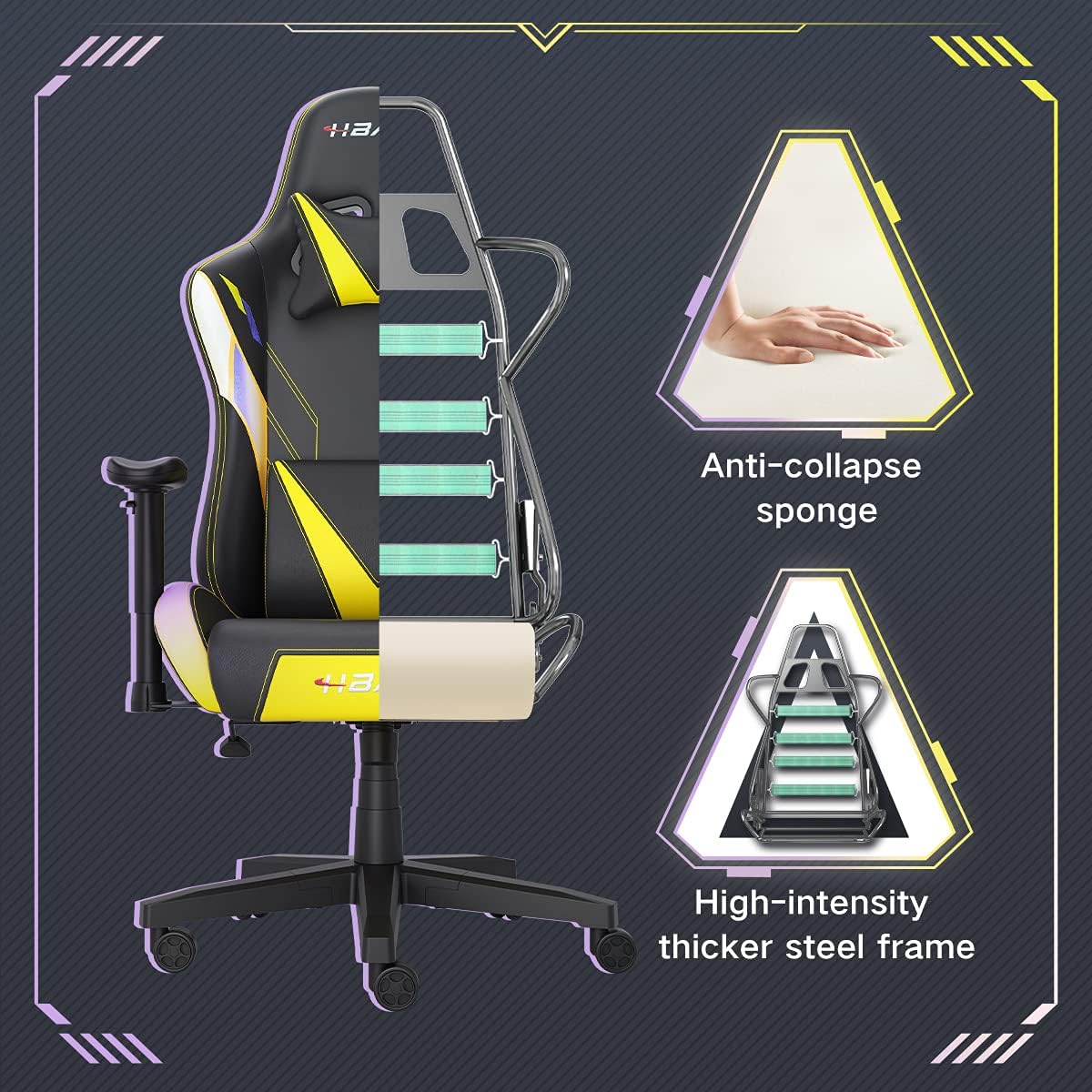
Imatge: Un retall view of the chair's internal structure, highlighting the anti-collapse sponge padding and the high-intensity thicker steel frame, indicating durable construction.
Resolució de problemes
If you encounter any issues with your Hbada Gaming Chair, refer to the following common problems and solutions:
| Problema | Causa possible | Solució |
|---|---|---|
| La cadira no ajusta l'alçada | Mal funcionament de l'elevador de gas o palanca no accionada. | Assegureu-vos que la palanca d'ajust d'alçada estigui completament activada. Si el problema persisteix, és possible que calgui substituir l'elevador de gas. Poseu-vos en contacte amb el servei d'atenció al client. |
| La cadira està inestable o trontolla | Cargols solts o muntatge incorrecte. | Check all assembly screws and bolts, and tighten them securely. Refer to the assembly instructions. |
| Les rodes no giren suaument | Restes (cabells, pols) atrapades a les rodes. | Turn the chair over and remove any debris from the caster wheels. |
| El respatller no es reclina ni es bloqueja | Recline mechanism jammed or lever not engaged. | Ensure the recline lever is fully engaged. Check for any obstructions around the mechanism. |
Especificacions
| Característica | Detall |
|---|---|
| Marca | Hbada |
| Número de model | W203YMA/EU |
| ASIN | B095PSFLKX |
| Color | groc |
| Material | PU Leather, Metal Frame |
| Dimensions del producte | 70 x 70 x 128 cm (Llarg x Amplada x Altura) |
| Pes del producte | 22 quilos |
| Característiques especials | Ergonomic, Swivel, Casters, Headrest Support, Adjustable Recline (90°-155°), Adjustable Seat Height (8cm range), Adjustable Armrests (7cm range) |
| Nombre d'unitats | 1.0 recompte |
Garantia i Suport
Your Hbada Gaming Chair comes with a garantia d'un any des de la data de compra. Aquesta garantia cobreix defectes de fabricació i defectes de materials en condicions d'ús normal.
If you experience any issues during use, including problems with installation, damage, or missing parts, please do not hesitate to contact Hbada customer service. We are committed to providing reliable service and can offer free exchanges for covered issues.
For support, please visit the official Hbada weblloc o poseu-vos en contacte amb el vostre distribuïdor.