
1. Producte acabatview
The Lexmark MX611DHE is a monochrome laser multifunction device designed for office environments, offering comprehensive capabilities including printing, copying, scanning, and faxing. This robust unit is engineered for high-volume output and efficient document handling.
- Multifuncionalitat: Integrates print, copy, fax, and scan functions into a single device.
- Rendiment d'alta velocitat: Capable of printing and copying at speeds up to 50 pages per minute (ppm).
- Impressió a doble cara: Supports automatic two-sided printing to conserve paper.
- Capacitat d'entrada: Features a standard input capacity of 650 sheets, expandable for larger tasks.
- Connectivitat: Equipped with USB and Ethernet interfaces for versatile network integration.
- Control intuïtiu: Features a touchscreen display for easy navigation and operation.
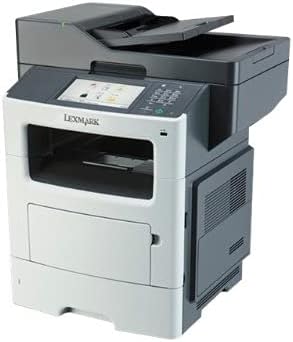
Figura 1: Frontal view of the Lexmark MX611DHE multifunction printer, showcasing its compact design and front-facing paper tray.
2. Guia de configuració
Follow these steps to set up your Lexmark MX611DHE printer for initial use.
- Desembalatge: Traieu amb cura la impressora del seu embalatge. Traieu totes les cintes protectores i els materials d'embalatge de l'exterior i l'interior del dispositiu.
- Col·locació: Place the printer on a stable, level surface with adequate ventilation. Ensure there is enough space around the printer for proper operation and maintenance.
- Connexió d'alimentació: Connect the power cord to the printer's power input and then to a grounded electrical outlet. Do not connect to a surge protector or extension cord initially.
- Càrrega de paper: Open the paper tray and load the appropriate paper size (up to 8.5 x 14 inches). Adjust the paper guides to fit the paper stack snugly.
- Connexió de xarxa/USB:
- For Network (Ethernet): Connecteu un cable Ethernet des del port Ethernet de la impressora al vostre encaminador o commutador de xarxa.
- Per a USB: Connect a USB cable from the printer's USB port to your computer.
- Encesa inicial: Press the power button to turn on the printer. Follow the on-screen prompts on the touchscreen display to select language, region, and perform initial setup configurations.
- Instal·lació del controlador: Install the necessary printer drivers on your computer. Drivers can typically be found on the Lexmark support website or on an included installation CD (if applicable).
3. Instruccions de funcionament
This section provides basic instructions for using the Lexmark MX611DHE's primary functions.
3.1. Impressió
- Assegureu-vos que la impressora estigui engegada i connectada a l'ordinador o a la xarxa.
- Obriu el document que voleu imprimir a l'ordinador.
- Seleccioneu File > Imprimeix (o l'ordre equivalent a la vostra aplicació).
- Choose "Lexmark MX611DHE" from the list of available printers.
- Adjust print settings such as number of copies, paper size, and duplex options as needed.
- Feu clic Imprimeix.
3.2. Còpia
- Place the document face-down on the scanner glass or face-up in the automatic document feeder (ADF).
- On the printer's touchscreen, select the Còpia funció.
- Ajusteu paràmetres com ara el nombre de còpies, la claredat/foscor i la mida del paper.
- Premeu el botó Comença botó per començar a copiar.
3.3. Escaneig

Figure 2: The Lexmark MX611DHE with its scanner lid open, revealing the flatbed scanner glass and the automatic document feeder mechanism.
- Col·loqueu el document al vidre de l'escàner o a l'ADF.
- On the printer's touchscreen, select the Escaneja funció.
- Choose your desired scan destination (e.g., Scan to Computer, Scan to Email, Scan to Network Folder).
- Configureu els paràmetres d'escaneig com ara la resolució, el mode de color i file format.
- Premeu el botó Comença button to initiate the scan.
3.4. Enviament de faxos
- Ensure the printer is connected to a telephone line.
- Col·loqueu el document al vidre de l'escàner o a l'ADF.
- On the printer's touchscreen, select the Fax funció.
- Enter the recipient's fax number using the keypad on the control panel.
- Ajusteu els paràmetres de fax necessaris.
- Premeu el botó Comença botó per enviar el fax.
4. Manteniment
Regular maintenance ensures optimal performance and extends the lifespan of your Lexmark MX611DHE.
- Neteja de l'exterior: Utilitzeu un suau, damp, lint-free cloth to wipe the exterior surfaces of the printer. Avoid abrasive cleaners.
- Neteja del vidre de l'escàner: For clear scans, regularly clean the scanner glass with a soft, lint-free cloth and a mild glass cleaner.
- Substitució del cartutx de tòner: When the toner low message appears, order a new Lexmark toner cartridge. Follow the instructions provided with the new cartridge for proper installation.
- Neteja del recorregut del paper: If paper jams become frequent, consult the printer's internal guides or the Lexmark support website for instructions on cleaning the paper path rollers.
5. Solució De Problemes
This section addresses common issues you might encounter with your Lexmark MX611DHE.
| Problema | Causa possible | Solució |
|---|---|---|
| La impressora no respon | Cable d'alimentació desconnectat, problema de xarxa, problema del controlador. | Comproveu les connexions d'alimentació. Verifiqueu el cable de xarxa o la connexió USB. Torneu a instal·lar els controladors de la impressora. |
| Embús de paper | Incorrectly loaded paper, foreign object in paper path. | Open access covers and carefully remove jammed paper. Ensure paper is loaded correctly. |
| Poca qualitat d'impressió | Low toner, dirty print head/rollers, incorrect print settings. | Replace toner cartridge. Clean internal components as per maintenance guide. Adjust print quality settings in driver. |
| L'escàner no funciona | Scanner glass dirty, software issue, connectivity problem. | Clean scanner glass. Restart computer and printer. Check USB/network connection. |
6. Especificacions
Detailed technical specifications for the Lexmark MX611DHE.
| Característica | Detall |
|---|---|
| Marca | Lexmark |
| Nom del model | MX611DHE |
| Tipus de visualització | LCD (pantalla tàctil) |
| Tecnologia d'impressió | Làser (monocrom) |
| Velocitat màxima d'impressió (monocrom) | 50 ppm |
| Velocitat màxima de còpia (blanc i negre) | 50 ppm |
| Resolució | 1200 x 1200 ppp |
| Capacitat d'emmagatzematge de memòria | 1024 MB |
| Suport de mida de full | Up to 8.5 x 14 Inches |
| Interfície del maquinari | USB, Ethernet |
| Dimensions del producte | 22.6 x 23.5 x 26.5 polzades |
| Color | Gris/blanc |
| UPC | 656942073611 |
7. Garantia i Suport
Your Lexmark MX611DHE (Renewed) product is covered by a limited warranty and support resources.
- Garantia: Aquest producte ve amb un Garantia limitada de 90 dies. Please refer to your purchase documentation for specific terms and conditions of the Amazon Renewed Guarantee.
- Suport tècnic: For technical assistance, driver downloads, or further troubleshooting, please visit the official Lexmark support weblloc o poseu-vos en contacte amb el seu servei d'atenció al client.
- Recursos en línia: Additional user guides, FAQs, and firmware updates may be available on the Lexmark support portal.