
1. Introducció
Thank you for choosing the Dacom K6H Pro Bluetooth 5.0 Earphones. This manual provides detailed instructions on how to set up, operate, and maintain your earphones to ensure optimal performance and longevity. Please read this manual thoroughly before using the product.
2. Contingut del paquet
- Dacom K6H Pro Wireless Earbuds (Left and Right)
- Estoig de càrrega
- Manual d'usuari
3. Producte acabatview
Familiarize yourself with the components of your Dacom K6H Pro earphones and charging case.
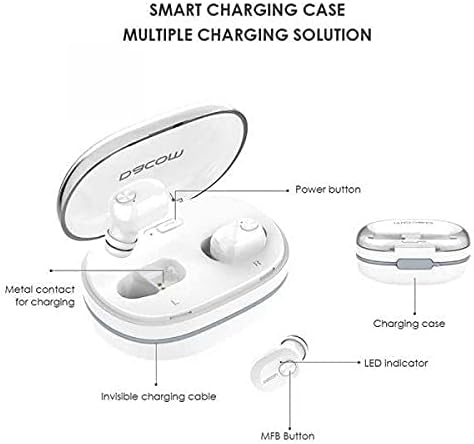
Imatge 3.1: Diagram illustrating the Dacom K6H Pro earphones and charging case components. The image highlights the power button, metal contacts for charging, invisible charging cable, LED indicator, and Multi-Function Button (MFB) on the earbud.
Components clau:
- Estoig de càrrega: Stores and charges the earbuds. Features a power button and metal contacts for earbud charging.
- Invisible Charging Cable: Integrated USB charging cable for convenient power replenishment.
- Earbuds (Left & Right): Each earbud has an LED indicator and a Multi-Function Button (MFB) for control.

Imatge 3.2: The Dacom K6H Pro wireless earphones, showing both the charging case with one earbud inserted and the other earbud removed, ready for use. The case is open, revealing the earbud compartments.
4. Càrrega
Ensure your Dacom K6H Pro earphones and charging case are fully charged before first use.
4.1 Càrrega dels auriculars
- Col·loqueu els auriculars a les ranures respectives de la caixa de càrrega.
- Tanca la tapa de l'estoig de càrrega. Els auriculars començaran a carregar-se automàticament.
- The LED indicator on the earbuds will show charging status (refer to LED indicator section for details).
4.2 Càrrega de la funda
The charging case features a hidden, integrated USB charging cable for convenience.
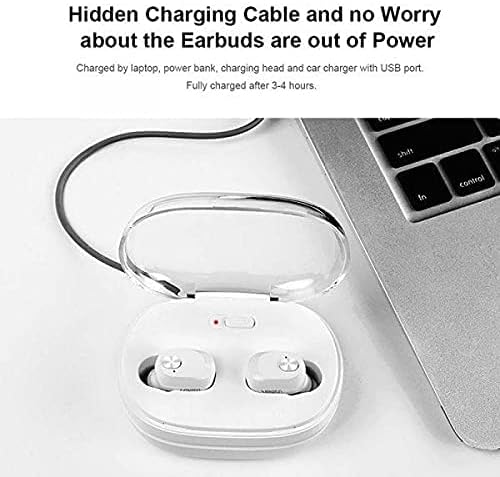
Imatge 4.1: The Dacom K6H Pro charging case connected to a laptop via its integrated USB charging cable. The earbuds are inside the case, and a red LED indicator on the case is visible, signifying charging in progress.
- Locate the integrated USB charging cable on the charging case.
- Connect the USB cable to a power source such as a laptop, power bank, charging head, or car charger with a USB port.
- The charging case LED indicator will illuminate to show charging status.
- Una càrrega completa sol trigar aproximadament 3-4 hores.
5. Configuració i emparellament
Follow these steps to pair your Dacom K6H Pro earphones with your device.
5.1 Emparellament inicial
- Assegureu-vos que els auriculars estiguin carregats.
- Obre l'estoig de càrrega. Els auriculars s'encendran automàticament i entraran en mode d'emparellament.
- On your smartphone (iPhone or Android) or other Bluetooth-enabled device, go to the Bluetooth settings.
- Cerca available devices and select "Dacom K6H Pro" from the list.
- Un cop connectat, un missatge de veu confirmarà l'emparellament correcte.
5.2 Reconnexió
After initial pairing, the earbuds will automatically reconnect to the last paired device when removed from the charging case and the device's Bluetooth is active.
6. Controls de funcionament
The Dacom K6H Pro earphones feature touch controls via the Multi-Function Button (MFB) on each earbud.
- Reproduir/pausa: Single tap on either MFB.
- Pista següent: Double tap the MFB on the right earbud.
- Pista anterior: Double tap the MFB on the left earbud.
- Respondre/Finalitzar la trucada: Single tap on either MFB during an incoming call.
- Rebutja la trucada: Press and hold either MFB for 2 seconds during an incoming call.
- Activa l'Assistent de veu: Triple tap on either MFB.
- Control de volum: Volume is typically controlled via the connected device.
7. Manteniment
Un manteniment adequat garanteix la longevitat i el rendiment dels teus auriculars.
- Neteja: Netegeu regularment els auriculars i l'estoig de càrrega amb un drap suau, sec i sense borrissol. No utilitzeu productes químics agressius ni materials abrasius.
- Emmagatzematge: Quan no els utilitzeu, guardeu els auriculars a la seva funda de càrrega per protegir-los de la pols i els danys.
- Eviteu l'aigua: Els auriculars no són impermeables. Eviteu l'exposició a l'aigua, la humitat o les temperatures extremes.
- Contactes de càrrega: Ensure the metal charging contacts on both the earbuds and the case are clean and free of debris for effective charging.
8. Solució De Problemes
If you encounter issues with your Dacom K6H Pro earphones, refer to the following common solutions.
- Auriculars que no s'emparellan:
- Assegureu-vos que els dos auriculars estiguin carregats.
- Desactiva el Bluetooth al dispositiu i torna'l a activar.
- Forget/delete "Dacom K6H Pro" from your device's Bluetooth list and attempt to pair again.
- Torneu a col·locar els auriculars a la funda, tanqueu la tapa, espereu uns segons i, a continuació, obriu-la per tornar a entrar al mode d'emparellament.
- Només funciona un auricular:
- Assegureu-vos que els dos auriculars estiguin carregats.
- Try resetting the earbuds (refer to manufacturer's specific reset instructions if available, otherwise try placing both in case, closing, and reopening).
- Netegeu els contactes de càrrega dels auriculars i de la funda.
- Auriculars que no es carreguen:
- Assegureu-vos que la funda de càrrega estigui carregada.
- Verify the earbuds are correctly seated in the charging case.
- Netegeu els contactes de càrrega dels auriculars i de la funda.
- Try a different USB power source for the charging case.
- Mala qualitat del so:
- Assegureu-vos que els auriculars estiguin correctament col·locats a les orelles.
- Check the audio source and volume levels on your connected device.
- Acosteu-vos més al dispositiu connectat per evitar interferències.
9. Especificacions
| Marca | Dacom |
| Número de model | K6H Pro |
| Connectivitat | Sense fil, Bluetooth 5.0 |
| Tipus d'auriculars | In-orella |
| Micròfon | Inclòs |
| Control de soroll | Cancel·lació activa del soroll |
| Tipus de control | Control multimèdia, tàctil |
| Característica del cable | Without Cable (integrated USB for case) |
| Dispositius compatibles | Multi (iPhone & Android) |
| Color | Blanc |
| Dimensions del paquet | 17.2 x 10.2 x 3.8 cm |
| Pes de l'article | 120 g |
10. Garantia i Suport
Dacom products are designed for reliability and performance. For warranty information, please refer to the warranty card included in your product packaging or visit the official Dacom website. For technical support or further assistance, please contact Dacom customer service through the channels provided on their official weblloc.