
Introducció
Welcome to the user manual for your new Other T11 Smart Watch. This device is designed to enhance your daily life with features such as fitness tracking, health monitoring, and smart notifications. Please read this manual carefully to understand the functions and proper operation of your smartwatch. This watch is compatible with both Android and iOS devices.
Configuració
1. Càrrega del rellotge intel·ligent
Before initial use, fully charge your T11 Smart Watch. Connect the provided charging cable to the charging port on the back of the watch and plug the USB end into a standard USB power adapter (not included) or a computer USB port. The watch display will indicate charging status.
2. Baixada de l'aplicació complementària
To unlock all features and synchronize data, download the dedicated companion app on your smartphone. Cerca the app name (usually indicated in the quick start guide or on the watch packaging) in the Apple App Store (for iOS) or Google Play Store (for Android).
3. Emparellament amb el telèfon intel·ligent
- Assegureu-vos que el Bluetooth estigui habilitat al vostre telèfon intel·ligent.
- Obriu l'aplicació complementària al vostre telèfon intel·ligent.
- Follow the in-app instructions to search for and connect to your T11 Smart Watch. The watch name should appear in the list of available devices.
- Confirma la sol·licitud d'emparellament tant al telèfon com al rellotge si se't demana.
Instruccions de funcionament
Navegació bàsica
The T11 Smart Watch features a full touch screen for easy navigation. Swipe left, right, up, or down to access different menus and functions. Tap to select an option or confirm an action.
Changing Watch Dials
The T11 Smart Watch offers various beautiful dials to personalize your experience. You can change the watch face directly by touching and holding the screen, then swiping to browse available options and tapping to select. No phone connection is needed for this function.

Image: The T11 Smart Watch allows users to easily change between various pre-installed watch faces by interacting directly with the touch screen.
Real-time Information Reminders
Once paired with your smartphone via Bluetooth, the T11 Smart Watch can provide real-time reminders for calls and messages. Ensure your phone's Bluetooth is active and the companion app is running in the background. The watch will vibrate to alert you, displaying the content of messages or caller ID directly on the screen.
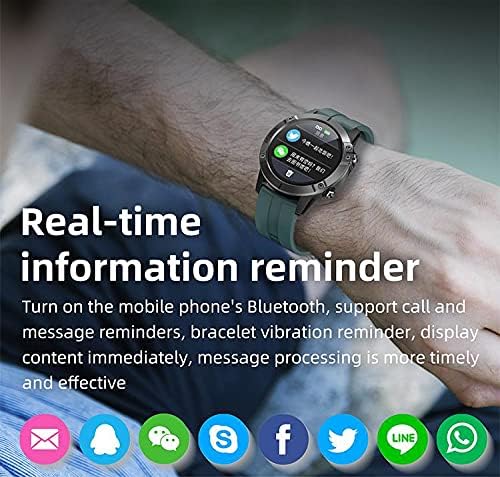
Image: The T11 Smart Watch on a wrist, showing notifications from various social media and messaging applications.
Múltiples modes esportives
The T11 Smart Watch supports multiple sports modes to track your physical activities. These modes include hiking, climbing, running, swimming, cycling, walking, football, basketball, badminton, and more. Select the appropriate mode before starting your activity for accurate data recording.

Image: A visual representation of the T11 Smart Watch's multiple sports modes, including walking, running, riding, climbing, football, basketball, table tennis, and badminton.
Vigilància de la salut
The watch includes several health monitoring features:
- Heart Rate Tracker: Controla la teva freqüència cardíaca durant tot el dia.
- Monitor d'oxigen en sang: Mesura els nivells de saturació d'oxigen a la sang.
- Seguiment del son: Analyzes your sleep patterns, including deep sleep and light sleep.
- Rastreig d'aptitud: Registra els passos, la distància i les calories cremades.
Característiques addicionals
- Control de música: Controla la reproducció de música al teu telèfon intel·ligent directament des del rellotge.
- Càmera remota: Use the watch as a remote shutter for your smartphone's camera.
- Despertador: Set alarms to wake you up or remind you of tasks.
- Mood Tracker: (Functionality may vary, refer to app for details).

Imatge: Un cop mésview of the T11 Smart Watch's key features: full touch screen, sport pedometer, music control, multiple sports modes, health assistant, large-capacity battery, and remote camera.
Manteniment
Resistència a l'aigua (IP67)
The T11 Smart Watch is IP67 water-resistant, meaning it is protected against dust and can withstand immersion in water up to 1 meter for 30 minutes. It is suitable for daily use and activities like hand washing or light rain. However, it is not recommended for swimming, diving, or hot water activities.
Neteja
Netegeu regularment el rellotge i la corretja amb un drap suau i sec. Si cal, utilitzeu un drap lleugerament sec.amp cloth and then dry thoroughly. Avoid using harsh chemicals or abrasive materials, as these can damage the device.
Cura de la bateria
To prolong battery life, avoid fully discharging the watch frequently. Charge it regularly, especially if you plan not to use it for an extended period.
Resolució de problemes
El rellotge no s'encén
- Assegura't que el rellotge estigui completament carregat. Connecta'l al carregador durant almenys 30 minuts.
- Press and hold the power button (if available) for several seconds.
Cannot Pair with Smartphone
- Assegureu-vos que el Bluetooth estigui habilitat al vostre telèfon intel·ligent.
- Assegureu-vos que el rellotge estigui dins de l'abast del Bluetooth del telèfon (normalment 10 metres).
- Reinicieu tant el vostre telèfon intel·ligent com el rellotge.
- Clear the Bluetooth cache on your phone or forget the device and try pairing again.
- Assegureu-vos que l'aplicació complementària estigui actualitzada a la darrera versió.
Dades de salut inexactes
- Assegureu-vos de portar el rellotge ben ajustat al canell, ni massa ajustat ni massa fluix.
- Netegeu els sensors de la part posterior del rellotge.
- Avoid excessive movement during measurements for better accuracy.
No apareixen notificacions
- Check notification permissions for the companion app in your phone's settings.
- Ensure the app is running in the background and not being closed by your phone's power-saving features.
- Verify that notifications are enabled within the companion app settings.
Especificacions tècniques
| Característica | Especificació |
|---|---|
| Nom del model | T11 |
| Nom de marca | Altres |
| Sistema operatiu | Múltiples |
| Sistemes operatius compatibles | Android, iOS |
| Tipus de visualització | LCD |
| Mida de la pantalla | 1.3 polzades |
| Resolució | 320 x 240 |
| Entrada de la interfície humana | Control tàctil |
| Tecnologia de connectivitat | Sense fil |
| Comunicació sense fils estàndard | Bluetooth 4.0 |
| Capacitat de la bateria | 280 mAh |
| Temps d'espera | Aprox. 35 dies |
| Horari de treball | 7-10 dies |
| Classificació de protecció internacional | IP67 (Resistent a l'aigua) |
| Profunditat de resistència a l'aigua | 1 metre |
| Tipus de material de la banda | Silicona |
| Case Material Type | Plàstic |
| Color | Negre |
| Components inclosos | Silicone bracelet (black), 280 mAh battery, 280 mAh battery charger |
Garantia i Suport
Per obtenir informació sobre la garantia i assistència al client, consulteu la documentació que s'inclou amb la compra o poseu-vos en contacte amb el distribuïdor. Conserveu el comprovant de compra per a qualsevol reclamació de garantia.