
1. Introducció
The Syble K816 is a high-performance, fixed, wired 1D laser barcode reader designed for efficient and accurate data capture in various environments. This manual provides essential information for setting up, operating, maintaining, and troubleshooting your K816 barcode reader.
Les característiques clau inclouen:
- Número de model: K816
- Marca: Síbil
- Connectivitat: Amb cable (USB)
- Capacitat d'escaneig: Codis de barres 1D
- Velocitat d'escaneig: 1500 escanejos per segon
- Font de llum: Làser
- Dispositius compatibles: Escriptori, ordinador portàtil
2. Configuració
Follow these steps to set up your Syble K816 Barcode Reader:
- Desempaquetar el dispositiu: Carefully remove the barcode reader and its cable from the packaging. Ensure all components are present.
- Connecteu el cable: Plug the USB cable from the barcode reader into an available USB port on your desktop or laptop computer.
- Encès: The device will typically power on automatically once connected to a powered USB port. The laser light may briefly activate, indicating it is ready.
- Instal·lació del controlador: The Syble K816 is generally a plug-and-play device and does not require specific driver installation for most operating systems (Windows, macOS, Linux). The system should automatically recognize it as a Human Interface Device (HID) keyboard.
- Prova l'escàner: Open a text editor (e.g., Notepad, Word) or any application that accepts keyboard input. Aim the scanner at a 1D barcode and press the trigger (if applicable, or wait for automatic scanning). The barcode data should appear in the text editor.
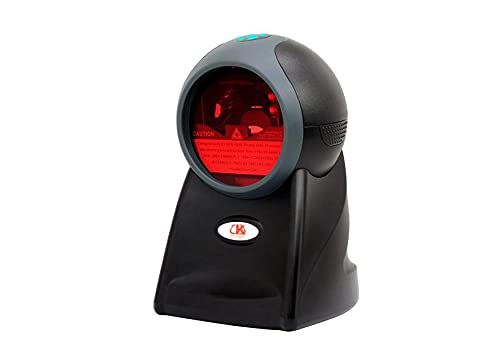
Figura 2.1: Frontal view of the Syble K816 Barcode Reader, showing the scanning window and indicator light.
3. Instruccions de funcionament
The Syble K816 Barcode Reader is designed for straightforward operation:
- Posicionament: Place the fixed barcode reader on a stable surface where barcodes can be easily presented to its scanning window.
- Escaneig d'un codi de barres: Hold the 1D barcode within the scanning range of the device. The laser beam will automatically activate and scan the barcode.
- Confirmació: A successful scan is typically indicated by an audible beep and/or a visual indicator light. The scanned data will be transmitted to your connected computer as if typed from a keyboard.
- Angle d'escaneig: For optimal performance, ensure the barcode is presented flat to the scanner window. Avoid extreme angles that may prevent the laser from reading the barcode accurately.

Figura 3.1: Angle view of the Syble K816 Barcode Reader, highlighting the scanning window and laser output.
4. Manteniment
Proper maintenance ensures the longevity and optimal performance of your barcode reader:
- Neteja de la finestra d'escaneig: Netegeu regularment la finestra d'escaneig amb un drap suau i sense borrissol. Per a la brutícia resistent, netegeu lleugeramentampNetegeu el drap amb aigua o un netejador suau i no abrasiu. No utilitzeu productes químics agressius ni materials abrasius.
- Neteja general: Wipe the exterior of the device with a dry or slightly damp drap per eliminar la pols i la brutícia.
- Eviteu l'exposició a líquids: No submergiu el dispositiu en aigua ni l'exposeu a una humitat excessiva.
- Emmagatzematge: When not in use, store the barcode reader in a clean, dry environment away from direct sunlight and extreme temperatures.
- Cura del cable: Eviteu doblegar o girar excessivament el cable USB per evitar danys interns.
5. Solució De Problemes
If you encounter issues with your Syble K816 Barcode Reader, refer to the following troubleshooting guide:
| Problema | Causa possible | Solució |
|---|---|---|
| L'escàner no s'encén. | El cable USB no està connectat correctament o el port USB està defectuós. | Ensure the USB cable is securely connected. Try a different USB port or a different computer. |
| L'escàner no llegeix codis de barres. | Dirty scanning window, incorrect barcode type, or barcode damage. | Clean the scanning window. Ensure you are scanning a 1D barcode. Try scanning a different, known-good barcode. |
| Les dades escanejades són incorrectes o incompletes. | Poor scan quality, damaged barcode, or software conflict. | Ensure the barcode is flat and within optimal scanning range. Try scanning multiple times. Check your computer's keyboard settings. |
| No beep or visual confirmation after scanning. | Scan failed or indicator settings. | Ensure the barcode is properly scanned. Check the device's configuration for sound/light indicators (if programmable). |
Si el problema persisteix després de provar aquestes solucions, poseu-vos en contacte amb l'atenció al client.
6. Especificacions
Detailed technical specifications for the Syble K816 Barcode Reader:
| Característica | Descripció |
|---|---|
| Número de model | K816 |
| Nom de marca | Síbil |
| Connectivitat | Amb cable (USB) |
| Tipus | Fixed Barcode Reader |
| Capacitat d'escaneig | Escaneig de codis de barres 1D |
| Taxa d'escaneig | 1500 escanejos per segon |
| Font de llum | Làser |
| Dispositius compatibles | Escriptori, ordinador portàtil |
| Font d'alimentació | Elèctric amb cable (via USB) |
| External Product ID | 2724837269333 (EAN-13) |
| ASIN | B096955S3R |
7. Informació de seguretat
Si us plau, observeu les precaucions de seguretat següents:
- Seguretat làser: This device uses a laser light source. Do not stare directly into the laser beam or point it at others' eyes.
- Seguretat elèctrica: Use only the provided USB cable for connection. Do not attempt to open or modify the device, as this may expose you to electrical hazards.
- Ambiental: Feu funcionar el dispositiu dins dels rangs de temperatura i humitat recomanats. Eviteu condicions extremes.
- Nens: Mantingueu el dispositiu fora de l'abast dels nens.
8. Garantia i Suport
Per obtenir informació sobre la garantia, assistència tècnica o consultes sobre el servei tècnic, consulteu la documentació que s'inclou amb la compra o poseu-vos en contacte amb el vostre distribuïdor. Conserveu el comprovant de compra per a reclamacions de garantia.
