
1. Introducció
This manual provides comprehensive instructions for the installation, operation, and maintenance of your SENSTREE WTC200 Wireless Thermostat Plug-in Temperature Controller Outlet. Please read this manual thoroughly before using the device to ensure proper function and safety. Keep this manual for future reference.
2. Producte acabatview
2.1 Components inclosos
- Wireless Thermostat Receiver (Plug-in Outlet)
- Comandament a distància sense fil
- 2m/6ft NTC Temperature Probe
- Manual d'usuari (Aquest document)
- 2 AAA batteries (for remote controller, may be included or required separately)
2.2 Característiques clau
- Funcionament sense fil: Control temperature remotely with the handheld unit.
- High Accuracy Sensor: The temperature is detected automatically by the thermostat outlet or remote.
- Heating & Cooling Modes: Automatically activates or deactivates connected devices based on preset temperatures.
- Botó d'encesa/apagada manual: The plug-in outlet features a manual power button.
- Interruptor d'unitat de temperatura: Easily switch between Celsius (℃) and Fahrenheit (℉).
- Programable: Simple two-step setup for heating or cooling applications.
- Alarmes d'alta/baixa temperatura: Provides alerts for temperature deviations.
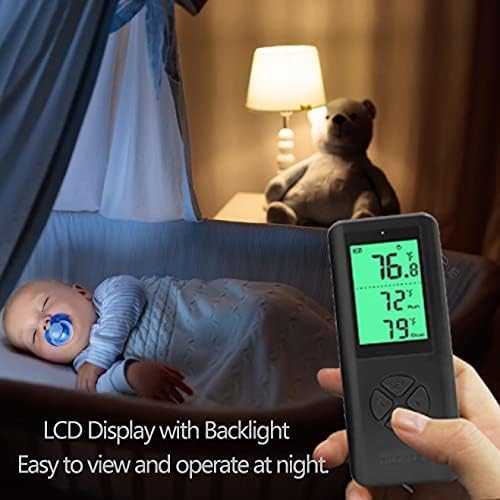
- Pantalla LCD retroiluminada: Clear digital display for easy reading, even in low light.
2.3 Product Components Visual Guide


3. Instruccions de configuració
3.1 Instal·lació de la bateria del comandament a distància
- Localitzeu el compartiment de les piles a la part posterior del comandament a distància.
- Obriu la tapa del compartiment de la bateria.
- Introduïu dues piles AAA, assegurant-vos de la polaritat correcta (+/-).
- Tanqueu la tapa del compartiment de la bateria.
3.2 Connecting the Temperature Probe
- Identify the NTC temperature probe cable.
- Plug the probe's jack into the designated port on the side of the wireless thermostat receiver (plug-in outlet).
- Position the probe in the area where you wish to measure and control the temperature. Ensure it is not obstructed or directly exposed to heat/cold sources that do not represent the ambient temperature.
3.3 Initial Power-Up and Pairing
- Plug the wireless thermostat receiver into a standard 3-prong grounded electrical outlet.
- The remote controller and receiver are designed to automatically pair upon initial power-up. The display on the remote should activate and show temperature readings.
- If the remote does not display readings or connect, ensure batteries are correctly installed and the receiver is powered. Refer to the Troubleshooting section if issues persist.
4. Instruccions de funcionament
4.1 Remote Controller Layout

The remote controller features a digital display and several buttons:
- Botó SET: S'utilitza per introduir i confirmar la configuració.
- Up (▲) / Down (▼) Buttons: Used to adjust temperature values and navigate menu options.
- Botó M (mode): Used to switch between heating and cooling modes, and other functions.
4.2 Setting Temperature and Mode
- Seleccioneu el mode: Premeu el botó M button to toggle between Heating (indicated by a flame icon or similar) and Cooling (indicated by a snowflake icon or similar) modes.
- Enter Setting: Premeu el botó SET button once. The target temperature display will begin to flash.
- Ajustar la temperatura: Utilitza el Amunt (▲) i Avall (▼) buttons to set your desired target temperature.
- Confirmeu la configuració: Premeu el botó SET button again to confirm and save the target temperature. The display will stop flashing.
- The thermostat will now automatically turn on or off the connected device to maintain the set temperature.
4.3 Commutació d'unitats de temperatura (℃/℉)
Per canviar entre Celsius (℃) i Fahrenheit (℉):
- With the remote display active, press and hold the M button for approximately 3 seconds. The temperature unit on the display will change.
- Release the button once the desired unit is shown.
4.4 Alarmes de temperatura alta/baixa
The WTC200 features adjustable high and low-temperature alarms. When the ambient temperature exceeds the high alarm setting or falls below the low alarm setting, the remote controller will emit an audible alert.
- Premeu el botó SET button twice to enter the alarm setting mode.
- Utilitza el Amunt (▲) i Avall (▼) buttons to adjust the high-temperature alarm threshold.
- Premeu SET again to switch to the low-temperature alarm threshold.
- Utilitza el Amunt (▲) i Avall (▼) buttons to adjust the low-temperature alarm threshold.
- Premeu SET a third time to save and exit the alarm settings.
4.5 Manual ON/OFF on the Outlet
The plug-in outlet receiver has a manual power button. Press this button to manually turn the connected device ON or OFF, overriding the thermostat's automatic control. The remote will reflect the current status.
5. Manteniment
5.1 Neteja
- Assegureu-vos que el dispositiu estigui desconnectat abans de netejar-lo.
- Wipe the surfaces of the remote controller and plug-in outlet with a soft, dry cloth.
- No utilitzeu netejadors abrasius ni dissolvents ni submergiu el dispositiu en aigua.
5.2 Substitució de la bateria
When the battery indicator on the remote controller's display shows low power, replace the AAA batteries as described in Section 3.1. Prompt battery replacement ensures continuous and reliable operation.
6. Solució De Problemes
| Problema | Causa possible | Solució |
|---|---|---|
| Remote display is blank or unresponsive. | Piles baixes o gastades; instal·lació incorrecta de la bateria. | Substituïu les piles AAA, assegurant-vos de la polaritat correcta. |
| Thermostat not controlling connected device. | Device not plugged into the outlet; outlet not receiving power; incorrect mode (heating/cooling); temperature settings outside range. | Ensure device is securely plugged into the thermostat outlet. Verify the thermostat outlet is plugged into a live wall socket. Check if the correct mode (heating/cooling) is selected. Adjust target temperature settings. |
| Les lectures de temperatura són inexactes. | Temperature probe is disconnected or improperly placed; probe is damaged. | Ensure the temperature probe is securely connected to the outlet. Reposition the probe away from direct heat/cold sources or drafts. If damage is suspected, contact support. |
| Remote and outlet not communicating. | Out of range; interference; pairing issue. | Move the remote closer to the outlet. Ensure no large metal objects or strong electronic devices are between them. Re-power both units to attempt re-pairing. |
| L'alarma sona inesperadament. | Ambient temperature has reached a set high or low alarm threshold. | Check the current temperature and your alarm settings. Adjust alarm thresholds if necessary (refer to Section 4.4). |
7. Especificacions
| Característica | Detall |
|---|---|
| Marca | SENSTREE |
| Número de model | WTC200 |
| Tipus de controlador | Remot |
| Tipus de control de temperatura | Automàtic |
| Tecnologia de connectivitat | RF (freqüència de ràdio) |
| Font d'alimentació | Elèctric |
| Voltage | 1.5 Volts (Remote), 100-240 Volts (Outlet) |
| Càrrega màxima | 14A, 1500W (at 110V), 3000W (at 220V) |
| Tipus de visualització | LCD digital amb retroiluminació |
| Mètode de control | Button Control, Remote |
| Sonda de temperatura | 2m/6ft NTC probe |
| Piles (comandament a distància) | Necessites 2 piles AAA |
| Pes de l'article | 8.4 unces |
| Dimensions del paquet | 4.8 x 4.17 x 2.32 polzades |
8. Garantia i Suport
8.1 Garantia del producte
The SENSTREE WTC200 Wireless Thermostat Plug-in Temperature Controller Outlet comes with a garantia d'un any des de la data de compra. Aquesta garantia cobreix els defectes de materials i fabricació en condicions d'ús normal. No cobreix els danys causats per un mal ús, accidents, modificacions no autoritzades o instal·lació incorrecta.
8.2 Atenció al client
For technical assistance, troubleshooting, or warranty claims, please contact SENSTREE customer support. Refer to the product packaging or the official SENSTREE weblloc web per obtenir la informació de contacte més actualitzada.