
Other Y10
Y10 Smart Bluetooth Sports Watch User Manual
Model: Y10
1. Producte acabatview
The Y10 Smart Bluetooth Sports Watch is a versatile wearable device designed to enhance your daily life and fitness routine. It combines essential smartwatch features with comprehensive health and activity tracking capabilities, all accessible through a vibrant full-touch display.
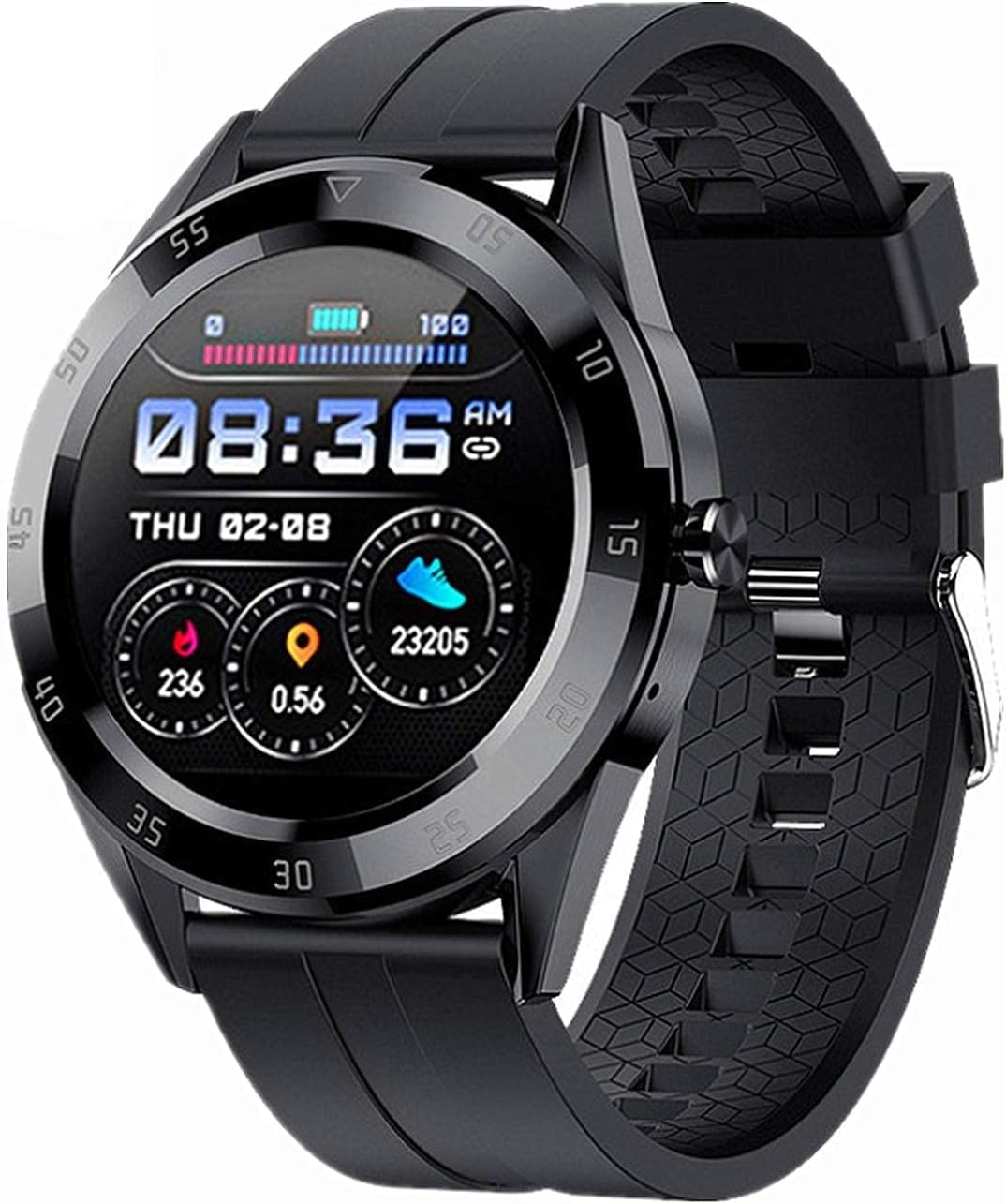
Figura 1.1: Frontal view of the Y10 Smart Bluetooth Sports Watch, displaying time, battery, and activity metrics.
2. Característiques
- Funció de trucada Bluetooth: Make and receive calls directly from your watch when connected to your mobile phone.
- Reproducció de música: Listen to music through the watch during Bluetooth calls.
- Resistència a l'aigua IP68: Designed to withstand hand washing, rain, and swimming. Not suitable for hot water showers or saunas.
- Monitorització de la salut les 24 hores: Continuous tracking of heart rate, blood pressure, and blood oxygen levels.
- Monitorització del son: Fa un seguiment dels patrons de son per ajudar-te a entendre la qualitat del teu son.
- Seguiment d'activitats: Calculates steps taken, calories burned, and distance covered.
- Recordatori sedentari: T'avisa que et pots moure després de períodes d'inactivitat.
- Pantalla personalitzable: Multiple user interface styles and dual switching for time and date display.
- Notificacions intel·ligents: Displays call, text message, and SNS notifications (Facebook, Twitter, WhatsApp, Line, KakaoTalk, Messenger, WeChat, QQ) when connected to the FitPro app.
- Despertador: Estableix alarmes per als recordatoris.
- Cronòmetre: Per a activitats de cronometratge.
- Find Bracelet Feature: Helps locate your watch if misplaced.
- Raise-to-Wake Screen: Il·lumina automàticament la pantalla quan aixeques el canell.
- Control remot de la càmera: Controla la càmera del teu telèfon de forma remota des del rellotge.
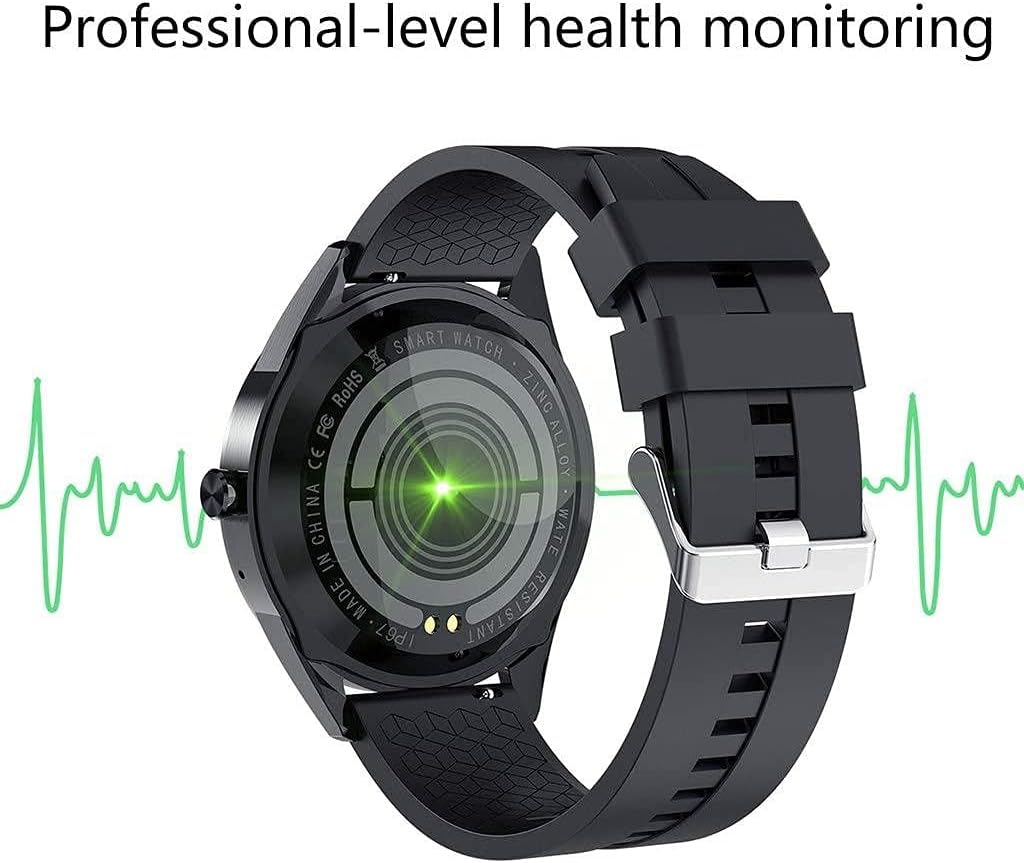
Figura 2.1: posterior view of the Y10 Smart Bluetooth Sports Watch, highlighting its professional-level health monitoring sensors.

Figure 2.2: The watch displaying its call dialer interface, allowing users to make calls directly from their wrist.

Figure 2.3: The watch showcasing various custom dial options, allowing personalization of the display.
3. Especificacions
| Especificació | Detall |
|---|---|
| Número de model | Y10 |
| Mida de la pantalla | 1.54-inch IPS Color Screen |
| Resolució de pantalla | 240 x 240 |
| Dimensions del cos | 42mm × 12mm |
| Material de la corretja | Silicona |
| Mida de la corretja | 20 mm |
| Chipset | HS6620D |
| Versió Bluetooth | 4.0 |
| Capacitat de la bateria | 200 mAh |
| Temps de càrrega | Aproximadament 2 hores |
| Temps de treball | 1-3 dies |
| Mode de càrrega | Clip de càrrega |
| Funció del botó | Toqueu complet |
| Aplicació acompanyant | FitPro |
| Sistemes compatibles | Android 4.4 i posterior, iOS 8.0 i posterior |
| Pes del producte | 50 g (aprox.) |
| App Supported Languages | English, Japanese, Turkish, Spanish, German, Russian, Finnish, French, Malay, Indonesian, Korean, Portuguese, Chinese |
4. Contingut del paquet
En obrir el paquet, assegureu-vos que hi hagi tots els elements següents:
- 1 x Y10 Smart Watch
- 1 x corretja de silicona
- 1 x Charging Cable (with clip)
- 1 x Manual d'usuari

Figure 4.1: The Y10 Smart Bluetooth Sports Watch, its charging cable, and packaging.
5. Configuració
5.1 Càrrega inicial
Before first use, fully charge your Y10 Smart Watch. Connect the charging clip to the charging points on the back of the watch and plug the USB end into a standard USB power adapter (not included) or a computer USB port. Charging typically takes about 2 hours.
5.2 App Installation (FitPro)
To unlock the full functionality of your Y10 Smart Watch, you must download and install the 'FitPro' app on your smartphone. The app is compatible with Android 4.4 and above, and iOS 8.0 and above.
- Cerca 'FitPro' in your phone's app store (Google Play Store for Android, Apple App Store for iOS).
- Baixeu i instal·leu l'aplicació.
5.3 Pairing with Your Mobile Phone
Important: Always pair your watch through the 'FitPro' app, not directly through your phone's Bluetooth settings. Direct Bluetooth pairing may prevent proper synchronization.
- Assegureu-vos que el Bluetooth estigui habilitat al vostre telèfon mòbil.
- Open the 'FitPro' app on your mobile phone.
- Navigate to the device pairing section within the app (usually labeled 'Device', 'Mine', or a similar icon).
- The app will search for available devices. Select 'Y10' or the corresponding device name when it appears.
- Confirma la sol·licitud d'emparellament tant al telèfon com al rellotge si se't demana.
6. Instruccions de funcionament
6.1 Navegació bàsica
- Pantalla tàctil: The watch features a full touch screen for navigation. Swipe left/right, up/down, and tap to select options.
- Activa la pantalla: Raise your wrist to automatically wake the screen, or press the side button.
6.2 Bluetooth Call Function
Once paired via the FitPro app, ensure the watch's Bluetooth is also connected for calls (sometimes a separate Bluetooth connection appears for audio). You can then:
- Fer trucades: Access the dialer on the watch to input numbers or select contacts from your synced phonebook.
- Rebre trucades: Answer or reject incoming calls directly from the watch.
6.3 Vigilància de la salut
Access health data by swiping through the watch interface or through the FitPro app.
- Freqüència cardíaca: Tap to measure your current heart rate.
- Blood Pressure/Oxygen: Tap to initiate a measurement.
- Seguiment del son: Wear the watch to bed for automatic sleep analysis. View detailed reports in the FitPro app.
6.4 Seguiment d'activitat
The watch automatically tracks your daily activity.
- Passos, calories, distància: View your daily progress on the watch face or in the app.
- Recordatori sedentari: Set intervals in the app for the watch to remind you to move.
6.5 Notificacions
Ensure notification permissions are granted to the FitPro app on your phone.
- Incoming calls, text messages, and app notifications will be displayed on the watch screen.
6.6 Altres funcions
- Alarma: Set alarms via the FitPro app.
- Cronòmetre: Access from the watch's menu.
- Càmera remota: Open the camera function in the FitPro app, then use the watch to trigger your phone's camera shutter.
- Cerca polsera: Use the FitPro app to make your watch vibrate, helping you locate it.
7. Manteniment
- Neteja: Wipe the watch and strap regularly with a soft, dry cloth. For silicone straps, a damp es pot utilitzar un drap i després assecar-lo bé.
- Resistència a l'aigua: The watch is IP68 water-resistant. This means it can withstand splashes, rain, and brief immersion in shallow water. Do NOT expose it to hot water, steam (e.g., hot showers, saunas), or high-pressure water jets. Do NOT press buttons underwater.
- Càrrega: Use only the provided charging cable. Ensure the charging contacts on the watch and clip are clean and dry before charging.
- Emmagatzematge: Guardeu el rellotge en un lloc fresc i sec quan no l'utilitzeu. Eviteu temperatures extremes.
- Eviteu productes químics: No exposeu el rellotge a productes químics forts, detergents o dissolvents, ja que poden danyar els materials.
8. Solució De Problemes
| Problema | Possible solució |
|---|---|
| El rellotge no s'encén | Ensure the watch is fully charged. Connect to the charging cable and leave it for at least 30 minutes before attempting to turn it on. |
| Cannot pair with phone / Data not syncing | 1. Assegureu-vos que el Bluetooth estigui activat al telèfon. 2. Make sure you are pairing through the 'FitPro' app, not directly via phone's Bluetooth settings. 3. Restart both your phone and the watch. 4. Ensure the 'FitPro' app has all necessary permissions (Bluetooth, location, notifications). 5. Check if the watch battery is low. |
| Lectures de dades de salut inexactes | 1. Ensure the watch is worn snugly on your wrist, not too loose or too tight. 2. Keep the sensor clean and free from sweat or dirt. 3. Readings are for reference only and should not be used for medical diagnosis. |
| No apareixen notificacions | 1. Ensure the watch is successfully paired with the FitPro app. 2. Check notification settings within the FitPro app to ensure desired apps are enabled. 3. Verify that your phone's notification settings allow the FitPro app to display notifications. |
| Durada de la bateria curta | 1. Redueix la brillantor de la pantalla. 2. Limit frequent screen wake-ups. 3. Turn off continuous health monitoring if not needed 24/7. 4. Ensure no background apps on the watch are consuming excessive power. |
9. Important Notes and Disclaimer
- Wearable devices monitor human activities through electronic sensors. Data collected is for reference only and should not be compared with professional medical equipment.
- This product is NOT a medical device and should not be used for medical diagnosis, treatment, or prevention of disease.
- It is normal for there to be some deviation in readings due to the nature of consumer electronic sensors.
- Users should interpret all data objectively.
10. Garantia i Suport
Specific warranty information for the Y10 Smart Bluetooth Sports Watch is not provided in this manual. Please refer to your point of purchase or the retailer's website for details regarding warranty coverage and return policies.
For technical support or further assistance, please contact the seller or retailer from whom you purchased the product. This manual provides general operating instructions and troubleshooting tips.
Ask a question about this manual
Ask about setup, troubleshooting, compatibility, parts, safety, or missing instructions. Manuals+ will review the question and use this page’s manual context to help answer it.