
1. Introducció
This manual provides instructions for the Allimity RM-C3402 replacement remote control. This remote is designed to function as a direct replacement for original JVC TV remote controls, offering seamless operation without the need for complex programming. Please read this manual carefully to ensure proper use and to maximize your experience with the remote control.
2. Producte acabatview
The Allimity RM-C3402 is an infrared replacement remote control for various JVC TV models. It features a standard layout with dedicated buttons for power, channel, volume, menu navigation, and other common TV functions. Its ergonomic design ensures comfortable handling.
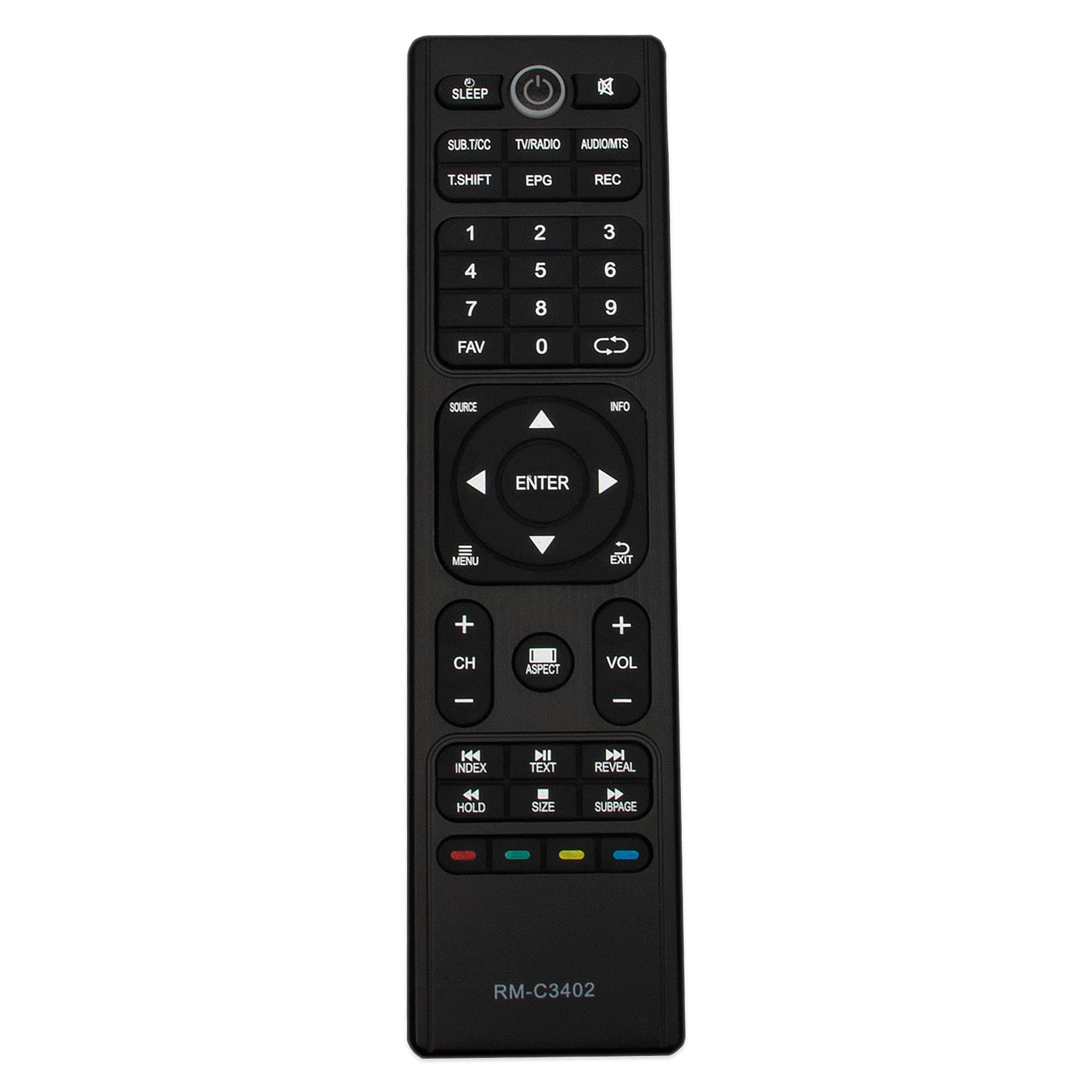
Figura 2.1: Frontal view of the Allimity RM-C3402 Remote Control, showing all buttons and their labels.
3. Configuració
3.1 Instal·lació de la bateria
The RM-C3402 remote control requires two (2) AAA alkaline batteries for operation. No programming or setup is required; simply insert the batteries, and the remote will be ready to use.
- Localitzeu el compartiment de la bateria a la part posterior del comandament a distància.
- Premeu el pestell i feu lliscar la tapa de la bateria cap avall per obrir-la.
- Introduïu dues piles alcalines AAA, assegurant-vos que els terminals positiu (+) i negatiu (-) s'alineïn correctament amb les marques de l'interior del compartiment.
- Feu lliscar la coberta de la bateria al seu lloc fins que faci un clic de manera segura.

Figura 3.1: Esquena view of the remote control with the battery compartment open, showing correct battery placement.
4. Instruccions de funcionament
Once batteries are installed, the remote control is ready for immediate use with compatible JVC TV models. Point the remote directly at your television and press the desired function button.
4.1 Funcions bàsiques
- Botó d'encendre (⏻): Encén o apaga el televisor.
- Teclat numèric (0-9): Selecciona els canals directament.
- VOL +/-: Ajusta el nivell de volum.
- CH +/-: Canvia de canal seqüencialment.
- Botó Silenciar (🔇): Silencia o activa l'àudio del televisor.
- MENÚ: Accedeix al menú principal del televisor.
- ENTRAR: Confirma les seleccions dins dels menús.
- Arrow Buttons (▲ ▼ ◄ ►): Navega pels menús i opcions.
- FONT: Selecciona fonts d'entrada (HDMI, AV, etc.).
- EPG: Mostra la Guia electrònica de programes.
- INFORMACIÓ: Mostra informació sobre el programa actual.
- DORMIR: Configura el temporitzador de suspensió del televisor.
The remote operates using infrared technology and has a maximum effective range of 10 meters (approximately 33 feet). Ensure a clear line of sight between the remote control and the TV's infrared receiver for optimal performance.
5. Compatibilitat
This Allimity RM-C3402 remote control is compatible with the following JVC TV models:
- LT-65N785A
- LT-32N386A
- LT-40N570A
- LT-50N790A
- LT-55N550A
- LT-32N370A
- LT-39N370AN
- LT-58N790A
- LT-50N590A
- LT-55N685A
This list includes both the hyphenated and non-hyphenated versions of the model numbers as provided by the manufacturer.
6. Especificacions
| Marca | ALLIMITAT |
| Número de model | RM-C3402 |
| Tecnologia de connectivitat | infrarojos |
| Dispositius compatibles | Televisió |
| Característica especial | No es requereix programació |
| Interval màxim | 10 metres (aprox. 33 peus) |
| Nombre de bateries necessàries | 2 |
| Tipus de bateria | AAA alcalí |
| Pes de l'article | 2 unces |
| Dimensions de l'article (L x A x A) | 6" x 2" x 0.5" |
7. Solució De Problemes
Si teniu problemes amb el comandament a distància, proveu els passos següents:
- Comproveu les bateries: Ensure batteries are inserted correctly with the correct polarity (+/-). Replace old batteries with new AAA alkaline batteries if the remote is unresponsive.
- Línia de visió: Assegureu-vos que no hi hagi cap obstacle entre el comandament a distància i el sensor d'infrarojos del televisor.
- Remote Proximity: Ensure you are within the effective operating range (up to 10 meters) of the television.
- Compatibilitat amb TV: Verify that your JVC TV model is listed in the compatibility section of this manual.
If problems persist after trying these steps, please refer to the support section for further assistance.
8. Manteniment
Per garantir la longevitat i el bon funcionament del comandament a distància, seguiu aquestes pautes de manteniment:
- Neteja: Netegeu el comandament a distància amb un drap suau i sec. No utilitzeu netejadors líquids ni materials abrasius, ja que poden danyar la superfície o els components interns.
- Cura de la bateria: Remove batteries if the remote control will not be used for an extended period to prevent battery leakage.
- Emmagatzematge: Guardeu el comandament a distància en un lloc fresc i sec, lluny de la llum solar directa i de temperatures extremes.
- Eviteu les gotes: Protect the remote from physical impact or dropping, which can cause internal damage.
9. Garantia i Suport
9.1 Informació de la garantia
This Allimity RM-C3402 remote control comes with a 60 dies de garantia from the date of purchase. This warranty covers manufacturing defects and ensures the product functions as described. Please retain your proof of purchase for warranty claims.
9.2 Atenció al client
For any questions regarding the remote control, troubleshooting assistance, or warranty claims, please feel free to contact us by email. Our customer support team is available to help resolve any issues you may encounter.
Contact information is typically provided with your purchase or on the product packaging.