
Producte acabatview
The TECKNET Wireless Doorbell offers a reliable and convenient solution for your home or office. It features a robust IP65 waterproof transmitter and a plug-in receiver, ensuring dependable performance in various environments. With an impressive wireless range of over 400 meters, 60 selectable melodies, and 5 adjustable volume levels, this doorbell system is designed for flexibility and ease of use. It also includes a practical LED flash for visual notification, especially useful in silent mode.

Image: The TECKNET Wireless Doorbell set, showing the plug-in receiver on the left and the compact push-button transmitter on the right. Both units are white with blue accents.
Què hi ha a la caixa
Si us plau, comproveu el contingut del paquet per assegurar-vos que hi hagi tots els elements:
- 1 x Doorbell Transmitter (Push Button)
- 1 x Doorbell Receiver (Plug-in Chime Unit)
- 1 x Manual d'usuari
- Mounting Accessories (Double-sided adhesive tape, screws)

Image: A visual representation of the package contents, including the transmitter, receiver, user manual, and mounting hardware.
Instruccions de configuració
1. Install the Transmitter (Doorbell Button)
The transmitter requires one CR2032 battery (not included). Ensure the battery is inserted with the correct polarity. The transmitter can be mounted using either the provided double-sided adhesive tape or screws.
- Ús de cinta adhesiva: Clean the mounting surface thoroughly. Peel off one side of the adhesive tape and apply it to the back of the transmitter. Peel off the other side and firmly press the transmitter onto the desired location (e.g., door frame, wall).
- Ús de cargols: Open the transmitter casing. Mark the drilling points on the wall using the transmitter's mounting holes. Drill holes, insert wall plugs (if necessary), and secure the transmitter with the provided screws. Close the casing.

Image: Illustrations demonstrating both adhesive tape and screw mounting options for the doorbell transmitter.
2. Install the Receiver (Chime Unit)
Simply plug the receiver into any standard power outlet within the desired range. For optimal performance, choose a central location free from large metal objects or other potential sources of interference.

Image: The doorbell receiver unit plugged into a wall socket, ready for operation.
3. Emparellament (si cal)
The wireless doorbell set is pre-paired at the factory for immediate use. If re-pairing is required (e.g., after replacing a unit or adding more transmitters/receivers), follow these steps:
- Press and hold the 'Settings' button on the receiver for 5-10 seconds until it enters pairing mode (indicated by a specific light or sound).
- Within a few seconds, activate the transmitter (press the doorbell button). The receiver should confirm successful pairing with a chime or flash.
Instruccions de funcionament
1. Canvi de melodies
The receiver offers 60 different melodies. To cycle through them, press the 'Melody Selection' button on the side of the receiver. Each press will play the next melody. Stop at your preferred chime.

Image: A close-up of the receiver's side, highlighting the buttons for mode, volume, and melody selection.
2. Ajust de volum
There are 5 adjustable volume levels, ranging from 50 dB to a maximum of 120 dB. Press the 'Volume Control' button on the side of the receiver to cycle through the volume settings until you reach your desired level.
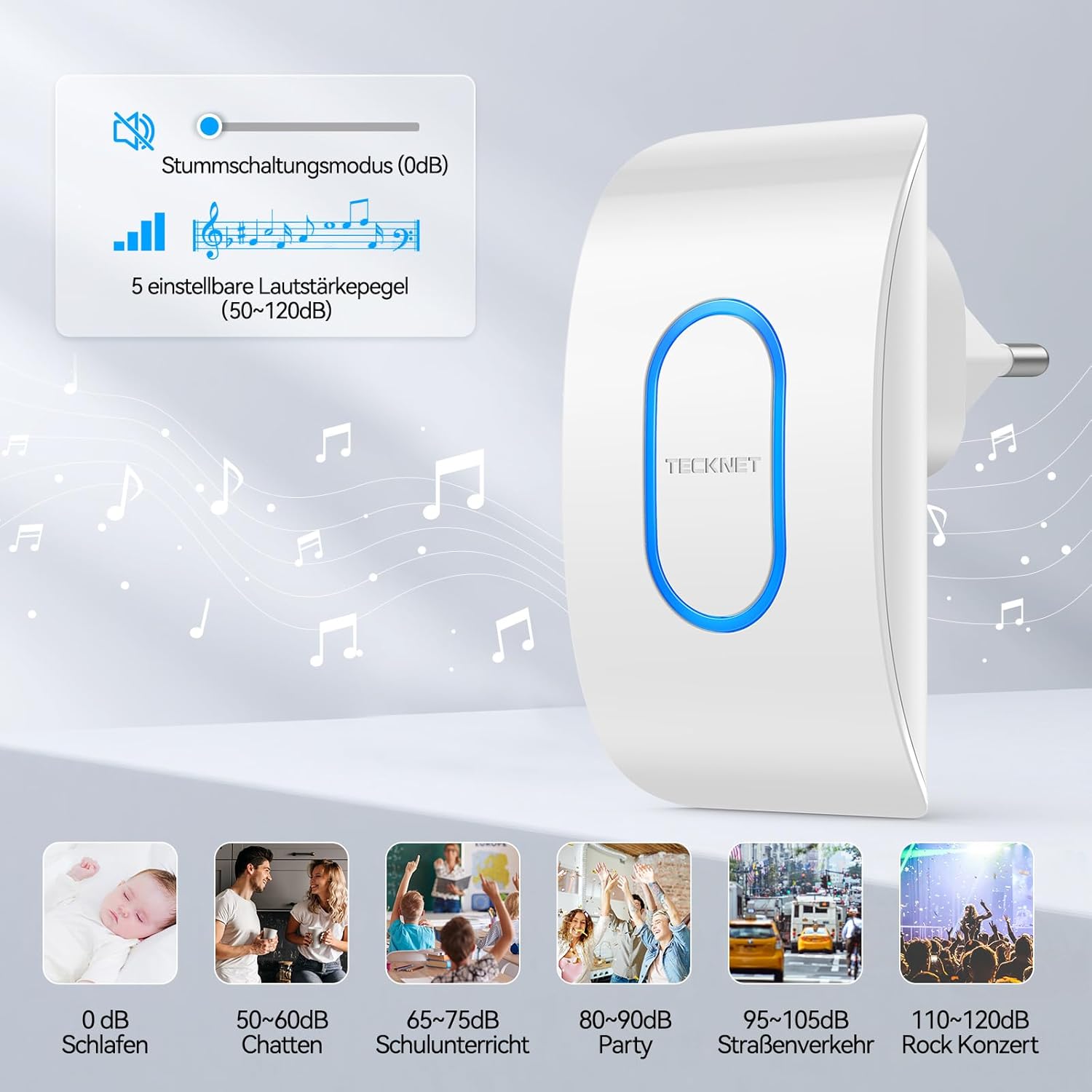
Image: The receiver unit with a graphic illustrating the five adjustable volume levels, from silent to 120dB, and examples of typical sound environments.
3. Modes de treball
The doorbell offers three distinct working modes to suit different needs:
- Ringtone and Light Mode: The doorbell will chime and the LED flash will activate when the button is pressed.
- Ringtone Only Mode: Only the selected melody will play; the LED flash will not activate.
- Silent Mode (Light Only): The doorbell will not chime, but the LED flash will activate, providing a visual alert. This mode is ideal for quiet environments or when you do not wish to disturb others.
To switch between modes, press the 'Mode Selection' button on the side of the receiver.

Image: A visual representation of the three working modes: LED flash + chime, LED flash (silent mode), and chime only.
4. Funció de memòria
The doorbell system is equipped with a memory function. It will automatically remember your last selected melody and volume level, even after a power outage. This means you do not need to reset your preferences each time the power is interrupted or the receiver is unplugged.

Image: An illustration depicting the memory function, showing a musical note within a brain outline, symbolizing the retention of settings.
Manteniment
Neteja
To clean the doorbell units, wipe them gently with a soft, dry cloth. Do not use abrasive cleaners, solvents, or immerse the units in water. The transmitter is IP65 waterproof, meaning it is protected against water jets, but it should not be submerged.
Battery Replacement (Transmitter)
The transmitter is powered by a CR2032 battery, which typically lasts up to 4.5 years under normal usage. When the doorbell button no longer activates the receiver, or the LED on the transmitter does not light up, it's time to replace the battery.
- Obriu amb cura l'emissor casing (you may need a small screwdriver).
- Traieu la bateria CR2032 antiga.
- Insert a new CR2032 battery, ensuring the positive (+) side faces up.
- Tanca el casing de manera segura.

Image: A graphic illustrating the expected 4.5-year battery life of the doorbell transmitter.
Resolució de problemes
| Problema | Causa possible | Solució |
|---|---|---|
| Receiver does not chime or flash. | Receiver unplugged; power outage; transmitter battery low/dead; units not paired. | Ensure receiver is plugged in and power is on. Replace transmitter battery. Re-pair units if necessary (see Setup section). |
| Abast sense fil curt o senyal intermitent. | Obstacles (thick walls, metal structures); interference from other wireless devices. | Relocate receiver to a more central position. Avoid placing near large metal objects or strong electromagnetic fields. Ensure transmitter is not obstructed. |
| Doorbell rings automatically when power is restored after an outage. | Normal behavior for some doorbell models upon power cycle. | This is a known characteristic. If disruptive, consider unplugging the receiver during extended power outages. |
| Cannot change melody or volume. | Buttons not pressed correctly; unit malfunction. | Ensure buttons are pressed firmly. If issue persists, try unplugging and replugging the receiver. If still unresolved, contact customer support. |

Image: An illustration showing the doorbell's wireless range of over 400m and its ability to penetrate multiple walls (wooden, brick, cement, marble).
Especificacions
| Característica | Detall |
|---|---|
| Marca | TECNET |
| Número de model | TK-WD004 |
| Dimensions del producte | 9.3 x 6 x 7 cm (Receiver); 108 grams (Total Weight) |
| Bateria del transmissor | 1 x CR2032 (Required, not included) |
| abast sense fils | Over 400m (open area) |
| Melodies | 60 melodies seleccionables |
| Nivells de volum | 5 adjustable levels (50-120 dB) |
| Modes de treball | Ringtone + Light, Ringtone Only, Silent (Light Only) |
| Classificació d'impermeabilitat (transmissor) | IP65 |
| Temperatura de funcionament | -20 °C a +60 °C (-4 °F a 140 °F) |
Garantia i Suport
TECKNET ofereix una 36 mesos de garantia for this product. This warranty covers defects in materials and workmanship under normal use. Please note that warranty registration may be required.
If you encounter any issues or have questions regarding your TECKNET Wireless Doorbell, please do not hesitate to contact our professional customer service team. For the quickest support, please refer to the contact information provided on the TECKNET official weblloc web o la documentació de la compra.