
Introducció
Thank you for choosing the VEGER 10000mAh USB C Power Bank. This compact and lightweight portable charger is designed to provide reliable power for your mobile devices on the go. With its accurate LED display and versatile charging options, it ensures you stay connected wherever you are.
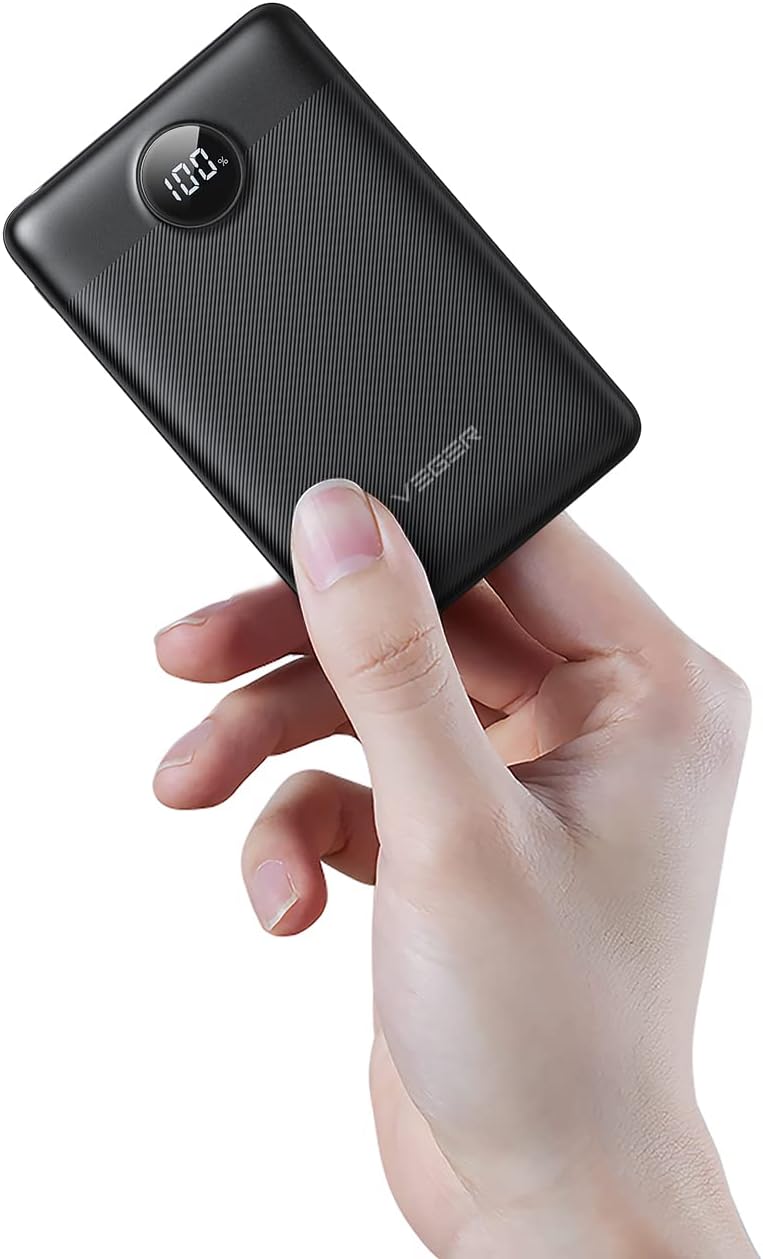
Image: The VEGER 10000mAh Power Bank, demonstrating its ultra-compact design when held in a hand.
Característiques del producte
- Accurate LED Display: The integrated LED screen provides a precise real-time percentage of the remaining power, activated by pressing the power button.
- Dual Input/Output Ports: Supports both Micro USB and USB-C inputs for recharging the power bank. The USB-C port also functions as an output.
- Capacitat de 10000 mAh: Sufficient capacity to charge an iPhone 12 approximately 2.3 times, an iPhone 11 Pro 2.3 times, or a Huawei P20 2.1 times, ideal for daily use and travel.
- Simultaneous Charging & Wide Compatibility: Equipped with two output ports (USB-A and USB-C) to charge two devices concurrently without sacrificing speed. Compatible with a wide range of USB-enabled devices including smartphones, iPads, and tablets.
- Disseny compacte i portàtil: Ultra-compact body measuring only 10.6 x 6.9 x 1.6 cm (4.17 x 2.72 x 0.63 inches) and weighing just 164.4 g (5.8 oz), making it easy to carry in a pocket or bag.

Imatge: Detallada view of the accurate LED display on the power bank, showing the battery percentage.

Image: Visual representation of the power bank's charging capacity for different devices, including iPhone 12, Google Pixel 6, AirPods, and Galaxy S21.

Image: The power bank connected to and charging two devices at once, demonstrating its dual output capability.
Contingut del paquet
Si us plau, comproveu el contingut del paquet en desembalar-lo per assegurar-vos que hi hagi tots els elements:
- 1 x VEGER 10000mAh Power Bank
- 1 x cable de càrrega USB-A a USB-C
- 1 x Manual d'usuari
- 1 x bossa d'emmagatzematge

Imatge: Una imatge superior view of the VEGER power bank's packaging and included accessories.
Configuració
Primer ús
Before using your VEGER Power Bank for the first time, it is recommended to fully charge it. This ensures optimal battery performance and accuracy of the LED display.
- Connect the provided USB-A to USB-C cable to the USB-C input port on the power bank.
- Plug the USB-A end of the cable into a compatible USB wall charger (not included) or a computer's USB port.
- La pantalla LED mostrarà el progrés de la càrrega. El banc d'energia està completament carregat quan la pantalla mostra "100%".
Instruccions de funcionament
Carregant els teus dispositius
The VEGER Power Bank can charge a wide range of USB-powered devices.
- Connect your device's charging cable to one of the output ports on the power bank (USB-A or USB-C).
- Connecteu l’altre extrem del cable al dispositiu.
- The power bank will automatically begin charging your device. If it doesn't, press the power button on the side of the power bank.
- La pantalla LED mostrarà el percentatge de bateria restanttage del banc d'energia.

Image: The power bank charging both a smartphone and a pair of wireless earbuds, showcasing its versatility for different devices.
Recàrrega del Power Bank
When the power bank's battery is low, recharge it using either the Micro USB or USB-C input port.
- Connect a compatible charging cable (Micro USB or USB-C) to the corresponding input port on the power bank.
- Plug the other end of the cable into a USB wall charger (5V/3A recommended for fastest charging) or a computer's USB port.
- The LED display will illuminate and show the charging percentage. It takes approximately 4.5 hours to fully recharge the power bank with a 3A charger.

Image: A USB-C cable being inserted into the power bank's USB-C port, highlighting its dual input/output functionality.
Guia de visualització LED
The LED display shows the exact battery percentage of the power bank. Press the power button once to activate the display and check the current charge level.
Manteniment
- Mantingueu el banc d'energia allunyat de temperatures extremes (calor o fred), llum solar directa i ambients humits.
- No exposeu el banc d'energia a aigua o altres líquids.
- Netegeu el banc d'energia amb un drap suau i sec. No utilitzeu productes químics agressius ni materials abrasius.
- Store the power bank in a cool, dry place when not in use. For long-term storage, it is recommended to charge it to about 50-75% every 3 months to preserve battery life.
Resolució de problemes
| Problema | Causa possible | Solució |
|---|---|---|
| El banc d'energia no carrega els dispositius. | Power bank is out of charge; Cable is faulty or not properly connected; Device is not compatible. | Recharge the power bank; Try a different cable or ensure connections are secure; Verify device compatibility. |
| El banc d'energia no es carrega. | Charging cable or adapter is faulty; Input port is damaged; Power bank is already full. | Try a different charging cable or wall adapter; Ensure the input port is clean and undamaged; Check the LED display for 100%. |
| Velocitat de càrrega lenta. | Using a low-power charger/cable; Device's charging input limit; Charging multiple devices simultaneously. | Use a 5V/3A charger and a high-quality cable; Check your device's charging specifications; Charge one device at a time for faster charging. |
| La pantalla LED no funciona. | Power button not pressed; Power bank is completely drained or faulty. | Press the power button firmly; Recharge the power bank; If issue persists, contact customer support. |
Especificacions
| Característica | Detall |
|---|---|
| Marca | VEGER |
| Model | Banc d'energia USB C de 10000 mAh |
| Tipus de connector | USB tipus C, micro USB |
| Color | Negre 1 |
| Característica especial | Esvelt |
| Voltage | 5 Volts |
| Composició de la bateria | Polímer de liti |
| Pes de l'article | 167 grams |
| Ampedat | 3 A |
| Nombre de Ports | 3 (1 Micro USB Input, 1 USB-C Input/Output, 1 USB-A Output) |
| Temps de càrrega | 4.5 hours (with 3A charger) |

Image: A visual breakdown of the power bank's input and output capabilities, including Micro Input (18W), USB A Output (22.5W), and USB C Output/Input (18W/20W).
Informació de seguretat
Si us plau, llegiu i seguiu aquestes pautes de seguretat per evitar lesions o danys al producte:
- No desmunteu, obriu ni esmicoleu el banc d'energia extern.
- No exposeu el banc d'energia a la calor ni al foc. Eviteu emmagatzemar-lo sota la llum solar directa.
- No curtcircuiteu el banc d'energia.
- No sotmeti el banc d'energia a cops mecànics.
- In the event of a leak, do not allow the liquid to come into contact with skin or eyes. If contact has occurred, wash the affected area with copious amounts of water and seek medical advice.
- Mantingueu el banc d'energia fora de l'abast dels nens.
- Desfeu-vos del banc d'energia elèctrica correctament d'acord amb la normativa local. No el llenceu amb les escombraries domèstiques.
Garantia i Suport
VEGER products come with a standard manufacturer's warranty. For detailed warranty information, technical support, or any product-related inquiries, please refer to the contact information provided on the product packaging or visit the official VEGER weblloc.
Conserveu el vostre comprovant de compra per a reclamacions de garantia.