
1. Introducció
Thank you for choosing the AIYIMA A05 TPA3221 Power Amplifier. This compact 2.0 channel stereo amplifier is designed to deliver high-fidelity audio to passive speakers, featuring both Bluetooth and RCA input options. This manual provides detailed instructions for setup, operation, and maintenance to ensure optimal performance and longevity of your device.
2. Instruccions de seguretat
- Font d'alimentació: Use only the specified power adapter (DC 12-32V) to prevent damage. Ensure the power outlet voltage és compatible.
- Ventilació: Col·loca el amplifier in a well-ventilated area. Do not block ventilation openings. Avoid placing it on soft surfaces that may obstruct airflow.
- Humitat: Keep the device away from water, humidity, and liquids. Do not operate with wet hands.
- Calor: Avoid direct sunlight, heat sources, or extreme temperatures.
- Neteja: Desconnecteu l'alimentació abans de netejar. Feu servir un drap suau i sec. No utilitzeu netejadors líquids ni en aerosol.
- Manteniment: No intenteu reparar ni desmuntar la unitat vosaltres mateixos. Encarregueu tot el manteniment a personal qualificat.
- Nens: Mantenir fora de l'abast dels nens.
3. Contingut del paquet
Si us plau, comproveu el paquet per veure si hi ha els elements següents:
- AIYIMA A05 Bluetooth 5.0 Amplificador x 1
- Antena Bluetooth x 1
- Manual d'usuari x 1
- Targeta de garantia x 1
- Adaptador d'alimentació de 32 V CC x 1

Imatge 3.1: Contents of the AIYIMA A05 amppaquet lificador, incloent-hi el amplifier unit, Bluetooth antenna, user manual, warranty card, and power adapter.
4. Producte acabatview
4.1 Controls del panell frontal
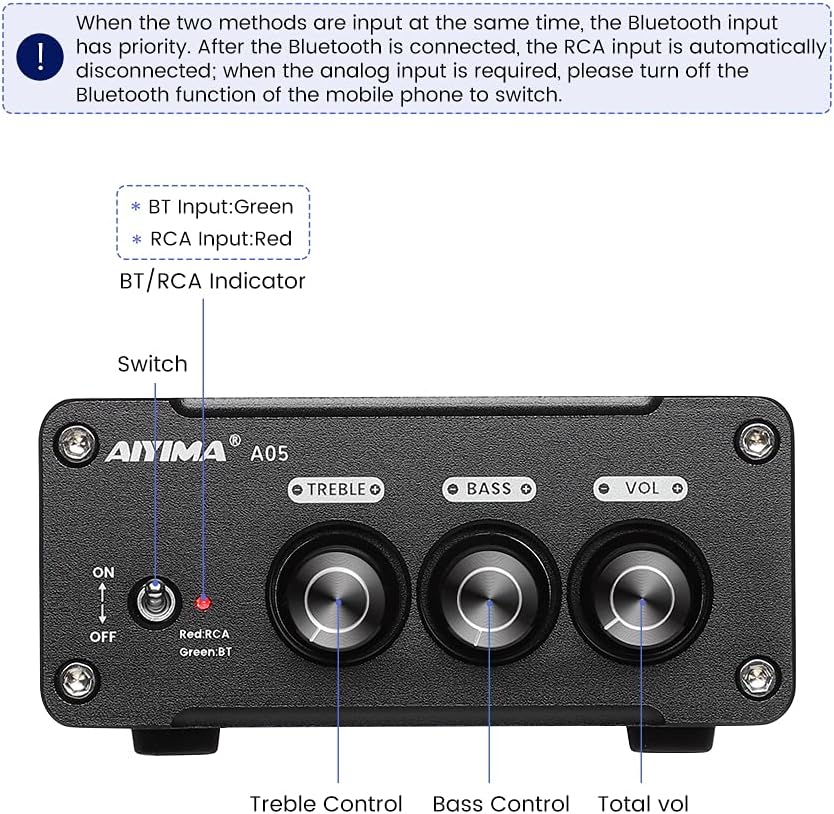
Imatge 4.1: Front panel of the AIYIMA A05 amplifier, showing the power switch, input indicator, treble, bass, and volume controls.
- Interruptor d'alimentació (ON/OFF): Activa o desactiva amppotència de lificació.
- BT/RCA Indicator: Displays the active input source. Green indicates Bluetooth (BT) input, Red indicates RCA input.
- Control dels aguts: Ajusta la sortida d'àudio d'alta freqüència.
- Control de baix: Ajusta la sortida d'àudio de baixa freqüència.
- Control de volum: Ajusta el nivell general de sortida d'àudio.

Imatge 4.2: Primer pla view of the power switch and the BT/RCA input indicator on the front panel.

Imatge 4.3: Primer pla view of the Treble, Bass, and Volume control knobs.
4.2 Connexions del panell posterior

Imatge 4.4: Rear panel of the AIYIMA A05 amplifier, showing the Bluetooth antenna port, RCA audio input, speaker outputs, and DC power input.
- ANT (Bluetooth Antenna Port): Connect the included Bluetooth antenna here for wireless audio reception.
- AUDIO IN (RCA Input): Connect audio sources (e.g., CD player, TV, DAC) using RCA cables.
- SPEAKER (Audio Output): Connect passive speakers using speaker wires. Ensure correct polarity (+ to + and - to -).
- DC 24-32V (Power Input): Connect the provided DC power adapter.
5. Instruccions de configuració
Follow these steps to set up your AIYIMA A05 ampmés viu:
- Connect Bluetooth Antenna: Screw the included Bluetooth antenna into the ANT port on the rear panel.
- Connectar els altaveus: Connect your passive speakers to the SPEAKER output terminals on the rear panel. Ensure the positive (+) terminal of the amplifier connects to the positive (+) terminal of the speaker, and the negative (-) terminal connects to the negative (-).
- Connect Audio Source (RCA): If using a wired audio source, connect it to the AUDIO IN (RCA) ports on the rear panel using appropriate RCA cables.
- Connectar l'alimentació: Connect the DC power adapter to the DC 24-32V input port on the rear panel, then plug the adapter into a wall outlet.
- Encès: Flip the power switch on the front panel to the "ON" position. The input indicator will light up.

Imatge 5.1: Rear panel of the amplifier with Bluetooth antenna, RCA cables, speaker wires, and power adapter connected.
6. Instruccions de funcionament
6.1 Engegada/apagada
Per encendre el amplifier, flip the front panel switch to the "ON" position. To power off, flip the switch to the "OFF" position.
6.2 Connexió Bluetooth
- Assegureu-vos el amplifier is powered on and the BT/RCA indicator is green, indicating Bluetooth mode. If it's red, ensure no RCA cable is connected or disconnect it.
- On your mobile device (phone, tablet, etc.), enable Bluetooth and search for available devices.
- Select "AIYIMA A05" from the list of devices to pair.
- Once paired, the indicator light will remain green, and you can play audio from your device through the ampmés viu.
6.3 RCA Input Usage
- Connect your audio source to the RCA input ports on the rear panel.
- Assegureu-vos el amplifier is powered on. The BT/RCA indicator should be red, indicating RCA input mode.
- If the indicator is green (Bluetooth mode), ensure Bluetooth is disconnected on any paired device, or turn off Bluetooth on your mobile device to switch to RCA input.
6.4 Adjusting Audio
- Volum: Rotate the "VOL" knob clockwise to increase volume and counter-clockwise to decrease.
- Aguts: Rotate the "TREBLE" knob to adjust high-frequency sounds to your preference.
- Baix: Rotate the "BASS" knob to adjust low-frequency sounds to your preference.
7. Manteniment
- Neteja: Disconnect the power adapter before cleaning. Use a soft, dry, lint-free cloth to wipe the surface of the amplifier. Do not use harsh chemicals or abrasive materials.
- Emmagatzematge: If not in use for an extended period, store the ampGuardar en un lloc fresc i sec, allunyat de la llum solar directa i de temperatures extremes.
- Connexions: Comproveu periòdicament totes les connexions dels cables per assegurar-vos que estiguin ben fixades i que no presentin corrosió.
8. Solució De Problemes
If you encounter issues with your AIYIMA A05 amplifier, consulteu els següents problemes i solucions habituals:
| Problema | Causa possible | Solució |
|---|---|---|
| Sense sortida de so |
|
|
| So distorsionat o brunzit |
|
|
| Bluetooth no connectat |
|
|
| Loud noise/ticking on startup |
|
|
If the problem persists after trying these solutions, please contact AIYIMA customer support for further assistance.
9. Especificacions

Imatge 9.1: Dimensions of the AIYIMA A05 amplifier: 107mm (4.2in) width, 87mm (3.4in) depth, 36mm (1.4in) height.
| Característica | Especificació |
|---|---|
| Model | A05 |
| Potència de sortida | 105 Watts (at 4 Ω) |
| Nombre de canals | 2.0 (estèreo) |
| Versió Bluetooth | QCC3034 APTX Bluetooth 5.0 |
| Chipset | TPA3221 |
| Subministrament mínim Voltage | 12 volts (CC) |
| Volum de subministrament màximtage | 32 volts (CC) |
| Pes de l'article | 500 grams |
| Dimensions (aprox.) | 107 mm (W) x 87 mm (D) x 36 mm (H) |
10. Garantia i Suport
The AIYIMA A05 amplifier comes with a warranty. Please refer to the included Warranty Card for specific terms and conditions. For technical support, troubleshooting assistance, or warranty claims, please contact AIYIMA customer service through the retailer where the product was purchased or visit the official AIYIMA weblloc.
Recursos en línia: For additional information and support, you may visit the AIYIMA store page: AIYIMA Official Store