
Introducció
This manual provides essential information for the ALLIMITY BN59-01301A Replacement Remote Control. It is designed to be compatible with various Samsung 2018 UHD Smart TV models. Please read these instructions carefully to ensure proper setup and operation of your new remote control.
Configuració
The ALLIMITY BN59-01301A remote control requires two AAA batteries (not included) for operation. No programming is required; simply insert the batteries, and the remote will be ready to use with compatible Samsung TVs.
Instal·lació de la bateria
- Localitzeu la tapa del compartiment de la bateria a la part posterior del comandament a distància.
- Feu lliscar la tapa cap avall o premeu el pestell i aixequeu-la per obrir el compartiment.
- Introduïu dues piles AAA noves, assegurant-vos que els terminals positiu (+) i negatiu (-) coincideixin amb els diagrames de l'interior del compartiment.
- Torneu a col·locar la tapa del compartiment de la bateria fent-la lliscar fins que faci clic de manera segura.

Image showing the open battery compartment of the remote control, ready for two AAA batteries to be inserted. The positive and negative terminals are clearly marked.
Instruccions de funcionament
This remote control is designed for immediate use with compatible Samsung 2018 UHD Smart TVs without any setup or programming. Point the remote directly at your television's infrared sensor.
Funcions bàsiques
- Botó d'engegada (vermell): Encén o apaga el televisor.
- Botó Font: Selecciona les fonts d'entrada (HDMI, AV, etc.).
- Botons numèrics (0-9): Directly select channels.
- Pujar/baixar volum (VOL +/-): Adjusts the television's volume.
- Botó de silenci: Mutes or unmutes the television sound.
- Channel Up/Down (CH ^/v): Changes channels sequentially.
- tecla de navegació (amunt, avall, esquerra, dreta, intro): Navega pels menús i confirma les seleccions.
- Home/Smart Hub Button: Accesses the TV's Smart Hub or main menu.
- Botó de retorn: Torna a la pantalla o al menú anterior.
- Botó de sortida: Surt del menú o de l'aplicació actual.
- Botó de configuració: Obre el menú de configuració del televisor.
- Botó de guia: Mostra la guia electrònica de programes.
- Botó d'informació: Mostra informació sobre el programa actual.
- Botons de color (A, B, C, D): Perform specific functions depending on the TV menu or application.
- Media Control Buttons (Play, Pause, Stop, Fast Forward, Rewind): Controla la reproducció multimèdia.
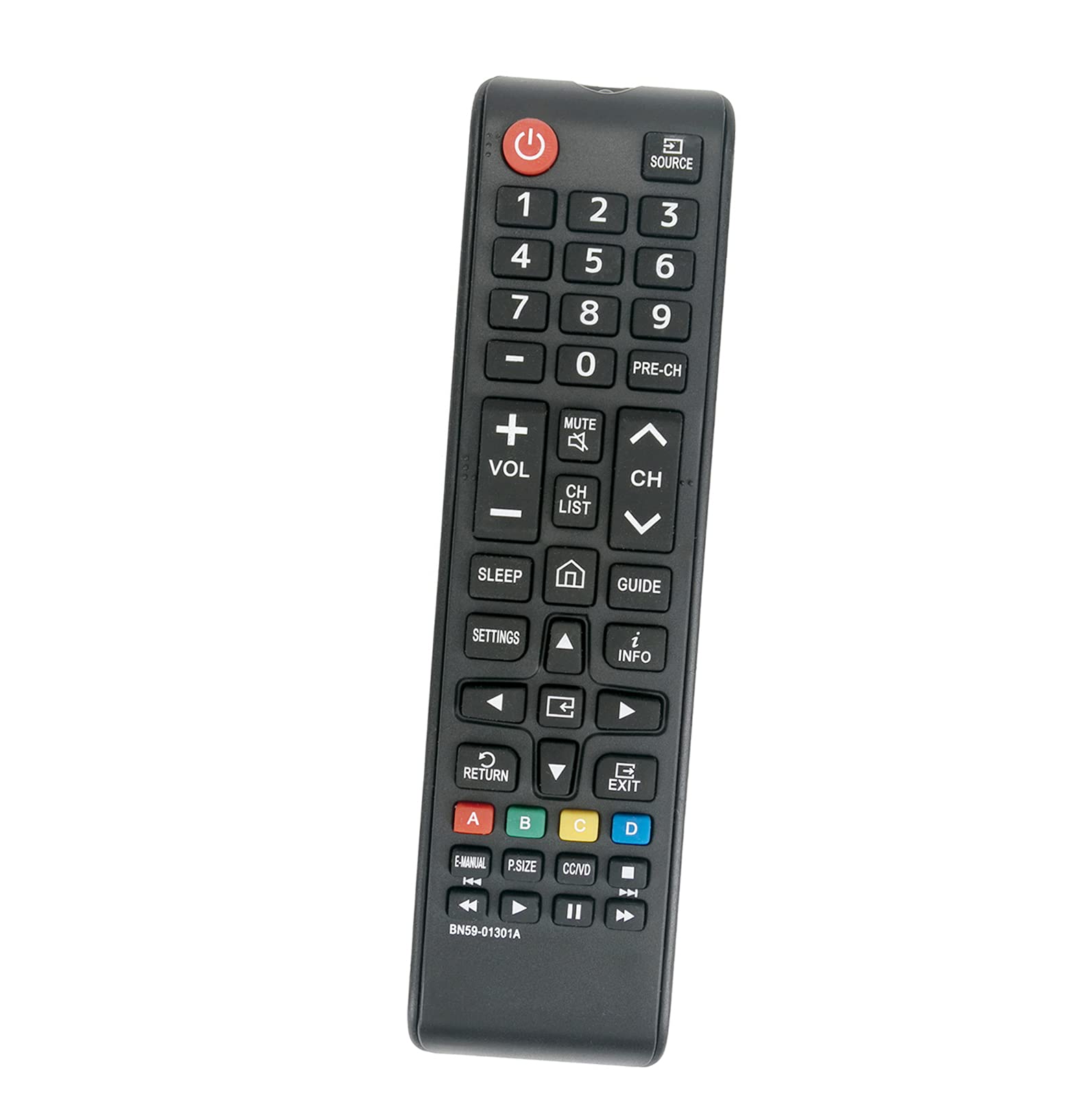
Acabatview of the ALLIMITY BN59-01301A replacement remote control, displaying all buttons and their labels, including power, volume, channel, navigation, and media controls.
Manteniment
Neteja
Netegeu el comandament a distància amb un drap suau i sec. No utilitzeu netejadors líquids ni materials abrasius, ja que poden danyar la superfície o els components interns.
Cura de la bateria
Canvieu les piles quan la resposta del comandament a distància es torni lenta o deixi de funcionar. Traieu les piles si no fareu servir el comandament a distància durant un període prolongat per evitar fuites.
Resolució de problemes
- El comandament a distància no respon:
- Ensure fresh AAA batteries are correctly installed with proper polarity.
- Check for any obstructions between the remote control and the TV's infrared sensor.
- Verifiqueu que el televisor estigui encès.
- Test the remote at a closer distance to the TV.
- Botons específics que no funcionen:
This may indicate a faulty button or a need for battery replacement. If replacing batteries does not resolve the issue, contact customer support.
Especificacions
- Marca: ALLIMITAT
- Model: BN59-01301A
- Tecnologia de connectivitat: Infrarojos (IR)
- Dispositius compatibles: Samsung 2018 UHD Smart TVs (e.g., UN43NU7100FXZA, UN55NU6900FXZA, UN55NU7100FXZA, UN75NU7100FXZA, and others)
- Font d'alimentació: 2 piles AAA (no incloses)
- Característica especial: No es requereix programació
- Quantitat de botons: 20
- Interval màxim: Approximately 3.28 feet (1 meter)
- Pes de l'article: Aproximadament 2 unces
Garantia i Suport
This product is a replacement remote control. For any issues or questions regarding its functionality or compatibility, please refer to the seller's return policy or contact the manufacturer, ALLIMITY, directly for support. Keep your purchase receipt for any warranty claims.