
T-Wolf AB-00065
T-Wolf RGB Mechanical Gaming Keyboard and Mouse User Manual
Model: AB-00065
1. Introducció
Thank you for choosing the T-Wolf RGB Mechanical Gaming Keyboard and Mouse. This product is designed to enhance your gaming and typing experience with its responsive mechanical feel, vibrant RGB backlighting, and ergonomic design. This manual provides detailed instructions for setup, operation, maintenance, and troubleshooting to ensure optimal performance and longevity of your device.

Figure 1.1: T-Wolf RGB Mechanical Gaming Keyboard and Mouse. The image displays the full-sized black keyboard with rainbow LED backlighting and a matching black gaming mouse with green accents.
2. Informació de seguretat
- Do not expose the device to liquids or excessive moisture.
- Avoid extreme temperatures. Operate and store the device in a dry environment within recommended temperature ranges.
- No intenteu desmuntar ni reparar el dispositiu vosaltres mateixos. Encarregueu tot el manteniment a personal qualificat.
- Mantingueu el dispositiu allunyat de camps magnètics forts.
- Feu servir només el cable USB proporcionat per a la connexió.
3. Contingut del paquet
Si us plau, comproveu el contingut del paquet en desembalar-lo. Si falta algun article o hi ha algun malmès, poseu-vos en contacte amb el servei d'atenció al client.
- T-Wolf RGB Mechanical Gaming Keyboard
- T-Wolf Gaming Mouse
- USB Cable (integrated with keyboard and mouse)
- Manual d'usuari (aquest document)
4. Instruccions de configuració
- Desempaquetar el dispositiu: Traieu amb cura el teclat i el ratolí del seu embalatge.
- Connexió a l'ordinador: Locate an available USB port on your desktop computer or laptop. Insert the USB connector from the keyboard into the USB port. Repeat for the mouse.
- Instal·lació del controlador (automàtica): The keyboard and mouse are plug-and-play devices. Your operating system (Windows 7 or later recommended) will automatically detect and install the necessary drivers. This process may take a few moments.
- Verifica la connexió: Once drivers are installed, the keyboard backlighting should illuminate, and the mouse cursor should be responsive on your screen.
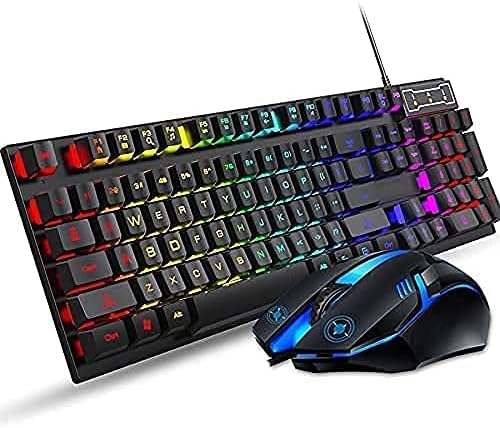
Figure 4.1: The T-Wolf gaming keyboard and mouse, ready for USB connection. The image shows the keyboard with its vibrant RGB backlighting and the mouse with blue accents, both featuring integrated USB cables.
5. Instruccions de funcionament
5.1 Funcions del teclat
The T-Wolf keyboard features a standard UK layout with 104 keys, designed for both gaming and office work. Its mechanical feel provides tactile feedback for precise input.
Control de retroiluminació:
The keyboard features rainbow LED backlighting. To control the lighting:
- Activar/desactivar la llum de fons: Premeu el botó "SL" (Scroll Lock) key to toggle the backlighting on or off. This key is typically located in the upper right section of the keyboard.

Figura 5.1: Primer pla view of the keyboard highlighting the "SL" (Scroll Lock) key, which controls the cool lighting effect. Pressing this key toggles the keyboard's rainbow LED backlight on and off.
Media Shortcut Keys:
The keyboard includes various media shortcut keys for quick access to functions. Refer to the shortcuts shown on the back of the product packaging for a full list of combinations, typically involving the Fn clau.

Figura 5.2: Mésview of the keyboard and mouse, emphasizing the "Media shortcut key" functionality. The image explains that the cool lighting effect can be toggled on/off by pressing the 'SL' key, showcasing the elegant design.
5.2 Funcions del ratolí
The T-Wolf gaming mouse provides precise tracking and comfortable grip, ideal for extended use in gaming or productivity tasks.
- Botons estàndard: Left-click, right-click, and scroll wheel for navigation and interaction.
- Ajust de DPI: (If applicable, not explicitly stated in product description, but common for gaming mice) Some gaming mice include a DPI button to adjust sensitivity. Refer to product packaging or manufacturer website for specific instructions if present.
6. Manteniment i cura
- Neteja: Feu servir un drap suau i sec per netejar el teclat i el ratolí. Per a la brutícia persistent, netegeu lleugeramentampen the cloth with water or a mild, non-abrasive cleaner. Ensure the device is unplugged before cleaning.
- Eliminació de pols: Feu servir aire comprimit per eliminar la pols i les restes que hi ha entre les tecles.
- Eviteu líquids: Do not spray cleaning solutions directly onto the device.
- Emmagatzematge: Quan no l'utilitzeu durant períodes prolongats, guardeu el dispositiu en un lloc fresc i sec, allunyat de la llum solar directa.
7. Solució De Problemes
| Problema | Causa possible | Solució |
|---|---|---|
| El teclat/ratolí no respon | Connexió USB fluixa, port USB defectuós, problema amb el controlador. |
|
| La retroiluminació no funciona | Backlight turned off, power issue. |
|
| Keys not registering or sticky | Restes sota la tapa de les tecles, interruptor defectuós. |
|
8. Especificacions
| Característica | Detall |
|---|---|
| Marca | T-Wolf |
| Número de model | AB-00065 |
| Connectivitat | Cable USB |
| Tipus de teclat | Mechanical Feel, 104 Keys (UK Layout) |
| Il·luminació de fons | Rainbow LED Backlit |
| Compatibilitat de sistemes operatius | Windows 7 and onwards |
| Longitud del cable | 1.35m (Keyboard) |
| Color | Negre |
| Pes de l'article | Aproximadament 1.37 lliures (0.62 kg) |
| Dimensions del producte (LxWxH) | 21 x 6 x 2 polzades (53.34 x 15.24 x 5.08 cm) |
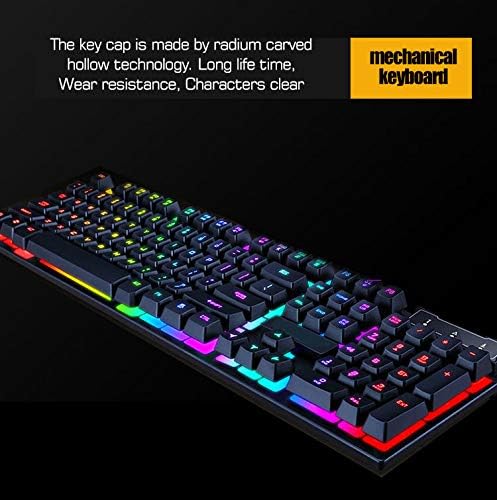
Figure 8.1: Detail of the keyboard's keycaps, illustrating the radium carved hollow technology for long life, wear resistance, and clear characters, contributing to the mechanical feel.
9. Garantia i Suport
For warranty information and technical support, please refer to the contact details provided on the product packaging or visit the official T-Wolf weblloc web. Conserveu el rebut de compra com a comprovant de compra per a qualsevol reclamació de garantia.
If you encounter any issues not covered in the troubleshooting section, please contact our customer service team for assistance.
Ask a question about this manual
Ask about setup, troubleshooting, compatibility, parts, safety, or missing instructions. Manuals+ will review the question and use this page’s manual context to help answer it.