
Introducció
This manual provides essential instructions for the safe and efficient operation of the Williams AV POE 001 Power-Over-Ethernet Injector. Please read this manual thoroughly before installation and use to ensure proper functionality and to prevent damage to the device or connected equipment. The POE 001 is designed to supply power to compatible Power-over-Ethernet (PoE) devices over an Ethernet cable, simplifying installation by eliminating the need for separate power outlets near the powered device.
Informació de seguretat
- Assegureu-vos que la font d'alimentació coincideixi amb el voltage requirements specified for the POE 001.
- No exposeu el dispositiu a la humitat, la pluja ni a temperatures extremes.
- Eviteu col·locar el dispositiu a prop de fonts de calor o sota la llum solar directa.
- No intenteu obrir ni fer el manteniment de la unitat. Demaneu totes les tasques de manteniment a personal qualificat.
- Use only the provided WLC 004 line cord or an approved equivalent.
Contingut del paquet
Verifiqueu que tots els elements siguin presents al paquet:
- Williams AV POE 001 Power-Over-Ethernet Injector
- WLC 004 Line Cord
- Aquest manual d'usuari
Configuració
Follow these steps to set up your POE 001 injector:
- Connecteu-vos a la xarxa: Connect an Ethernet cable from your network switch or router to the "DATA IN" port on the POE 001 injector.
- Connecteu-vos al dispositiu PoE: Connect another Ethernet cable from the "DATA & POWER OUT" port on the POE 001 injector to the PoE-compatible device (e.g., IP camera, VoIP phone, wireless access point).
- Connectar l'alimentació: Plug the WLC 004 line cord into the power input of the POE 001 injector, then plug the other end into a standard AC power outlet.
- Verificar el funcionament: Once powered, the indicator light on the POE 001 should illuminate, indicating that power is being supplied. The connected PoE device should also power on.
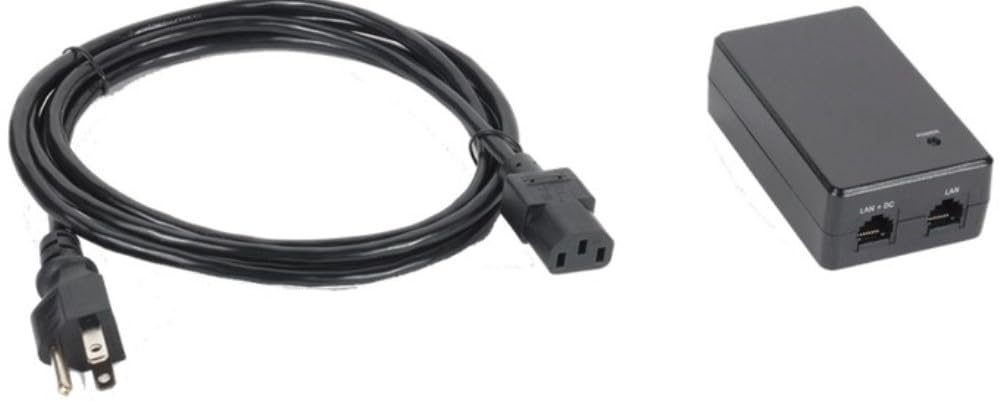
Figure 1: Williams AV POE 001 Power-Over-Ethernet Injector. This image shows the compact design of the injector with its "DATA IN" and "DATA & POWER OUT" Ethernet ports, and the power input.
En funcionament
The Williams AV POE 001 operates automatically once connected and powered. It provides power and data simultaneously over a single Ethernet cable to a compatible PoE device.
- Indicador d'alimentació: A status LED on the injector indicates power status. Refer to the device's specific documentation for LED behavior (e.g., solid green for active power).
- Transmissió de dades: The injector passes network data through without modification, ensuring seamless communication between your network and the PoE device.
- Compatibilitat: Ensure your connected device is PoE-compatible to avoid damage. The POE 001 is designed to work with standard PoE devices.
Manteniment
The POE 001 injector requires minimal maintenance to ensure long-term performance.
- Neteja: Disconnect power before cleaning. Use a soft, dry cloth to wipe the exterior of the device. Do not use liquid cleaners or aerosols.
- Ventilació: Assegureu-vos que el dispositiu estigui col·locat en una zona ben ventilada per evitar el sobreescalfament. No bloquegeu les obertures de ventilació.
- Gestió de cables: Comproveu periòdicament totes les connexions dels cables per assegurar-vos que estiguin ben fixades i que no estiguin danyats.
Resolució de problemes
| Problema | Causa possible | Solució |
|---|---|---|
| No power to PoE device. |
|
|
| No hi ha connexió de dades. |
|
|
| Injector feels hot. |
|
|
Especificacions
| Característica | Detall |
|---|---|
| Número de model | POE 001 |
| Marca | Williams AV |
| Pes de l'article | 12 unces |
| Accessori inclòs | WLC 004 Line Cord |
| Funció | Power-Over-Ethernet Injector |
| ASIN | B096WJ5HPV |
Garantia i Suport
For warranty information and technical support, please refer to the official Williams AV weblloc web o contacteu directament amb el servei d'atenció al client. Conserveu el rebut de compra per a reclamacions de garantia.
Williams AV Contact Information:
- Weblloc: www.williamsav.com
- Atenció al client: Consulteu el weblloc web per obtenir dades de contacte regionals.