
1. Introducció
The Livoo TES242 is a versatile device that integrates a Bluetooth speaker, a 15W fast wireless charger, and an LED ambient light. This manual provides essential information for the safe and efficient use of your device. Please read it thoroughly before operation and retain it for future reference.
2. Instruccions de seguretat
- No exposeu el dispositiu a l'aigua, la humitat ni a temperatures extremes.
- Mantingueu el dispositiu allunyat de fonts de calor, la llum solar directa i materials inflamables.
- Use only the provided USB cable for power. Ensure the power adapter (not included) meets the required specifications (e.g., 5V/2A or higher for optimal charging).
- No intenteu desmuntar, reparar o modificar el dispositiu. Això anul·larà la garantia i pot causar danys o lesions.
- Mantenir fora de l'abast dels nens.
- Avoid placing metal objects or cards with magnetic strips (e.g., credit cards) on the wireless charging pad, as this may damage the device or the objects.
3. Contingut del paquet
Si us plau, comproveu el paquet per veure si hi ha els elements següents:
- Livoo TES242 LED Speaker with Wireless Charger
- Cable d'alimentació USB
- Manual d'usuari (aquest document)
4. Producte acabatview
Familiarize yourself with the components and controls of your Livoo TES242 device.
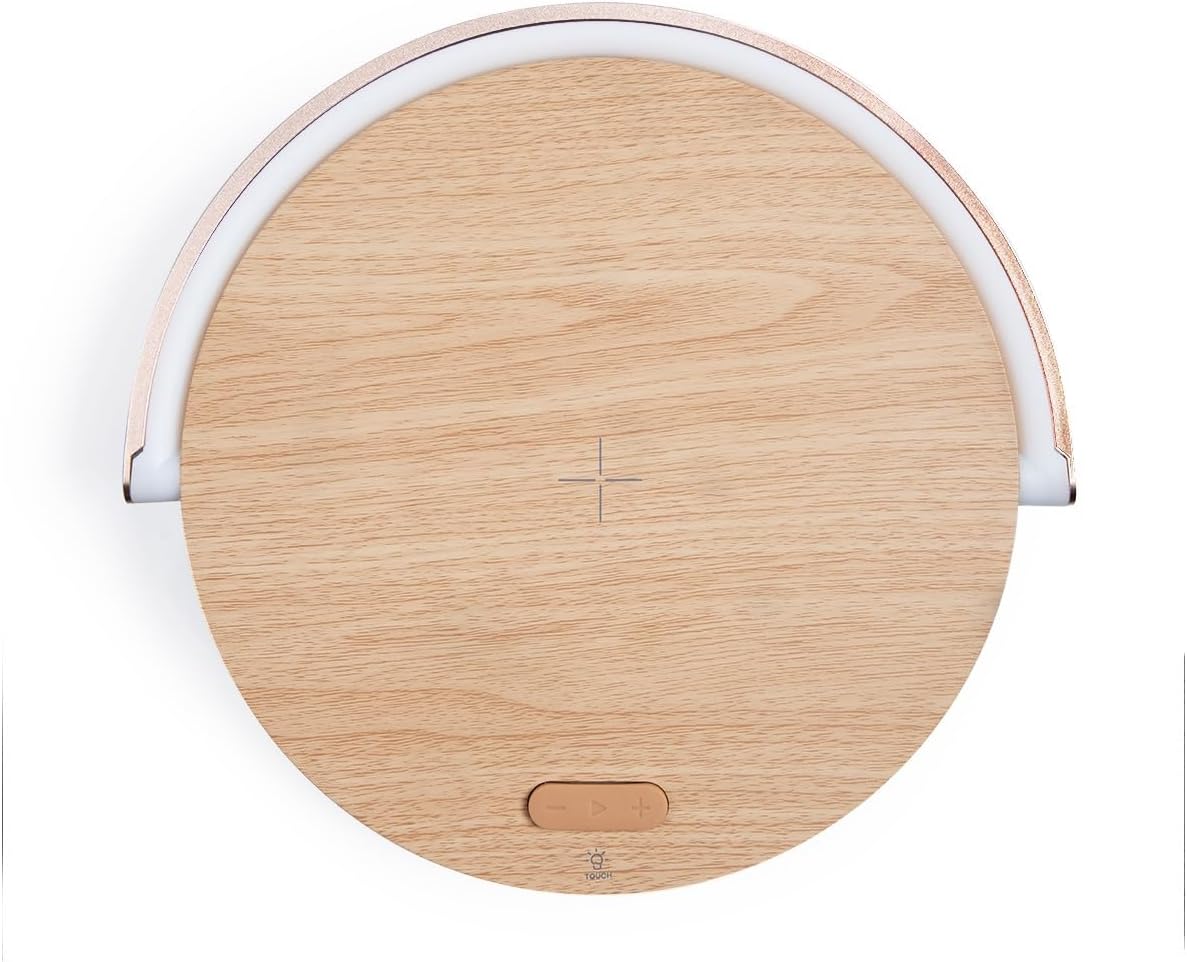
Figura 4.1: superior View del Dispositiu. This image shows the top surface of the Livoo TES242, highlighting the central cross symbol for wireless charging alignment and the control buttons located below it.

Figure 4.2: Device with Phone on Charging Pad. Un angle view illustrating a smartphone positioned on the wireless charging pad, with the LED light arch illuminated, demonstrating the device in use.
Controls i indicadors:
- Coixinet de càrrega sense fil: Central area on the top surface for QI-compatible device charging.
- LED Light Arch: Provides ambient lighting, pivots for direction adjustment.
- Touch Button (Light Control): Located on the base, cycles through LED light modes.
- Altaveu Bluetooth: Altaveu integrat per a la sortida d'àudio.
- Port d'entrada USB-C: Per connectar el cable d'alimentació.
5. Configuració
5.1 Connexió d'alimentació
- Connect the small end of the provided USB power cable to the USB-C input port on the Livoo TES242.
- Connect the larger end of the USB cable to a compatible USB power adapter (e.g., a smartphone charger, minimum 5V/2A recommended for optimal performance, not included).
- Plug the power adapter into a wall outlet. The device will power on automatically or can be turned on by pressing a power button if available (refer to product overview for specific button locations).
5.2 Càrrec inicial
For optimal battery performance, it is recommended to fully charge the Livoo TES242 before its first use. The device has a built-in 1500 mAh Li-ion battery, providing up to 4 hours of audio playback on a full charge.
6. Instruccions de funcionament
6.1 Vinculació Bluetooth
Per connectar el telèfon intel·ligent o un altre dispositiu amb Bluetooth:
- Ensure the Livoo TES242 is powered on. It will automatically enter Bluetooth pairing mode, indicated by an audible prompt or flashing light (if applicable).
- Al telèfon intel·ligent o dispositiu d'àudio, activeu el Bluetooth i cerqueu els dispositius disponibles.
- Selecciona "TES242" or "Livoo Speaker" de la llista de dispositius trobats.
- Once connected, a confirmation sound will be heard from the speaker. You can now play audio through the speaker.
- The effective Bluetooth range is up to 10 meters (33 feet).
6.2 Funció de càrrega sense fil
The Livoo TES242 features a 15W fast wireless charging pad:
- Ensure the Livoo TES242 is connected to a power source.
- Place your QI-compatible smartphone or device directly onto the center of the charging pad. Align your device with the cross symbol for optimal charging.
- Charging will begin automatically. Your device's screen or charging indicator will confirm that it is charging.
- For fast charging, ensure your power adapter supports the required output (e.g., 9V/1.67A).
6.3 modes de llum LED
The integrated LED light arch offers three ambient lighting modes:
- Locate the "Touch" button on the base of the device.
- Tap the "Touch" button to cycle through the available light modes: Llum natural, Llum Blanca, i Llum groga.
- The LED arch can be manually pivoted to adjust the direction of the light as desired.
7. Manteniment
- Neteja: Use a soft, dry cloth to clean the surface of the device. Do not use liquid cleaners, aerosols, or abrasive chemicals, as these may damage the finish or internal components.
- Emmagatzematge: Quan no l'utilitzeu durant períodes prolongats, guardeu el dispositiu en un lloc fresc i sec, allunyat de la llum solar directa i de temperatures extremes.
- Cura de la bateria: To prolong battery life, avoid fully discharging the battery frequently. Recharge the device regularly, even if not in constant use.
8. Solució De Problemes
If you encounter issues with your Livoo TES242, please refer to the following common problems and solutions:
| Problema | Causa possible | Solució |
|---|---|---|
| El dispositiu no s'encén. | No power connection or depleted battery. | Ensure the USB cable is securely connected to both the device and a working power adapter. Charge the device for at least 30 minutes. |
| No es pot emparellar per Bluetooth. | Speaker not in pairing mode, Bluetooth off on source device, or out of range. | Ensure the speaker is powered on and in pairing mode. Turn Bluetooth off and on again on your source device. Move the source device closer to the speaker (within 10m). Forget "TES242" from your device's Bluetooth list and try pairing again. |
| La càrrega sense fil no funciona. | Phone not QI-compatible, misaligned, or thick phone case. | Verify your phone supports QI wireless charging. Re-position the phone centrally on the charging pad, aligning it with the cross symbol. Remove any thick phone cases that might interfere with charging. Ensure the speaker is connected to a sufficient power source. |
| Mala qualitat de so o desconnexions. | Weak Bluetooth signal or interference. | Move your paired device closer to the speaker. Ensure there are no large obstructions between the speaker and your device. Avoid placing the speaker near other electronic devices that may cause interference. |
9. Especificacions
Technical details for the Livoo TES242 LED Speaker with Wireless Charger:
| Característica | Especificació |
|---|---|
| Marca | Livoo |
| Número de model | TES242 |
| Tecnologia de connectivitat | Bluetooth |
| Potència de sortida dels altaveus | 5 W |
| Interval Bluetooth | Fins a 10 metres |
| Wireless Charging Standard | Qi |
| Potència de càrrega sense fils | 15 W Fast Charge |
| Max Output (Wireless Charging) | 9 V / 1.67 A |
| Dispositius compatibles | Smartphones, Bluetooth-enabled audio devices |
| Modes de llum LED | 3 (Natural, White, Yellow) |
| Tipus de bateria | Li-ió |
| Capacitat de la bateria | 1500 mAh |
| Audio Playback Time | Fins a 4 hores |
| Font d'alimentació | Cable USB (inclòs) |
| Vol. De sortidatage | 5 volts (CC) |
| Ampedat | 1.67 A |
| Ports USB totals | 1 |
| Material intern | Acrilonitril butadiè estirè (ABS) |
| Color | Fusta |
| Portàtil | Sí |
| País d'origen | França |
10. Garantia i Suport
The Livoo TES242 LED Speaker with Wireless Charger comes with a 2 any de garantia des de la data de compra. Aquesta garantia cobreix els defectes de fabricació en condicions d'ús normal.
For technical support, warranty claims, or further assistance, please contact your retailer or visit the official Livoo weblloc web per a informació d'atenció al client.