
Introducció
Thank you for choosing the PHEANOO D6 Sound Bar System. This 2.1 channel soundbar with a dedicated wired subwoofer is designed to enhance your audio experience, providing clear dialogue, powerful bass, and immersive sound for your home entertainment. This manual provides detailed instructions for setup, operation, maintenance, and troubleshooting to ensure optimal performance and longevity of your device.
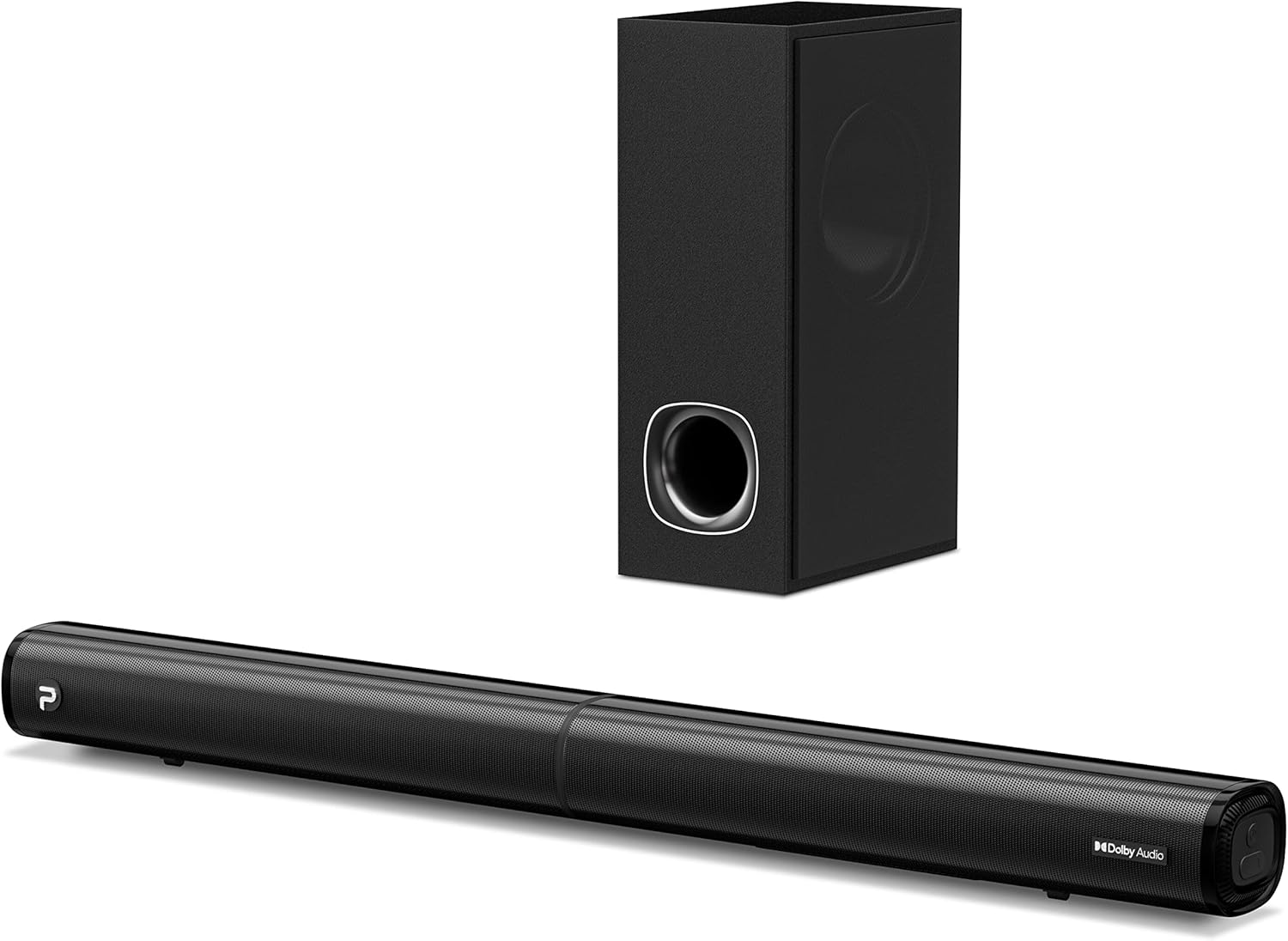
Image: The PHEANOO D6 Sound Bar and its accompanying wired subwoofer, showcasing el seu elegant disseny negre.
Què hi ha a la caixa
Si us plau, reviseu atentament el contingut del paquet. Si falta algun article o hi ha algun malmès, poseu-vos en contacte amb el servei d'atenció al client.
- Soundbar and Wired Subwoofer
- Cable HDMI
- Cable d'àudio RCA
- Wall Mount Kit (screws and anchors)
- Comandament a distància (piles no incloses)
- Adaptador d'alimentació

Image: All components included in the PHEANOO D6 Sound Bar package, laid out for clear identification, including the soundbar, subwoofer, cables, remote, and wall mount kit.
Configuració
1. Assembling the Soundbar (Detachable Design)
The PHEANOO D6 soundbar features a unique detachable design for flexible placement. Follow these steps to assemble it:
- Align the audio connector from one half of the soundbar with the corresponding port on the other half.
- Gently push the two halves together until they click into place.
- Twist the two halves to secure the connection, ensuring the soundbar is firmly assembled.

Image: A three-step visual guide demonstrating how to connect the two halves of the detachable soundbar, ensuring proper alignment and secure locking.
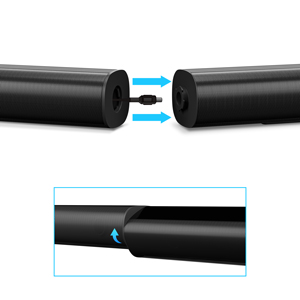
Imatge: Un primer pla view of the soundbar's detachable connection point, showing the male and female connectors.
2. Connexió del subwoofer
Connecteu el subwoofer amb cable a la barra de so amb el cable de subwoofer dedicat. Assegureu-vos que la connexió sigui segura.
3. Opcions de col·locació
You can place the soundbar on a tabletop or mount it on a wall.
- Col·locació de la taula: Col·loca la barra de so directament davant del televisor, assegurant-te que no obstrueixi el sensor del comandament a distància del televisor.
- Muntatge a la paret: Use the included wall mount kit. It is recommended to measure and mark the drilling points accurately, rather than relying solely on the paper stencil, to ensure a level installation.
4. Connexions d'àudio
The PHEANOO D6 offers multiple connectivity options. Choose the best one for your device:
- HDMI (ARC): For the best audio quality and control, connect an HDMI cable from the soundbar's HDMI (ARC) port to your TV's HDMI (ARC) port. This allows your TV remote to control the soundbar's volume.
- Òptic: Connect an optical cable from the soundbar's Optical port to your TV's Optical Digital Audio Out port.
- AUX: Use the 3.5mm AUX cable to connect to devices with a 3.5mm audio output.
- Bluetooth 5.0: For wireless connection, pair your device via Bluetooth.

Image: The rear panel of the PHEANOO D6 Sound Bar, highlighting the HDMI (ARC), Bluetooth, Optical, and AUX input ports with corresponding icons.

Imatge: Una imatge detallada view of the soundbar's input panel, showing the AUX, Optical, and HDMI (ARC) ports clearly labeled.
5. Connexió d'alimentació
Connect the power adapter to the soundbar and then plug it into a wall outlet.
Instruccions de funcionament
Control remot
The included remote control allows you to manage all functions of the soundbar. Insert two AAA batteries (not included) into the remote before use.

Image: The remote control for the PHEANOO D6 Sound Bar, showing its buttons and an indicator light.
Encès/Apagat
Press the power button on the remote or the soundbar to turn the unit on or off.
Selecció d'entrada
Press the "Input" button on the remote to cycle through available input sources: HDMI (ARC), Optical, AUX, and Bluetooth.
Emparellament Bluetooth
Per vincular un dispositiu Bluetooth:
- Select Bluetooth input on the soundbar. The indicator light will flash.
- Enable Bluetooth on your device (smartphone, tablet, etc.) and search for "PHEANOO D6".
- Select the soundbar from the list to pair. Once connected, the indicator light will be solid.

Image: A smartphone displaying a music app, wirelessly connected to the PHEANOO D6 Sound Bar via Bluetooth, indicated by a Wi-Fi like symbol.
Modes de so
La barra de so ofereix diversos modes de so per optimitzar la vostra experiència auditiva:
- Mode de diàleg: Enhances vocal clarity, making speech easier to understand.
- Mode de música: Optimized for music playback, providing balanced audio.
- Mode pel·lícula: Delivers an immersive cinematic experience with enhanced effects.
- Mode 3D: Creates a wider, more enveloping soundstage.

Image: Icons representing different sound modes: Dialogue, Music, Movie, and 3D, indicating the soundbar's versatility.
Ajust dels baixos
Use the dedicated bass control buttons on the remote to increase or decrease the subwoofer's output level to your preference.

Image: A close-up of the subwoofer, with a visual effect suggesting powerful bass emanating from it.
Dolby Digital Support
The PHEANOO D6 Sound Bar supports Dolby Digital decoding, providing a rich and dynamic audio experience for compatible content.

Image: A living room setup with the soundbar and TV, overlaid with a grid pattern indicating premium 3D surround sound powered by Dolby Audio.

Image: The Dolby Audio logo accompanied by visual representations of sound waves, emphasizing the enhanced audio quality.
Roku TV Ready
This soundbar is certified to work seamlessly with your Roku TV. Enjoy smooth setup, easy access to sound settings, and compatibility with any Roku TV remote.

Image: A television screen displaying the "Roku TV Ready" setup interface, with the PHEANOO Soundbar and subwoofer positioned below it, illustrating seamless integration.
Manteniment
- Neteja: Feu servir un drap suau i sec per netejar les superfícies de la barra de so i el subwoofer. No utilitzeu netejadors líquids ni aerosols.
- Ventilació: Assegureu-vos que hi hagi una ventilació adequada al voltant de la barra de so i el subwoofer per evitar el sobreescalfament. No bloquegeu cap obertura de ventilació.
- Emmagatzematge: Si guardeu la unitat durant un període prolongat, desconnecteu-la de l'alimentació i guardeu-la en un lloc fresc i sec.
Resolució de problemes
| Problema | Causa possible | Solució |
|---|---|---|
| Sense poder | Cable d'alimentació no connectat; presa de corrent no funciona. | Assegureu-vos que el cable d'alimentació estigui ben connectat. Proveu una altra presa de corrent. |
| Sense so | Entrada incorrecta seleccionada; Volum massa baix; Cables no connectats correctament. | Seleccioneu la font d'entrada correcta. Augmenteu el volum. Comproveu totes les connexions del cable d'àudio. |
| S'ha produït un error en l'aparellament de Bluetooth | La barra de so no està en mode d'emparellament; Dispositiu massa lluny; Interferències. | Ensure soundbar is in Bluetooth input and indicator is flashing. Move device closer. Turn off other Bluetooth devices. |
| Mala qualitat del so | Incorrect sound mode; Source audio quality is low. | Try different sound modes (Music, Movie, Dialogue). Ensure the audio source is high quality. |
| El comandament a distància no funciona | Batteries dead or incorrectly inserted; Obstruction between remote and soundbar. | Canvieu les piles, assegurant-vos de la polaritat correcta. Traieu qualsevol obstrucció. |
For more detailed troubleshooting, refer to the official Troubleshooting Guide PDF available on the product page or contact PHEANOO customer support.
Especificacions
| Característica | Detall |
|---|---|
| Model | D6 |
| Marca | FEANOU |
| Tipus d'altaveu | Barra de so amb subwoofer per cable |
| Configuració del canal | 2.1 CH |
| Tecnologia de connectivitat | HDMI (ARC), Bluetooth 5.0, Optical, AUX |
| Interval Bluetooth | Up to 100 Meters (approx. 328 feet) |
| Potència de sortida màxima dels altaveus | 240 watts |
| Dimensions del producte (barra de so) | 29.5" d'amplada x 2.4" d'alçada x 2.8" de profunditat |
| Pes de l'article | 11.57 lliures |
| Tipus de controlador | Control remot |
| Característiques especials | Dolby Digital Decoding, Dialogue Enhancement, Bass Adjustable, Detachable Design, Roku TV Ready |
Garantia i Suport
The PHEANOO D6 Sound Bar System comes with a Garantia limitadaSi us plau, consulteu la targeta de garantia inclosa al paquet per conèixer els termes i condicions específics.
For technical support, warranty claims, or further assistance, please visit the official PHEANOO website or contact their customer service department. You can also find additional resources like the Guia de l'usuari (PDF) i Guia de resolució de problemes (PDF) en línia.