
1. Introducció
This manual provides comprehensive instructions for the assembly, operation, and maintenance of your FLEXISPOT EN2 Electric Height Adjustable Standing Desk. Please read this manual thoroughly before assembly and use to ensure safe and efficient operation.
The FLEXISPOT EN2 desk features a spacious one-piece desktop, an electric height adjustment system with memory presets, and a removable clamp power strip for convenient device charging and cable management. It is designed to support a dynamic work environment, allowing seamless transitions between sitting and standing positions.
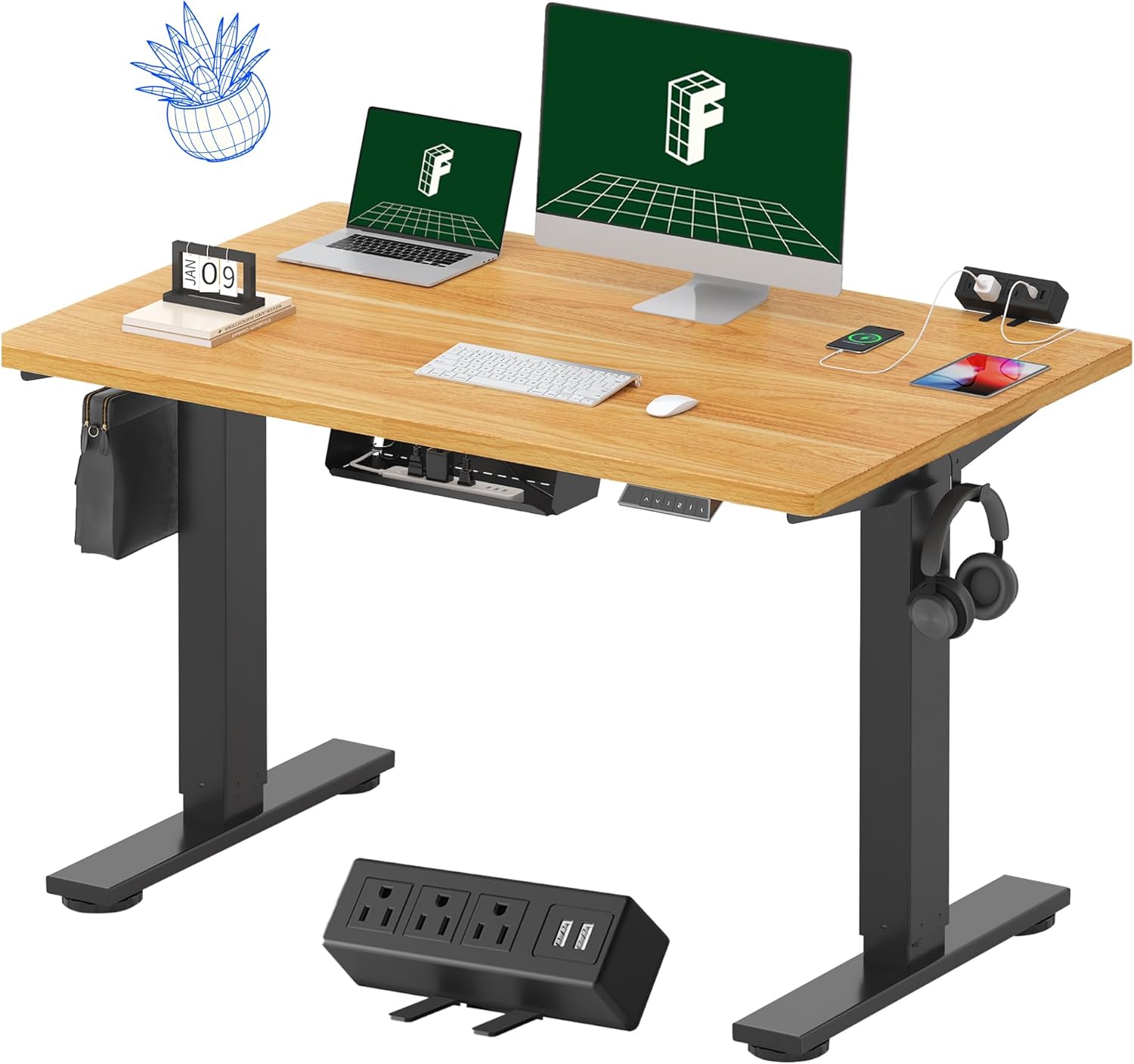
Image 1.1: FLEXISPOT EN2 Standing Desk with Maple Top and Black Frame, showcasing a typical setup with monitors, a laptop, and a clamp regleta d'alimentació.
2. Informació de seguretat
AVÍS: Si no es segueixen aquestes instruccions de seguretat, es poden produir lesions o danys al producte.
- Seguiu sempre atentament les instruccions de muntatge.
- An electric drill (not included) may be required for assembly.
- Ensure the desk is properly anchored to prevent tipping.
- No supereu el pes màxim recomanat de 176 lliures (80 kg).
- Keep the work surface clear of items that could fall and cause injury during height adjustments.
- Always unplug the desk before performing any maintenance or making adjustments to the frame or electrical components.
- Mantingueu els nens i les mascotes allunyats de l'escriptori durant el funcionament.
3. Contingut del paquet
Your FLEXISPOT EN2 Standing Desk will arrive in two separate packages, which may be shipped separately. Please ensure you have received both packages and all components before beginning assembly.

Image 3.1: Illustration showing the desk components arriving in two separate packages: one for the desktop and one for the desk frame.
Components inclosos:
- One-piece desktop (48" x 30" Maple Top)
- Electric height-adjustable frame (Black)
- 6-button digital controller with 4 memory presets
- Removable clamp power strip (3 AC outlets, 2 USB charging ports)
- Cable management device
- Assembly hardware and tools (excluding electric drill)
4. Muntatge i muntatge
Assembly typically requires two people and an electric drill (not included). Follow the detailed instructions provided in the separate assembly guide included with your product. The process involves attaching the legs to the desktop and connecting the control panel and motor.
Consells de muntatge:
- Col·loqueu tots els components sobre una superfície suau i neta per evitar ratllades.
- Assegureu-vos que tots els cargols estiguin ben ajustats, però no els estrenyeu massa.
- Properly route all cables using the provided cable management solutions to avoid interference with desk movement.
Video 4.1: Official FLEXISPOT Standing Desk Frame Installation Guide. This video demonstrates the step-by-step process of assembling the desk frame and attaching it to the desktop.
5. Instruccions de funcionament
5.1 Panell de control digital
The desk is operated using a 6-button digital controller, typically mounted on the underside of the desktop. It features up/down arrows, an LED display for height, and four programmable memory presets.

Image 5.1: Digital control panel with LED display showing current height, up/down arrows, and four numbered memory preset buttons.
5.2 Ajust d'alçada
- Manteniu premut el botó Fletxa amunt (^) botó per aixecar l'escriptori.
- Manteniu premut el botó Fletxa avall (v) botó per baixar l'escriptori.
- The desk adjusts smoothly from 28.1 inches (71.4 cm) to 45.7 inches (116.1 cm).
- The motor operates quietly at less than 50 dB.
5.3 Configuració de preajustos de memòria
The controller allows you to save up to four preferred height settings for quick adjustments.
- Ajusteu l'escriptori a l'alçada desitjada utilitzant les fletxes amunt/avall.
- Premeu el botó Memory (M) button. The LED display will flash.
- En 3 segons, premeu un dels botons predefinits numerats (1, 2, 3 o 4) per desar l'alçada actual a aquesta configuració predefinida.
- Per recuperar una alçada desada, només cal que premeu el botó preestablert numerat corresponent. L'escriptori es mourà automàticament a la posició desada.
Video 5.2: FlexiSpot Brand Store video demonstrating the desk's height adjustment and memory preset functions.
6. Característiques
6.1 One-Piece Desktop
The desk features a spacious, single-piece desktop made of FSC-Certified wood. This design provides a smooth, seamless work surface, enhancing stability and aesthetics compared to multi-piece desktops.

Image 6.1: Visual comparison highlighting the smooth surface of a single-piece desktop against the visible seams of a two-piece desktop.
6.2 Removable Clamp Regleta d'endolls
A desktop-mounted power strip is included, featuring 3 AC outlets (125V/12A) and 2 USB charging ports (5V/2A). This allows for convenient charging of electronic devices directly from your desk. The power strip can be clipped to the back or side of your desk.

Image 6.2: Close-up of the removable clamp power strip, detailing its 3 AC outlets and 2 USB-A ports, and how it attaches to the desk edge.
6.3 Gestió de cables
The desk includes a cable management device to help organize and tidy up your workspace, preventing cables from dangling and interfering with desk movement.

Image 6.3: Illustration demonstrating effective cable management with an under-desk tray, showing a tidy setup compared to unmanaged cables.
7. Manteniment
- Inspeccioneu regularment tots els cargols i connexions per assegurar-vos que estiguin ben ajustats.
- Netegeu la superfície de l'escriptori amb un drap suau iamp tela. Eviteu netejadors abrasius que puguin danyar l'acabat.
- Mantingueu el motor i els components elèctrics lliures de pols i humitat.
- Do not place hot items directly on the desktop without protective coasters.
8. Solució De Problemes
8.1 Desk Not Moving or Displaying Error Code (e.g., "r5t")
If your desk is not responding or the LED display shows an error code like "r5t", a system reset may be required.
- Desendolleu l'escriptori de la presa de corrent.
- Wait for at least 10-15 seconds.
- Torneu a connectar l'escriptori a la presa de corrent.
- Press and hold the "Down Arrow (v)" button until the desk reaches its lowest position and then slightly rises. This indicates a successful reset.
- Si el problema persisteix, poseu-vos en contacte amb el servei d'atenció al client.
8.2 Desk Wobbling at Higher Heights
While the desk is designed for stability, minor wobbling can occur at maximum heights. Ensure the adjustable feet on the leg bases are properly leveled to compensate for uneven flooring.
9. Especificacions
| Característica | Especificació |
|---|---|
| Marca | FLEXISPOT |
| Model | EN2 |
| Material d'escriptori | FSC-Certified Maple Wood |
| Dimensions de l'escriptori | 48 cm (amplada) x 30 cm (profunditat) |
| Gruix de l'escriptori | 1 polzades |
| Material del marc | Industrial-grade Alloy Steel (Black) |
| Interval d'ajust d'altura | De 28.1" a 45.7" (de 71.4 cm a 116.1 cm) |
| Nivell de soroll del motor | < 50 dB |
| Capacitat de pes | 176 lliures (80 kg) |
| Tauler de control | 6-button digital controller with 4 memory presets |
| Endoll | 3 AC outlets (125V/12A), 2 USB charging ports (5V/2A) |
| Muntatge obligatori | Yes (electric drill recommended) |
10. Garantia i Suport
10.1 Informació de la garantia
- 5 any de garantia: Covers frames, motors, and other mechanical devices.
- 2 any de garantia: Covers controllers, switches, and electronics.
Si us plau, conserveu el comprovant de compra per a reclamacions de garantia. La garantia cobreix defectes de materials i fabricació en condicions d'ús normal.
10.2 Atenció al client
For any questions, troubleshooting assistance, or warranty claims, please contact FLEXISPOT customer support through their official weblloc web o el venedor on vau comprar el producte.