
1. Introducció
This manual provides comprehensive instructions for the Taidacent RJ45 to RS485 Converter Terminal Adapter. This device is designed to facilitate communication between RJ45 network interfaces and RS485 serial communication systems, commonly used in industrial and network applications. Please read this manual thoroughly before installation and operation to ensure correct usage and optimal performance.
2. Informació de seguretat
Observeu sempre les precaucions de seguretat següents:
- Ensure all power is disconnected from devices before making any connections.
- Do not expose the adapter to moisture, extreme temperatures, or corrosive environments.
- Eviteu impactes físics o deixar caure el dispositiu.
- Only use the adapter for its intended purpose as an RJ45 to RS485 converter.
3. Contingut del paquet
- 1 x Taidacent RJ45 to RS485 Converter Terminal Adapter
4. Producte acabatview
The Taidacent RJ45 to RS485 Converter Terminal Adapter provides a simple and robust solution for converting an RJ45 interface to a 2-wire RS485 terminal block. It features a standard RJ45 connector on one end and a screw-type terminal block with 'A' and 'B' markings for RS485 differential signals on the other.
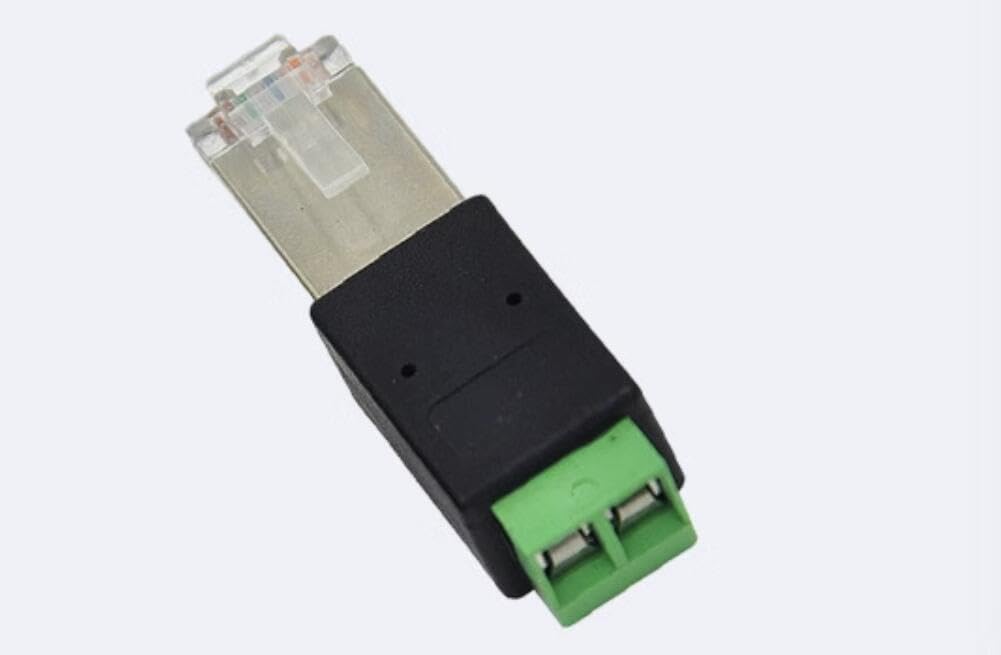
Image 1: Taidacent RJ45 to RS485 Converter Terminal Adapter. This image shows the adapter with its RJ45 plug on the right and the green screw terminal block on the left, labeled 'A' and 'B'.
5. Especificacions
| Característica | Descripció |
|---|---|
| Model de producte | RJ45-485 Terminal (ZC-RJ45485adapter-210617) |
| Propòsit | Converts RJ45 to RS485 physical interface |
| Supported RJ45 Pins | Pin 4 & Pin 5 or Pin 6 & Pin 7 (customization for other pins may be required) |
| Temperatura de funcionament | -40 °C a 85 °C |
| Tipus de connector | RJ45 |
| Dispositius compatibles | Industrial and network devices, PCs |
| Tipus d'acabat | Cristall |
| Nombre de Ports | 1 |
| Tipus d'endoll d'alimentació | No plug (passive device) |
| Pes de l'article | 0.08 lliures (uns 36 grams) |
| UPC / GTIN | 739319150839 |
6. Configuració i connexió
This adapter facilitates the connection of an RS485 device to an RJ45 interface. The key is to correctly map the RS485 A and B signals to the appropriate pins on the RJ45 connector.
6.1. RJ45 Pin Mapping for RS485
The adapter supports common RJ45 pin assignments for RS485. The terminal block has two screw terminals labeled 'A' and 'B'.
- Option 1: Using RJ45 Pin 6 and Pin 7
- Connect the RS485 'A' signal to the terminal labeled 'A'. This typically corresponds to RJ45 Pin 6 (485A).
- Connect the RS485 'B' signal to the terminal labeled 'B'. This typically corresponds to RJ45 Pin 7 (485B).
- Nota: Depending on your RS485 device's polarity, you may need to reverse the connections (e.g., terminal A to 485B, terminal B to 485A). The adapter allows for this flexibility as long as the correct two pins are used.
- Option 2: Using RJ45 Pin 4 and Pin 5
- Connect the RS485 'A' signal to the terminal labeled 'A'. This typically corresponds to RJ45 Pin 4 (485A).
- Connect the RS485 'B' signal to the terminal labeled 'B'. This typically corresponds to RJ45 Pin 5 (485B).
- Nota: Similar to Option 1, polarity reversal (terminal A to 485B, terminal B to 485A) is possible if required by your RS485 device.
- Custom Pin Assignments: If your application uses other RJ45 pins for RS485 communication, customization of the wiring may be necessary. Consult your device's documentation for specific pinouts.
6.2. Procediment de connexió
- Identify the RS485 A and B signals from your RS485 device or network.
- Loosen the screws on the green terminal block of the adapter.
- Insert the RS485 'A' wire into the terminal labeled 'A' and tighten the screw securely.
- Insert the RS485 'B' wire into the terminal labeled 'B' and tighten the screw securely.
- Plug the RJ45 end of the adapter into the corresponding RJ45 port on your network device or PC, ensuring the RJ45 pins are correctly mapped as per Section 6.1.
- Verify all connections are firm and correct before powering on any connected equipment.
7. Instruccions de funcionament
The Taidacent RJ45 to RS485 Converter Terminal Adapter is a passive device and does not require external power. Once correctly connected, it acts as a physical interface converter, allowing data to flow between the RJ45 and RS485 interfaces. Ensure that the communication parameters (baud rate, data bits, stop bits, parity) are correctly configured on both the RJ45-connected device and the RS485 device for successful data transmission.
8. Manteniment
This adapter requires minimal maintenance:
- Mantingueu el dispositiu net i lliure de pols. Feu servir un drap suau i sec per netejar-lo.
- Emmagatzemar en un lloc fresc i sec, lluny de la llum solar directa i de temperatures extremes.
- Regularly check connections for tightness, especially in environments with vibration.
9. Solució De Problemes
If you experience issues with the converter, consider the following:
- Sense comunicació:
- Verify that the RS485 A and B signals are correctly connected to the 'A' and 'B' terminals, respectively, or with reversed polarity if required.
- Confirm that the RJ45 pins used for RS485 on your network device match the pins connected to the adapter (Pin 4/5 or Pin 6/7).
- Ensure that the communication parameters (baud rate, data format) are identical on both connected devices.
- Check for loose connections at both the terminal block and the RJ45 port.
- Comunicació intermitent:
- Inspect cables for damage or poor shielding.
- Ensure terminal screws are tightened securely.
- Check for electromagnetic interference (EMI) in the environment.
10. Informació de la garantia
Taidacent products are manufactured to high-quality standards. This product is covered by a limited warranty against defects in materials and workmanship for a period specified by the retailer at the time of purchase. This warranty does not cover damage caused by misuse, accident, unauthorized modification, or improper installation. Please retain your proof of purchase for warranty claims.
11. Atenció al client
For technical assistance or support, please contact your retailer or visit the Taidacent official website for contact information. When contacting support, please have your product model number (ZC-RJ45485adapter-210617) and a detailed description of the issue ready.