
Valeton GP-100VT
Manual d'usuari del processador multiefectes Valeton GP-100
Model: GP-100VT | Brand: Valeton
1. Introducció
Gràcies per la compraasing the Valeton GP-100 Multi-Effects Processor. This device is a versatile and compact multi-effects unit designed for guitar and bass players, offering a wide range of amp models, IR cabinet simulations, and various effects. It features a powerful HD digital modeling system, a built-in looper, drum rhythms, and functions as a USB audio interface with OTG support for mobile devices. This manual provides detailed instructions for setup, operation, maintenance, and troubleshooting to help you get the most out of your GP-100.
2. Informació de seguretat
Please read and understand all safety instructions before operating the Valeton GP-100. Retain this manual for future reference.
- Font d'alimentació: Feu servir només l'adaptador de corrent especificat. Volum incorrectetagi pot danyar la unitat i anul·lar la garantia.
- Aigua i humitat: Do not expose the unit to rain, moisture, or any liquids. Do not place objects filled with liquids on the unit.
- Fonts de calor: Mantingueu la unitat allunyada de fonts de calor com ara radiadors, registres de calor, estufes o altres aparells (inclosos amplificadors) que produeixen calor.
- Ventilació: Assegureu-vos que hi hagi una ventilació adequada. No bloquegeu cap obertura de ventilació.
- Neteja: Netegeu només amb un drap sec. No utilitzeu netejadors líquids ni aerosols.
- Manteniment: No intenteu atendre aquest producte vosaltres mateixos. Consulteu tots els serveis a personal de servei qualificat.
- Manipulació: Manipuleu la unitat amb cura. Eviteu deixar-la caure ni sotmetre-la a impactes forts.
- Interferència electromagnètica: This device may cause radio interference if not installed and used in accordance with the instructions.
3. Contingut del paquet
Verifiqueu que tots els elements siguin presents al paquet:
- Valeton GP-100 Multi-Effects Processor
- Adaptador d'alimentació
- Cable USB
- Manual d'usuari (aquest document)
4. Producte acabatview
The Valeton GP-100 is a compact yet powerful multi-effects processor designed for a wide range of musical applications. Below is an overview of its physical components and connectivity options.

Figura 4.1: Frontal view of the Valeton GP-100 Multi-Effects Processor, showing the display, control knobs, and footswitches.
4.1 Controls del panell frontal
- Pantalla LCD: Shows current patch, effect parameters, and menu navigation.
- Navigation Knobs/Buttons: Used for selecting and adjusting parameters on the display.
- Pedal d'expressió: Assignable to various effects (e.g., volume, wah, pitch).
- Pedals: For patch changes, effect on/off, looper control, and tuner activation.

Figure 4.2: Rear panel of the Valeton GP-100, illustrating various input and output ports.
4.2 Connexions del panell posterior
- ENTRADA: 1/4" mono input for connecting your guitar or bass.
- L/R OUTPUT: 1/4" mono/stereo outputs for connecting to an amplifier, mesclador o interfície d'àudio.
- AUX IN: 1/8" stereo input for connecting external audio devices (e.g., MP3 player).
- TELÈFONS: 1/8" stereo output for headphones.
- Port USB: For connecting to a computer for software editing, firmware updates, and USB audio interface functionality.
- DC IN: Entrada d'alimentació per a l'adaptador de corrent inclòs.
5. Configuració
Follow these steps to set up your Valeton GP-100 for the first time.
- Connexió d'alimentació: Connect the included power adapter to the DC IN port on the rear panel of the GP-100, then plug the adapter into a suitable power outlet.
- Connexió de l'instrument: Connect your guitar or bass to the INPUT jack on the rear panel using a standard 1/4" instrument cable.
- Connexió de sortida d'àudio:
- For mono output, connect the L/MONO OUTPUT jack to your amplificador o mesclador.
- For stereo output, connect both L and R OUTPUT jacks to your stereo amplifier, mesclador o interfície d'àudio.
- For silent practice, connect headphones to the PHONES jack.
- External Audio (Optional): If you wish to play along with external audio, connect your device (e.g., smartphone, MP3 player) to the AUX IN jack using a 1/8" stereo cable.
- Computer Connection (Optional): To use the GP-100 as a USB audio interface or to edit patches with the software editor, connect the USB port on the GP-100 to your computer using the supplied USB cable.
- Encès: Once all connections are secure, the unit will power on automatically.
6. Instruccions de funcionament
The Valeton GP-100 offers a wide array of features. This section covers basic operation and key functionalities.
6.1 Navegació bàsica
- Selecció de pegats: Use the footswitches to cycle through different patches (presets).
- Ajust de paràmetres: Use the control knobs below the display to adjust parameters of the selected effect or amp model. The display will show which parameter each knob controls.
- Navegació del menú: Press the main encoder knob to enter the menu. Rotate to scroll and press again to select. Use the back button (if present) to return to the previous screen.
6.2 Efectes i Amp Modelatge
The GP-100 features 140 built-in effects, 45 legendary amp models, and 40 IR cabinet simulations. You can customize your signal chain with up to 9 simultaneous effect blocks.
- Effect Blocks: Each patch consists of various effect blocks (e.g., COMP, OD/DIST, AMP, CAB, MOD, DLY, RVB). You can enable/disable and reorder these blocks.
- IR Loading: The unit supports 3rd party IR (Impulse Response) files, allowing you to expand your cabinet simulation options. Refer to the software editor section for details on loading custom IRs.
6.3 Funció Looper
The GP-100 includes a 90-second looper for practice and performance.
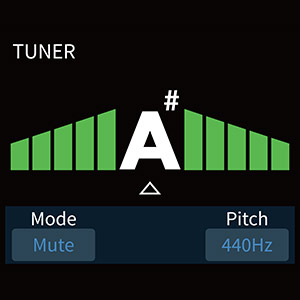
Figure 6.1: Looper interface on the GP-100 display.
- Activating Looper: Typically activated by holding a specific footswitch or through the menu.
- Gravació: Press the footswitch once to start recording.
- Sobredoblatge: Press again to overdub.
- Reproducció: Press again to stop overdubbing and play the loop.
- Desfer/Refer: Some models allow undoing the last overdub.
- Esborra: Hold the footswitch to clear the loop.
6.4 Drum Rhythms
Practice with 100 built-in drum rhythms across various genres.
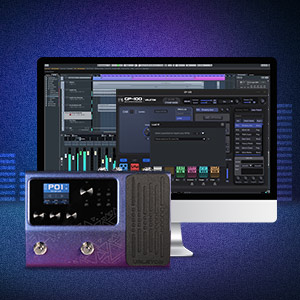
Figure 6.2: Drum machine interface on the GP-100 display.
- Selecció de ritmes: Navigate to the Drum section in the menu to choose a rhythm style and adjust BPM (Beats Per Minute) and volume.
- Inici/Parada: Use the designated control or footswitch to start and stop the drum rhythm.
6.5 Sintonitzador
The built-in tuner allows for accurate instrument tuning.
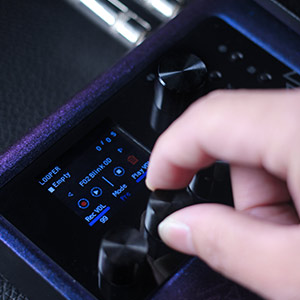
Figure 6.3: Tuner interface on the GP-100 display.
- Activating Tuner: Hold down a specific footswitch (refer to the quick start guide or on-screen prompts) to enter tuner mode. The output will typically be muted.
- tuning: Play a single note on your instrument. The display will show the note and indicate if it's sharp, flat, or in tune.
- Sortint de Tuner: Press the footswitch again to exit tuner mode and resume normal operation.
6.6 Software Editor
The Valeton GP-100 comes with free Mac/Windows software for sound editing and preset management, offering a more intuitive way to customize your tones.

Figure 6.4: Valeton GP-100 software editor interface.
- Instal·lació: Download the latest software editor from the official Valeton website. Follow the installation instructions provided with the software.
- Connexió: Connect your GP-100 to your computer via the USB cable. Launch the software editor. The software should automatically detect the device.
- Edició: Use the software to visually adjust effect parameters, reorder effect blocks, save/load patches, and manage IR files.
7. Manteniment
Proper care will ensure the longevity and optimal performance of your Valeton GP-100.
- Neteja: Netegeu la unitat amb un drap suau i sec. No utilitzeu productes de neteja abrasius, ceres ni dissolvents.
- Emmagatzematge: Quan no l'utilitzeu durant períodes prolongats, guardeu la unitat en un lloc sec i fresc, allunyat de la llum solar directa i de temperatures extremes.
- Actualitzacions de firmware: Periodically check the official Valeton website for firmware updates. Updating the firmware can improve performance, add new features, and fix bugs. Follow the instructions provided with the firmware update carefully.
- Eviteu el xoc físic: Protect the unit from drops and impacts, which can damage internal components.
8. Solució De Problemes
If you encounter issues with your Valeton GP-100, refer to the following common problems and solutions.
| Problema | Causa possible | Solució |
|---|---|---|
| Sense sortida de so. |
|
|
| So distorsionat o de mala qualitat. |
|
|
| GP-100 not recognized by computer software. |
|
|
| Footswitches or expression pedal not responding. |
|
|
9. Especificacions
Technical specifications for the Valeton GP-100 Multi-Effects Processor.
| Característica | Detall |
|---|---|
| Número de model de l'article | GP-100VT |
| Dimensions (L x A x A) | 12.1" x 6.7" x 2.7" (30.7 x 17 x 6.8 cm) |
| Pes de l'article | 16 unces (aprox. 0.45 kg) |
| Color | Violeta |
| Interfície del maquinari | USB |
| Format del senyal | Analog (internal digital processing) |
| Font d'alimentació | Elèctric amb cable |
| Voltage | 9 Volts |
| Efectes | 140 Built-in Guitar/Bass/Acoustic Effects |
| Amp Models | 45 Legendary Amp Models |
| IR Cabinet Simulations | 40 carefully selected IR Cabinet Simulations (20 User Slots for 3rd Party IRs) |
| Processament del senyal | 24 bits 44.1 kHz |
| Ritmes de bateria | 100 Built-in Drum Rhythms |
| Looper | 90 Seconds Looper |
| Presets | 198 presets |
| Simultaneous Effect Blocks | Maximum 9 Simultaneous Effect Blocks |
| Interfície d'àudio USB | Stereo Audio Streaming, OTG function support |
| Interfície d'usuari | Multi Language User Interface (Hardware) with Free Mac/Windows Software |
10. Garantia i Suport
Valeton products are manufactured to the highest quality standards.
10.1 Informació de la garantia
The Valeton GP-100 comes with a limited warranty against defects in materials and workmanship. The specific terms and duration of the warranty may vary by region and retailer. Please retain your proof of purchase for warranty claims. For detailed warranty information, refer to the warranty card included with your product or visit the official Valeton weblloc.
10.2 Atenció al client
For technical assistance, troubleshooting beyond this manual, or service inquiries, please contact Valeton customer support. You can typically find contact information and frequently asked questions (FAQs) on the official Valeton weblloc: www.valeton.net.
Ask a question about this manual
Ask about setup, troubleshooting, compatibility, parts, safety, or missing instructions. Manuals+ will review the question and use this page’s manual context to help answer it.