
Introducció
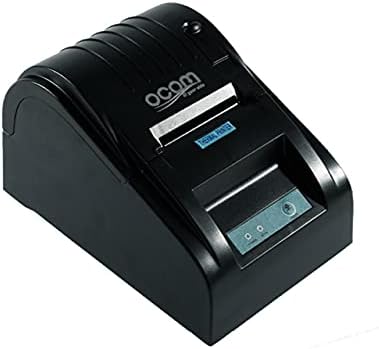
This image shows the OCOM OCPP-585A-U-B Thermal Receipt Printer from a slightly elevated front-right angle. The printer is black with a sleek, compact design. The paper output slot is visible at the top, and the control panel with 'POWER' and 'MODE' indicators is located on the front.
This manual provides detailed instructions for the OCOM OCPP-585A-U-B Thermal Receipt Printer. Please read this manual carefully before using the printer to ensure proper operation and longevity.
Guia de configuració
1. Desembalatge
Carefully remove the printer and all accessories from the packaging. Verify that all components are present: printer unit, power adapter, USB cable, and a roll of thermal paper.
2. Càrrega de paper tèrmic
- Open the paper cover by pushing the cover open button (usually located on the side or front).
- Insert the thermal paper roll into the paper compartment, ensuring the printing side of the paper faces the print head. The paper should feed smoothly from the bottom of the roll.
- Pull out a small length of paper beyond the paper exit slot.
- Tanqueu la coberta de paper fermament fins que encaixi al seu lloc.
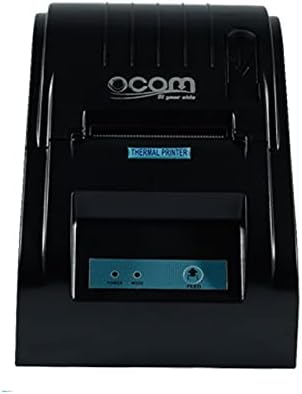
This image displays the OCOM OCPP-585A-U-B Thermal Receipt Printer from a direct top-down perspective. The paper compartment is visible, showing a thermal paper roll correctly inserted. The 'THERMAL PRINTER' label and the control panel with 'POWER' and 'MODE' indicators are clearly visible.
3. Connexió de la impressora
- Connect the power adapter to the printer's power input port and then plug it into a power outlet.
- Connect the USB cable to the printer's USB port and the other end to your computer or POS system.
- Press the power button to turn on the printer. The power indicator light should illuminate.
Instruccions de funcionament
Impressió bàsica
Once connected and powered on, the printer is ready to receive print commands from your connected device. Ensure the correct printer driver is installed on your computer/POS system.
- Obriu el document o l'aplicació des del qual voleu imprimir.
- Select 'Print' from the file menú.
- Choose 'OCOM OCPP-585A-U-B' as your printer.
- Ajusteu la configuració d'impressió si cal (per exemple, la mida del paper, la qualitat d'impressió).
- Feu clic a "Imprimeix".
Self-Test Print
To perform a self-test print, ensure the printer is off. Hold down the 'FEED' button (if available, or a combination of buttons as per specific model) while turning on the printer. Release the button once printing begins. This will print a configuration page, confirming basic printer functionality.
Manteniment
Neteja del capçal d’impressió
Regular cleaning of the print head ensures optimal print quality and extends printer life.
- Apagueu la impressora i desconnecteu el cable d'alimentació.
- Obriu la coberta del paper.
- Feu servir un bastonet de cotó lleugeramentampened with isopropyl alcohol to gently wipe the thermal print head (the dark strip inside the printer).
- Deixeu que el capçal d'impressió s'assequi completament abans de tancar la tapa i engegar la impressora.
Cleaning the Paper Path
Traieu la pols o les restes de paper del camí del paper amb un raspall suau o aire comprimit.
Resolució de problemes
| Problema | Causa possible | Solució |
|---|---|---|
| La impressora no s'encén | Power cable loose; Power outlet faulty | Comproveu les connexions d'alimentació; proveu una presa de corrent diferent |
| Sense sortida d'impressió | Paper loaded incorrectly; Out of paper; Driver not installed/selected | Reload paper correctly; Replace paper roll; Install/select correct printer driver |
| Faint or blank print | Thermal paper loaded upside down; Print head dirty; Paper quality issue | Flip paper roll; Clean print head; Try new thermal paper |
| Impressora fora de línia | USB cable disconnected; Printer driver issue | Reconnect USB cable; Reinstall printer driver |
Especificacions
| Característica | Detall |
|---|---|
| Primera data disponible | 2021 de juny de 20 |
| Fabricant | OCOM |
| ASIN | B097LSGP62 |
| Número de model de l'article | OCPP-585-U-B |
| Nom de marca | OCOM |
| Tecnologia de connectivitat | USB |
| Tecnologia d'impressora | Tèrmica |
| Color | Negre |
| Nom del model | OCPP 585 U B |
| Mitjans impresos | Etiquetes |
| Tipus d'escàner | Rebut |
Garantia i Suport
This OCOM printer typically comes with a standard manufacturer's warranty. Please refer to the warranty card included with your product for specific terms and conditions, or visit the official OCOM weblloc per obtenir informació detallada sobre la garantia.
For technical support, driver downloads, or further assistance, please visit the OCOM official support website or contact their customer service. Keep your model number (OCPP-585A-U-B) and purchase details ready when seeking support.